
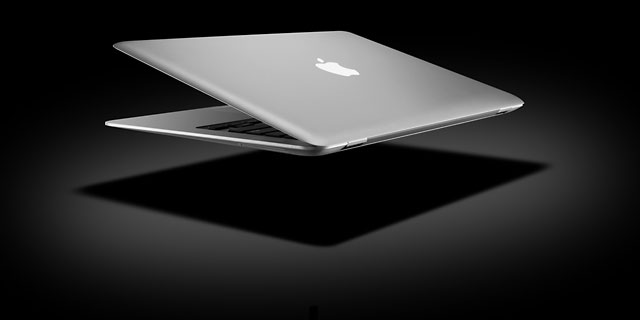
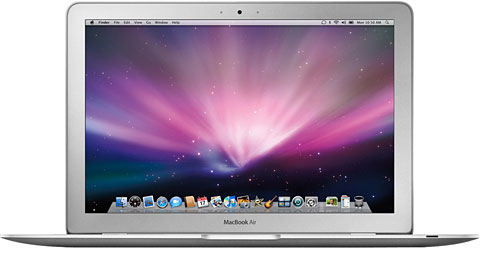
The Late 2008 MacBook Air (MBA) has the same Mini DisplayPort introduced with the 15″ MacBook Pro. Drive options are a 120 GB hard drive or a 128 GB solid state drive (SSD), but now on a SATA bus for much better speed.
Perhaps the biggest improvement comes ditching integrated Intel video for the Nvidia GeForce 9400M graphics processor, which has 16 cores and uses 256 MB of system memory.
 There are lots of incremental improvements over the Early 2008 MBA – a 6 MB level 2 cache (vs. 4 MB), a 1066 MHz memory bus (up from 800 MHz), and a tiny bit more speed at the top end – 1.86 GHz instead of 1.80.
The MacBook Air supports wireless NetBoot, and the Remote Disc software that comes with the MBA (on CD) can turn a Mac or Windows PC into a NetBoot server, allowing access to that computer’s optical drive from the MBA even for reinstalling the operating system. (However, you have to use a USB optical drive to install Windows for use with Boot Camp or virtualization.)
The MacBook Air has no built-in optical drive, but you can add an external USB 2.0 SuperDrive (only compatible with the MacBook Air) for US$99.
A few things are missing. There is no FireWire, and you only get one USB port. There is no option to upgrade RAM from the 2 GB built into the computer, because it’s soldered to the logic board. There’s no built-in ethernet port; if you need ethernet, Apple sells a USB 2.0 ethernet adapter for $29. The Apple Remote is not included with the MBA; it sells for $19.
The MacBook Air has a backlit keyboard.
The MacBook Air is available only with an 18-bit glossy display – not the 24 bits you might expect. Like the iPod and iPhone, it does not have an easily replaceable battery. Cost to have Apple replace the 37 Watt-hour battery out of warranty is $130.
The MacBook Air is available in two configurations, which can be further customized:
- 1.6 GHz Intel Core 2 Duo, 120 GB 4200 rpm hard drive, 2 GB RAM, built-in iSight, and a 1280 x 800 display for US$1,799.
- 1.83 GHz, 128 GB solid state drive, 2 GB RAM, US$2,499.
Although it is not officially supported, the Late 2008 MacBook Air can run macOS Sierra using Colin Mistr’s Sierra Patch Tool. However, WiFi is not supported on this device. See our macOS Sierra page for more details and a link.
What You Need to Know
Because of many internal improvements, the 1.86 GHz model benchmarks about 40% higher than the 1.8 GHz Early 2008 MacBook Air, a very impressive step forward!
With just 2 GB of memory, the MacBook Air is a decent performer with OS X 10.5 Leopard and 10.6 Snow Leopard, which is probably the best OS to use on it since it is optimized for Intel. While this model can run OS X 10.7 Lion or later, its limited RAM is going to be a real problem, especially for the hard drive version.
Although the Late 2008 MBA still uses a tiny, slow 1.8″ microdrive, at least it’s a SATA drive, and that means a lot more upgrade options than the Early 2008 MBA with its PATA drive bus. Other World Computing sells a range of SSDs starting at $99 for 60 GB and going up to $400 for 480 GB (August 2014 pricing). They claim up to 41x the performance of the hard drive and 3x the speed of the SSD.
Your best bet is to put in a fast new SSD and run OS X 10.6 Snow Leopard to get the most out of the Late 2008 MacBook Air.
Closed Lid Mode: All Intel ‘Books support “lid closed” (or clamshell) mode, which leaves the built-in display off and dedicates all video RAM to an external display. To used closed lid mode, your ‘Book must be plugged into the AC adapter and connected to an external display and a USB or Bluetooth mouse and keyboard (you might also want to consider external speakers). Power up your ‘Book until the desktop appears on the external display and then close the lid. Your ‘Book will go to sleep, but you can wake it by moving the mouse or using the keyboard. The built-in display will remain off, and the external monitor will become your only display. Since all video RAM is now dedicated to the external monitor, you may have more colors available at higher resolutions. The MacBook Air is designed to run safely in closed lid mode, but if yours runs hot (perhaps due to overclocking or high ambient temperatures), you may want to open the lid when in closed lid mode: The screen will remain off and the computer will more readily vent heat from the CPU.
To resume use of the internal display, you need to disconnect the external display, put the computer to sleep, and then open the lid. This will wake up your ‘Book and restore use of the built-in display.
Intel-based Macs use a partitioning scheme known as GPT. Only Macintel models can boot from GPT hard drives. Both PowerPC and Intel Macs can boot from APM (Apple’s old partitioning scheme) hard drives, which is the format you must use to create a universal boot drive in Leopard. Power PC Macs running any version of the Mac OS prior to 10.4.2 cannot mount GPT volumes. PowerPC Macs won’t let you install OS X to a USB drive or choose it as your startup volume, although there is a work around for that.
Details
- introduced 2008.10.14 at US$1,799 (1.6 GHz with hard drive) and US$2,499 (1.86 GHz with solid state drive); replaced with faster model 2009.06.08
- CPU: 1.6/1.83 GHz Intel Core 2 Duo SL9300/9400
- Bus: 1066 MHz
- RAM: 2 GB
- Level 2 cache: 6 MB shared cache
- Part no.: MB543 (1.6 GHz), MB940 (1.86 GHz)
Mac OS
- Requires Mac OS X 10.5.5 Leopard through 10.11 El Capitan, macOS Sierra via patch tool – see macOS Sierra on Low End Macs. Broadcom BCM4321 WiFi module, if present, is not supported by Sierra. macOS 10.4 Mojave and later are not supported.
- Mac OS X 10.6 Snow Leopard compatibility
- Grand Central Dispatch is supported.
- 64-bit operation is supported.
- OpenCL is supported.
- OS X 10.8 Mountain Lion compatibility
- AirPlay Mirroring is not supported.
- AirDrop is not supported.
- Power Nap is not supported.
Performance
- Geekbench 2, 32-bit: 2259 (1.6 GHz), 2425 (1.86 GHz)
- Geekbench 2, 64-bit: 2563 (1.6 GHz), 2701 (1.86 GHz)
- Geekbench 3, 32-bit, 1 core: 895 (1.6 GHz), 912
- Geekbench 3, 32-bit, multicore: 1419 (1.6 GHz), 1405
- Geekbench 3, 64-bit, 1 core: 1062 (1.86 GHz)
- Geekbench 3, 64-bit, multicore: 1660 (1.86 GHz)
- Speedmark 5: 174 (1.86 GHz)
- Xbench 1.3 (1.83 GHz with SSD, Early 2008 1.6 GHz hard drive model in parentheses)
- overall: 141.90 (40.65)
- CPU: 125.52 (77.83)
- memory: 172.40 (127.09)
- Quartz graphics: 127.50 (96.97)
- OpenGL graphics: 125.43 (13.92)
- Hard drive: 98.68 (20.30)
Graphics
- GPU: Nvidia GeForce 9400M with Mini DisplayPort, supports extended desktop.
- VRAM: uses 256 MB of system memory
- Video out: Mini DisplayPort (2560 x 1600 maximum resolution)
- display: 13.3″ glossy 1280 x 800 18-bit 113 ppi color active matrix
- supports 1280 x 800, 1152 x 720, 1024 x 640, and 800 x 500 pixels at 16:10 aspect ratio; 1024 x 768, 800 x 600, and 640 x 480 pixels at 4:3 aspect ratio; 720 x 480 at 3:2 aspect ratio
- allows mirroring to external display and extended desktop mode
Drives
- Hard drive: 120 GB 4200 rpm 1.8″ hard drive (same one used in iPod classic), 128 GB solid state drive optional
- SuperDrive: optional external USB 2.0 drive, requires high power USB port (only compatible with MacBook Air)
- floppy drive: external USB only
Expansion
- expansions bays: none
- USB: 1 USB 2.0 port
- FireWire: none
- IR port: none
- Ethernet: optional USB-to-ethernet adapter
- Modem: No longer offered by Apple
- WiFi: 802.11n AirPort Extreme built in
- Bluetooth: BT 2.1 built in
- ExpressCard/34 slots: none
Physical
- size: 8.94 x 12.8 x 0.16-0.76″ (227 x 325 x 4.0-19.4 mm)
- Weight: 3.0 pounds (1.36 kg)
Online Resources
Keywords: #13inchmacbookair #macbookair #unsupportedsierra
Short link: http://goo.gl/gzovNX
searchword: late2008macbookair




