
Apple took a completely different approach to ultralight notebook computers with the MacBook Air (MBA). Where netbooks used small screens, shrunken keyboards, and underpowered CPUs, Apple has gone very, very thin so the MacBook Air can have a 13.3″ LED backlit display, a full-sized keyboard, and a 1.6 GHz Core 2 Duo CPU – along with up to 5 hours of battery life without turning off AirPort.
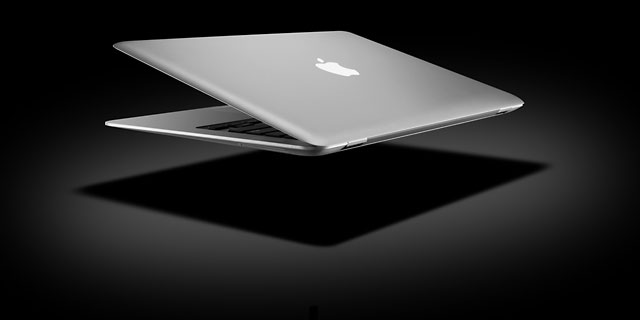
New to the MacBook line is a large multitouch trackpad, which lets MacBook Air users do the same kind of things iPhone users can. The MacBook Air uses a special version of the Core 2 CPU that’s 60% smaller than usual. (You can upgrade to a 1.8 GHz CPU for US$300 additional.) There is no built-in optical drive.
The MacBook Air is Apple’s first computer to support wireless NetBoot, and the Remote Disc software that comes with the MBA (on CD) can turn a Mac or Windows PC into a NetBoot server, allowing access to that computer’s optical drive from the MBA even for reinstalling the operating system. (However, you have to use a USB optical drive to install Windows for use with Boot Camp or virtualization. You can add an external USB 2.0 SuperDrive that is only compatible with the MBA for US$99.)
The MacBook Air has the same footprint as the MacBook, but it’s 2.2 lb. lighter and was the first Mac with a unibody aluminum design.
- Got a MacBook, Pro, or Air? Join our MacBook Group.
- Our Leopard Group is for those using Mac OS X 10.5 and 10.6.
A few things are missing. This is the first aluminum Mac notebook since 1999 without FireWire, and it only has one USB port. There is no option to upgrade RAM from the 2 GB built into the computer, because it’s soldered to the logic board. There’s no built-in ethernet port; if you need ethernet, Apple sells a USB 2.0 ethernet adapter for $29. The Apple Remote is not included with the MBA; it sells for $19.
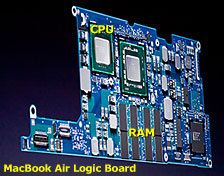
Like MacBook Pro models, the MacBook Air has a backlit keyboard, and it uses the same Intel GMA X3100 graphics processor as the consumer MacBook (this ties up 144 MB of system memory).
The MacBook Air is available only with an 18-bit glossy display, not the 24 bits you might expect. Like the iPod and iPhone, it does not have an easily replaceable battery. Cost to have Apple replace the 37 Watt-hour battery out of warranty is $130.
The MacBook Air was available in two configurations, which can be further customized:
- 1.6 GHz Intel Core 2 Duo, 80 GB 4200 rpm hard drive, 2 GB RAM, built-in iSight, and a 1280 x 800 display for US$1,799.
- 1.8 GHz, 64 GB solid state drive, 2 GB RAM, US$3,098.
What You Need to Know
With 2 GB of memory and no upgrade possible, OS X 10.5 Leopard and 10.6 Snow Leopard are your best OS choices, especially 10.6 since it is optimized for Intel. OS X 10.7 Lion is too demanding of resources to be practical on the original MacBook Air unless you’ve upgraded to an SSD, and even then you might not be happy with its performance.
The MacBook Air was the only Intel-based Mac designed to run from a parallel ATA hard drive, a tiny, slow 80 GB microdrive also used in iPods. Then again, SSD was so expensive in Early 2008 that it cost $999 to upgrade to a 64 GB SSD. As of August 2014, you can upgrade to a 60 GB SSD for $149 or a 128 GB SSD for $247 from Other World Computing.
Because you can’t upgrade RAM, your best upgrades are to replace the poky microdrive – or even Apple’s original SSD – with a fast new SSD and run OS X 10.6.
Closed Lid Mode: All Intel ‘Books support “lid closed” (or clamshell) mode, which leaves the built-in display off and dedicates all video RAM to an external display. To used closed lid mode, your ‘Book must be plugged into the AC adapter and connected to an external display and a USB or Bluetooth mouse and keyboard (you might also want to consider external speakers). Power up your ‘Book until the desktop appears on the external display and then close the lid. Your ‘Book will go to sleep, but you can wake it by moving the mouse or using the keyboard. The built-in display will remain off, and the external monitor will become your only display. Since all video RAM is now dedicated to the external monitor, you may have more colors available at higher resolutions. The MacBook Air is designed to run safely in closed lid mode, but if yours runs hot (perhaps due to overclocking or high ambient temperatures), you may want to open the lid when in closed lid mode: The screen will remain off and the computer will more readily vent heat from the CPU.
To resume use of the internal display, you need to disconnect the external display, put the computer to sleep, and then open the lid. This will wake up your ‘Book and restore use of the built-in display.
Intel-based Macs use a partitioning scheme known as GPT. Only Macintel models can boot from GPT hard drives. Both PowerPC and Intel Macs can boot from APM (Apple’s old partitioning scheme) hard drives, which is the format you must use to create a universal boot drive in Leopard. Power PC Macs running any version of the Mac OS prior to 10.4.2 cannot mount GPT volumes. PowerPC Macs won’t let you install OS X to a USB drive or choose it as your startup volume, although there is a work around for that.
Details
- Nickname: AirBook
- introduced 2008.01.15 at US$1,799 (1.6 GHz) and US$3,098 (1.8 GHz with solid state drive), due to ship 2 weeks later; build-to-order price for SSD reduced US$400 and 1.8 GHz CPU $100 2007.07.04, making top-end model US$2,598; replaced by Late 2008 model 2008.10.14
- CPU: 1.6/1.8 GHz Intel Core 2 Duo P7500/P7700
- Bus: 800 MHz
- RAM: 2 GB
- Level 2 cache: 4 MB shared cache
- Part no.: unknown
Mac OS
- requires Mac OS X 10.5.1 Leopard to 10.7 Lion; not compatible with 10.8 Mountain Lion or later
- Mac OS X 10.6 Snow Leopard compatibility
- Grand Central Dispatch is supported.
- 64-bit operation is supported.
- OpenCL is not supported with Intel X3100 GPU.
Performance
- Geekbench 2, 32-bit: 2044 (1.6 GHz), 1800 (1.8 GHz)
- Geekbench 2, 64-bit: 2352 (1.6 GHz), 2455 (1.8 GHz)
- Geekbench 3, 32-bit, 1 core: 771 (1.6 GHz), 814 (1.8 GHz)
- Geekbench 3, 32-bit, multicore: 1183 (1.6 GHz), 1283 (1.8 GHz)
- Geekbench 3, 64-bit, 1 core: 899 (1.6 GHz)
- Geekbench 3, 64-bit, multicore: 1413 (1.6 GHz)
- Xbench 1.3 (1.6 GHz hard drive model)
- overall: 40.65
- CPU: 77.83
- memory: 127.09
- Quartz graphics: 96.97
- OpenGL graphics: 13.92
- Hard drive: 20.30
Graphics
- GPU: Intel X3100 with resolution to 1920 x 1200 on external display (mini-DVI port), supports extended desktop.
- VRAM: 144 MB (shared with main memory)
- Video out: Micro-DVI (DVI, VGA, S-video, and composite supported with adapters; DVI and VGA adapters included)
- display: 13.3″ glossy 1280 x 800 18-bit 113 ppi color active matrix
- supports 1280 x 800, 1152 x 720, 1024 x 768, 1024 x 640, 800 x 600, 800 x 500, 720 x 480, and 640 x 480 pixels at 16:10 aspect ratio; 1024 x 768, 800 x 600, and 640 x 480 pixels at 4:3 aspect ratio; 720 x 480 at 3:2 aspect ratio
- allows mirroring to external display and extended desktop mode
Drives
- Hard drive: 80 GB 4200 rpm 1.8″ hard drive (same one used in iPod classic), 64 GB solid state drive optional at US$999 additional
- SuperDrive: optional external USB 2.0 drive, requires high power USB port (only compatible with MacBook Air)
- floppy drive: external USB only
Expansion
- expansions bays: none
- USB: 1 USB 2.0 port
- FireWire: none
- IR port: none
- ExpressCard/34 slots: none
Connectivity
- Ethernet: optional USB-to-ethernet adapter
- Modem: external USB only
- WiFi: 802.11n AirPort Extreme built in
- Bluetooth: BT 2.0 built in
Physical
- size: 8.94 x 12.8 x 0.16-0.76″ (227 x 325 x 4.0-19.4 mm)
- Weight: 3.0 pounds (1.36 kg)
Online Resources
Keywords: #13inchmacbookair #macbookair
Short link: http://goo.gl/kOE5O2
searchword: early2008macbookair




