
Apple has done something really different with the Mac Pro, and it’s taken a few days to put it all in perspective.
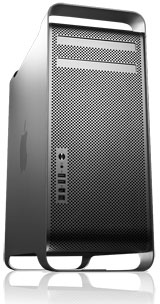 Instead of three different models with several build-to-order options, Apple has a single model with a host of build-to-order options. You can get it with a pair of 2.0 GHz dual-core CPUs, 1 GB of RAM, a 160 GB hard drive, and an Nvidia GeForce 7300 GT video card for US$2,124.
Or you can go for the 3.0 GHz configuration with 16 GB of RAM, four 500 GB hard drives, two SuperDrives, Nvidia Quadro FX 4500 graphics, Bluetooth 2.0, AirPort Extreme, and a wireless Mighty Mouse/keyboard combo for US$12,224. ($5,700 of that is for the RAM!)
With so many options – Apple says there are millions of possible configurations – it’s not easy to come up with a simple value equation for the Mac Pro.
Power
Apple claims the 3.0 GHz Mac Pro provides up to twice the power of the 2.5 GHz Power Mac G5 Quad. As always, “up to” is the operative phrase. Applications compiled for Intel processors will be the perkiest, those compiled for Apple’s older PowerPC machines will be slower (sometimes sluggish), and anything that requires Classic won’t run at all without third-party help.
As someone who has recently begun working with video (I plan to review the XLR8 ProView USB in the near future), I’ve discovered that video is the best reason for a non-gamer to upgrade to modern hardware. Even with a dual processor Power Mac G4/1 GHz, it can take hours and hours and hours to apply color correction to a one-hour video in iMovie.
I’m guessing that a 2.0-2.3 GHz dual-core G5 would cut that time in half, the G5 Quad would half that again, and that for a project like this the four core 3.0 GHz Mac Pro might half that once again. Ballpark figure, I’d estimate 6-10x faster than my Power Mac G4 for this kind of thing.
Update: Geekbench 2 results, 32-bit mode. Tests primarily CPU and memory speed. The slowest Mac Pro scores 17% higher than the G5 Quad.
- 1.0 GHz Power Mac G4 MDD, 963
- 1.25 GHz Power Mac G4 MDD, 1184
- 2.0 GHz Power Mac G5 dual CPU, 1855
- 2.0 GHz Power Mac G5 dual-core, 2017
- 2.3 GHz Power Mac G5 dual-core, 2313
- 2.7 GHz Power Mac Gt dual CPU, 2442
- 2.5 GHz Power Mac G5 Quad, 3738
- 2.0 GHz Mac Pro, 4 cores, 4374
- 2.66 GHz Mac Pro, 4 cores, 6510
- 3.0 GHz Mac Pro, 4 cores, 7161
And that’s what the leading edge is all about – power. Not more power than you could possibly ever need, but more than anyone already has and enough to really improve productivity for certain types of work. Especially editing video.
Except for extremely demanding tasks like video, I’m sure I’d be quite happy with an iMac, MacBook, or dual-core Mac mini. Heck, except for video work, I’m quite happy with my dual processor 2002 Power Mac G4, and I was happy with my 700 MHz and 1.25 GHz eMacs before that. And my 400 MHz PowerBook G4 also kept me happy for about three years (from 2001 until 2004, when I bought my first eMac).
Value vs. PowerPC
Before Apple undertook the Intel migration, a new model meant blowout fire sale prices on old inventory. That hasn’t been the case this year, and dealers are offering Power Mac G5 models for the same prices they had before the Mac Pro was introduced.
We’re looking at a 2.0 GHz dual-core G5 for $1,999, 2.3 GHz for $2,499, and the 2.5 GHz quad-core Power Mac G5 for $3,299. Similarly configured Mac Pros all have four cores: 2.0 GHz for $2,278 (including Bluetooth 2.0 and AirPort Extreme, which are standard features on the G5 models), 2.66 GHz for $2,578, and 3.0 GHz for $3,378.
Yes, there’s a small “Intel tax” – just as there was with the iMac, Mac mini, MacBook Pro, and MacBook. The Macintel models just cost a bit more to build, so they cost a bit more to buy.
In terms of sheer power, the 2.0 GHz Mac Pro should be up to one-third faster than the 2.5 GHz G5 Quad while retailing for about $1,000 less. It’s a no brainer if (and only if) all the programs you use have been updated for Intel CPUs.
It’s anything but if you depend on some older programs that are PowerPC only. Rosetta is very nice, but if you’ve been running a high-end dual processor or dual-core G5 system, you’ll get better performance from your PowerPC apps than you will on the Mac Pro.
If you’re using a single processor G5 system or anything but a CPU-upgraded dual G4 system, Rosetta may well run PowerPC software faster than your older Macs.
As more and more software becomes “universal”, the Mac Pro value will improve vs. older PowerPC hardware.
Best Choices
Bang for the buck, what’s the best way to configure a Mac Pro?
Speed
There’s a $300 difference between the 2.0 GHz and 2.66 GHz models. That’s less than 10% of the retail price for a 33% improvement in CPU speed. Unless your budget is especially tight, that’s worth the relatively small difference in price.
Going to 3.0 GHz adds $800 to the price. That’s almost a 30% increase in price for a 12% boost in speed – just about the opposite of the move from 2.0 to 2.66 GHz. The only way to justify the cost of the 3.0 GHz model is if shaving 10-12% off the time of video work (or anything equally intensive) will significantly increase your billables.
Hard Drive
Unless 250 GB is plenty of space for you, my advice is to order your Mac Pro with the 160 GB drive, trimming $75 from its price. Then pop over to dealmac or Deals on the Web and check out prices on SATA hard drives. One recent deal had the 500 GB Seagate Barracuda for $240.
There’s a $275 difference between buying your Mac Pro with a 160 GB drive and a 500 GB one, so you save $35 and end up with 660 GB of storage. That’s value. And you’ll still have two empty drive bays.
Memory
If you want to put 16 GB of RAM in your Mac Pro, you can save nearly $1,000 by doing it yourself. Today’s prices on matched pairs: 2×512 MB, $219; 2×1 GB, $398; 2×2 GB, $798; 2×4 GB, $1,596.
Apple’s price for 2 GB, $300 (save $80 by doing it yourself); 4 GB, $1,100 (save $300); 8 GB, $2,700 (save $1,100).
The Mac Pro has eight RAM slots, and RAM must be installed in matched pairs. The best value is ordering your Mac Pro with 1 GB of RAM and adding what you need yourself. I’d guess that adding a pair of 1 GB FB-DIMMs for $398 to reach 3 GB total RAM should be enough for most users at present.
Video Cards
I’m not a gamer. I play mostly solitaire, and most of that on my Palm. I don’t care which card will give you the best frame rate with World of Warcraft or some other game. But that’s just me.
For most users, the standard GeForce 7300 GT with 256 MB of video memory and dual-link DVI support should be fine. For serious gamers, expect reviews of the Radeon X1900 XT and Quadro FX 4500 on your favorite gaming and benchmark sites Real Soon Now.
My advice: Unless you know you need something better, stick with the GeForce 7300.
Other Options
If you’re using this caliber of computer, I hope you’re not tethered to dialup. But if you want to send faxes from your Mac Pro, the $49 USB Modem is probably your best bet.
You can add Bluetooth 2.0 and AirPort Extreme immediately, but ask yourself if you’ll really use them first. Gigabit ethernet runs circles around AirPort wireless, so there’s probably no need to put wireless in most desktops. Bluetooth is a silly way to connect a mouse and keyboard (overkill technology), but it can be a great way to sync your cell phone or Palm – or connect a headset. That’s probably worth $29, and you can add it later, so there’s no benefit to ordering it now if you don’t need it now.
Much as I love a wireless mouse, I’d rather go with something by Logitech, Microsoft, or another vendor than use Apple’s wireless Mighty Mouse. And although I use a wireless keyboard (it came in a combo pack with the mouse), connecting a keyboard to a desktop computer with a wire isn’t a hardship.
Unless you love the Mighty Mouse, take what comes with the Mac Pro and look at alternative mice at your local computer or office supply store.
Apple’s monitors are gorgeous and widescreen, and they complement the styling of the Power Mac G5 and Mac Pro. With recent price cuts, they seem competitive, but you’ll want to do your own analysis there.
You can add a second SuperDrive for just $100, and that might become a very popular option. It means you’ll be able to burn discs on one while accessing content on the other. It’s not something everyone needs, but it is a very modest price for adding another SuperDrive.
In the end, only you can decide whether the Mac Pro is for you now (or later) and how much power you need. If you choose to make the move, the best value is the 2.66 GHz model with the smallest hard drive and least RAM Apple offers coupled with your own hard drive and memory upgrades.
Keywords: #macprovalue #2006macprovalue
searchword: 2006macprovalue
