Mac Musings
Honest Speed
March 10, 2000 - Daniel Knight
Yesterday I condemned the AIM consortium for the lack of faster Macs. Motorola can't make faster G4, IBM can make them but can't sell them, and Apple won't sell a G3 faster than the fastest Power Mac G4. So we're stuck at 500 MHz.
Is that such a terrible place to be?
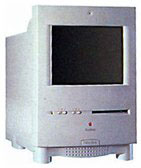 Sure, faster is always better, always
nicer, but is it always necessary or worth the extra expense? I'm quite
content with the Blue G3/300 I use at
work, and almost as happy with my G3/250 upgraded Umax SuperMac S900 at home. My oldest son
is quite content with his S900 using the stock 200 MHz 604e processor.
The other three boys are pleased with the performance of their 6100s (much faster than the Centris 610, accelerated Color Classic, and SE/30 they used to use), although
they desperately need more memory and larger hard drives. And my wife
never complains about her 33 MHz 68030-based PowerBook 150.
Sure, faster is always better, always
nicer, but is it always necessary or worth the extra expense? I'm quite
content with the Blue G3/300 I use at
work, and almost as happy with my G3/250 upgraded Umax SuperMac S900 at home. My oldest son
is quite content with his S900 using the stock 200 MHz 604e processor.
The other three boys are pleased with the performance of their 6100s (much faster than the Centris 610, accelerated Color Classic, and SE/30 they used to use), although
they desperately need more memory and larger hard drives. And my wife
never complains about her 33 MHz 68030-based PowerBook 150.
While everyone, myself included, talks about the high end of the performance curve, we too often forget to ask the other question: How much power is enough?
In the Wintel world, they're saying a 500 MHz Celeron or Pentium III is quite comfortable - not blazingly fast, but not slow enough to slow you down, either.
In the Mac world, I think we reach that point somewhere around 300 MHz, which is the speed of Apple's slowest current model, the iBook.
Of course, Mac OS X will change that, as it makes more demands on the computer, especially in the area of graphics. By next January, when Apple promises to make OS X the default operating system of all new Macs, we'll probably be running at 500 MHz on the low end, so even the slowest model then will perform very comfortably with the new OS and interface.
It's always been a moving target. I remember when OS 7 pretty much made the 8 MHz 68000-based Macs like my Plus obsolete. Well, not really. They ran fine with System 6, but became dog slow with 7. They ran, just not as well.
I remember back in 1993 when I got my Centris 610 at home while we were still using Mac IIcis at work. It was a real speed demon in the pre-Web era.
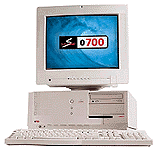 I used that computer for five years, upgrading
memory a couple times, replacing the hard drive with a larger one
twice, and moving from a 14.4 to a 56k modem. I replaced it in June
1998 with a SuperMac J700, a
computer with a 180 MHz 604e processor and an accelerated video card.
It more than held its own against the 7300/200 I used at work.
I used that computer for five years, upgrading
memory a couple times, replacing the hard drive with a larger one
twice, and moving from a 14.4 to a 56k modem. I replaced it in June
1998 with a SuperMac J700, a
computer with a 180 MHz 604e processor and an accelerated video card.
It more than held its own against the 7300/200 I used at work.
For the past six to nine months, I've been working with a 300 MHz G3 at work and 250 MHz at home. It's not lightning fast, but the performance is definitely comfortable. I have more problems running out of memory than running out of speed.
Last week we got our first G4/450s at work. Mine should arrive in another week or two. I'm confident it will feel even faster than what I have now, but that it won't make me a whole lot more productive. I can only type so fast. The ISDN internet connection is only so fast. It'll be 30% faster, but how often is that going to really matter?
There's a "sweet spot" for computer performance. It's a moving target, but you'll usually find it a couple steps behind the bleeding edge - and much more affordable. In the Wintel world, they're saying that's about 500 MHz, half the speed of the 1 GHz Athlon and Pentium III chips announced this week.
Why is the sweet spot so far from the cutting edge? Because programmers realize that most people are using computers one or two years old, machines with slower processors than the newest models. After all, a program optimized for an 800 MHz processor is going to feel sluggish on a 400 MHz computer - and the marketing people don't want that to happen.
For the Macintosh, a 300 MHz G3 probably hits the sweet spot. That's a bit over half the performance of the G4/500. That's the performance of the iBook, the iMac Rev. D, and the second version of the beige Power Mac G3 introduced two years ago as Apple's fastest computer.
Apple has designed OS X for a 300 MHz or faster G3. It'll run on a slower Mac, but feel sluggish.
Apple has apparently done the same with ClarisWorks 6, based on what I'm reading on other sites. Microsoft definitely tuned Office 98 for faster Power Macs - just ask anyone trying to run Word 98 on a 100 MHz or slower Power Mac.
Sure, more speed is always better. A faster processor means smoother animation for games, cleaner playback of QuickTime movies, faster filters in Photoshop. But it won't improve your typing speed.
That's the honest truth about computer speed. Whether it takes 3 seconds to calculate a complex spreadsheet or only 2, that little bit is not going to improve your productivity. Games may look better, but beyond a certain level of performance, that's just eye candy, not improved playability.
Do remember that the sweet spot moves as fast as Apple updates the Mac OS and Microsoft ships new applications. It follows Moore's Law, doubling every 18 months or so, always situated somewhere around half the speed of today's fastest, most expensive computer.
You can lust for speed, but it's a never-ending desire.
Or you can learn to find contentment a step back from the leading edge, buying upgrades a notch below state of the art as they go on fire sale pricing. That's how I scored my SuperMac J700/180 for $800, my G3/250 card for $240, and my ixMicro Ultimate Rez card for $80.
It's the appeal of bargain computing that influences Low End Mac. I got a lot of years out of my Mac Plus, both before and after the accelerator. The same goes for my Centris 610. Best of all, because my J700 and S900 (the six-slot tower version of the J700) have lots of expansion slots, room for up to 1 GB of memory, and take processor upgrade cards, I won't have to replace them until I really need to go past the G4/500 mark - that's probably two years from now.
It comes down to one question: Is your computer a custom street rod that you're always tweaking out, or is it a solid production tool that does its job comfortably?
The second choice makes for far more economical computing. It's a very good place to be.
Join us on Facebook, follow us on Twitter or Google+, or subscribe to our RSS news feed
Dan Knight has been using Macs since 1986, sold Macs for several years, supported them for many more years, and has been publishing Low End Mac since April 1997. If you find Dan's articles helpful, please consider making a donation to his tip jar.
Links for the Day
- Mac of the Day: Power Mac G3, introduced 1997.11.15. The first G3 Power Mac and the last Mac in a beige enclosure.
- Support Low End Mac