Home Profiles Articles Groups Deals News Software Mac Help News Feed
Low End Mac Reader Specials
TypeStyler For Mac OS X is Now Shipping! Download The Free Fully Functional 60 Day Tryout at www.typestyler.com
Don't install Parallels to play poker online! Poker Mac will show you how
to download and install a native Mac poker application such as Full
Tilt Poker Mac.
PowerBooks & iBooks
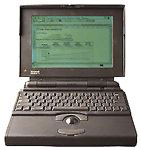
PowerBook 140
Code Name: Leary, Tim LC
- Got a PowerBook? Join LEM's PowerBooks Group.
Overview
The PowerBook 140 had
a physically larger passive-matrix screen than the PB 100 (although it displayed the
same 640 x 400 pixels), a more efficient CPU, and a 2-hour NiCad
battery (used on all PowerBook models from 140 to 180). It was
replaced by the 25 MHz PB 145 in August
1992.
As with all early PowerBooks, when buying used be sure it has all the memory you need (new PB RAM is getting more difficult to locate, especially at reasonable prices).
The PB 140 has an 8 MB memory ceiling, although you can go beyond that by using Virtual Memory (slow and free) or RAM Doubler (faster, not free, and discontinued). Another option is RAM Charger 8.1, which offers better memory management than the Mac OS.
Details
- introduced 1991.10.21 at $3,000; discontinued 1992.08.03
- requires System 7.0.1 to 7.6.1
- CPU: 16 MHz 68030
- FPU: none
- performance: 2.8 (relative to SE); 4.10, Speedometer 3.06; 0.26, Speedometer 4; 3.9 MIPS
- ROM: 1 MB
- RAM: 2 MB RAM, expandable to 8 MB using a special 100ns pseudostatic RAM card
- display: 9.8" 1-bit 640 x 400 passive matrix
- hard drive: 80 or 160 MB
- ADB: 1 port for keyboard and mouse
- serial: 2 DIN-8 RS-422 ports on back of computer
- SCSI: HDI30 connector on back of computer
- hard drive: 20, 40, or 80 MB
- proprietary modem slot
- weight: 6.8 pounds
- power supply: M5140 - 15W, 2 amps
Online Resources
- Low End Mac's best classic Mac OS deals. Best online prices for System 6, 7.1, 7.5.x, Mac OS 7.6, 8.0, 8.1, 8.5, 9.0, 9.2.2, and other versions.
- Mac 'Book power management adventures, Charles Moore, 'Book Value, 2009.05.19. If your 'Book won't power up, shuts down while your working, or has other power issues, resetting its internal power manager may clear things up.
- The 25 most important Macs (part 2), Dan Knight, Mac Musings, 2009.02.17. The 25 most significant Macs in the first 25 years of the platform, continued.
- Why you should partition your Mac's hard drive, Dan Knight, Mac Musings, 2008.12.11. "At the very least, it makes sense to have a second partition with a bootable version of the Mac OS, so if you have problems with your work partition, you can boot from the 'emergency' partition to run Disk Utility and other diagnostics."
- Creating Classic Mac boot floppies in OS X, Paul Brierley, The 'Book Beat, 2008.08.07. Yes, it is possible to create a boot floppy for the Classic Mac OS using an OS X Mac that doesn't have Classic. Here's how.
- The compressed air keyboard repair, Charles Moore, Miscellaneous Ramblings, 2008.07.24. If your keyboard isn't working as well as it once did, blasting under the keys with compressed air may be the cure.
- Macs: Better by design, Tamara Keel, Digital Fossils, 2008.07.11. From the beginning, Macs have stood apart from other computers with their attractive and intelligent design.
- A vintage Mac network can be as useful as a modern one, Carl Nygren, My Turn, 2008.04.08. Old Macs can exchange data and share an Internet connection very nicely using Apple's old LocalTalk networking.
- Vintage Mac networking and file exchange, Adam Rosen, Adam's Apple, 2007.12.19. How to network vintage Macs with modern Macs and tips on exchanging files using floppies, Zip disks, and other media.
- Better Classic emulation, Leopard on any G3?, CardBus and Compact Flash, and more, Dan Knight, Low End Mac Mailbag, 2007.12.18. Also where to find even older versions of BBEdit Lite, more oddball Mac video connections, installing System 7 on a PowerBook with no install disks, and lockups when faking out the Leopard installer.
- Solving Mac startup problems, Adam Rosen, Adam's Apple, 2007.12.12. When your old Mac won't boot, the most likely culprits are a dead PRAM battery or a failed (or failing) hard drive.
- Better and safer surfing with Internet Explorer and the Classic Mac OS, Max Wallgren, Mac Daniel, 2007.11.06. Tips on which browsers work best with different Mac OS versions plus extra software to clean cookies and caches, detect viruses, handle downloads, etc.
- Hacking Mac OS 7.6.1 so many Mac OS 8 apps will run, Max Wallgren, Mac Daniel, 2007.10.30. With a little ResEdit work and a second copy of your System Folder, you can run a lot of OS 8 apps with Mac OS 7.6.1.
- Simple Macs for simple tasks, Tommy Thomas, Welcome to Macintosh, 2007.10.19. Long live 680x0 Macs and the classic Mac OS. For simple tasks such as writing, they can provide a great, low distraction environment.
- Mac System 7.5.5 can do anything Mac OS 7.6.1 can, Tyler Sable, Classic Restorations, 2007.06.04. Yes, it is possible to run Internet Explorer 5.1.7 and SoundJam with System 7.5.5. You just need to have all the updates - and make one modification for SoundJam.
- Appearance Manager allows Internet Explorer 5.1.7 to work with Mac OS 7.6.1, Max Wallgren, Mac Daniel, 2007.05.23. Want a fairly modern browser with an old, fast operating system? Mac OS 7.6.1 plus the Appearance Manager and Internet Explorer may be just what you want.
- Format any drive for older Macs with patched Apple tools, Tyler Sable, Classic Restorations, 2007.04.25. Apple HD SC Setup and Drive Setup only work with Apple branded hard drives - until you apply the patches linked to this article.
- Making floppies and CDs for older Macs using modern Macs, Windows, and Linux PCs, Tyler Sable, Classic Restorations, 2007.03.15. Older Macs use HFS floppies and CDs. Here are the free resources you'll need to write floppies or CDs for vintage Macs using your modern computer.
- Getting notebook design 'just right', Andrew J Fishkin, The Mobile Mac, 2006.12.05. Some notebooks have just the right mix of design, quality, and features, while others fall short in one or more categories.
- System 7 Today, advocates of Apple's 'orphan' Mac OS 7.6.1, Tommy Thomas, Welcome to Macintosh, 2006.10.26. Why Mac OS 7.6.1 is far better for 68040 and PowerPC Macs than System 7.5.x.
- 30 days of old school computing: No real hardships, Ted Hodges, Vintage Mac Living, 2006.10.11. These old black-and-white Macs are just fine for messaging, word processing, spreadsheets, scheduling, contact management, and browsing the Web.
- Jag's House, where older Macs still rock, Tommy Thomas, Welcome to Macintosh, 2006.09.25. Over a decade old, Jag's House is the oldest Mac website supporting classic Macs and remains a great resource for vintage Mac users.
- 30 days of old school computing: Increasing battery life with a RAM disk, Ted Hodges, Vintage Mac Living, 2006.09.14. When using the hard drive, the old battery ran out of juice within 30 minutes, but running from a RAM disk it still has a 50% charge after half an hour.
- 30 days of old school computing: Computing at work with a PowerBook 170, Ted Hodges, Vintage Mac Living, 2006.09.08. This vintage Mac laptop's battery still holds a charge, and it's a competent performer for browsing the Web, email, writing, and instant messaging.
- Inside your notebook's battery: Ordinary AA Li-Ion cells, Dan Knight, Mac Musings, 2006.09.08. That expensive battery in your notebook computer probably holds less than $30 worth of off-the-shelf AA Li-Ion batteries.
- Compact Flash with SCSI Macs, PB 1400 CD-RW upgrade problems, and Web incompatibilities, Dan Knight, Low End Mac Mailbag, 2006.06.16. Suggested ways to use Compact Flash with vintage Macs and PowerBooks, problems getting CD-RW to work with a PowerBook 1400, and more thoughts on website incompatibilities.
- Moving files from your new Mac to your vintage Mac, Paul Brierley, The 'Book Beat, 2006.06.13. Old Macs use floppies; new ones don't. Old Macs use AppleTalk; Tiger doesn't support it. New Macs can burn CDs, but old CD drives can't always read CD-R. So how do you move the files?
- System 7.6.1 is perfect for many older Macs, John Martorana, That Old Mac Magic, 2006.03.24. Want the best speed from your old Mac? System 7.6.1 can give you that with a fairly small memory footprint - also helpful on older Macs.
- System 7.5 and Mac OS 7.6: The beginning and end of an era, Tyler Sable, Classic Restorations, 2006.02.15. System 7.5 and Mac OS 7.6 introduced many new features and greater modernity while staying within reach of most early Macintosh models.
- Web browser tips for the classic Mac OS, Nathan Thompson, Embracing Obsolescence, 2006.01.03. Tips on getting the most out of WaMCom, Mozilla, Internet Explorer, iCab, Opera, and WannaBe using the classic Mac OS.
- Which system software is best for my vintage Mac?, Tyler Sable, Classic Restorations, 2005.11.22. Which system software works best depends to a great extent on just which Mac you have and how much RAM is installed.
- Why you should use Mac OS 7.6 to get the most out of vintage Macs, Thomas Ahart, The Productive Mac, 2005.12.12. Although you may be able to run OS 8 or 9 on your old Mac, you'll generally find better performance using Mac OS 7.6.
- PowerBook history, Adam Robert Guha, Apple Archive, 2000.05.12. A history of portable Macs from 1989 through 1996.
- Games for '030s, Brian Rumsey, Low End Mac Gaming, 2000.05.26. A look at games that run nicely on the old 68030-based Macs.
- Recovering a stolen PowerBook, The 'Book Page. One user's experience.
- Faster browsing on older Macs, Online Tech Journal
- Networking a Mac Plus to an iMac, Jag's House. Key component is a SCSI-ethernet adapter, which will work with a PowerBook as well.
- Email lists: PowerBooks, Classic Macs Digest, Vintage Macs
- Links to System 7.0.1
- White PowerBook 140, Applefritter. Light gray prototype.
- PowerBook 14x/16x/170/180 Q&A, Apple Knowledge Base Archive
- PowerBook 140 Technical Specifications, Apple Knowledge Base Archive
Online Profiles
- Apple Tech Specs
- Wikipedia, general PowerBook history
- PowerBook Readme
- EveryMac
- Apple History
Cautions
- The PowerBook 140 does not support SCSI Disk Mode.
- Apple Computer considers this computer obsolete as of 2001.07.16 in the United States and 2001.07.23 in Canada. Service parts and documentation are no longer available from Apple.
- The 100-series and 500-series PowerBooks do not provide SCSI termination power, depending on external SCSI devices to provide it. For more details, see SCSI Termination Power.
- Macs with black-and-white only displays (1-bit, no grays) may find Netscape Navigator 3 makes it impossible to view some pages and sites. The workaround is to use Navigator 2.
- Modem port limited to 57.6 kbps (printer port may be faster); use of a 56k modem on the modem port may limit throughput. See 56k modem page.
- Apple has discontinued support and parts orders for this model. You may be able to find dealers with parts inventory either locally or on our parts and service list.
About LEM Support Usage Privacy Contact
Follow LEM on Twitter
LEM on Facebook
Navigation
Used Mac Dealers
Apple History
Video Cards
Email Lists
Favorite Sites
MacSurfer
MacMinute
MacInTouch
MyAppleMenu
InfoMac
Macs Only!
The Mac Observer
Accelerate Your Mac
RetroMacCast
PB Central
MacWindows
The Vintage Mac
Museum
DealMac
DealsOnTheWeb
Mac2Sell
ramseeker
Mac Driver Museum
JAG's House
System
6 Heaven
System 7 Today
the pickle's Low-End
Mac FAQ
Abandonware
Petition
Mac vs. PC Info
Affiliates
The Apple
Store
Mac
Connection
B&H
MacMall
TechRestore
ExperCom
Crucial
Memory
batteries.com
MacMinute
MacInTouch
MyAppleMenu
InfoMac
Macs Only!
The Mac Observer
Accelerate Your Mac
RetroMacCast
PB Central
MacWindows
The Vintage Mac
Museum
DealMac
DealsOnTheWeb
Mac2Sell
ramseeker
Mac Driver Museum
JAG's House
System 6 Heaven
System 7 Today
the pickle's Low-End
Mac FAQ
Abandonware
Petition
Mac vs. PC Info
Mac Connection
B&H
MacMall
TechRestore
ExperCom
Crucial Memory
batteries.com