
The titanium PowerBook was announced on 2001.01.09 at the Macworld Expo. It is smaller and lighter than any of the G3 PowerBooks that preceded it, measuring just 1″ thick and weighing in at 5.3 pounds. Construction is titanium and carbon fiber, making for a very tough, very light computer.
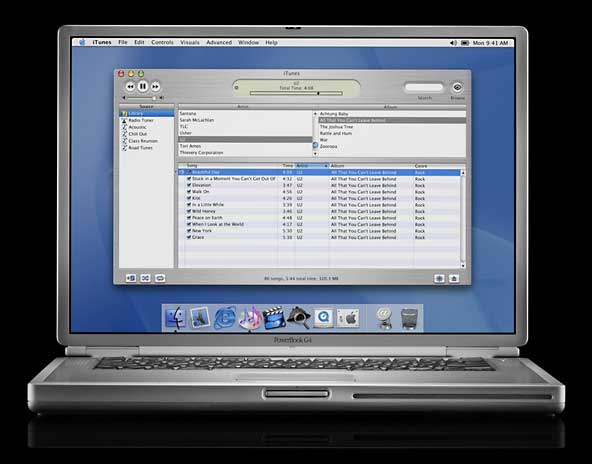
In the field, its battery yields up to 5 hours of use. The DVD drive is built into the G4, not a drive bay module like recent PowerBooks used.
The “mega-wide” display shows 1152 x 768 pixels, which is enough to display two full pages, and it measures about 12.6″ wide and 8.4″ high. This is the only G4 PowerBook that does not support Quartz Extreme, due to its ATI Rage Mobility 128 graphics processor.
In many respects, this is a Pismo logic board modified for a G4 CPU.
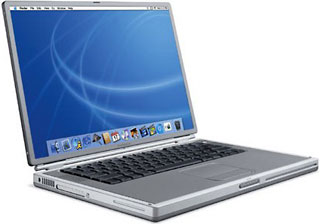
Closed Lid Mode: TiBooks support “lid closed” (or clamshell) mode, which leaves the built-in display off and dedicates all video RAM to an external display. To used closed lid mode, your ‘Book must be plugged into the AC adapter and connected to an external display and a USB mouse and keyboard (you might also want to consider external speakers). Power up your ‘Book until the desktop appears on the external display and then close the lid. Your ‘Book will go to sleep, but you can wake it by moving the mouse or using the keyboard. The built-in display will remain off, and the external monitor will become your only display. Since all video RAM is now dedicated to the external monitor, you may have more colors available at higher resolutions. The TiBook is designed to run safely in closed lid mode, but if yours runs hot (perhaps due to overclocking or high ambient temperatures), you may want to open the lid when in closed lid mode: The screen will remain off and the computer will more readily vent heat from the CPU.
To resume use of the internal display, you need to disconnect the external display, put the computer to sleep, and then open the lid. This will wake up your ‘Book and restore use of the built-in display.
- Got a G4 PowerBook or iBook? Join our G4 ‘Books Group or PowerBooks and iBooks Forum.
- Got a PowerBook G4? Join the Titanium G4 email list.
- Our Mac OS 9 Group is for those using Mac OS 9, either natively or in Classic Mode.
- Our Puma Group is for those using Mac OS X 10.1.
- Our Jaguar Group is for those using Mac OS X 10.2.
- Our Panther Group is for those using Mac OS X 10.3.
- Our Tiger Group is for those using Mac OS X 10.4.
Details
- code names: Mercury, TiBook
- introduced 2001.01.09 at US$2,599 and $3,499; prices dropped to $2,199 and $2,999 2001.08.25; replaced by PB G4 (550 MHz) and PB G4 (667 MHz) 2001.10.16
- product code: M7952 (400 MHz), M7710 (500 MHz)
- Requires Mac OS 9.1 or later; Mac OS X 10.5 not officially supported
- CPU: 400 or 500 MHz G4 (7410)
- Bus: 100 MHz
- Performance:
- Geekbench 2 (Tiger): 245 (400 MHz), 332 (500 MHz)
- also see our Benchmarks: PowerBook G4/400
- ROM: 4 MB, NewWorld ROM in RAM architecture
- RAM: 128 or 256 MB, expandable to 1 GB using two PC100 3.3 volt unbuffered low-power 144-pin 100 MHz SO-DIMMs
- Level 2 cache: 1 MB
- Video: ATI AGP 2x Rage Mobility 128
- VRAM: 8 MB
- Video out: VGA and S-video connectors
- display: 15.2″ (38 cm) 24-bit 1152 x 768 91 ppi color active matrix
supports 896 x 600 and 720 x 480 pixels at 3:2 aspect ratio; 1024 x 768, 800 x 600, and 640 x 480 pixels at 4:3 aspect ratio
allows mirroring to external display or extended desktop mode - Hard drive: 10 or 20 GB UltraATA-66, 30 GB build to order option, 128 GB maximum
- DVD-ROM: 2x
- floppy drive: external USB only
- expansions bays: none
- USB: 2 USB 1.1 ports
- FireWire: 1 FW400 port
- infrared: 4 Mbps IrDA 1.1
- Ethernet: 10/100Base-T
- Modem: v.90 56k
- PC Card slots: 1
- battery: 50 watt-hours, rated at up to 5 hours
- PRAM battery: Apple part 922-4361, US$25-95
- size: 9.5 x 13.5 x 1.0″ (241 x 341 x 26 mm)
- Weight: 5.3 pounds (2.4 kg)
CPU Upgrades
- 8x SuperDrive DL upgrade, MCE Technologies, $199.
- Combo drive upgrade, MCE Technologies, $199.
- 550 MHz MACh Speed G4 Titanium, $249.
Cautions
- Macworld UK noted on 2001.03.28 that the OS 9.1 CD included with OS X will not install on the PowerBook G4, Power Mac G4 (133 MHz bus), or 2001 iMacs. The solution is to use the Mac OS 9.1 CD that came with the computer.
- Do not under any circumstances use the Password Security control panel with any PowerBook running Mac OS 9 – see PowerBook (FireWire): Late Breaking News – it will render your PowerBook inoperable. The only fix is to put the drive in an older PowerBook, open Password Security, go to Setup, and click the Reset button, and then put the drive back in your ‘Book.
- There is an incompatibility between the Kensington Startup ADB extension and the Trackpad control on the iBook with Mac OS 9.0.4. Symptom: trackpad responds during boot, but not later. Solution: disable Kensington Startup ADB extension. This may also apply to other USB portables and versions of the Mac OS.
Keywords: #tibook #titaniumpowerbook
Short link: http://goo.gl/JS1ERf
searchwords: tibook400, tibook500
Online Resources




