
PowerBook G4/867, G4/1 GHz
Nickname: TiBook
- Got a PowerBook G4? Join the G4 'Books email list.
- Got a PowerBook G4? Join the Titanium G4 email list.
- Mac OS 9 List is for those using Mac OS 9, either natively or in Classic Mode.
- Puma List is for those using Mac OS X 10.1.
- Jaguar List is for those using Mac OS X 10.2.
- Panther List is for those using Mac OS X 10.3.
- Tiger List is for those using Mac OS X 10.4.
- Leopard List is for those using Mac OS X 10.5.
Overview
Low End Mac Reader Specials
Download Typestyler, still the Ultimate Styling Tool for Internet, Print and Video Graphics. Works great in Classic with a Native OS X Version on the way. Free Tryout: www.typestyler.com
LA Computer Company: LA Computer Company: Specials on AppleCare, Apple Displays, MacBooks, iMac's, MacBook Pros, Laptop and iPod accessories and more. Apple A/C Adapters for laptops starting at $25.00 Call 1-800-941-7654 or Click Here.
OWC: Juice up your iPod w/NewerTech High Capacity Battery from $19.99 Free Installation Videos for most models. Pro Installation Service w/FedEx Shipping From $57.95 (Battery Included). - www.MacSales.com
Mac users can finally play Party Poker for Mac. Not only that, they can also learn how to play PokerStars for Mac.
Laptop Hardware Provided by TechRestore - Overnight Mac & iPod Repairs.
Compare products like desktop computers, laptops, and LCD TVs side by side! All the information and reviews to make the best purchasing decision for a new cell phone GPS products or MP3 players. The Ciao network makes searching products easy for you.
New iMac 800Mhz Memory 4GB $98, 2GB $50. Click to Maximize your Macs...
A bit more than six months after bumping the fastest TiBook from 667 MHz to 800 MHz, Apple updated the titanium workhorse with faster processors (867 MHz and 1 GHz) and ATI Mobility Radeon 9000 graphics (with 32 MB of video memory on the slower model, 64 MB on the faster).
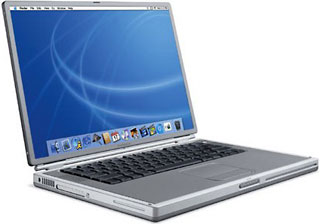
The 867 MHz TiBook has an 8x8x24x Combo drive that can burn CDs as well as read DVDs, and the 1 GHz model has a full-fledged SuperDrive that allows it to burn DVDs.
Lid Closed Mode: TiBooks supports "lid closed" (or clamshell) mode, which leaves the built-in display off and dedicates all video RAM to an external display. To used lid closed mode, your 'Book must be plugged into the AC adapter and connected to an external display and a USB mouse and keyboard (you might also want to consider external speakers). Power up your 'Book until the desktop appears on the external display and then close the lid. Your 'Book will go to sleep, but you can wake it by moving the mouse or using the keyboard. The built-in display will remain off, and the external monitor will become your only display. Since all video RAM is now dedicated to the external monitor, you may have more colors available at higher resolutions. The TiBook is designed to run safely in closed lid mode, but if yours runs hot (perhaps due to overclocking or high ambient temperatures), you may want to open the lid when in lid closed mode: The screen will remain off and the computer will more readily vent heat from the CPU.
To resume use of the internal display, you need to disconnect the external display, put the computer to sleep, and then open the lid. This will wake up your 'Book and restore use of the built-in display.
Details
- introduced 2002.11.06 at US$2,299 (867 MHz/Combo) and US$2,999 (1 GHz/SuperDrive); reduced to US$1,999 and $2,599 on 2003.06.02; replaced by 15" Aluminum PowerBook G4 2003.09.16
- requires Mac OS 9.2 or later, Mac OS X 10.1 or later
- CPU: 867 MHz/1 GHz G4 (7455)
- bus: 133 MHz
- performance:
- Geekbench 2 (Tiger): 490 (867 MHz), 539 (1.0 GHz)
- ROM: 4 MB, NewWorld ROM in RAM architecture
- RAM: 256/512 MB, expandable to 1 GB using two PC133 SO-DIMMs
- Level 2 cache: 256 KB at CPU speed
- Level 3 cache: 1 MB
- Video: ATI Mobility Radeon 9000 AGP4x
- VRAM: 32/64 MB
- Video out: S-video and DVI connectors (VGA supported with adapter)
- display: 15.2" (38 cm) 24-bit 1280 x 854 color active matrix
supports 1152 x 768, 896x600, and 720x480 pixels at 3:2 aspect ratio; 1024 x 768, 800 x 600, and 640 x 480 pixels at 4:3 aspect ratio
allows mirroring to external display or extended desktop mode - hard drive: 40/60 GB 4200 RPM Ultra ATA/66
- Optical drive: 8x8x24x CD-RW/DVD-ROM Combo drive or 1x6x8x4x24x SuperDrive
- floppy drive: external USB only
- expansions bays: one
- USB: 2 USB 1.1 ports
- FireWire: 1 FW400 port
- IR port: none
- ethernet: 10/100/gigabit
- modem: v.92 56k
- WiFi: 802.11b AirPort Card included on 1 GHz model, optional on 867 MHz
- PC Card slots: 1
- battery: 50 watt-hours, rated at up to 5 hours
- PRAM battery: Apple part 922-5205, US$40-80
- size: 9.5 x 13.4 x 1.0" (241 x 341 x 26 mm)
- weight: 5.4 pounds (2.45 kg)
- Model no.: M8858 (867), M8859 (1 GHz)
Upgrades
- 8x SuperDrive DL upgrade, MCE Technologies, $149.
Online Resources
- Low End Mac's Compleat Guide to Titanium PowerBooks, Charles Moore, 'Book Value, 2008.04.29. Between January 2001 and November 2002, Apple went through four revisions and eight models ranging from 400 MHz to 1 GHz.
- Low End Mac's Best Titanium PowerBook G4 Deals, updated biweekly.
- Best classic Mac OS deals. Best online prices for System 6, 7.1, 7.5.x, Mac OS 7.6, 8.0, 8.1, 8.5, 9.0, 9.2.2, and other versions.
- Best Mac OS X 10.0-10.3 deals. Best online prices for Mac OS X 10.0, 10.1, 10.2, and 10.3.
- Best Mac OS X 10.4 'Tiger' deals. Best online prices for Mac OS X 10.4.
- Best Mac OS X 10.5 'Leopard' deals. Best online prices for Mac OS X 10.5.
- Unsupported Leopard installation, Dan Knight, 2007.10.31. How to install Mac OS X 10.5 on unsupported hardware - plus field reports.
- Faking out the Leopard installer with Open Firmware, Dylan McDermond, Unsupported Leopard, 2007.12.06. You don't have to hack the installer to make the Mac OS X 10.5 installer run on sub-867 MHz G4 Macs by using this simple Open Firmware trick.
- What's the best version of OS X for my Mac?, Ian R Campbell, The Sensible Mac, 2008.02.28. Which version of Mac OS X is best for your hardware depends on several factors.
- Low End Mac's Compleat Guide to Mac OS 9, 2008 edition, Charles Moore, Miscellaneous Ramblings, 2008.05.12. Declared dead by Steve Jobs 6 years ago, Mac OS 9 remains fast and stable, but Classic software hasn't kept up with Web changes. What Macs support OS 9, where to buy it, and how to update to version 9.2.2.
- Can Linux replace OS X on older Macs?, Carl Nygren, Classic Macs in the Intel Age, 2008.06.30. Looking at Ubuntu 8.04 on a 1 GHz PowerBook and Kubuntu 5.04 on a clamshell iBook.
- SheepShaver brings Classic Mac OS to Intel Macs and Leopard, Alan Zisman, Mac2Windows, 2008.05.20. Mac OS X 10.5 doesn't support Classic Mode. Neither does Leopard. But SheepShaver lets you emulate a PowerPC Mac and run the Classic Mac OS.
- Mac value, the Hackintosh market, unsupported Leopard, and USB 2.0 for older PowerBooks, Dan Knight, Low End Mac Mailbag, 2008.04.30. High-end Macs cost less than comparable HPs and Dells, the need for a Mac minitower, a Leopard installation tip, Leopard on an 800 MHz iBook, and which PC Cards work with Mac OS X drivers.
- Overpriced Macs, 4-core Mac Pro value, USB for G3 PowerBooks, and more, Dan Knight, Low End Mac Mailbag, 2008.04.24. Also reader feedback on running a keyboard through the dishwasher, tips for using external DVD drives, and 8 GB partition issues with the Classic Mac OS on the beige G3.
- OS X for PCs, Mac mini with HDTV, 802.11n options, upgrading from Mac OS 9, and more, Dan Knight, Low End Mac Mailbag, 2008.04.22. Also reviving a dead PowerBook 5300, Lucida Grande, external FireWire SuperDrive advice, OS X and the DeskWriter, and royalties.
- Outliners for word processing, Mac compatible WiFi cards, iWork disappoints, and more, Dan Knight, Low End Mac Mailbag, 2008.03.27. Also running Leopard on a maxed out Digital Audio Power Mac, Clamshell iBook hacks, Lombard external display resolutions, and collective nouns.
- Wireless FAQ for Older Apple PowerBook Computers. Resources to help you to install and maintain 802.11b/g wireless PC Cards on older PowerBook computers.
- The Complete and Utter Guide to PC Cards and Expansion Bays on the PowerBook, Insanely Great. All about the PCMCIA, PC Card, or CardBus slots used in various PowerBooks.
- Power your recycled laptop with a rebuilt battery, John Hatchett, Recycled Computing, 2008.02.20. Old notebook computers usually mean old batteries that may be dead or on their last legs. You can buy a replacement battery, or you can have your old battery rebuilt.
- Better YouTube viewing on older Macs, too many dead pixels, Safari problems in Panther, and more, Dan Knight, Low End Mac Mailbag, 2008.02.05. Also picking the right used G4 iBook, Quartz Extreme support for PCI video, problems with Mac OS 9.x on G4 Power Macs, open firmware problems with 667 MHz PowerBook, and more.
- iPods, notebooks, and other modern electronics more readily replaced than repaired, Adam Robert Guha, Apple Archive, 2007.12.07. Whether it's an intermittent failure or a broken display cable, more often than not it's cheaper to replace a broken electronics device than repair it.
- Dell's 802.11g card for PowerBooks, glad for the death of Classic, FireWire cams, and more, Charles Moore, Miscellaneous Ramblings, 2007.11.05. Also silent computing with 'obsolete' Macs, Leopard and the 867 MHz limit, and Tiger performance on a 600 MHz G3 iBook.
- iBook G3 quality, 802.11g for older PowerBooks, installing Tiger on a CD-ROM eMac, and more, Charles Moore, Miscellaneous Ramblings, 2007.10.29. Also FireWire webcam options for the classic Mac OS and installing Leopard on an upgraded Power Mac G4.
- Leopard DVD Player requires 1.6 GHz CPU, dual processor questions, and dual boot Macs, Dan Knight, Low End Mac Mailbag, 2007.10.24. DVD Player currently runs on any G3 that supports Tiger, but the new version needs 1.6 GHz of power and other bloat in Leopard.
- The future of titanium PowerBooks in the Age of Leopard, Dan Knight, Mac Musings, 2007.10.17. Most of the 'titanium' PowerBooks aren't officially supported under Mac OS X 10.5, but with maximum RAM and a fast hard drive, they should be able to handle it.
- FastMac 8x SuperDrive and BurnAgain DVD: Fast and easy multisession disc burning, Charles Moore, Miscellaneous Ramblings, 2007.10.08. FastMac's 8x SuperDrive upgrade is remarkably fast compared with older PowerBook burners, and BurnAgain DVD makes it easy to append files to a previously burned CD or DVD.
- PC war losers, Mac 'just works', $68 802.11n for older Macs, a free font manager, and more, Mac News Review, 2007.08.31. Also DVD region locking, the iMac's glossy screen, Mac mini powerful enough, Chromac iMac housings, SanDisk's 8 GB flash drive, and more.
- Connecting a LaserWriter to ethernet and the TiBook that wouldn't boot, Dan Knight, Low End Mac Mailbag, 2007.08.23. The importance of an AAUI ethernet adapter, the cost of PowerBook PRAM batteries, and booting old Macs from SCSI drives.
- 250 GB 5400 rpm notebook drive benchmarked, Apple shrinks pro MagSafe adapter, $150 Linux laptop, and more, The 'Book Review, 2007.07.27. Also touchup paint for TiBooks, Dell and Lenovo offer wireless USB, Logitech's nano mouse and receiver, and bargain 'Books from $130 to $2,199.
- The TiBook marches on: 400 MHz productivity in the 2 GHz era, Neil Hokanson, My Turn, 2007.07.26. "Even though my PowerBook isn't the fastest or latest and greatest, it works, and the low-end marches on."
- Unmatched Classic Mac OS apps, TiBook reliability, Matias Tactile Pro 2.0 disappoints, and more, Charles Moore, Miscellaneous Ramblings, 2007.06.18. Also Netscape 7 and 9, MacBook causing problems with iMac's display, and graphics cards for a Power Mac G4 and an ADC display.
- Compact Flash faster than a hard drive, CF in a clamshell iBook, eSATA for PowerBooks, and more, Dan Knight, Low End Mac Mailbag, 2007.06.12. Faster boot times with a flash drive, replacing the hard drive in an iBook with Compact Flash, eBay feedback tips, eSATA CardBus options for PowerBooks, and the importance of G3 support in Mac OS X 10.5.
- Operation FlashBook: Running Tiger from flash on a PowerBook G4, John Muir, Mac Daniel, 2007.05.29. With the hard drive failing and Compact Flash prices falling, it was time to consider running the PowerBook G4 from flash. Looking back at 6 months, was it worth it?
- Format any drive for older Macs with patched Apple tools, Tyler Sable, Classic Restorations, 2007.04.25. Apple HD SC Setup and Drive Setup only work with Apple branded hard drives - until you apply the patches linked to this article.
- OS 10.4.8 making PowerBook run cooler?, Charles W. Moore, OS X Odyssey, Applelinks, 2006.10.24. "...I haven't restarted, and the 'Book is still running in the high 40°s - low 50°s most of the time. The fan has only activated sporadically while doing heavy multitasking."
- Better laptop performance: What's the best upgrade?, Andrew J Fishkin, The Mobile Mac, 2006.10.09. Memory, CPU, bus speed, and hard drives all impact performance and battery life. Which upgrades will give you the most up time in the field?
- Inside your notebook's battery: Ordinary AA Li-Ion cells, Dan Knight, Mac Musings, 2006.09.08. That expensive battery in your notebook computer probably holds less than $30 worth of off-the-shelf AA Li-Ion batteries.
- Setting up a titanium PowerBook for video editing, Adam Robert Guha, Apple Archive, 2006.09.01. Working with a limited budget, a 867 MHz TiBook should be sufficient for basic video editing.
- Low End Mac's Best Titanium PowerBook G4 Deals, updated biweekly.
- Customizing Mac OS 9, Nathan Thompson, Embracing Obsolescence, 2006.08.01. Fiddling with themes, picking a browser, and making the Classic Mac OS work just the way you want it to.
- 7 tools for keeping your laptop (uh, notebook) cool, Charles Moore, Miscellaneous Ramblings, 2006.07.24. A quick look at the Podium CoolPad, ChillMat, ChillHubs, Laptop Desk, Xpad, iLap, and iBreeze - seven stands designed to keep you 'Books running cooler.
- Power strategies for using your 'Book in the field: Batteries and AC adapters, Andrew J Fishkin, The Mobile Mac, 2006.06.05. One or two extra batteries and at least one spare AC adapter can be essential when you're traveling and need to get hours and hours of use from your 'Book.
- End of G4 models points to unprecedented value for used G4 Macs, Leaman Crews, Plays Well with Others, 2006.06.02. The PowerPC G4 may no longer have a place in Apple's product line, but that's a far cry from saying G4-based Macs are obsolete. If anything, their value is going to increase.
- Replacing Lombard with a TiBook: which one is enough?, Joe Rivera, Mac Fallout Shelter, 2006.04.19. Nice as the Lombard was, it has a new owner. The new 'Book should have FireWire, G4 power, and run Tiger nicely. How much TiBook is enough?
- Making the move from Jaguar (OS X 10.2) to Panther (10.3), Ted Hodges, Vintage Mac Living, 2006.04.11. One advantage of Apple's "no upgrades" policy for OS X - someone can give you their old copy after upgrading without worrying about violating their license.
- FastMac's $190 8x dual-layer SuperDrive for PowerBooks and dual USB iBooks, Charles Moore, Miscellaneous Ramblings, 2006.01.30. For US$190-250 you can replace the CD-ROM, CD-RW, Combo, or slow old SuperDrive in most PowerBooks, white iBooks, slot-loading iMacs, and Cubes with a faster, dual-layer drive.
- Web browser tips for the classic Mac OS, Nathan Thompson, Embracing Obsolescence, 2006.01.03. Tips on getting the most out of WaMCom, Mozilla, Internet Explorer, iCab, Opera, and WannaBe using the classic Mac OS.
- The best browsers for PowerPC Macs and the classic Mac OS, Nathan Thompson, Embracing Obsolescence, 2005.12.16. Two browsers stand out from the pack: iCab 3 is modern and remains under development, and WaMCom brings Mozilla to older Macs.
- FixIt Guide: PowerBook G4 DVI, PB FixIt. All you need to know to take apart, upgrade, repair, and put your PowerBook back together again. Online and print versions available.
- NewerTech TiBook battery provides four hours of use, Dan Knight, Mac Musings, 2004.05.24. "In the real world, I can get at least 4 hours of active use, and with the Energy Saver settings activated, a freshly charged battery usually shows over 5 hours of power."
- Flash memory improves PowerBook, Dan Knight, Mac Daniel, 2002.11.14. Using Compact Flash to boot, save files, run silently, extend battery life, and as virtual memory on a PowerBook.
- ColorSync profile for PowerBook G4, Berg Design. Try it - your PowerBook G4's screen will look better.
- How to run the PowerBook G4 with the lid down, Apple TIL, 2001.01.18
- Titanium G4 email list, The Macintosh Guy. New list for PowerBook G4 users - count me in!
- Memory pricing at ramseeker.
- Apple Spec: PowerBook G4 (DVI)
Cautions
- Do not under any circumstances use the Password Security control panel with any PowerBook running Mac OS 9 - see PowerBook (FireWire): Late Breaking News - it will render your PowerBook inoperable. The only fix is to put the drive in an older PowerBook, open Password Security, go to Setup, and click the Reset button, and then put the drive back in your 'Book.
- There is an incompatibility between the Kensington Startup ADB extension and the Trackpad control on the iBook with Mac OS 9.0.4. Symptom: trackpad responds during boot, but not later. Solution: disable Kensington Startup ADB extension. This may also apply to other USB portables and versions of the Mac OS.
About LEM | Support | Usage | Privacy | Contacts





