Power Macintosh

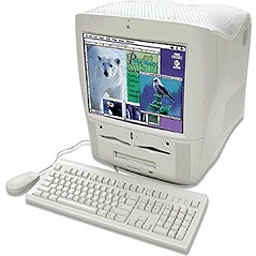
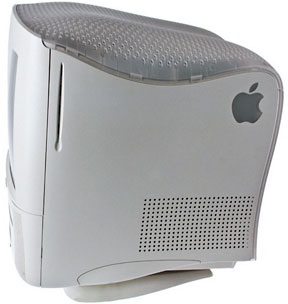
Power Macintosh G3 All-in-One
- Got a G3, G4, or G5 Power Mac? Join G-List.
- Our Mac OS 9 Group is for anyoneusing Mac OS 9, either natively or in Classic Mode.
- Our Puma Group is for those using MacOS X 10.1.
- Our Jaguar Group is for those usingMac OS X 10.2.
The G3 All-in-One succeeded the Power Mac 5000 series for the educationmarket. Key features include the G3 processor and a 15" multiscandisplay (13.8" viewable). The All-in-One was specifically designedfor the education market, where less wires and parts to remove area big plus.
The motherboard is on a slide-out tray for easier upgrade andservice. A 4 GB EIDE hard drive, 24x CD-ROM player, and10Base-T ethernet are standard. An internal Zip drive isoptional.
Unfortunately, this machine was discontinued to make room forthe iMac. A lot of users,especially educators, missed having an integrated Power Mac withPCI slots.
If you have a hard drive larger than 8 GB, you should partition isso that the first partition is under 8 GB in size (for simplicity,we suggest 7 GB). Failure to do this could eventually result in anunbootable computer, as all System files must be within the first8 GB of drive space. These Macs can work successfully with largerdrives for some time, but once a System files goes outside of the first8 GB of space, you'll have nothing but problems.
Mac OS X
If you have an IDE hard drive over 8 GB in size, you mustpartition it or you will not be able to install Mac OS X. If youare creating the partition within OS X, it must be smallerthan 7.45 as reported by Disk Utility (because sometimes a GB isbillion bytes and sometimes it's 1,073,741,824 bytes); we suggestsimply setting it at 7 GB to avoid having to redo the wholeinstallation if the partition ends up bigger than specified (ithappens). Mac OS X must be completely within the first8 GB of space on your hard drive or you will not be able torun OS X.
You can only boot OS X from a "master" drive in the beige G3.This applies to hard drives and CD-ROM drives. If the CD-ROM is setto slave, you will not be able to install OS X. If the harddrive is set to slave, you will not be able to boot from it.
Non-Apple upgrades and peripherals (such as unsupported USBdevices, replacement drives, and third-party memory) may causeproblems when installing or booting into Mac OS X.
Be sure to read and follow Apple's "Read Before You Install"instructions to increase the likelihood of getting OS Xinstalled and running on the first try.
The beige G3 is not officially supported under OS X 10.3(Panther), but it does work with 10.2.8 and earlier. Panther can beinstalled using XPostFacto 3,although built-in video is not currently supported.
Cautions
Data on the RAM Disk is lost during a restart, unlike earlierMacs. Apple also notes that the 100 MHz Pentium PC Compatibilitycard is incompatible, although this seems to be due to an audiocable problem. There are also reports that the G3 will not stayasleep.
Other compatibility issues:
- GeoPort Modem not supported
- QTC and AMC not supported
- Must disconnect LocalTalk if using ethernet
- Needs updated drivers for StyleWriter 4100 & 4500
- Needs new ethernet driver for use on 10/100 autosensinghubs
- LocalTalk printing slow on busy networks
- Apple TokenRing card not supported
Some of these issues were addressed by later versions of the MacOS.
When buying a G4 upgrade for the beige G3, make sure it iscompatible with this model's 66 MHz bus. Pulled G4s from Apple's "Yikes!" G4 and some OEM G4s arespecifically designed for a 100 MHz bus and will not work properlyin the beige G3.
The beige G3 supports 256 MB DIMMs, but they must be built using128 Mb chips. DIMMs built with 256 Mb chips will work, but thememory controller will only see the first 128 Mb of each chip.Compatible 256 MB DIMMs will have 16 memory chips, 8 on eachside.

Details
- introduced 1998.04.03; discontinued 1999.01.01
- requires Mac OS 8 or later, 10.2.x officially supported,10.3.x and 10.4.x can generally be installed using XpostFacto4
- CPU: 233/266 MHz PPC 750
- bus: 66 MHz
- L2 cache: 512 KB 2:1 backside cache
- performance: 4.5/5.0 (relative to 7500/100); 767/888, Macbench4
- RAM: 32 MB (expandable to 768MB, desktop version requires lowprofile DIMMs), uses 3.3V unbuffered 100 MHz 168-pin SDRAM, 3sockets accept 8, 16, 32, 64, 128, or 256MB DIMMS
- VRAM: 2 MB SGRAM, expandable to 6 MB
- Video: supports resolutions to 1024 x 768, uses ATI 2D/3D64-bit accelerated chip set
- hard drive: 4 GB EIDE drive. Maximum IDE drive size is 128 GB without third-partysupport. See How Big a Hard Drive Can I Putin My iMac, eMac, Power Mac, PowerBook, or iBook? for threeoptions.
- CD-ROM: 24x maximum throughput
- 3 PCI slots
- 1 Personality Card slot (matches Comm Slot II, but only workswith modems)
- microphone: standard 3.5mm minijack, compatible with line-levelinput including Apple's PlainTalk microphone
- ADB: 1 port for keyboard and mouse
- serial: 2 DIN-8 GeoPorts on back of computer
- SCSI: DB-25 connector on back of computer
- 10Base-T ethernet connectors on back of computer
- size (HxWxD): 19.9" x 16.1" x 18.0"
- weight: 59.5 lb.
- Gestalt ID: 510
- PRAM battery: 3.6V half-AA
- upgrade path: G3 and G4 ZIF CPU upgrades (note that maximum CPU speedyou can set using the J16 jumper block is466 MHz - 7 times bus speed - unless the upgrade sets its ownmultiplier)
Accelerators & Upgrades
- 8x SuperDriveDVD±RW upgrade, MCE Technologies, $149. 8x4x12x DVD,24x24x40x CD. 2 MB buffer. Requires OS 9 orOS X.
- Guide to G3 ZIF Upgrades, Low EndMac
- 333 MHz, 400 MHzupgrades for Power Mac G3, MacCPU
- see Clocking the G3 for details ontweaking the G3 motherboard
Online Resources
- Best Power Mac G3deals, updated monthly.
- Picking up a usedPower Mac G3 or G4: Is it worth it?, Dan Knight, Mac Musings,2008.12.18. In some cases, shipping can cost more than the computeritself. Where are the best values?
- Best classic MacOS deals. Best online prices for System 6, 7.1, 7.5.x, Mac OS 7.6,8.0, 8.1, 8.5, 9.0, 9.2.2, and other versions.
- Best Mac OS X 10.0-10.3deals. Best online prices for Mac OS X 10.0, 10.1, 10.2, and10.3.
- How to Recoverfrom a Beige G3 Startup Error, Dan Knight, Mac Daniel, 2012.07.19.If you're not careful, installing OS X 10.2 Jaguar can create anunbootable Beige Power Mac G3. How to fix it - and how to avoid theproblem.
- What'sthe best version of OS X for my Mac?, Ian R Campbell, The SensibleMac, 2008.02.28. Which version of Mac OS X is best for your hardwaredepends on several factors.
- Bringing G3 iMacs and other G3Macs into the Tiger Age, Dan Knight, Mac Daniel, 2007.12.07. Tipson hard drives, memory, WiFi, and getting Mac OS X 10.4 installed on G3iMacs and other older G3 Macs.
- Low End Mac'sCompleat Guide to Mac OS 9, 2008 edition, Charles Moore,Miscellaneous Ramblings, 2008.05.12. Declared dead by Steve Jobs 6years ago, Mac OS 9 remains fast and stable, but Classic softwarehasn't kept up with Web changes. What Macs support OS 9, where to buyit, and how to update to version 9.2.2.
- Environmentallyresponsible retirement for old Macs, Rick Lawson, Pioneers in MacDevelopment, 2008.06.13. After you've scavenged what useful parts youcan from your old Mac, what's the most environmentally friendly way todispose of the rest?
- Know your Mac'supgrade options, Phil Herlihy, The Usefulness Equation, 2008.08.26.Any Mac can be upgraded, but it's a question of what can be upgraded -RAM, hard drive, video, CPU - and how far it can be upgraded.
- The good, the bad,and the ugly of Apple design, Charles Moore, MiscellaneousRamblings, 2008.10.15. Apple has produced some beautiful computers andiPods over the years, but also a few of the ugliest and most ungainlycomputers ever seen.
- Leopardon Pre-AGP, MacTech, 2008.09.03. How to get OS X 10.5 running on aYikes! Power Mac G4, G4-upgraded Blue & White or Beige Power MacG3, or PCI Power Mac (or clone) with a G4 daughter card.
- Beige Power MacG3: Maximum power then, great value now, Leo Titus LeBron V,Collection Spotlight, 2009.08.03. The world's most powerful personalcomputer when it was introduced in November 1997, the beige G3 stillhas a lot to offer anyone looking for a very low cost, powerfulMac.
- Optimized software buildsbring out the best in your Mac, Dan Knight, Low End Mac's OnlineTech Journal, 2009.06.30. Applications compiled for your Mac's CPU canload more quickly and run faster than ones compiled for universaluse.
- Tips forinstalling or reinstalling Mac OS X 10.4 'Tiger', Adam Rosen,Adam's Apple, 2009.06.10. Mac OS X 10.4 uses less memory than Leopard,supports Classic Mode on PowerPC Macs, and isn't supported on G3Macs.
- Is it worth maxingthe RAM in old G3 and G4 Macs?, Simon Royal, Mac Spectrum,2009.04.15. Increasing memory can make your old Mac faster and make youmore productive, but it probably won't improve resale value by theamount you spend.
- The 'better safe thansorry' guide to installing Mac OS X updates, Charles Moore,Miscellaneous Ramblings, 2008.12.16. Most users encounter no problemsusing Software Update, but some preflight work and using the Comboupdater means far less chance of trouble.
- Why youshould partition your Mac's hard drive, Dan Knight, Mac Musings,2008.12.11. "At the very least, it makes sense to have a secondpartition with a bootable version of the Mac OS, so if you haveproblems with your work partition, you can boot from the 'emergency'partition to run Disk Utility and other diagnostics."
- Every workingcomputer is useful to someone, Allison Payne, The Budget Mac,2008.11.19. Whether it's a PowerBook 1400, G3 iMac, or Power Mac G4, itcould be all the computer someone needs.
- Attractive and ugly Macs,discontinued MacBook Pro value, and writing with TextEdit, CharlesMoore, Miscellaneous Ramblings, 2008.10.30. Readers weigh in on thegood, the bad, and the ugly of Macintosh design over the past 24years.
- How to clone Mac OS Xto a new hard drive, Simon Royal, Mac Spectrum, 2008.10.07. Whetheryou want to put a bigger, faster drive in your Mac or clone OS X foruse in another Mac, here's the simple process.
- Getting themost from your G3 Mac, Simon Royal, Mac Spectrum, 2008.10.03. MostG3 Macs can be upgraded so they can run Mac OS X 10.4 'Tiger' quitenicely. Here's how.
- Bumps in theroad for G3 Macs, John Hatchett, Recycled Computing, 2008.07.28.MobileMe wouldn't sync with the Pismo, and Skype's software refused toinstall, but both problems were solved.
- The compressed airkeyboard repair, Charles Moore, Miscellaneous Ramblings,2008.07.24. If your keyboard isn't working as well as it once did,blasting under the keys with compressed air may be the cure.
- Opera trumps Safari, flashed videocards for Macs, hacking Leopard for G3 Power Macs, and more, DanKnight, Low End Mac Mailbag, 2008.07.11. Also expectations for futureMacBooks, more power than expected from a CPU upgrade, ADB andQuickCams, Snow Leopard and PowerPC, and more.
- Turn your oldMac into a web server with Linux, Apache, MySQL, and PHP, JasonPacker, Macs in the Enterprise, 2008.07.09. Step-by-step instructionsfor installing and configuring Linux, Apache, MySQL, and PHP on anolder Mac.
- Turn yourold Mac into a website server with free open source software, JasonPacker, Macs in the Enterprise, 2008.07.02. By installing Linux withouta GUI, your old Mac can dedicate all of its resources to runningApache, MySQL, and PHP.
- Mac OS X 10.2'Jaguar' can unleash the power of G3 iBooks, Carl Nygren, ClassicMacs in the Intel Age, 2008.06.17. After pulling a bad stick of RAM,the Dual USB iBook didn't have enough memory for Tiger or Linux. Buteven with just 128 MB of RAM, Jaguar did the job.
- More G4 upgrade advice, securedisk wipes, 500 MHz iMacs with Tiger in action, and more, DanKnight, Low End Mac Mailbag, 2008.05.09. The importance of securelyclearing your hard drive before you pass on your Mac, Pismo and closedlid mode, G3 iMacs in the classroom, and more thoughts on upgrading G4Power Macs.
- Macintosh peace of mind, PA Semiand the iPhone, $40 802.11g PCI card, and more, Dan Knight, Low EndMac Mailbag, 2008.05.01. Also Power Mac vs. Mac mini, more on DVD UserOp Patch, 12" vs. 14" iBook, and VGA for a Power Mac 6100.
- Troubleshooting Eudora, backing upa Beige G3, and why Macs are green, Charles Moore, MiscellaneousRamblings, 2008.05.01. Problems getting help with Eudora, backupoptions for a Power Mac G3, and how the long-term usefulness of Macsmakes them environmentally friendly computers.
- Picking the right 'Book, clamshelliBook memories, and alternatives to SCSI-to-USB, Charles Moore,Miscellaneous Ramblings, 2008.04.23. Choosing a good used 'Book forClassic, remembering the clamshell iBooks, and alternate options toavoid spending $99 on a SCSI-to-USB adapter.
- 3 ways to better YouTube viewingon older Macs, Dan Knight, Low End Mac Mailbag, 2008.02.06.Watching YouTube videos in your browser on G3 Macs can be painfullyslow, but there are several ways to improve your YouTube viewingexperience.
- WWDC Leopard on upgraded Beige G3,PowerBook vs. iBook, Leopard on an 800 MHz iBook G4, and more, DanKnight, Low End Mac Mailbag, 2008.01.30. Also MacBook Air points tofuture notebooks, iPod and iPhone coverage on Low End Mac, changes inXbench scores, and help with a Mac Classic.
- G3 and G4Power Macs and Clamshell iBooks still useful, Ben Zalutsky, NoWindows for Me, 2008.01.29. Intel CPUs may be blazingly fast, but theold G3 and G4 Macs have plenty of usable life left in them.
- Vintage Macvideo and monitor mania, Adam Rosen, Adam's Apple, 2007.12.17.Vintage Macs and monitors didn't use VGA connectors. Tips on makingmodern monitors work with old Macs.
- Getting insidevintage Macs and swapping out bad parts, Adam Rosen, Adam's Apple,2007.12.14. When an old Mac dies, the best source of parts is usuallyanother dead Mac with different failed parts.
- 8 GB partition issue impacts OS 9,RAM for G3 iMacs, success with Open Firmware hack, and more, DanKnight, Low End Mac Mailbag, 2007.12.10. Partitions over 8 GB can causeproblems in the classic Mac OS, more unsupported Leopard reports,another vote against the iPhone, and millions vs. thousands ofcolors.
- Reasons for sticking with theClassic Mac OS, Tommy Thomas, Welcome to Macintosh, 2007.10.30.Whether it's the simplicity, elegance, speed, or desire not to replacelots of expensive hardware, there are lots of good reasons for stickingwith Mac OS 9.
- Interchangeabilty andcompatibility of Apple 1.4 MB SuperDrive floppy drives, SonicPurity, Mac Daniel, 2007.09.26. Apple used two kinds of high-densityfloppy drives on Macs, auto-inject and manual inject. Can they beswapped?
- AirPort Extreme interferencerobustness explained, 1 GHz G3 upgrade, new OS X image editor, andmore, Mac News Review, 2007.09.14. Also picking the right Mac,Microsoft's wireless mouse with 1 GB of flash memory, Revolabs wirelessmicrophone with iListen, Opera 9.5 for Mac reaches alpha 3, andmore.
- The future of G3 Power Macs inthe Age of Leopard, Dan Knight, Mac Musings, 2007.09.12. There's noG3 support in Leopard. What does that mean for those with a Beige G3 ora Blue and White G3?
- Gigabyte confusion, big letterkeyboard wanted, G3 All-in-One problem, and more, Dan Knight,Low End Mac Mailbag, 2007.08.22. Also alternative printingsolutions for older Macs and missing AppleWorks.
- The truth about CRTs and shockdanger, Tom Lee, Online Tech Journal, 2007.05.22. You've beenwarned that CRT voltage can injure and even kill. The truth is thatthis danger is overstated - and takes attention away from a greaterdanger.
- Why Apple must continue G3support in Mac OS X 10.5 'Leopard', Dan Knight, Mac Musings,2007.05.08. "We're worried about what happens if Apple unchecksthat box in Xcode to include the instructions necessary to runOS X on G3 processors at all."
- Installing UbuntuLinux on the Beige G3 Mac, John Honniball, 2005. Step-by-stepguide to installing Ubuntu Linux on a beige Power Mac G3.
- Importance of G3 support in 10.5,clever USB/FireWire solution, upgrade options, and more, DanKnight, Low End Mac Mailbag, 2007.05.01. Also the loss of thePowerBook brand, upgrading to an Intel iMac, Korg and the Mac,Quadra boot problems, and the value of a Mac Classic.
- Format any drive for older Macswith patched Apple tools, Tyler Sable, Classic Restorations,2007.04.25. Apple HD SC Setup and Drive Setup only work with Applebranded hard drives - until you apply the patches linked to thisarticle.
- $25 802.11g card for PCI Macs,drive support for 802.11n AirPort Extreme, Adtron ups flash disks,and more, Mac News Review, 2007.03.02. Also firmware updateinfo for Intel Macs, washable medical mouse and keyboard, TechToolProtogo, and more.
- Musings on low-end SATA cardsin PCI Power Macs, Nathan Thompson, Embracing Obsolescence,2006.11.06. Thoughts on why the inexpensive SATA card might almostwork in a pre-G3 PCI Power Mac.
- Old Power Macs and SATA not amarriage made in heaven, Nathan Thompson, EmbracingObsolescence, 2006.11.03. The PCI SATA card said blue & whiteG3 or newer and Mac OS 8.6 or later, but maybe it would work in anolder pre-G3 Power Mac....
- Is Ubuntu Linux a sensiblealternative for Mac users?, Charles Moore, MiscellaneousRamblings, 2006.09.18. If your Mac can run OS X decently, is thereany reason to try Ubuntu Linux? If it can't run OS X well, isUbuntu a reasonable choice?
- Mac OS 8 and 8.1: Maximum size,maximum convenience, Tyler Sable, Classic Restorations,2006.09.11. Mac OS 8 and 8.1 add some useful new features andtools, and it can even be practical on 68030-based Macs.
- Is the G3 still a practicalchoice?, Matthew Jay, Macs to the Max, 2006.08.10. Although theG3 is several generations old, it has enough horsepower for most ofthe things we do on our computers.
- Customizing Mac OS 9,Nathan Thompson, Embracing Obsolescence, 2006.08.01. Fiddling withthemes, picking a browser, and making the Classic Mac OS work justthe way you want it to.
- The ins and outs of bootingLinux on the Mac, Larry Stotler, Linux on the Low End,2006.07.31. "Old World" Macs can't boot directly into Linux. Theyneed to boot the Classic Mac OS first, then pass control over toLinux.
- Floppy drive observations: Acompleat guide to Mac floppy drives and disk formats, ScottBaret, Online Tech Journal, 2006.06.29. A history of the Mac floppyfrom the 400K drive in the Mac 128K through the manual-inject 1.4MSuperDrives used in the late 1990s.
- More on the best classic Mac OSbrowser and video capture options with Mac OS 9, Charles Moore,Miscellaneous Ramblings, 2006.06.28. WaMCom as the best classic Macbrowser, software suggestions for OS 9 video capture, and twohardware alternatives to having your Mac do the videoconversion.
- Making the move from Jaguar (OSX 10.2) to Panther (10.3), Ted Hodges, Vintage Mac Living,2006.04.11. One advantage of Apple's "no upgrades" policy for OS X- someone can give you their old copy after upgrading withoutworrying about violating their license.
- What to buy when the old BeigeG3 is just too sluggish, Ted Hodges, Vintage Mac Living,2006.03.27. When your old Power Mac G3 just can't keep up with yourneeds under OS X, it's time to look at the used Power Mac G4market. The difference in speed can be astounding.
- Web browser tips for theclassic Mac OS, Nathan Thompson, Embracing Obsolescence,2006.01.03. Tips on getting the most out of WaMCom, Mozilla,Internet Explorer, iCab, Opera, and WannaBe using the classic MacOS.
- The best browsers for PowerPCMacs and the classic Mac OS, Nathan Thompson, EmbracingObsolescence, 2005.12.16. Two browsers stand out from the pack: iCab 3 ismodern and remains under development, and WaMCom brings Mozilla toolder Macs.
- How Big a Hard Drive Can I Put in MyiMac, eMac, Power Mac, PowerBook, or iBook?, Dan Knight, Mac Daniel,2005.10.24. A lot of older Macs don't know how to deal with drivesover 128 GB in size. We look at three options.
- Sonata SD,Sonnet Tech, 2004.06.01. First new PCI video card for the Mac inages sells for just US$99, supports OS 7.5.3 and later plus OS X10.1.5 and later, works with VGA or old Mac monitors, 16 MBVRAM.
- Beige G3owner reports on TV tuners, Accelerate Your Mac, 2004.03.26.Solutions for watching television and capturing video on OS X andthe classic Mac OS.
- Migration issues in moving froma Beige G3 to a Blue and White, Adam Robert Guha, AppleArchive, 2004.02.20. Using an older printer and a SCSI scanner,ejecting a CD, and dealing with a system freeze.
- Stepping up from a Beige G3 toBlue and White, Adam Robert Guha, Apple Archive, 2004.02.16.Why it was time to upgrade, benefits of the newer computer, andtroubles caused by the Rev. 1 motherboard.
- Choosing between beige G3upgrade options, Dan Knight, Low End Mac Mailbag, 2003.04.25.Thoughts on video cards, CPU upgrades, and more.
- The value and limitations ofthe beige G3, Dan Knight, Mac Daniel, 2003.03.03. As used G3prices plummet, has the beige G3 become a best buy, or are theregood reasons to avoid it?
- Speeding up a beige G3,Dan Knight, Mac Daniel, 2002.10.28. Pumping up an old G3/266 with afaster processor, faster hard drive, and faster drivecontroller.
- OS X: 10.1.5 correctsbeige G3/Radeon incompatibility, obzorg.org. "...Apple hascorrected this problem with one notable limitation."
- Rage at being left behind,Dan Knight, Mac Musings, 2001.12.24. It's official - Apple doesn'tplan to support graphics acceleration for any Mac with ATI Ragevideo.
- OS X and the beige G3, AdamRobert Guha, Apple Archive, 2001.12.21. OS X runs decently ona beige G3, but also cripples the floppy drive, printer port,graphics performance....
- How toinstall a CD-RW in a G3 All-in-One, ScienceMac, 2001.10.30.Includes lots of helpful photos.
- OS X graphics speedup with early ATI video, Mac OS X:Optimizing for Earlier ATI Graphics Accelerators,2001.03.09. ATI Rage II+, IIc, Pro, and LT Pro faster displayingthousands of colors, not millions.
- Review: The Silencer,ScienceMan.com, 1/25/01. Making the G3 All-in-One quieter with anew fan.
- Guide to G4 ZIF Upgrades, Low EndMac
- Guide to G3 ZIF Upgrades, Low EndMac
- G3 Zone,Accelerate Your Mac!
- Hardware: FourZIF upgrades for Power Mac G3, MacInTouch, 1/27
- Will Artemis (G3 All-in-One) return from the grave?, SteveWood, MacTimes, 12/23
- Review: 400 MHzupgrade for Power Mac G3, Accelerate Your Mac
- Apple has discovered the cause of the dim video problem withthe audio/video personality card in the Power Mac G3s. ContactApple or your Apple dealer for a new card that fixes theproblem.
- Apple Specs: PowerMacintosh G3 All-in-One
- The G3 All-in-oneStop Shop
Cautions
- Power Macs earlier than the Quicksilvermodels do not have built-in support for IDE harddrives with capacities over 128 GB. Without a third-party solution,larger drives can only be formatted to 128 GB in these models.There are three options (as noted on Accelerate Your Mac):
- Intech's ATAHi-Cap Support Driver
- A PCI IDE card that supports big drives
- A FireWire enclosure that supports big drives
- Macs with IDE hard drive do not provide SCSI termination power,depending on external SCSI devices to provide it. For more details,see SCSI TerminationPower.
About LEM Support Usage Privacy Contact
FollowLow End Mac on Twitter
Join Low End Macon Facebook
Low End Mac Reader Specials
Favorite Sites
MacSurfer
Cult of Mac
Shrine of Apple
MacInTouch
MyAppleMenu
InfoMac
The Mac Observer
Accelerate Your Mac
RetroMacCast
PB Central
MacWindows
The Vintage Mac Museum
Deal Brothers
DealMac
Mac2Sell
Mac Driver Museum
JAG's House
System 6 Heaven
System 7 Today
the pickle's Low-End Mac FAQ
Affiliates
Amazon.com
The iTunes Store
PC Connection Express
Macgo Blu-ray Player
Parallels Desktop for Mac
eBay