Low End Mac Reader Specials
TypeStyler For Mac OS X is Now Shipping! Download The Free Fully Functional 60 Day Tryout at www.typestyler.com
OWC: We Make DIY Upgrading Easy! Maximize your Apple MacBook / MacBook Pro. Up to 8.0GB Memory, up to 1.0TB HD & More. Easy Guide + Free, Detailed Installation Videos. Click here
Don't install Parallels to play poker online! Poker Mac will show you how
to download and install a native Mac poker application such as Full
Tilt Poker Mac.
Laptop Hardware Provided by TechRestore - Overnight Mac & iPod Repairs.
Compare products like desktop computers, apple laptops, apple macs, and LCD Monitors side by side! All the information and reviews to make the best purchasing decision for new mobile phones, sat nav systems, or MP3 players. The Ciao online shopping community makes searching products easy for you.
Power Macintosh

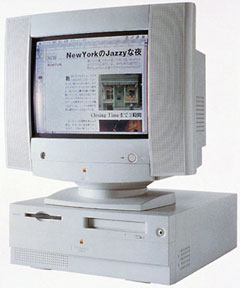
Power Macintosh 4400
Power Mac 7220 in some markets
A Compromised Mac
- Got a pre-G3 Power Mac with PCI slots? Join LEM's PCI PowerMacs Group.
- LEM's Mac OS 9 Group is for anyone using Mac OS 9, either natively or in Classic Mode.
Overview
The 4400 was Apple's attempt to build an inexpensive Mac using more industry standard components, such as a chunky DOS-like case. It was also available in a PC Compatible system with a 166 MHz DOS card (brand and model of CPU not mentioned on Apple's site) containing 16 MB RAM.
The 4400 was Apple's only computer designed around a modified Tanzania motherboard. The 4400 and other Tanzania-based clones will not boot with a dead PRAM battery. Try replacing the battery before attempting to replace the power supply on a "dead" 4400.
Note that there are some significant differences between the 160 MHz and 200 MHz models in terms of memory capacity and expansion slots.

Details
- 160 MHz model introduced 1996.11.07, discontinued
- 200 MHz model introduced 1997.02.17, discontinued
- DOS compatible model introduced 1997.04.04, discontinued
- requires System 7.5.3 (with System Enabler 827) through 9.1, excluding 7.5.5
- CPU: 160 MHz or 200 MHz PPC 603e
- bus: 40 MHz
- performance: XXX (relative to SE)
- ROM: 4 MB
- RAM: 32 MB, expandable to 96 MB (160 MHz version) or 160 MB (200 MHz model) using 3.3V unbuffered EDO RAM (three DIMM sockets, each supports an 8, 16, or 32 MB SIMM in 160 MHz model; support 64 MB DIMMs in 200 MHz machines; slot 1 supports only single-bank DIMMs)
- VRAM: 1 MB in 4400/160, 2 MB in 4400/200
- Video, std, 4400/160: 16-bit to 832 x 624, 8-bit to 1152-870
- Video, std, 4400/200: 24-bit to 800 x 600, 16-bit to 1152 x 870, 8-bit to 1280 x 1024
- Video, 4 MB max: 24-bit to 1024 x 768, 16-bit to 1280 x 1024
- L2 cache: 256 KB (optional on 4400/160)
- hard drive: 1.2GB IDE in 4400/160, 2GB IDE in 4400/200
- CD-ROM: 8x (12x in DOS Compatible model)
- ADB: 1 port for keyboard and mouse
- serial: 2 DIN-8 RS-422 ports on back of computer
- SCSI: DB-25 connector on back of computer
- ethernet: standard on 4400/200 and 7220/200, but not on the 4400/160.
- three PCI slots in 4400/160, two plus a Comm II slot in 4400/200
Accelerators & Upgrades
- Guide to G3 Accelerators for Level 2 Cache Slot
- Vimage at one time announced a G3 upgrade for the 4400
- Farallon 10/100 Comm Slot II ethernet card
Online Resources
- Low End Mac's best classic Mac OS deals. Best online prices for System 6, 7.1, 7.5.x, Mac OS 7.6, 8.0, 8.1, 8.5, 9.0, 9.2.2, and other versions.
- Low End Mac's Compleat Guide to Mac OS 9, 2008 edition, Charles Moore, Miscellaneous Ramblings, 2008.05.12. Declared dead by Steve Jobs 6 years ago, Mac OS 9 remains fast and stable, but Classic software hasn't kept up with Web changes. What Macs support OS 9, where to buy it, and how to update to version 9.2.2.
- Environmentally responsible retirement for old Macs, Rick Lawson, Pioneers in Mac Development, 2008.06.13. After you've scavenged what useful parts you can from your old Mac, what's the most environmentally friendly way to dispose of the rest?
- Know your Mac's upgrade options, Phil Herlihy, The Usefulness Equation, 2008.08.26. Any Mac can be upgraded, but it's a question of what can be upgraded - RAM, hard drive, video, CPU - and how far it can be upgraded.
- Why you should partition your Mac's hard drive, Dan Knight, Mac Musings, 2008.12.11. "At the very least, it makes sense to have a second partition with a bootable version of the Mac OS, so if you have problems with your work partition, you can boot from the 'emergency' partition to run Disk Utility and other diagnostics."
- Attractive and ugly Macs, discontinued MacBook Pro value, and writing with TextEdit, Charles Moore, Miscellaneous Ramblings, 2008.10.30. Readers weigh in on the good, the bad, and the ugly of Macintosh design over the past 24 years.
- Creating Classic Mac boot floppies in OS X, Paul Brierley, The 'Book Beat, 2008.08.07. Yes, it is possible to create a boot floppy for the Classic Mac OS using an OS X Mac that doesn't have Classic. Here's how.
- The compressed air keyboard repair, Charles Moore, Miscellaneous Ramblings, 2008.07.24. If your keyboard isn't working as well as it once did, blasting under the keys with compressed air may be the cure.
- Better and safer surfing with Internet Explorer and the Classic Mac OS, Max Wallgren, Mac Daniel, 2007.11.06. Tips on which browsers work best with different Mac OS versions plus extra software to clean cookies and caches, detect viruses, handle downloads, etc.
- Hacking Mac OS 7.6.1 so many Mac OS 8 apps will run, Max Wallgren, Mac Daniel, 2007.10.30. With a little ResEdit work and a second copy of your System Folder, you can run a lot of OS 8 apps with Mac OS 7.6.1.
- Interchangeabilty and compatibility of Apple 1.4 MB SuperDrive floppy drives, Sonic Purity, Mac Daniel, 2007.09.26. Apple used two kinds of high-density floppy drives on Macs, auto-inject and manual inject. Can they be swapped?
- Appearance Manager allows Internet Explorer 5.1.7 to work with Mac OS 7.6.1, Max Wallgren, Mac Daniel, 2007.05.23. Want a fairly modern browser with an old, fast operating system? Mac OS 7.6.1 plus the Appearance Manager and Internet Explorer may be just what you want.
- Format any drive for older Macs with patched Apple tools, Tyler Sable, Classic Restorations, 2007.04.25. Apple HD SC Setup and Drive Setup only work with Apple branded hard drives - until you apply the patches linked to this article.
- System 7 Today, advocates of Apple's 'orphan' Mac OS 7.6.1, Tommy Thomas, Welcome to Macintosh, 2006.10.26. Why Mac OS 7.6.1 is far better for 68040 and PowerPC Macs than System 7.5.x.
- Mac OS 8 and 8.1: Maximum size, maximum convenience, Tyler Sable, Classic Restorations, 2006.09.11. Mac OS 8 and 8.1 add some useful new features and tools, and it can even be practical on 68030-based Macs.
- Installing Linux on a PCI Power Mac, Part 1, Larry Stotler, Linux on the Low End, 2006.09.05. Preparing your PCI Power Mac (or clone) for Linux and getting openSUSE Linux installed.
- Preparing your Mac's hard drive for Linux, Larry Stotler, Linux on the Low End, 2006.08.09. Before you install Linux, you have to partition your hard drive. A look at three different hard drive strategies for Mac Linux.
- Customizing Mac OS 9, Nathan Thompson, Embracing Obsolescence, 2006.08.01. Fiddling with themes, picking a browser, and making the Classic Mac OS work just the way you want it to.
- The ins and outs of booting Linux on the Mac, Larry Stotler, Linux on the Low End, 2006.07.31. "Old World" Macs can't boot directly into Linux. They need to boot the Classic Mac OS first, then pass control over to Linux.
- Preparing your PCI Power Mac for Linux, Larry Stotler, Linux on the Low End, 2006.07.26. How powerful a CPU do you need? How much memory? Do you need a faster drive controller? Are some video cards better than others?
- Floppy drive observations: A compleat guide to Mac floppy drives and disk formats, Scott Baret, Online Tech Journal, 2006.06.29. A history of the Mac floppy from the 400K drive in the Mac 128K through the manual-inject 1.4M SuperDrives used in the late 1990s.
- ATI Radeon 7000 Driver for Mac OS 7.6.1, System 7 Today, 2006.05.29. ATI's installers don't support System 7.6.1, but System 7 Today's does, making this the fastest video card to work with Mac OS 7.6.1
- Getting the Mac digital jukebox up and running, Nathan Thompson, Embracing Obsolescence, 2006.05.08. Connecting your PowerPC Mac to your rstereo and remote control options for running a headless digital audio jukebox.
- System 7.6.1 is perfect for many older Macs, John Martorana, That Old Mac Magic, 2006.03.24. Want the best speed from your old Mac? System 7.6.1 can give you that with a fairly small memory footprint - also helpful on older Macs.
- System 7.5 and Mac OS 7.6: The beginning and end of an era, Tyler Sable, Classic Restorations, 2006.02.15. System 7.5 and Mac OS 7.6 introduced many new features and greater modernity while staying within reach of most early Macintosh models.
- Web browser tips for the classic Mac OS, Nathan Thompson, Embracing Obsolescence, 2006.01.03. Tips on getting the most out of WaMCom, Mozilla, Internet Explorer, iCab, Opera, and WannaBe using the classic Mac OS.
- The best browsers for PowerPC Macs and the classic Mac OS, Nathan Thompson, Embracing Obsolescence, 2005.12.16. Two browsers stand out from the pack: iCab 3 is modern and remains under development, and WaMCom brings Mozilla to older Macs.
- Why you should use Mac OS 7.6 to get the most out of vintage Macs, Thomas Ahart, The Productive Mac, 2005.12.12. Although you may be able to run OS 8 or 9 on your old Mac, you'll generally find better performance using Mac OS 7.6.
- The 4400, Eric Schwarz, SchwarzTech, 2005.06.21. "Fortunately, this machine that was more of an experiment into the business market didn't last long enough for many to remember."
- Sonata SD, Sonnet Tech, 2004.06.01. First new PCI video card for the Mac in ages sells for just US$99, supports OS 7.5.3 and later plus OS X 10.1.5 and later, works with VGA or old Mac monitors, 16 MB VRAM.
- The 10 worst Macs ever built, Remy Davison, Insanely Great Mac, 2001.08.06
- Review: Sonnet Tempo Ultra ATA66 Macintosh PCI Host Adapter, Dan Knight, 2000.07.28. The most economical way to put IDE support in a PCI Power Mac.
- Apple TIL 30720: Power Mac 4400 update 1.0
- AppleSpec: 4400/160, 4400/200, 4400/200 PC Compatible.
- Apple at one time released a patch for OS 8.1 specifically for the Power Mac 4400, 7220, Motorola StarMax, and Umax Aegis (an Asia-only model). It fixes problems with the HFS+ driver (which loads even when HFS+ volumes are not present) and the ATA Manager, which may result in your mouse click not registering or problems switching from a PC card. Read me and download.
Cautions
- Will not work with System 7.5.5
- DIMM slot 1 supports only single-bank DIMMs.
- Macs with IDE hard drive do not provide SCSI termination power, depending on external SCSI devices to provide it. For more details, see SCSI Termination Power.

About LEM | Support | Usage | Privacy | Contacts
Navigation
Used Mac Dealers
Apple History
Video Cards
Email Lists
Favorite Sites
MacSurfer
MacMinute
MacInTouch
MyAppleMenu
InfoMac
Macs Only!
The Mac Observer
Accelerate Your Mac
RetroMacCast
PB Central
MacWindows
The Vintage Mac
Museum
DealMac
DealsOnTheWeb
Mac2Sell
ramseeker
Mac Driver Museum
JAG's House
System
6 Heaven
System 7 Today
the pickle's Low-End
Mac FAQ
Abandonware
Petition
Mac vs. PC Info
Affiliates
The Apple
Store
Mac
Connection
B&H
MacMall
TechRestore
ExperCom
Crucial
Memory
batteries.com
Advertise
MacMinute
MacInTouch
MyAppleMenu
InfoMac
Macs Only!
The Mac Observer
Accelerate Your Mac
RetroMacCast
PB Central
MacWindows
The Vintage Mac
Museum
DealMac
DealsOnTheWeb
Mac2Sell
ramseeker
Mac Driver Museum
JAG's House
System 6 Heaven
System 7 Today
the pickle's Low-End
Mac FAQ
Abandonware
Petition
Mac vs. PC Info
Mac Connection
B&H
MacMall
TechRestore
ExperCom
Crucial Memory
batteries.com