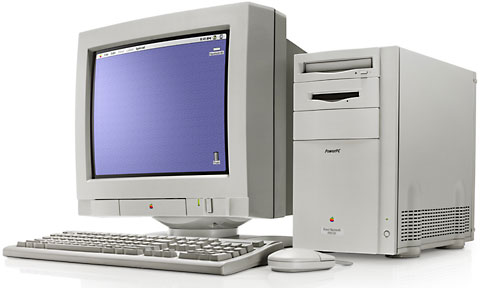
Power Macintosh
Power Macintosh 8100
a.k.a. 8115, Workgroup Server 8150
- Got a NuBus Power Mac? Join our 1st PowerMacs Group.
- Our Mac OS 9 Group is for anyoneusing Mac OS 9, either natively or in Classic Mode.
The8100/80 was the fastest Power Mac when Apple introduced the line inMarch 1994, and the only model to ship from the factory with a 256KB level 2 cache installed.
Built into the Quadra 800 case,the 8100 contains three NuBus slots and a PDS. Like the otherfirst-generation Power Macs, the 8100 uses RAM for video (up to 615KB, depending on resolution and bit-depth). It also has a separatePDS card with VRAM, making it very easy to work with two monitors.For best performance, use the video card, not motherboardvideo.
The 8100 was upgraded to 100 MHz January 1995, and a 110 MHzversion was added in January 1995. It was replaced by the 8500 in August 1995.
See our NuBus Video Card Guidefor information on adding a video card.
Note that these so-called NuBus upgrades do not go into a NuBusslot; they derive their name from the fact that they work in NuBusPower Macs. The processor upgrades fit into the PDS (ProcessorDirect Slot) which is normally occupied by a video card on the8100. These cards may also include a pass through connector (whichmay be an extra cost option) allowing you to plug the PDS videocard into the upgrade card.
Variants
8100av. Includes video-in and video-out. Supports 19" and21" monitors. Has 2 MB VRAM. (AV card can be added to any 8100with a free PDS slot.)

Details
- 8100/80 introduced 1994.03.14 at $4,200; discontinued 1995.01.03
8100/80av introduced 1994.03.14; discontinued 1995.01.03
8100/100 introduced 1995.01.03, discontinued 1995.10.14
8100/100av introduced 1995.01.03, discontinued 1995.08.05
8100/110 introduced 1994.11.03, discontinued 1995.08.05 - requires System 7.1.2 through 9.1 (80 MHz), System 7.5 through9.1 (100 MHz)
- CPU: 80-110 MHz PPC 601
- bus: 33-40 MHz
- performance: 2.6/3.3 (80 MHz/110 MHz, relative to Centris 650);35.77 (80 MHz), MacBench 2.0; 4.18, 80 MHz, Speedometer 4
- ROM: 4 MB
- RAM: 8 MB on motherboard, expandable to 264 MB using pairs of80ns 72-pin SIMMs in 8 SIMM sockets. Supports 4, 8, 16, and 32 MBSIMMs. Will not recognize more than 32 MB per SIMM even if youinstall 64 MB SIMMs.
- VRAM: none on motherboard, 2 MB on PDS video card(expandable to 4 MB), 2 MB on AV card (not expandable)
- Video:
- internal supports thousands of colors at 640 x 480 and 256colors at 832 x 642
- 2 MB PDS card and AV card support millions of colors at640 x 480 and 832 x 624, thousands of colors at 1024 x 768 and 1152x 870
- 4 MB PDS card supports millions of colors at 640 x 480,832 x 624, 1024 x 768, and 1152 x 870
- L2 cache: 256 KB standard, supports 256 KB to 1 MBcache
- Hard drive: 250 MB to 2 GB
- CD-ROM: 2x standard
- microphone: standard 3.5mm minijack, compatible with line-levelinput including Apple's PlainTalk microphone
- ADB: 1 port for keyboard and mouse
- serial: 2 DIN-8 GeoPorts on back of computer
- SCSI: DB-25 connector on back of computer
- ethernet: AAUI connector on back of computer, requires AAUI adapter
- NuBus slots: 3
- one PDS slot
- power: 200W
- PRAM battery: 3.6V half-AA
- height: 14.0 in
- width: 7.7 in
- depth: 15.75 in
- weight: 25.3 lb
- PRAM battery: 3.6V half-AA
- Gestalt ID: 65 (80 MHz), 55 (100 MHz), 40 (110 MHz)
Accelerators & Upgrades
- Guide to G3 Accelerators for NuBusMacs
- Chipping the Power Mac x100
- Because the 8100 uses up to 640 KB of system memory for video(unless you're using an AV card or NuBus video card), you canreally boost video and system performance with a 1MB L2 cache.
- Power Macintosh 8500 motherboard plusCPU card
- MicroMac Speedy variablespeed oscillator
- MC PriceBreakers, 90 MHz clock chipper for 8100/80, 120 MHz for8100/100, and 135 MHz for 8100/110.
- Output Enablers 123 MHzclock accelerator for 8100/100
Online Resources
- Low End Mac's bestclassic Mac OS deals. Best online prices for System 6, 7.1, 7.5.x,Mac OS 7.6, 8.0, 8.1, 8.5, 9.0, 9.2.2, and other versions.
- Low End Mac'sCompleat Guide to Mac OS 9, 2008 edition, Charles Moore,Miscellaneous Ramblings, 2008.05.12. Declared dead by Steve Jobs 6years ago, Mac OS 9 remains fast and stable, but Classic softwarehasn't kept up with Web changes. What Macs support OS 9, where to buyit, and how to update to version 9.2.2.
- Environmentallyresponsible retirement for old Macs, Rick Lawson, Pioneers in MacDevelopment, 2008.06.13. After you've scavenged what useful parts youcan from your old Mac, what's the most environmentally friendly way todispose of the rest?
- Know your Mac'supgrade options, Phil Herlihy, The Usefulness Equation, 2008.08.26.Any Mac can be upgraded, but it's a question of what can be upgraded -RAM, hard drive, video, CPU - and how far it can be upgraded.
- The 25 mostimportant Macs (part 2), Dan Knight, Mac Musings, 2009.02.17. The25 most significant Macs in the first 25 years of the platform,continued.
- Why youshould partition your Mac's hard drive, Dan Knight, Mac Musings,2008.12.11. "At the very least, it makes sense to have a secondpartition with a bootable version of the Mac OS, so if you haveproblems with your work partition, you can boot from the 'emergency'partition to run Disk Utility and other diagnostics."
- CreatingClassic Mac boot floppies in OS X, Paul Brierley, The 'Book Beat,2008.08.07. Yes, it is possible to create a boot floppy for the ClassicMac OS using an OS X Mac that doesn't have Classic. Here's how.
- The compressed airkeyboard repair, Charles Moore, Miscellaneous Ramblings,2008.07.24. If your keyboard isn't working as well as it once did,blasting under the keys with compressed air may be the cure.
- Macintosh peace of mind, PA Semiand the iPhone, $40 802.11g PCI card, and more, Dan Knight, Low EndMac Mailbag, 2008.05.01. Also Power Mac vs. Mac mini, more on DVD UserOp Patch, 12" vs. 14" iBook, and VGA for a Power Mac 6100.
- Vintage Macnetworking and file exchange, Adam Rosen, Adam's Apple, 2007.12.19.How to network vintage Macs with modern Macs and tips on exchangingfiles using floppies, Zip disks, and other media.
- Vintage Macvideo and monitor mania, Adam Rosen, Adam's Apple, 2007.12.17.Vintage Macs and monitors didn't use VGA connectors. Tips on makingmodern monitors work with old Macs.
- Getting insidevintage Macs and swapping out bad parts, Adam Rosen, Adam's Apple,2007.12.14. When an old Mac dies, the best source of parts is usuallyanother dead Mac with different failed parts.
- Solving Macstartup problems, Adam Rosen, Adam's Apple, 2007.12.12. When yourold Mac won't boot, the most likely culprits are a dead PRAM battery ora failed (or failing) hard drive.
- Better and safer surfing withInternet Explorer and the Classic Mac OS, Max Wallgren, Mac Daniel,2007.11.06. Tips on which browsers work best with different Mac OSversions plus extra software to clean cookies and caches, detectviruses, handle downloads, etc.
- Hacking Mac OS 7.6.1 so many MacOS 8 apps will run, Max Wallgren, Mac Daniel, 2007.10.30. With alittle ResEdit work and a second copy of your System Folder, you canrun a lot of OS 8 apps with Mac OS 7.6.1.
- Interchangeabilty andcompatibility of Apple 1.4 MB SuperDrive floppy drives, SonicPurity, Mac Daniel, 2007.09.26. Apple used two kinds of high-densityfloppy drives on Macs, auto-inject and manual inject. Can they beswapped?
- Apple's AAUI ethernet connector, DanKnight, Online Tech Journal, 2007.09.04. From 1991 through 1995, Appleused a proprietary ethernet connection. Why they created AAUI and whereto find adapters.
- Connecting a LaserWriter toethernet and the TiBook that wouldn't boot, Dan Knight, Low EndMac Mailbag, 2007.08.23. The importance of an AAUI ethernetadapter, the cost of PowerBook PRAM batteries, and booting old Macsfrom SCSI drives.
- Mac System 7.5.5 can do anythingMac OS 7.6.1 can, Tyler Sable, Classic Restorations,2007.06.04. Yes, it is possible to run Internet Explorer 5.1.7 andSoundJam with System 7.5.5. You just need to have all the updates -and make one modification for SoundJam.
- Appearance Manager allowsInternet Explorer 5.1.7 to work with Mac OS 7.6.1, MaxWallgren, Mac Daniel, 2007.05.23. Want a fairly modern browser withan old, fast operating system? Mac OS 7.6.1 plus the AppearanceManager and Internet Explorer may be just what you want.
- Format any drive for older Macswith patched Apple tools, Tyler Sable, Classic Restorations,2007.04.25. Apple HD SC Setup and Drive Setup only work with Applebranded hard drives - until you apply the patches linked to thisarticle.
- System 7 Today, advocates ofApple's 'orphan' Mac OS 7.6.1, Tommy Thomas, Welcome toMacintosh, 2006.10.26. Why Mac OS 7.6.1 is far better for 68040 andPowerPC Macs than System 7.5.x.
- Mac OS 8 and 8.1: Maximum size,maximum convenience, Tyler Sable, Classic Restorations,2006.09.11. Mac OS 8 and 8.1 add some useful new features andtools, and it can even be practical on 68030-based Macs.
- Customizing Mac OS 9,Nathan Thompson, Embracing Obsolescence, 2006.08.01. Fiddling withthemes, picking a browser, and making the Classic Mac OS work justthe way you want it to.
- Floppy drive observations: Acompleat guide to Mac floppy drives and disk formats, ScottBaret, Online Tech Journal, 2006.06.29. A history of the Mac floppyfrom the 400K drive in the Mac 128K through the manual-inject 1.4MSuperDrives used in the late 1990s.
- Setting up a NuBus Power Mac as adigital recording studio, Tyler Sable, Classic Restorations,2006.05.08. Take a Power Mac 7100 or 8100, add a DigidesignAudioMedia II card and a fast hard drive, and you've got the coreof a powerful, low-cost digital recording studio.
- System 7.6.1 is perfect formany older Macs, John Martorana, That Old Mac Magic,2006.03.24. Want the best speed from your old Mac? System 7.6.1 cangive you that with a fairly small memory footprint - also helpfulon older Macs.
- MpegDec: Play MP3s andstreaming audio on 680x0 and old PowerPC Macs, Nathan Thompson,Embracing Obsolescence, 2006.03.14. 680x0 Macs can play anythingshort of 128kbps stereo MP3s, and even the oldest PowerPC Macs haveno trouble at all with those recordings.
- System 7.5 and Mac OS 7.6: Thebeginning and end of an era, Tyler Sable, Classic Restorations,2006.02.15. System 7.5 and Mac OS 7.6 introduced many new featuresand greater modernity while staying within reach of most earlyMacintosh models.
- Web browser tips for theclassic Mac OS, Nathan Thompson, Embracing Obsolescence,2006.01.03. Tips on getting the most out of WaMCom, Mozilla,Internet Explorer, iCab, Opera, and WannaBe using the classic MacOS.
- The best browsers for PowerPCMacs and the classic Mac OS, Nathan Thompson, EmbracingObsolescence, 2005.12.16. Two browsers stand out from the pack:iCab 3 is modern and remains under development, and WaMCom bringsMozilla to older Macs.
- Why you should use Mac OS 7.6 toget the most out of vintage Macs, Thomas Ahart, The ProductiveMac, 2005.12.12. Although you may be able to run OS 8 or 9 on yourold Mac, you'll generally find better performance using Mac OS7.6.
- Getting to the Power Mac 8500motherboard, Dan Knight, Low End Mac Mailbag, 2003.05.28. "It'sbeen a few years since I've been inside one of these, but I canpretty much walk you through it from memory."
- Upgrading a Power Mac 7100,Dan Knight, Low End Mac Mailbag, 2003.05.07. "The 7100 is nineyears old, and it really shows. Fortunately upgrading an older Maccan be pretty economical."
- NuBus Video Cards. We've addedprofiles for the Apple 4-8, 8-24, 8-24GC, 24AC, and RadiusPrecision Color Pro 24X.
- What'sthe best NuBus video card?, Chris Lawson, 2000.10.10
- Follow Up on the 6100, 7100,and 8100, Adam Robert Guha, Mac Daniel, 2000.04.27. A look atupgrade options.
- 72-pin SIMM memorypricing, ramseeker
- Power Macintosh 7100, 8100: Expanding VRAM on PDS Video Card,Apple TIL 14757.
- Apple Specs: 8100/80,8100/80av,8100/100,8100/100av,8100/110,8115/110(Japanese version)
Caution
- You cannot upgrade from Mac OS 9.0 to 9.1 using updaters onNuBus models. You muse use a full installation CD for OS 9.1.
- Never run a 7100, 8100, 8150, or 9150 without a PDSvideo card or a PDS terminator. This can damage the motherboard. Ifthe video card goes bad, you can replace it with another video cardor use motherboard video after installing a PDS accelerator or"Apple Terminator, PDS, WGS 81XX." Workgroup Server 8150 and 9150: PDS Needs Terminator, feedbackfrom Mac Managers list, and personal experience.
About LEM Support Usage Privacy Contact
FollowLow End Mac on Twitter
Join Low End Macon Facebook
Low End Mac Reader Specials
Favorite Sites
MacSurfer
Cult of Mac
Shrine of Apple
MacInTouch
MyAppleMenu
InfoMac
The Mac Observer
Accelerate Your Mac
RetroMacCast
PB Central
MacWindows
The Vintage Mac Museum
Deal Brothers
DealMac
Mac2Sell
Mac Driver Museum
JAG's House
System 6 Heaven
System 7 Today
the pickle's Low-End Mac FAQ
Affiliates
Amazon.com
The iTunes Store
PC Connection Express
Macgo Blu-ray Player
Parallels Desktop for Mac
eBay