
I don’t own a Mac mini, and I don’t plan on buying one, so why in the world would I be interested in the NewerTech miniStack? For those not familiar with the miniStack, it’s one of many “zero footprint” drives designed to sit under the Mac mini and match its design.
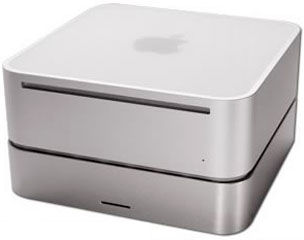 Old timers will remember zero footprint drives from the compact Macs era, when the term applied to any drive that fit under these small Macs without increasing their footprint on the desktop.
The miniStack includes USB 2.0 and FireWire 400 support, and a “0 GB” kit (an enclosure without a drive mechanism) sells for US$69. That’s about twice as much as some of the cheaper FireWire/USB enclosures I own.
So if I don’t have or plan to buy a Mac mini, why in the world would I choose this enclosure over a smaller, less expensive one?
I can answer that in two words: Heat and ports.
Heat
At Low End Mac, we’ve long recommended 7200 rpm hard drives with big buffers (8 MB or larger) as one way of getting better performance out of older, low-end Macs with 5400 rpm or slower drives.
The problem is, fast drives tend to run hot, and those nice compact aluminum Triumph Venus enclosures get hot with fast drives. And when a drive gets too hot, the platters can expand enough that they can’t be read or written to reliably. And that is not a good thing.
I still use the Venus enclosures for my backup drives, since they’re only powered on long enough for SuperDuper to complete the backup.
If you’ve ever worked inside a CRT iMac or an eMac, you know that some Macs are just a pain to upgrade. I’ve done it several times, putting in bigger, faster hard drives, and I just don’t want to do it again. Instead, I decided it made the most sense to run my eMac from a big, fast external drive – and someone was selling 200 GB drives for US$99 at the time. What a deal!
I did some online research, and I’ll tell you that it’s hard to find cooling information on drive enclosures. The combination USB 2.0/FireWire enclosures with cooling tend to cost a fair bit, and the NewerTech miniStack wasn’t much more expensive.
I ordered one shortly after the price dropped from $99 to $79, and when it arrived I spent some time finagling my 200 GB drive inside it. If the miniStack were any smaller, there wouldn’t be room for a 3.5″ hard drive. It’s a very tight fit, but eventually I got it all together. (You can also buy the miniStack with a drive already installed, and the price isn’t much higher than buying the enclosure and drive separately.)
I like the fact that the miniStack has a passive metal heatsink on the bottom that’s attached directly to the drive mechanism. This pulls away enough heat that the cooling fan doesn’t kick in very often.
Ports
In the old days, it used to be said that you can never have too much RAM or too much hard drive space. Let me add one more thing – you can never have too many ports on a Mac.
USB 1.1 and 2.0
I’ve got a USB printer, a USB flash card reader, a Logitech wireless keyboard that connects via USB, a USB mouse (for when the batteries in the wireless mouse conk out), and I keep a USB keyboard on hand just in case I don’t have batteries for my wireless keyboard (those batteries last just about forever).
I also use USB to iSync my cell phone and my Palm Zire 31. That’s four things I always have plugged in and three more that I might have plugged in. The three USB 2.0 ports in my 2004 eMac just aren’t enough, and the USB hub I had was an old USB 1.1 unit.
FireWire 400
By going to an external drive as my primary drive, I use one of two FireWire ports on my eMac. The other one can be used for an iPod, a backup drive, or a spare drive, but having just one free port isn’t really enough.
Unlike USB, FireWire lets you daisy-chain devices, but there’s a catch. If one item in the chain is powered down, the units beyond it on the chain are inaccessible. I don’t like to run the spare drive when I don’t need it – it’s an old, loud dual-drive enclosure – but I don’t want to go through the hassles of disconnecting it so I can plug in my iPod or backup drive.
miniStack to the Rescue
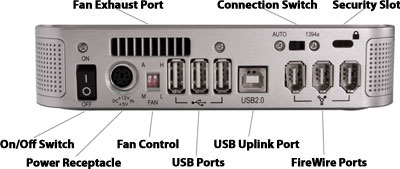
The miniStack gives me three USB 2.0 ports, eliminating the need for a separate USB 2.0 hub, and two FireWire ports. Since the miniStack will always be connected to my eMac and powered on, I can have three FireWire devices chained through one of its two FireWire ports. And I can have up to three USB 2.0 devices (including the flash card reader and printer) connected as well.
The only drawback to using the miniStack with another Mac might be the short 16″ FireWire and USB connector cables. Although this works fine with my eMac, it wouldn’t be long enough for my Power Mac G4, which sits below my desk, if I wanted the drive on my desk.
Even though I don’t have a Mac mini, the combination of a cool running drive enclosure with built-in FireWire and USB 2.0 hubs make this a perfect solution for my needs.
If you’re looking for an external hard drive, running out of ports, and don’t want to clutter your work space with extra hubs, power supplies, and wires, this might be just the drive for you as well.
Update: Since this review was published, NewerTech has continued to improve the product. As of December 2014, there are three models, all using 3.5″ SATA drives instead of the Ultra ATA drives supported by my older miniStacks.
- miniStack Classic with USB 2.0 and FireWire 800. Matches footprint of 2005-2009 Mac mini. $39 for enclosure.
- miniStack with one USB 3.0 port, two FireWire 800 ports, and one eSATA port. Matches footprint of 2010 and newer Mac mini. $69 for enclusure.
- miniStack Max adds an SD card reader and room for a DVD burner or Blu-ray drive. $130 for bare kit.
Manufacturers and distributors: Interested in having your product reviewed? Please read our review policy.
Keywords: #ministack
Short link: http://goo.gl/cBRTH0
searchword: ministack
