
Silence is golden, and you haven’t experienced silent computing until you use a laptop computer with no hard drive at all. That’s the promise of flash drives.
Everyone seems pretty excited about the fact that you’ll soon be able to buy notebook computers built with flash memory instead of a hard drive, with its energy sucking, noise producing, spinning platters. There are already a few flash laptops on the market, and within two or three years flash could become the norm for laptops, which will become lighter, quieter, and have better battery life.
It’s nothing new. Some old PowerBooks have been able to run from Compact Flash (CF) cards in PCMCIA or PC Card adapters for years. And CF is cheap – I recently ordered a 2 GB CF card for under US$20 shipped, and 8 GB cards are available for as little as $75. 16 GB cards start at $160, and 32 GB cards have been announced.
A Better Solution
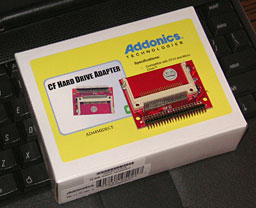 Realizing that this interest in flash-based laptops leaves a lot of old notebooks out in the cold, Addonics created a pair of CF Hard Drive Adapters – one holds a single Compact Flash memory card, and the other holds two, connecting CF to the computer’s ATA drive bus.
I read about them while editing The ‘Book Review last month and was intrigued. This could be a lot faster than using a CF card in a PC Card adapter – and it leaves the PC Card slot free. Conceivably you could use a dual-card adapter in an old PowerBook or iBook – plus up to two PC Card adapters with your PowerBook (if it has two PC Card slots), giving you four flash drives.
Addonics recently sent me a single card adapter for review (dual card adapters were out of stock). I decided to test it in my PowerBook 1400/166 with 48 MB of RAM. It’s the only ‘Book I have that’s relatively easy to get inside; my FireWire iBook G3/366 is absolutely horrid to put back together.
Booting the PB 1400 from Flash
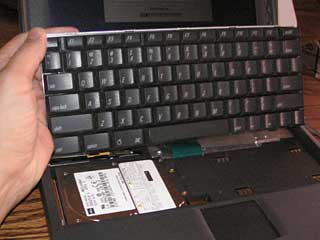 This was my first time getting inside a PowerBook 1400, and after determining that it wasn’t going to be easy getting the bottom off, I discovered that you can remove the speaker grille, lift the keyboard, and have access to the hard drive. There weren’t even screws holding the drive in place.
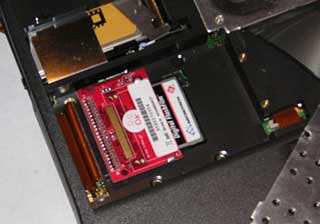
My first test was with a 512 MB CF card on which I’d previously installed Mac OS 9.1 using a PCMCIA adapter. It was plug and play: Plug the Addonics card into the IDE connector on the logic board, plug the Compact Flash card into the Addonics card, and start the computer.
Failure and More Failure
I ran my usual suite of benchmark tests and then decided it was time to try my 256 MB Microtech card with Mac OS 8.6 installed. No luck, although I could boot from the card when I put it in a PCMCIA adapter. Ditto for my 256 MB Ridata card with Mac OS 8.1.
Curious. I decided to initialize the cards using Disk Utility, but not before backing up the contents of each CF card to a disk image on my Power Mac G4. Then I put the cards in adapters, initialized them, formatted them, and brought them to my G4 so I could restore all of the files.
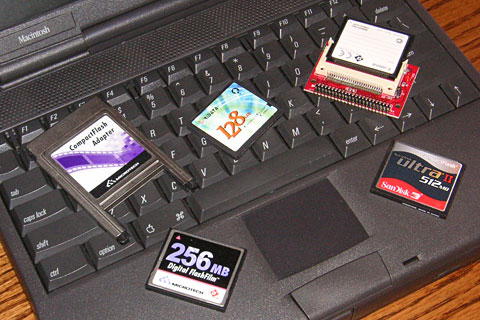
A PC Card adapter, the Addonics adapter, and some CF cards on the PB 1400.
No luck. The PB 1400 didn’t see them when plugged into the Addonics adapter – and it wanted to format them when I put them in the PC Card adapter.
Back to the Power Mac, where I used Disk Utility to format the 256 MB card as Apple Extended, then restore all of the files. This time the CF card was at least recognized as formatted and having content using a PC Card adapter – but not when plugged into the Addonics adapter.
Success!
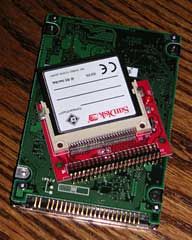 Okay, time to try something different. Dig out the CD-ROM drive and the CD that came with the 1400. Booting from that CD with my ancient 8 MB Canon CF card plugged into the Addonics adapter worked. I could see the CF card and initialize it.
I’d forgotten how slow booting from CD can be, even with an 8x CD-ROM drive and OS 7.6.1. Tedious, but at least it let me move forward, format the card, and install the OS.
But I had to have a card with at least 70 MB of free space to install Mac OS 7.6.1, so I decided to use my 128 MB card. No dice. Disk Utility didn’t see a disk to format. I had the same problem with the 256 MB card.
So it seems to be something about the cards themselves. The Mac OS recognized three cards (the 8 MB Canon, 512 MB SanDisk, and 2 GB PQI), but not the other two (128 MB Microtech and 256 MB Ridata). Time to backup the 512 MB card and install Mac OS 7.6.1 on it….
Look for cards that support UDMA (Ultra Direct Memory Access, a.k.a. “Fixed Disk Mode”) to play it safe. Removable type cards are not compatible with the classic Mac OS when used in the Addesso adapter. (I don’t have an OS X notebook to test compatibility.)
Sweet, it worked! So it’s definitely something about the cards, not the adapter. Be forewarned that not all CF cards will work, although I have no idea how you might be able to predict in advance which cards won’t work in the Addonics adapter. Every CF Card I’ve ever tried has worked in a PC Card adapter.
Update: Bill Kwong of Addesso explains what’s going on:
“Not all CFs behave the same, some have fixed disk mode and some are designed as removable type. Removable type may not always work as a boot device. Many OS cannot be installed into the removable type of CF. So we recommend user to used fixed disk mode CF and with UDMA for faster speed.”
Is It Faster?
When I tested my 1400 with CF cards in PC Card adapters last year, I noted that Speedometer 4.02 rated the internal hard drive 1.49 and the CF cards from 0.74 to 0.96 for regular speed and 1.31 for the high speed SanDisk Ultra II card. Testing that same CF card in the Addonics adapter, I had a drive score of 1.66 – 25% faster than with a PC Card adapter and 10% faster than the Toshiba hard drive inside the 1400. The PQI Hi-Speed 120 2 GB card I acquire later, rated at 40x, had a disk score of 1.57, almost as fast as the SanDisk Ultra II.
In cold boot comparisons done with extensions on and off, the 1400 booted a bit more quickly from the Addonics adapter than from a PC Card adapter – but we’re talking only a few seconds.
Of course, this comparison is on a PowerBook 1400, a decade-old model with an outdated IDE bus. The benefit of the Addonics adapter in a newer PowerBook could be significant. Too bad I don’t have a PowerBook G3 or G4 (my TiBook died last year) so I can test this theory.
Other Benefits
After I pulled the 2 GB drive from my PB 1400, I put it on my postage scale. It weighed in at about 5-1/4 ounces. I’ve probably trimmed the weight of the computer by nearly 5 oz., as both the adapter and the CF card are very lightweight, under an ounce combined.
Running from flash memory is quiet. Very quiet. No hard drive sounds at all. Steve Jobs’ hankering for a quieter computer could be a big factor in Apple offering flash-based MacBooks some day. [The MacBook Air was still 8 months off when this was published.]
 If your ‘Book provides easy access to the hard drive – not too hard on the 1400 – it’s easy to swap out CF cards to change your OS. I was able to run Mac OS 7.6.1 through 9.1 on my PowerBook 1400, and I see no reason that it shouldn’t work for OS X on ‘Books that support that operating system. Or System 7.1.1 for that matter, which is the oldest version the PowerBook 150 (the first PowerBook with an IDE bus) supports.
To make things even easier, I partitioned my 2 GB CF card with five partitions: two HFS partitions (for Mac OS 7.6.1 and work files) and three HFS+ (Mac OS 8.1, 8.6, and 9.1). I was able to use the Startup Disk control panel to switch between operating systems at will.
Drawbacks
Low capacity notebook drives are cheap, CF cost more per GB (about $10 per GB ), and then you have to add in the cost of the Addonics adapter ($25 for one slot, $30 for two). It’s not an expensive solution, but it’s not as cheap as a hard drive.
Then there’s the question of longevity: How long will a flash card last? Years and years, according to those who have emailed me with their experience. Only time will tell if they are more or less reliable than hard drives in the long run.
Advice
If you have a PowerBook or iBook with an IDE bus and have outgrown its hard drive, want to reduce the ‘Book’s weight by several ounces, would like to run more quietly, or simply like to tinker, the Addonics CF Hard Drive Adapter could be worthwhile investment – especially if you have some CF cards that aren’t being used.
The adapter should work in any PowerBook since the 150, which was the first to use an IDE hard drive interface. That was the era of 80 MB hard drives, so today’s $20 2 GB CF card will give you an incredible amount of storage space, and 16 GB cards should be adequate for modern ‘Books and Mac OS X.
If your ‘Book has room for it, I’d suggest you spend the extra $5 and get the dual-card adapter, which would allow two 16 GB cards today – and higher capacity ones in the future. Note that some Macs only have room for 9.5mm thick hard drives, and the dual adapter is 10mm thick. It may squeeze in; I have no way of testing that.
High speed CF cards are faster than older, low speed cards. Again, I don’t have a lot of testing options here, but my SanDisk Ultra II and PQI Hi-Speed 120 are about twice as fast as my other cards, and this speed may be limited by other factors such as the IDE bus on the PB 1400 itself.
Addonics states that their adapters are compatible with DOS, Windows 3.1, NT4, 98 SE, Me, 2000, XP, Vista, Mac, and Linux. I can only verify compatibility with Mac OS 7.6.1, 8.1, 8.6, and 9.1.
Silence is golden – and not all that expensive when you can add it to the notebook computer you already own.
Update: Addonics also offers a SATA adapter, which will let you use a single Compact Flash card in a MacBook or MacBook Pro.
Further Reading
- CF Adapter General FAQ, Addonics
- CompactFlash: A Solution for Low Memory Macs, Maxwell Cabral, 2000.06.08
- Flash Memory Improves PowerBook, Dan Knight, 2002.11.14
- Compact Flash for Vintage Macs, Dan Knight, 2006.06.13
Manufacturers and distributors: Interested in having your product reviewed? Please read our review policy.
Keywords: #runfromflashmemory #bootfromflashmemory
searchword: bootfromflash
