
Second Class Macs are Apple’s somewhat compromised hardware designs. For the most part, they’re not really bad – simply designs that didn’t meet their full potential.
When it was introduced on February 28, 2006, the Core Solo Mac mini was the smallest desktop computer on the market – and the second-least expensive Macintosh Apple had ever built. As with other first-generation Intel Macs, the price was $100 higher than the model it replaced.
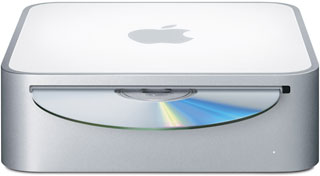 The secret to getting the Mac mini so small was using notebook components. That’s also a big part of the reason the Core Solo Mac mini is considered a Second Class Mac. Not that it’s a bad little machine: It has a decent amount of power, tolerable graphics, plenty of ports, and supports up to 2 GB of RAM.
Because of its size, there is simply no way to put a 3.5″ hard drive inside the Mac mini, so Apple had to use smaller, lower capacity, more costly, generally quieter, and usually slower 2.5″ notebook hard drives instead. At least with the Intel transition, Apple specified 5400 rpm drives, not the older, slower, cheaper 4200 rpm drives used in PowerBooks and iBooks of the past. Still, notebook drives are generally designed for low power consumption, not high performance, so this is one strike against the Mac mini.
 The second strike is the case itself, which is not designed for easy access. In fact, looking at it, you’d think there’s no way to get inside to add RAM or replace the hard drive. The solution is to carefully insert putty knives between the white case bottom and its aluminum surround, loosening the tabs that lock it in place. Once inside you can replace the RAM or hard drive – and be careful not to lose those tiny little black screws!
And that’s where the next strike against the Mac mini comes in: There’s only one bank of memory sockets, so to upgrade RAM according to Apple’s specification, you have to remove 256 MB modules that came with the computer. That’s wasteful.
That said, Other World Computing has discovered that you can use “mismatched” memory in the Mac mini and some other Intel-based Macs where Apple specifies that upgrades should only be done with matched pairs. Their test results show that in general there is more benefit from having more RAM – even mismatched – than there is from having less RAM that is matched.
The fourth strike comes from Apple’s decision to use integrated Intel GMA 950 graphics, which are not only horribly slow for 3D gaming although adequate for the OS X interface, but also steals 80 MB of system memory – that’s over 15% of the stock 512 MB.
Another strike comes from Apple’s inexplicable decision to use a single-core Intel Core CPU rather than the dual-core version found in all other first generation Intel-based Macs. Not only that, but at 1.5 GHz, it was the least powerful Core CPU ever used in a Mac.
Finally, the Core Solo CPU doesn’t support 64-bit computing; that came later with the August 2007 version of the Mac mini that uses the Core 2 Duo CPU. You can upgrade the Core Solo mini with a Socket M Core 2 Duo CPU, and as that wasn’t available when the Mac mini came to market, we won’t count this as a full strike against it. With Mac OS X 10.5 Leopard, the Mac gained a full blown 64-bit operating system, leaving Core Solo Macs another step behind the performance curve, and OS X 10.7 Lion is exclusively 64-bit, leaving all Core Duo Macs and this Core Solo Mac mini behind.
Not worth a strike, but worth noting, is that the Mac mini did not ship with a mouse or keyboard. Mice and keyboards are cheap, Apple makes some decent ones, and there are lots of good third-party options selling for well under US$100.
On the plus side, the Mac mini is small, quiet, energy efficient, and expandable on the outside. Other than upgrading from the barely adequate 512 MB of memory, the biggest performance boost comes from using an external 7200 rpm FireWire drive or 7200 rpm SATA notebook drive instead of the poky notebook drive inside the Mini.
In the end, it’s a decent little computer for its intended market, but the decision to use a notebook hard drive and give it only one bank of RAM sockets significantly limits it potential.
If you’re looking for a “set it an forget it” server, the size and low power draw of the mini make it attractive. Max out RAM, pick up a high capacity, fast 7200 rpm 2.5″ hard drive, and replace the Core Solo CPU with a Core Duo or Core 2 Duo, and you’re ready to set up your server.
Mac OS X 10.6 Snow Leopard
With the introduction of Mac OS X 10.6, things got even worse for the Mac mini Core Solo. With its Core Solo CPU, it is the only Intel Mac that doesn’t support Grand Central Dispatch (GCD), although upgrading with a Core Duo or Core 2 Duo should enable GCD. With its pre-Core 2 CPU, there is no support for 64-bit operation, and upgrading with a Core 2 Duo CPU won’t change that. Finally, there is no OpenCL support for Intel GPUs, leaving this 1.5 GHz model the slowest Intel Mac ever and also the one with the worst feature support with Snow Leopard.
Details
- introduced 2006.02.28 at US$599
- requires Mac OS X 10.4.4 Tiger through 10.6.8 Snow Leopard
- Mac OS X 10.6 Snow Leopard compatibility
- Grand Central Dispatch not supported with Core Solo CPU. Upgrading with a Core Duo or Core 2 Duo should enable GCD support.
- 64-bit operation is not supported with Core Solo or Core Duo CPUs. Upgrading with a Core 2 Duo CPU will not change that.
- OpenCL is not supported with the Intel GMA 950 GPU.
- CPU: 1.5 GHz Core Solo (Yonah), Socket M makes upgrades possible
- Bus: 667 MHz
- RAM: 512 MB, expandable to 2 GB using two PC2-5300 DDR SDRAM. Best performance with matched memory modules. 64 MB of RAM set aside as video memory. Will not support 3 GB of RAM even with a Core 2 upgrade.
- Graphics: Intel GMA 950 with resolution to 1920 x 1080 (VGA) and 1920 x 1200 (DVI).
- VRAM: 64 MB DDR2 SDRAM (shared with main memory, and according to Apple actually uses 80 MB of system RAM)
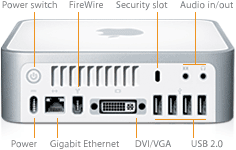
- Video out: DVI, VGA with included adapter, S-video with optional adapter
- L2 cache: 2 MB on CPU
- Hard drive: 2.5″ 60 GB 5400 rpm SATA standard; 80, 100, 120 GB available as build-to-order options
- Combo Drive: reads DVDs at up to 8x speed, writes CD-R discs at up to 24x, writes CD-RW discs at up to 16x, reads CDs at up to 24x
- USB 2.0: 4 ports
- FireWire 400: 1 port
- no internal modem; external USB modem available
- Ethernet: 10/100/gigabit
- AirPort Extreme: standard
- Bluetooth 2.0: standard
- Microphone: none
- Power supply: 85W external power supply
- PRAM battery: 3V CR2032 lithium
- H x W x D: 2.0 x 6.5 x 6.5 in/5.1 x 16.5 x 16.5 cm
- Weight: 2.9 lb./1.3 kg
Keywords: #macminicoresolo #secondclassmac #compromisedmac
Short link: http://goo.gl/8ziIlw
searchword: macminicoresolo

Hatchet job here! Someone notify the writer that the mac was released eight years ago with PPC mac minis released only a few months earlier.
Older PPC minis have 4200rpm Ultra-ATA notebook drives, not even SATA I, and just one RAM slot!
It is unfair to slam this mac mini for sharing the “faults” of every mac-mini – notebook based, with integrated graphics EVERY owner is just stuck with.
Since the maximum O.S. Snow Leopard is at End of Life, leading to no security updates from Apple, the price of the early Intel mac minis is plummeting.
Anyone buying a 1.5 Core Solo can now shop for the CPU they want as “a must upgrade” – I went with a T1200 to T7200. Since the cover is off, upgrading RAM is easy.
The far superior 2009 mac mini still has that cover to remove and (3) fragile antennas to move just to access the drives, after all.