
2000: While the iMac is the hottest product Apple has ever built, there is always room for improvement. Beyond the faster, bigger, and cheaper ideas, Apple should seriously consider rectifying the iMac’s shortfall in the expansion department.

While the iMac comes equipped with two USB ports and two FireWire ports; every user knows that those get used up quickly. It is possible to add ports to the iMac with products like the IceView USB hub to get the most out of your ports. However, this usually leads to the snarl of cables that Apple lampooned in its early iMac commercials.
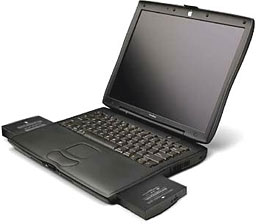 One way for Apple to reduce the clutter that seems to have been overlooked so far is making the front drive bay hot-swappable. Why not take this approach to allow users more drive choices? The technology already exists on the PowerBook line, so it would probably be an easy enough transformation.
A hot-swappable expansion bay on the iMac would open up many new possibilities for iMac owners. If you wanted to burn CDs, you would no longer have to sacrifice precious desk space for an external device. In fact, TechWorks already markets an internal CD burner called the PowerCDR for Revision A to D iMacs. This concept could apply to DVD-ROM, CD-ROM, burners, Zip or Jaz drives, or even floppy drives.
The advantages of this approach are pretty clear: Users could free up precious desk space as well as expanding the capabilities of their iMac. A drawer full of expansion modules seems like a better choice than several external units that require cables. If Apple could make the expansion modules fit both the iMac and the PowerBook, users with a primary machine could still share devices.
This could be especially handy if a hard drive was available. Instead of fiddling with cables or floppies, an information transfer could be as easy as moving a hard drive from one machine to the other and copying the files.
To carry this even further, a hot-swappable expansion module on an iMac could possibly be used as a backup power source, if you could somehow place a battery in the bay. If you were using your machine during a storm, a battery would provide a small window for you to wrap up what you have to do if the power fails. Running the iMac’s monitor off of a battery would severely limit this session, but it could still be a useful feature.
What can Apple gain from this feature? More bundling options are one thing they could capitalize on. Right now, they have expansion bay modules available for PowerBooks. Offering the same modules with iMacs could easily increase sales of the modules as well as providing consumers with more choice.
Apple would also add to the “gee-whiz” factor of the iMac. We have a few PCs in my office with swappable hard drives (called Device Bay in the PC world), but most desktops have fixed internal drives.
Apple could also benefit from a tighter integration of their products. If drives can be shared with several different computers, why not buy a PowerBook and an iMac instead of a PC laptop and an iMac?
There are some problems, of course. Each iMac would have to ship with a standard drive. Some consumers would want a CD burner while others may prefer a DVD drive. Apple already has a fairly diversified lineup, so adding more confusion wouldn’t help matters. Apple could alleviate this problem by sticking with its current lineup and offering other drives only as add-ons.
Marketed as a simple machine, the iMac could become even more user-friendly with the addition of a hot-swappable drive bay. More uses, more features, and less clutter would make an option like this extremely appealing.
