
2000 – It’s been a couple years since Scott Barber posted information on running Mac OS 8.1 on a Macintosh IIsi. It was a fairly convoluted method that only worked with a few Macs and required first booting from an older OS, then from an OS 8.1 hard drive – but it was possible.
Apple said that Mac OS 8.0 and 8.1 required a 68040 or PowerPC CPU and 12 MB of physical memory. Unless you’re very creative, they were right.
But where Scott Barber led, others have followed. The latest is Born Again from Brochner Software, which is a far more elegant solution – and one that supports more models.
To run Mac OS 8.1 on most 68030-based Macs, you need at least 12 MB of physical memory, 120 MB of free space on an external hard drive (or possibly a separate partition – I haven’t tried that), a Mac OS 8.1 CD-ROM, and a CD-ROM drive.
Born Again and the Mac IIfx
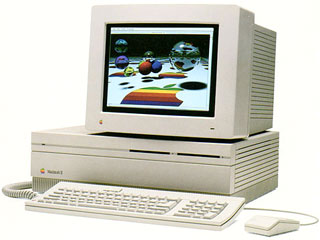 My guinea pig was my trustworthy old Macintosh IIfx, the $10,000 computer I picked up for $200 a few years back. I’d upgraded it to 32 MB of memory, installed an 8-24GC video card, and even had an ethernet card in it. This machine was once my email and web server, but I retired it when I discovered that it couldn’t restart itself after a power outage.
For several months, the IIfx has been connected to a MoniSwitch ADB and supporting my monitor. It’s the perfect height for use as a monitor stand. I’d even use the IIfx now and then to look at Low End Mac on older browsers and at reduced color levels that Power Macs don’t support.
I connected an old 2 GB external SCSI drive, my son’s external 24x CD-ROM, and booted the IIfx. I formatted the external drive with FWB Hard Disk Toolkit. Then I ran Born Again, which is pretty much a very sophisticated, very powerful installer script.
One key to running Mac OS 8.1 on older Macs is not updating the hard disk drivers. If you do that, you’re out of luck. After installing Mac OS 8.1 on the external drive, I also discovered it wouldn’t work with the version of FWB I had used.
Back to the drawing board?
Not quite. First, I copied everything from the external drive to my internal hard drive by dragging the drive icon onto my main drive’s icon. This would give me multiple system folders temporarily, but it shouldn’t be a problem in this case, since I had no intention of restarting the computer.
Then I rummaged about and located Apple HD SC Setup 7.3.5 and a hacked universal version on my Quadra 650 file server. Apple’s stock version wouldn’t work with the third-party drive, but the hacked one did.
Time to copy the folder where I stored the contents of the external drive back to the external drive. Then open that folder on the 2 GB drive and move all the contents (except Desktop Items) to the root level. Then copy the Desktop Items to the desktop.
Time to test it. Open the Startup Disk control panel, select the external drive, and reboot.
It worked!
I was weird and cool seeing Mac OS 8.1 load and run on my Mac IIfx. The system was pretty responsive, thanks to a 40 MHz CPU and system bus. My particular setup leaves garbage pixels on the screen. I suspect that’s due to the 8-24GC card.
Of course, that wasn’t enough for me. I had to test one more thing: could I boot other 68030-based Macs from this drive or was it set up specifically for the Mac IIfx?
Born Again on Other Macs
My first test was an LC III with 12 MB of memory. It ran flawlessly, although Mac OS 8.1 ate up over 10 MB of RAM. I reduced the drive cache and got the OS down to about 8 MB. Having 4 MB free RAM isn’t a lot of space, but the point is Mac OS 8.1 was running. Besides, you can boost the LC III as high as 36 MB if memory is an issue.
My next test was a Mac IIci with a Sonnet Presto 040 accelerator. I knew the Sonnet card supported Mac OS 8.1 with its own software drivers, so the first thing I did was remove the Presto card. Set the external drive as my startup disk and boot. Bingo.
Of course, that wasn’t good enough. I had to put the Presto back in and see if it worked that way. It didn’t even break a sweat.
I also tested it on a 9 MB Mac IIsi. With a minimum disk cache, it used 7.6 MB of RAM. That doesn’t leave enough room for any real work, but it does boot. More memory would make it useful.
Two Failures
Crossing my fingers, I connected my Classic II to the hard drive. No luck, even though I have 10 MB of memory. With the Classic II, I get the message, This startup disk will not work on this Macintosh model. Use the latest Installer to update this disk for this model.
On to my son’s Color Classic. Darn, same message.
Future Plans
I’m planning further tests on my wife’s old PowerBook 150. I may even try it on an SE/30, but that will be a bit more work. The SE/30 doesn’t have 32-bit clean ROMs, and the computer must be in 32-bit mode before you can boot from Mac OS 8.1.
What I’m planning on doing, and I’ve heard it works, is pull the ROMs from a IIsi (which is 32-bit clean) and install them in the SE/30. If all goes according to plan, this will allow me to run Mac OS 8.1 on an SE/30, which remains my favorite b&w compact Mac of all time. Unfortunately, while my SE/30 has ROMs on a SIMM, I don’t have a single IIsi (or IIci) configured that way. Until and unless I can locate one, I won’t be able to try 8.1 on my SE/30.
Why Do It?
The big question is, Why run Mac OS 8.1 on pre-68040 Macs?
The first answer: Because you can. There’s something bizarrely awesome about running an OS on a computer that isn’t supposed to work with it. I’m sure a lot of people who download and use Born Again will do it for that reason alone.
Scott Barber likes to set up small, inexpensive old Macs as unobtrusive file servers. One of his favorites is the IIsi, which isn’t much larger than many external drive cases. Drop in a 2, 4.5, or 9 GB SCSI drive, make sure you’ve got ethernet, install Mac OS 8.1, and you’ve got a very stable server with a fairly recent implementation of Open Transport networking.
And if you do find yourself using Mac OS 8.1 on your vintage Mac, don’t forget to pay your shareware fee.
Field Reports
Mark Looper reports using Born Again on his Duo 230 with Duo Dock II. Like me, he had problems with hard disk drivers at first, but he succeeded after he copied the installed files to another drive.
I benchmarked an LC III with both System 7.5.5 and Mac OS 8.1. Hard drive performance was one-third better under OS 8.1. Test with an accelerated Mac IIci were less compelling.
Keywords: #bornagain #os8on68030
Short link: http://goo.gl/PLC8mX
searchwird: bornagain
