
Our Fair Computer Company has released some quirky yet useful features in its computer systems and OS, and then advertised them very little – if at all. Apple’s SCSI Disk Mode and it’s modernized offspring, FireWire Target Disk Mode, are excellent examples.

SCSI Disk Mode
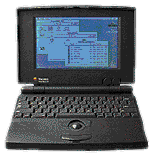 SCSI Disk Mode, introduced way back in October 1991 on the PowerBook 100, allows you to mount your PowerBook’s hard drive on another Mac using a funny $30 cable made called the SCSI Disk Adaptor. (Apple changed its name to HD Target Mode starting with the 5300 and 190, since they used IDE hard drives, but it works the same way. For consistency I’ll refer to them both as SCSI Disk Mode.)
While today you can do the same thing with File Sharing and a $15 ethernet crossover cable, on most models you’re limited to the relatively poor bandwidth of 10 megabit per second ethernet. Also, if your PowerBook has no ethernet port, you’d need to buy either an expensive PC Card ethernet adaptor or a speed-squashing LocalTalk-to-Ethernet bridge.
I’ll refer to the Mac acting as an external hard drive as the “target” Mac, like Apple does, and the connecting computer as the “host” Mac.
Setup of SCSI Disk Mode
- Shut down both machines.
- Connect your SCSI Disk Adaptor between the target PowerBook and the host Mac.
- Start up the target PowerBook. A SCSI icon and ID number should appear on the screen.
- Turn on any other SCSI devices if the PowerBook is not the only device on the SCSI chain.
- Start up the host Mac.
- The PowerBook’s hard drive icon should mount on the desktop of the host Mac. You can use it like you would use an external drive with little speed loss over using the PowerBook’s drive in the PowerBook.
Okay, so it’s not true plug-and-play ease, but it’s a really convenient feature if you have an older PowerBook and another Mac with SCSI and can get your hands on the hard-to-find SCSI Disk Adaptors.
- Note that the PowerBook 140, 145, 145b, 150, and 170 do not support SCSI Disk Mode.
FireWire Target Disk Mode
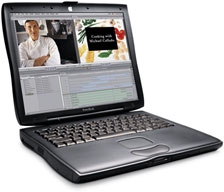 Apple stopped including SCSI with the 2000 PowerBooks, replacing the SCSI port with two of Apple’s more-modern FireWire ports. So you’re in the dark if you wanna drop a huge file onto a new PowerBook’s hard drive at full speed, right?
Of course not! Apple cleverly designed a new FireWire-based technology, called FireWire Target Disk Mode, which lets you connect your new PowerBook to another FireWire-equipped Mac. When Apple announced its new iBooks last September – which also come with FireWire – it included FireWire Target Disk Mode on them as well. As with its SCSI counterpart, the vast majority of 2000 PowerBook and iBook don’t know such a feature exists!
Setup of FireWire Target Disk Mode is almost too easy:
- Shut down the target Mac, leaving the host computer running.
- Connect an ordinary 6-pin to 6-pin FireWire cable to a FireWire port on both computers. (These can be bought for around $15.)
- Start up the target Mac and hold down the “T” key. A FireWire icon will appear on the screen, and the hard drive icon of the target Mac will pop up onto the host Mac’s desktop.
Compared to SCSI Disk Mode, FireWire Target Disk Mode requires no rebooting of the host Mac and needs only an easy-to-find FireWire cable (it’s half the price of the SCSI Disk Adaptor). FireWire Target Disk Mode is the fastest and easiest way to send files between a new portable Mac and any other Mac with FireWire. For sharing files between PowerBooks, FireWire provides 100 times the bandwidth of IrDA, the bigwig in Windows notebook computer and Palm PDA file sharing.
One other nicety is that FireWire Target Disk Mode is hot pluggable; you don’t have to plug the two computers together before you start up the “target” PowerBook or iBook. Once the target computer has booted and the FireWire icon is displayed on its screen, you can plug it into any FireWire-equipped Mac. When you’re done sending files, all you have to do is move the shared hard drive icon to the Trash and unplug the FireWire cable. When you plug it into another computer, it’ll mount on the desktop of that Mac!
The only big drawback is that the systems that support it in target mode are nowhere near low-end. You can only use it with the 2000 PowerBooks and iBooks, although, unlike SCSI Disk Mode, some desktop systems support it as well! The Sawtooth and Mystic Power Mac G4s support it, as long as they’re using hard drives connected to the built-in ATA controller. And if you’ve installed the iMac Firmware 2.4 updater, you can even use it with any slot-loading iMac. However, the G4 Cube, the G4 tower (if using a separate hard disk controller), and any Mac with FireWire added by a PCI or CardBus card, are not supported.
Still, if you have a new Mac and need to swap files with other systems that have FireWire, it’s a feature that is so intuitive and Mac-like you could use it happily every day. It’s fantastic if you want to get into Mac OS X. You could back up your iMac DV SE‘s hard drive to your sister’s new PowerBook to partition it, and do so fast enough that she’s not stuck counting sheep waiting to get back on her beloved computer.
If you have a computer that was built long before Apple started including FireWire on its systems, this doesn’t apply to you. But you can certainly use SCSI Disk Mode with older PowerBooks, knowing that Apple is continuing to innovate the newest incarnation of that feature, one it barely mentions in its Tech Info Library.
Keywords: #scsidiskmode #firewirediskmode
Short link: http://goo.gl/dNpCyz
searchword: scsiandfirewire
