

That’s what Microsoft asks in its current print ads. Their answer: No.
“After all, people are different. Jobs are different, Companies are different. And people need different type of computers to get their jobs done. Some need powerful PCs and workstations. Some need light and powerful laptops. Some need hand-held devices. Some need simple terminals running off a network. And some need a combination of machines.
“Computers must be different to meet the different demands people have in their jobs.
“And the reason computers can be different is because Microsoft® Windows® is the same.”
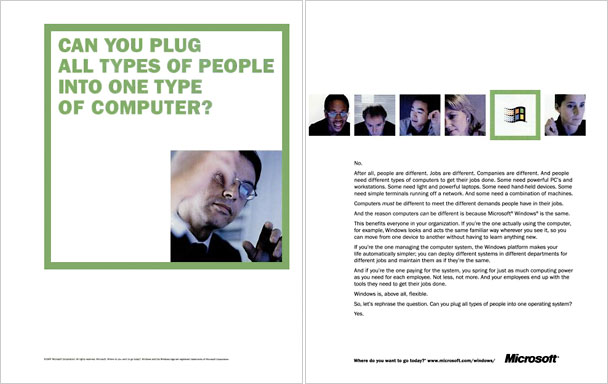
Microsoft’s 2-page print ad asks, “Can you plug all types of people into one type of computer?”
Later in the ad copy:
“Windows is, above all, flexible.
“So, let’s rephrase the question. Can you plug all types of people into one operating system?
“Yes.”
Huh?
Last I heard, there were five flavors of Microsoft® Windows® in use.
- Windows 3.1, which runs on older computers and which many users refuse to abandon.
Variant: Windows 3.1.1 with network support. - Windows 95, the one with the two-year-old name that only runs on more modern hardware (sorry, ‘386 owners, but most of you don’t have the speed, RAM, or hard drive space) – and there are two flavors of Win 95 which don’t interoperate well.
- Windows NT 4.0, the supposedly robust one designed for servers and several computers that don’t have Intel inside™. (Did you know that it’s very, very difficult to upgrade a Win 95 computer to Windows NT? Go figure!)
Variant: of course, some users are still on NT 3.51. - Windows CE, an operating system for personal digital assistants.
- And now a new version of Windows designed for network computers
But there is a better way, the solution for the rest of us.
Mac OS: One Operating System
The Macintosh operating system (Mac OS) is a single operating system. Although Apple has dropped support for its oldest models, you can run last year’s System 7.5.5 on a 1986 Mac Plus. You can run the current System 7.6.1 on a 1989 Mac IIci. And if you want to run System 8.0 when it ships in late July 1997, the 1991 Quadra 700 and 900 can do the job.
Even though the operating system has evolved, almost every program that ran one one computer will run on all future models and OS revisions.* And many of today’s apps will run on a lot of the older hardware, RAM, hard drive, and patience permitting. The core OS has remained the same, even with big jumps to System 7 and PowerPC CPUs.
Macs need no 16-bit emulation that keeps their CPUs from running flat out – a problem with Pentiums under Windows 95. Apple’s PowerPC Macs emulate the older 680×0 family of processors and run their software even faster than the old hardware could!
- PowerPC 604e, 200 MHz, Mac OS 8 – 501,000 keys/sec.
- Pentium Pro, 200 MHz, Linux – 483,624 keys/sec.
- Pentium Pro, 200 MHz, Windows NT – 465,000 keys/sec.
- Pentium Pro, 200 MHz, Windows 95 – 296,800 keys/sec.
Although the Pentium Pro on an unleashed operating system (Linux, Win NT) is nearly as fast as a PowerPC 604e running Mac OS, the same Pentium Pro is 36-38% slower under Windows 95.
Not only has the Mac OS remained consistent across 13 years, it also runs on the fastest PCs on earth.
- The Power Macintosh 6500/300 has a 300 MHz RISC processor that outperforms anything in the Pentium family.
- The PowerBook 3400c runs the same CPU at up to 240 MHz, making it the world’s fastest notebook computer – and leaving 166 MHz Pentium notebooks in its dust
Mac OS: Several Operating Systems
Maybe one operating system isn’t enough for you. Macintosh doesn’t limit your options.
- For Unix lovers, Linux, MachTen, and other Unix-derived operating systems are available. The forthcoming Rhapsody OS from Apple is based on the same Mach kernel. And the just released BeOS is in many ways similar to Unix.<
- For Wintel lovers, you have the choice between a PC-on-a-card solution or full Wintel emulation in software. Orange Micro and Reply make DOS cards for Macs that let them run 486 and beyond at flat-out speeds comparable to “real” DOS boxes. Best of all, they tend to have less teething problems and run more programs without trouble than computers designed specifically for Windows 95.
If you want to run Windows® apps now and then or speed isn’t a big concern, you can buy emulators from Insignia (SoftWindows) or Connectix (Virtual PC) that will let your run DOS, Windows® (3.1, 95, NT), or even a form of Unix or NextStep as an application within the Macintosh environment.
So, let’s rephrase the question.
Can you plug all types of people into one operating system?
Yes, as long as it comes from Apple.
* Apple continued to support the “classic” Mac OS in Mac OS X via Classic Mode, which allowed longtime Mac users to continue using their legacy apps on PowerPC Macs through OS X 10.4.11. Classic Mode was discontinued with OS X 10.5 in October 2007 and was never supported on Intel-based Macs.
This site best viewed with Verdana, a free TrueType font from Microsoft.
To answer several questions sent in response to the above line:
- I am not anti-Microsoft or anti-Windows. I am anti-hype.
- Although I don’t use Windows, no longer use Excel or Microsoft Works, and have given up on Internet Explorer, I do use Microsoft Word (version 5.1a) when I need a more control than ClarisWorks provides.
- Apple helped pioneer TrueType fonts.
- By using fonts that come with Windows or Internet Explorer, I make this site more visually attractive to the Wintel world.
- Free is a very nice price.
- Frankly, I like Verdana. It is a better sans serif font than the Geneva and Helvetica that Mac users have had for years. And if you don’t want to use Verdana, this page will display nicely using Helvetica or Geneva.