
The long-awaited M5 Pro and M5 Max MacBook Pros have finally arrived, taking Apple Silicon ‘Books to a whole new level. Each takes the already successful aluminum unibody from prior generations, ups the speed a bit, increases core count, as well as doing a bit of a name change for the types of CPU cores.

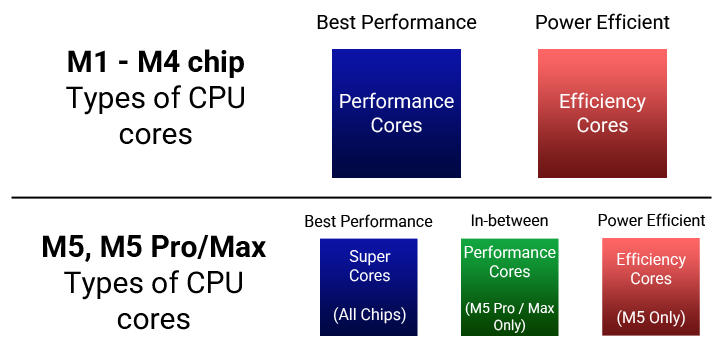
In previous generations, every Apple Silicon chip followed the same format: Performance + Efficiency cores. When the M5 Pro and Max were released, performance cores were renamed Super Cores, which retroactively applied to the M5 non-pro chip as well.
Following the example started by the iPhone 16e, the new M5 Pro and M5 Max MacBook Pros now also has it’s own Apple N1 wireless networking chip, which brings Wi-Fi 7 (802.11be), Bluetooth 6, and thread networking technology to the Mac.
Storage has also been doubled from the previous year, starting at a generous 1 TB for both the 14-Inch and 16-Inch models. Mostly everything else remains the same, the nano-texture display remains an option, but this is still a nice upgrade.
Apple Intelligence
macOS supports Apple intelligence on any Mac with Apple Silicon. This feature is also available on most iPads with an M-chip, as well as iOS devices running iOS 18 and later with an A17 Pro chip or better (iPhone 15 Pro/Pro Max, or all iPhone 16 models+).
The CPU Core name changes
- From the M1 through the M4, there were only 2 CPU types: Performance + Efficiency.
. - When the M5 chip came out in October, Apple continued using those same names officially until March 2nd, 2026.
. - What was previously known as a “Performance” core from the M1 – M4 generations is now called a “Super Core” in the M5, M5 Pro, and M5 Max chips.
. - While the new “Performance” cores take over the old name, they introduce a “more performance than efficiency, but more efficient than super” mid-tier approach.
What you need to know
- The M5 Pro adds support for 1 extra external display. It simultaneously supports: built-in panel + 3 external displays, whereas the M4 Pro can only do 2 external displays + its built-in panel.
. - The types of ports and their iterative versions stay the same from the previous generation: MagSafe 3, SDXC, Thunderbolt 5 (with USB 4), HDMI 2.1, and a 3.5mm headphone jack.
- The new SSD on the M5 Pro / M5 Max MacBook Pros are so fast, they read and write faster than DDR3 RAM from just over a decade ago!
. - Most people who use their Mac for everyday things won’t notice much of a difference between an M5 and an M5 Max. The real performance benefit of the M5 Pro and M5 Max starts when you take advantage of parallelization. The M5 Max, however, has an additional media engine.
. - If you’re someone who’s transitioning over from an Intel Mac, or will be using Intel Mac apps, Apple has an app called Rosetta 2 for Apple Silicon Macs. Once installed, this isn’t something you directly interact with. Rather, you may simply open an Intel app, and it’ll open. Rosetta 2 does an Intel to Arm “ahead of time” translation, using an instruction set in the M5 chip. The first time the Intel app launches it’ll be noticeably slow, as Rosetta caches and stores code. Once this process is done, the App should work just as normal.
 Closed Lid Mode: All ‘Books support “lid closed” (or clamshell) mode, which leaves the built-in display off and dedicates all video RAM to an external display or two. To use closed lid mode, your ‘Book must be plugged into the AC adapter and connected to an external display and a USB or Bluetooth mouse and keyboard (you might also want to consider external speakers). Power up your ‘Book until the desktop appears on the external display and then close the lid. Your ‘Book will go to sleep, but you can wake it by moving the mouse or using the keyboard. The built-in display will remain off, and the external monitor will become your only display.
To resume use of the internal display, you need to disconnect the external display, put the computer to sleep, and then open the lid. This will wake up your ‘Book and restore use of the built-in display.
Battery life is claimed to be 16 to 17 hours of wireless web, and up to 24 hours of video streaming.
Details
- Announced March 3rd, 2026
- Available March 11th, 2026
- Model Identifier: Mac17,9 (14-Inch)
- Model: A3246 (EMC 8934)
- MGDN4LL/A (14″, Silver, 1 TB) $2199
- MGDR4LL/A (14″, Space Black, 1 TB) $2199
- Model: A3246 (EMC 8934)
- Model Identifier: Mac17,8 (16-Inch)
- Model: A3428 (EMC 8936)
- MGE44LL/A (16″, Silver, 1 TB) $2699
- MGEA4LL/A (16″, Space Black, 1 TB) $2699
- Model: A3428 (EMC 8936)
Mac OS
- Requires macOS Tahoe 26.3.1 (Build 25D2128) or later
Core System
Legend: L1i = L1 Instruction Cache, L1d = L1 Data cache, SLC = System Level Cache
Note – All M5 chips have this memory configuration for their cache in their CPUS:
- L1 Per-Super core: 192KB L1i, 128KB L1d
- L1 Per-Performance core: 128 KB L1i, 64 KB L1d
. - M5 Pro 15-Core ($2199): 15 Cores, 5x 4.61 GHz “M5 Pro” Super Cores: 960K L1i, 640K L1d, 16MB L2*, 24MB* System Level Cache
- 10x 3.05 GHz “M5 Pro” Performance cores: 1.28 MB L1i, 640K L1d, 8 MB L2*, 24 MB* SLC
- 16-Core Neural Engine
. - M5 Max 18-CPU 40-GPU ($4099/4399): 18 Cores, 6x 4.61 GHz “M5 Max” Super Cores: 1.15 MB L1i, 768K L1d, 16MB L2*, 48MB* System Level Cache
- 12x 3.05 GHz “M5 Max” Performance cores: 1.53 MB L1i, 768K L1d, 8 MB L2*, 48 MB* SLC
- 16-Core Neural Engine
- 14-Inch MBP is $4099, 16-Inch MBP is $4399, same chip.
Memory
- M5 Pro: 24 GB 4800 MHz LPDDR5X-9600 SDRAM
- 307.2 GB/s Memory Bandwidth
- Configurable to: 48GB (only with a 40-GPU), or 64 GB (as a 20-GPU)
- M5 Max: 36 GB 4800 MHz LPDDR5X-9600 SDRAM
- 460.8 GB/s Memory Bandwidth
- 614 GB/s Memory Bandwidth on 18-CPU 40-GPU chip
- Configurable to: 48 / 64 / 128 GB, all upgrade options bump you up to 40 GPU Cores. Only the 36 GB model ships with 32 GPU Cores.
Video
- All GPUs: Integrated Apple M5 Pro or Max with Metal 4 Hardware Accelerated GPU. Support up to 3x (M5 Pro) or 4x (M5 Max) external displays over any combination of Thunderbolt and HDMI ports.
. - 14-Inch screen: 16:10 14.2? TFT IPS LED-Backlit LCD, 3024 x 1964 @254ppi, 1600 nits peak
- (+$150) optional nano-texture display option
- P3 Color
- 1,000,000:1 contrast ratio
- True Tone
- Up to 120 Hz refresh rate
- Support for 1 Billion colors
- 16-Inch screen: 16:10 16.2? TFT IPS LED-Backlit LCD, 3456 x 2234 @254ppi, 1600 nits peak
- (+$150) optional nano-texture display option
- P3 Color
- 1,000,000:1 contrast ratio
- True Tone
- Up to 120 Hz refresh rate
- Support for 1 Billion colors
- M5 Pro: Simultaneous support for 3 external displays plus the built-in display at native resolution plus the following configurations:
- 3x 6K60 or 4K144
- 2x displays: 1x 8K60 or 1x 5K120 or 4K240: plus a second display at 5K120 or 4K200.
- M5 Max: Simultaneous support for 4 external displays plus the built-in display at native resolution plus the following configurations:
- 4x 6K60 or 4K144
- 2x displays: 2x 8K60 or 2x 5K120 or 4K240.
Drives
- Drive Bus: 1 TB NAND NVMe PCIe SSD ~11.6 GB/s Read/Write
- Configurable to: 2 TB / 4 TB, 8 TB (M5 Max Only)
Audio
- 6-speaker sound, support for Spatial Audio, Dolby Atmos
- Dynamic tracking support when using supported models of AirPods.
- Force-Cancelling woofers
- Studio Quality Triple-Mic array w/directional beam foaming
- Voice Isolation, Wide Spectrum Mic modes
- HDMI port supports multichannel audio output (HDMI 2.1)
- Supported formats: AAC, MP3, Apple Lossless, FLAC, Dolby Digital, Dolby Digital Plus, and Dolby Atmos
Expansion / Misc.
- Apple N1 Wireless networking chip
- Wi-Fi 7 (802.11be), Bluetooth 6, and Thread Networking Technology
- Three USB-C style Thunderbolt 5 Ports
- Support for: USB 4 (up to 120 Gb/s), USB 3.1 Gen 2 (up to 10Gb/s)
- Magsafe 3 Port
- HDMI 2.1 port
- SDXC card slot
- 3.5mm headphone jack
- Ambient Light Sensor
- LED-Backlit keyboard
- Force Touch Trackpad
- Touch ID on Power button
- 12 MB Center Stage Camera with support for Desk View, 1080p Video
- Image signal processor w/computational video
Power
- 14-Inch MacBook Pro
- Power supply: 70W USB-C charging Brick, with 2-Meter USB-C to MagSafe 3 cable
- (Included w/18-Core M5 Pro, or configurable otherwise): 96W USB-C charging brick)
- Battery: 72.4 W/h Li-Ion battery
- Fast-charge capable on 96W or higher USB power delivery source.
- M5 Pro up to: 22H video streaming, 14H web
- M5 Max up to: 20H video streaming, 13H web
- Power supply: 70W USB-C charging Brick, with 2-Meter USB-C to MagSafe 3 cable
- 16-Inch MacBook Pro
- Power supply: 140W USB-C charging Brick, with 2-Meter USB-C to MagSafe 3 cable
- Battery: 100 W/h Li-Ion battery
- Fast-charge capable on 140W or higher USB power delivery source.
- M5 Pro up to: 24H video streaming, 17H web
- M5 Max up to: 22H video streaming, 16H web
Physical
- 14-Inch MacBook Pro
- Size: 0.61 x 12.31 x 8.71? (1.55 x 31.26 x 22.12 cm)
- M5 Pro Weight: 3.5 pounds (1.60 kg)
- M5 Max Weight: 3.6 pounds (1.62 kg)
- 16-Inch MacBook Pro
- Size: 0.66 x 14.01 x 9.77″ (1.68 x 35.57 x 24.81 cm)
- M5 Pro Weight: 4.7 pounds (2.14 kg)
- M5 Max Weight: 4.7 pounds (2.15 kg)



