Low End Mac Reader Specials
TypeStyler For Mac OS X is Now Shipping! Download The Free Fully Functional 60 Day Tryout at www.typestyler.com
Don't install Parallels to play poker online! Poker Mac will show you how
to download and install a native Mac poker application such as Full
Tilt Poker Mac.
Laptop Hardware Provided by TechRestore - Overnight Mac & iPod Repairs.
Compare products like desktop computers, apple laptops, apple macs, and LCD Monitors side by side! All the information and reviews to make the best purchasing decision for new mobile phones, sat nav systems, or MP3 players. The Ciao online shopping community makes searching products easy for you.
Apple Archive
Hands On: Palm Desktop 4.0
- 2002.04.26
This weekend, my Palm Pilot decided to die. I have had it for almost four years, although I only started using it daily a year and a half ago.
My Palm Pilot was a Palm III - from back when 3Com still owned Palm. It shipped with Palm Desktop 1.0, which was a big pain to use because it was not compatible with the then-new Mac OS 8.5. Of course, when I got my G4 I could no longer sync my Palm without buying an adapter, which I didn't do.
On Sunday I turned it on, only to find that the screen would not accept my tapping of the stylus. It had been doing this on and off over the past couple weeks, but I just figured it was because either the stylus or screen was dirty.
Obviously that was not the case, so I decided to hook my old cradle up to my Power Mac 7500 to see if I could backup the data that I had on the Palm. I remembered the long waits I had endured on the phone with 3Com to ask them why Palm Desktop 1.0 kept freezing on my Mac with OS 8.5, only to find out that it wasn't compatible --but a new version would be released "shortly."
So I figured I might as well just download the latest version, which is currently version 4.0. The biggest features are Mac OS X and OS 9 compatibility.
Palm Desktop 4.0 is a real pleasure to use. It installed quickly and runs very well on a 200 MHz 604e processor. I connected the cradle and pushed the HotSync button. Immediately the computer started synching my data. Then it proceeded to install an update to the OS, which I had never previously updated.
Unfortunately that still didn't fix my screen problem, but at least I now had the data backed up.
I am really impressed with Palm Desktop 4.0 for Mac. I love products that work the way they are intended, however very few seem to. Palm Desktop 4.0 really surprised me because not only did it do what I wanted it to do in a very timely manner, but it also had a very nice interface with excellent integration into Mac OS 9.1.
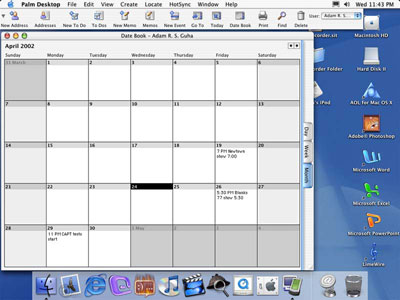
Palm Desktop 4.0 on Mac OS X
You also can't beat the price - it's free. Even if you don't have a Palm, you can use Palm Desktop, and I highly recommend it. It's a cinch to use, too. There is a toolbar at the top that lists the memo pad documents, calendar, and contacts. Clicking on them will bring up the lists in a window below. The customizable colors make it even more fun to use. One of the best things about this application is that it is consistent and looks relatively similar in Mac OS X and OS 9, which is something I like. It eases the transition between the OSes, especially if you regularly use both systems. Palm Desktop 4.0 may replace my obsolete copy of Now Up-To-Date 3.6, dated 1996 - almost 7 years ago.
Now-Up-To-Date was a very nice application. While it does not have as many features as Palm Desktop, it does have a nice interface that really looks like a wall calendar, a look that I like. You can also customize it to make it look like a desk calendar. It's also got a nice little feature where you can include pictures in with your To Do lists. One of the best things about it is that it runs quickly on any Power Mac. However, it's a little complicated to enter the data into the days. It's somewhat integrated with Now Contact, a contact management application, and comes with a set of utilities that offer an analog menu bar clock and alarms, which unfortunately don't work well with any system newer than 7.6.1 (Palm Desktop also has alarms). It does come with a very useful application for taking down quick notes called QuickPad (very good if someone calls while you are on the computer and want to get their phone number and name). You can also add a to do item or contact through this little application.
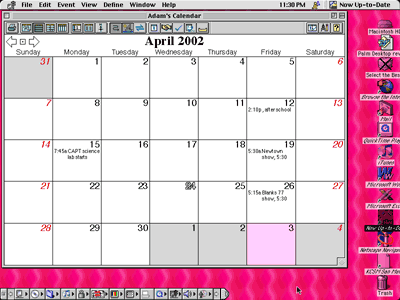
Now Up-To-Date on the classic Mac OS
Now-Up-To-Date does have a number of disadvantages. The toolbar buttons tend to be a little small and not clearly labeled. The interface is not exactly consistent, unless you are running it under System 7.x, since OS 8 and 9 try to apply their Platinum themes to the menus and windows in the application. The utility extensions are not consistently compatible with OS 8.1 through 8.6, and do not seem to work with a machine running OS 9.
While Now-Up-to-Date 3.6 was a good application, but it is now out of date Palm Desktop offers the same features, and at a much better price (free). I think Palm Desktop just gained another user.

Recent Apple Archive articles
- iPods, notebooks, and other modern electronics more readily replaced than repaired, 12.07. Whether it's an intermittent failure or a broken display cable, more often than not it's cheaper to replace a broken electronics device than repair it.
- Options for replacing your older iPod, 11.19. Whether you've run out of space on your old iPod or want features it doesn't have, here are your options in new and used iPods.
- Could the $200 'green' PC with gOS Linux become a threat to Apple?, 11.14. The low cost, low power Everex desktop comes with a customized version of Ubuntu Linux, has a Mac-like Dock, and sells for $400 less than the Mac mini.
- Leopard different, a bit buggy, but worth the upgrade, 11.02. Leopard on a Power Mac G4 and a MacBook Pro: It runs well on both computers, but each has some odd bugs, and some of the changes are a step backwards.
- More in the Apple Archive index.
Links for the Day
- Mac of the Day: Mac mini Core Solo, Feb. 2006 - The only Mac to use a Core Solo CPU, this model ran at 1.5 GHz, has integrated graphics, and includes a Combo drive
- Group of the Day: SuperMacs is for those using Umax SuperMac clones.
- November 24 in LEM history: 98: Microsoft's heavy hand - 00: Looking at the iMac - 04: The best Mac for the holidays - Picking the right replacement for a dead mouse - Better battery for 15" AlBook
- Support Low End Mac
Recent Content on Low End Mac
- Why Spaces is My Favorite Leopard (and Snow Leopard) Feature, Charles W. Moore, Miscellaneous Ramblings, 11.23. Spaces, a feature introduced with OS X 10.5, is like having several monitors on your Mac without the cost and space of using multiple displays.
- i5 iMac Benchmarked, Mac mini 'Shouldn't Be Overlooked', Twitter Client for Classic Mac OS, and More, Mac News Review, 11.20. Also why Apple leaves the low end to others, 10.6.2 fixes video playback problem in 27" iMac, 3D Leopard and Snow Leopard performance, and more.
- Apple's Tablet an End Run Beyond Netbooks, Frank Fox, Stop the Noiz, 11.20. Whatever Apple has planned will leverage existing technologies while going beyond what its competitors can offer.
- Apple #4 in Reliability, Apple Tablet a Gadget for All?, HP's i7 Notebook Outdoes Mac Rivals, and More, The 'Book Review, 11.20. Also Flash 10.1 improves video on Hackintosh netbooks, thin-and-light notebooks impress, Windows XP finally on the way out, and more.
- NASA Chemical Sensor for iPhone, Smartphone Death Match, iPhone Earrings, and More, Ian R Campbell, 11.20. Also mobile phone dangers, new apps, GPS solution for iPod touch, new iPod and iPhone cases, and more.
- Replacing the Hard Drive in a Clamshell iBook, John Hatchett, Recycled Computing, 11.19. Yes, it is one of the most difficult Apple notebooks to disassemble and reassemble, but a 10 GB hard drive just will not do.
- IBM Model F: A Great Old Keyboard with an Outdated Layout, Tommy Thomas, Welcome to Macintosh, 11.19. Although it used a different technology than the revered IBM Model M keyboard, the Model F was a great keyboard in its own right.
- More links in our archive.
Recent Deals
- Best 12" PowerBook G4 Deals, 11.23. Used 867 MHz SuperDrive, $348; 1 GHz Combo, $379; SD, $519; 1.33 GHz, $529; 1.5 GHz Combo, $549; SuperDrive, $609.
- Best Mac Pro Deals, 11.23. Used 2.66 GHz 4-core, $1,300; 3.0 4-core. $1,919; refurb 2.66 4-core Nehalem, $2,149; 2.93, $2,549; 2.93 8-core, $4,999; new 2.26 8-core, $2,290.
- Best Time Capsule and AirPort Deals, 11.23. Used 802.11g AirPort Extreme, $49; 500 GB Time Capsule, $150; new, $190; 1 TB dual-band, $280; 2 TB, $469; 802.11n AirPort Extreme, $170.
- Best eMac Deals, 11.18. Used 1 GHz Combo, $100; SuperDrive, $269; 1.25 GHz Combo, $119; SD, $319; 1.42 GHz Combo, $289; SD, $498.
- Best Mac OS X 10.6 and Mac Box Set Deals, 11.18. "Snow Leopard", single user, $25; 5 users, $45; Mac Box Set, single user, $139; 5 users, $180; Server, $414. Shipping included.
- Best Xserve Deals, 11.18. Used 1 GHz dual G4, $649; 2.3 dual G5, $795; 3.0 4-core Xeon, $1,899; refurb 2.26 4-core, $2,499; new, $2,888; refurb 8-core, $2,999; new, $3,449; more.
- Best 15" MacBook Pro Deals, 11.17. Used 1.83 GHz, $750; 2.16, $800; 2.33, $900; refurb 2.4, $1,299; 2.53, $1,449; 2.66, $1,699; 2.8, $1,899; new 2.53, $1,579; 2.66, $1,799; more.
- Best Power Mac G4 and AGP Video Card Deals, 11.17. Used 400 MHz, $50; 933 MHz, $80; 500 dual, $60; 867 dual, $90; 1 GHz dual, $150; 1.25 GHz dual, $225; 1.42 GHz, $499.
- Best Mac OS X 10.5 Deals, 11.17. "Leopard" upgrade, $80; single user license, $135; 5 users, $173; Mac Box Set, 5 users, $230; Server, 10 users, $340; unlimited, $850. Shipping included.
- More deals in our archive.
About LEM | Support | Usage | Privacy | Contacts
Navigation
Used Mac Dealers
Apple History
Video Cards
Email Lists
Favorite Sites
MacSurfer
MacMinute
MacInTouch
MyAppleMenu
InfoMac
Macs Only!
The Mac Observer
Accelerate Your Mac
RetroMacCast
PB Central
MacWindows
The Vintage Mac
Museum
DealMac
DealsOnTheWeb
Mac2Sell
ramseeker
Mac Driver Museum
JAG's House
System
6 Heaven
System 7 Today
the pickle's Low-End
Mac FAQ
Abandonware
Petition
Mac vs. PC Info
Affiliates
The Apple
Store
Mac
Connection
B&H
MacMall
TechRestore
ExperCom
Crucial
Memory
batteries.com
Advertise
MacMinute
MacInTouch
MyAppleMenu
InfoMac
Macs Only!
The Mac Observer
Accelerate Your Mac
RetroMacCast
PB Central
MacWindows
The Vintage Mac
Museum
DealMac
DealsOnTheWeb
Mac2Sell
ramseeker
Mac Driver Museum
JAG's House
System 6 Heaven
System 7 Today
the pickle's Low-End
Mac FAQ
Abandonware
Petition
Mac vs. PC Info
Mac Connection
B&H
MacMall
TechRestore
ExperCom
Crucial Memory
batteries.com


