Apple's 'i' applications gained popularity with Mac fans almost
immediately after iMovie was introduced.
iMovie was popular because of its ease of use. Before iMovie, it
was difficult to edit your own digital movie without some knowledge
of existing video editing software.
When iTunes
arrived, it became almost everyone's default MP3 player
application, making Windows users wish that an application like
this would be released for their OS.
With OS X 10.2 came iChat and iCal, both of which have
room for improvement.
Some of these Windows users apparently realised that wishing
wasn't good enough - they would actually clone applications for
their OS. So out came AquaTunes, an OS X like browser, 'Finder'
type file browser, iChat like chat client, and Mail-like E-mail
application. Run all of these at once and you might even fool
yourself into thinking you're somehow running OS X on a
Windows PC.
But that's as far as it goes.
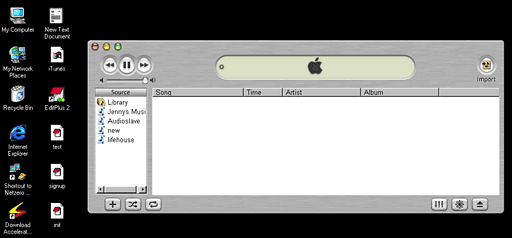
Open it up, and AquaTunes* looks exactly like iTunes.
However, looks are deceiving. Unlike the real iTunes, which lets
you to set up playlists, edit file information, view
visualisations, and use the equalizer, AquaTunes, does none of
that. In fact, all it does is play one MP3 at a time. Try to drag a
file into the window - nothing happens. You must click import and
select the file in an open file dialogue box. Once the file is done
playing, the application almost always crashes.
- * Editor's note: I used Google to search the Web, but was
unable to find a link for AquaTunes. You can be very certain that
Apple legal will be all over them for use of the Apple logo - if
they haven't already done so. dk
AquaBrowser
looks just like IE for Mac OS X, even with a menu bar at the top of
the screen. But the menu bar is false; clicking on menu items does
nothing, and you cannot change preferences. It does load pages very
quickly, but loading pages is about the only thing it does.
AquaFinder is
also somewhat useless. Upon opening it, you feel like you're
running Mac OS X - and you can browse folders quickly and
easily (I so much prefer the Mac OS method to the 'Explorer' type
interface that is the default in Windows 98 and above). The toolbar
buttons even work. The menu bar at the top only works sometimes. I
say this because clicking on an item often does nothing, but
occasionally the menu will pop up. However, selecting a menu item
does nothing either.
iTalk
has a welcome screen exactly like that of iChat, but alas, it is
not AOL Instant Messenger compatible, and you must have an MSN
account in order to use it.
AquaMail also
has the same welcome screen as the Mac OS X Mazil program, but
I didn't set it up fully.
These applications are a great attempt by someone with a real
"do it yourself" attitude, which is great. "Apple won't release it,
we'll do it." And they did - sort of.
If only these apps would work as well as they do on the Mac, but
unfortunately AquaTunes is practically useless, and the other apps
aren't much better. But it does show that it can be done.
I realise that Apple is trying to help convert users to its
platform with their i-applications, so they will probably try to
prevent the developers of these "clones" from continuing with their
work.
I hope that Apple will leave them alone. I don't think these
apps are a threat - in fact, they might help sell more Macs. If
people start to like the OS X interface after using it on
their PC, they might be tempted to buy a Mac.
This is a project I had been hoping for someone to undertake the
minute I first started using iTunes, and I am very curious to see
how these cloned applications will change and (hopefully) improve
in future versions.



