I'd been using a 266 MHz beige G3 for
the past year or so as my "non-work" machine (mainly for Internet,
instant messaging, a bit of recording, and some basic photo editing).
It got the job done fairly well. While it wasn't exactly speedy, it
wasn't too slow, either. It did, however have several major
shortcomings which preventing me doing some of the things I wanted.
First of all, the video card was a 2 MB card - not enough to show
millions of colors at 1024 x 768. iTunes visualizations wouldn't
display smoothly at all, although I was surprised that QuickTime movies
seemed to display fine. The video card could be upgraded to 6 MB,
but I felt that wasn't really enough. There was always the option of a
newer PCI video card, but that runs into money.
The beige G3 didn't have USB or FireWire, which prevented me from
using both my iPod and my USB webcam (which I couldn't even use on my
12" PowerBook, since the webcam doesn't support OS X, or my Dell,
since it doesn't support Windows XP, either). I thought about adding a
PCI FireWire/USB card, but they don't "officially" support the iPod,
and I didn't feel like playing around to try to make it work.
It looked like what I needed was a machine of about the same speed
with built in USB and FireWire, as well as a better video card.
Everything seemed to point to a blue &
white G3.
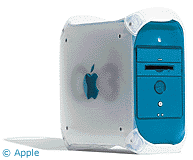 I managed to do a trade for a 350 MHz
blue G3 tower with a Zip drive as well as a SCSI card installed. I had
already upgraded the RAM in the beige G3 with a 256 MB module and the
hard drive with a 40 GB Maxtor, so I moved both over to the blue G3 and
started it up.
I managed to do a trade for a 350 MHz
blue G3 tower with a Zip drive as well as a SCSI card installed. I had
already upgraded the RAM in the beige G3 with a 256 MB module and the
hard drive with a 40 GB Maxtor, so I moved both over to the blue G3 and
started it up.
It hung on the startup screen, so I reseated the RAM. This time it
hung just before the login screen. I left it for few minutes, and when
I came back into the room the screen had shown up. I logged in, and
everything seemed normal. I opened some applications, and then it hung
again - for about 30 seconds or so.
I restarted, and it gave me a system error. Restarted again, logged
in, and the second partition didn't show up on the desktop. After the
next restart half my files were gone or had names like &@x~y3."
I knew the hard drive didn't have corruption problems on the beige
G3, but I moved it back and booted that machine just to be sure. It
worked fine. I opened the b&w G3 again and looked at how the drives
were set up inside. Like the beige G3, the blue G3 has two hard drive
controllers, one for up to two hard drives and the second for the
CD-ROM and Zip drive.
"Why do I really need a Zip drive?" I thought, remembering that I
had used the one in my beige G3 only once. I disconnected that, and,
using a spare hard drive bracket, set up the hard drive in the space
above the CD-ROM drive (Apple suggests not using the Zip drive bay for
hard drives). I set the hard drive to master and the CD-ROM to slave
and then connected everything up using a longer IDE cable from an old
PC.
It booted and ran perfectly.
The Rev. 1 Problem
Of course, I was curious as to why my hard drive had given me
problems with the other controller, so once I got the machine up and
running, I went online to find out. Apparently, revision 1 b&w G3s
have a hard drive corruption problem if you use certain drives with the
built in controller. I guess my 40 GB Maxtor was one of those
drives.
This reminded me of the problem I was having with my dad's 400 MHz
b&w G3, where half the time the newly installed 80 GB drive
wouldn't be recognized, data would disappear from it, or it would ask
to be reformatted. I'll bet his is a revision 1 and the drive would
work just fine if he connected it to the other controller.
In terms of performance, the blue G3 is definitely faster. Even
QuickTime movies, which seemed to play fine on the beige G3, play more
smoothly on the blue G3. I'm now able to use a standard VGA monitor
without an adapter, and the video card supports high resolutions - so I
chose to use the 19" CTX monitor from my PC. Startup time is about the
same, but general responsiveness is quicker.
I don't plan on running OS X on it just yet - maybe at some point in
the future, as it's nice to know that 10.3 is supported on this
machine. Right now I've got everything just the way I like it in
OS 9, so I think I'll keep it that way for now. After all, it's
what about half of all Mac users are still using.
Good-bye to a Good Friend
Also, I'd like to mention my friend Matthew Hunt, who died last
Wednesday at 18 years of age. He was a Mac user, a Web designer, a
photography enthusiast, and just generally an awesome person to be
friends with. I'll miss him greatly. Check out his site, The Lost Asylum: Fairfield Hills State
Hospital, an unfinished documentary on the Fairfield Hills mental
hospital in Newtown, CT. His girlfriend, Sable, and I plan to finish it
in his memory.



