The topic of upgrading older Macs has come up again recently
(see Adding an Intel Mac mini Can Be
Cheaper than Upgrading a Power Mac G4!). With Apple's current,
more consumer-oriented offerings that lean toward lower prices, the
argument for buying new is very strong - especially in light of to
the relative un-upgradability of Apple's recent past offerings.
Performa vs. Power Mac
In the mid to late 1990s, Apple had a reasonable hierarchy of
models, as complex as the naming of them was. The Performa 5x00 and
6x00 series were consumer multimedia desktops that shipped with
bundled software and often bundled hardware (like a TV tuner card,
something you can't get built into any current Mac).
The Power Mac 7x00 series were professional desktops designed
for a business environment. The 8x00 series were midrange
minitowers that allowed for a decent amount of upgradability and
were typically used in businesses and offices. And the 9x00 series
were the graphics powerhouses; no design firm in the 90s was
complete without one.
While the 5200s and 6200s had limited upgradability because they
were based on older motherboards designed for pre-PowerPC Macs, the
5300-5500 and 6300-6500 were extremely upgradable with CPU upgrades
and PCI cards - just like the Power Mac models. Perhaps the most
significant limitation of these models was memory: It could only be
upgraded to 136 MB on models that came with 16 MB on the
motherboard - and 128 MB on those that had no built-in RAM. These
were some of the last desktop Macs to come with RAM onboard.
The Power Mac models were highly sought-after for quite some
time due to their ability to accept daughter cards for fast 604e,
G3, and G4 processors. With
XPostFacto, these machines could be made to run OS X, and
with a G3 or G4 upgrade, they generally ran it fairly well.
In 1997, the Power Mac G3 replaced
the 7x00, 8x00, and 9x00. It was available in both desktop and a
tower configurations that allowed for expandability and
upgradability with their PC66 RAM slots, ZIF CPU socket, and three
PCI slots. They were also the first top-end Macs to include IDE
hard drive support.
Enter the G3
I've owned both a desktop 233 MHz G3 and a minitower 266 MHz G3,
and I was impressed at the expansion capabilities of both. The
audio Personality Card could be removed and replaced with one that
allowed a composite video (as used by a TV) to be connected to the
computer.
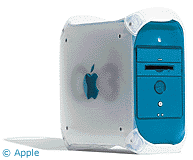 In 1999, the
blue and white G3 (code name:
Yosemite) was released. This is still one of my favourite Macs, if
for no other reason than the design of the case. The side could
fold down like a drawbridge for easy access to all of the
components inside - try finding a PC like that in 1999!
In 1999, the
blue and white G3 (code name:
Yosemite) was released. This is still one of my favourite Macs, if
for no other reason than the design of the case. The side could
fold down like a drawbridge for easy access to all of the
components inside - try finding a PC like that in 1999!
There were four RAM slots that held PC100 RAM and four hard
drive bays - plus one for an optional Zip drive (which mine had,
although I never used it). The processor used the same easily
upgradeable ZIF socket as the beige G3s, and G4 upgrades were
readily available. By the time I finished with mine, which ran at
300 MHz, had 320 MB of RAM and a 40 GB hard drive, and was running
Mac OS X 10.3. While not particularly fast, it was very solid
and reliable.
But it was slow. I could have improved the speed with a 500-800
MHz G4 upgrade, but I'd still have only 320 MB of RAM, a 40 GB hard
drive, and ancient ATA/66 hard drive controller (there was a bug
with the ATA/100 controller that caused problems with some drives
over 20 GB - using that controller for the CD-ROM and the AT/66
controller for the hard drive was the workaround), not to mention
the 16 MB video card.
I could have easily put $500 into upgrading it and come out with
a machine not much better than a used G4. Given that the computer's
original price was $1,600 and that it had lasted five years with
relatively few upgrades, it was time for something newer.
Power Mac G5
The dual 1.8 GHz Power Mac G5 that I
purchased in the summer of 2005 (see Moving Up from a 350 MHz Power Mac G3 to a
Dual 1.8 GHz Power Mac G5) is what I would call a marvel of
industrial design. It looks fantastic from any angle - even the
rear and the interior. It's solid, heavy, and genuinely feels like
it was worth the price I paid. Performance is also what I paid for,
and it hasn't disappointed there. It's every bit as fast currently
as it was when I purchased it 18 months ago.
Unfortunately, upgradability was not an added bonus.
While the G5 does have a SATA drive controller onboard, it only
has two hard drive bays. I currently have two internal hard drives,
and I plan on adding a third. Well, I would have planned on adding
a third if I could have - instead it looks like I'll have to spend
more money in order to replace one of the drives already in the
machine (I routinely bring the machine from school in Montreal to
the family home in Connecticut, so an external drive isn't a good
solution).
RAM is slightly less expandable and a bit less simple than in
the G3 and G4 Macs before it. I have to upgrade RAM in pairs, and
the machine can hold a maximum of 4 GB. Considering that when
I purchased the machine I installed an additional 1 GB beyond
the 256 MB that it came with and thus started out with 1.25 GB,
4 GB doesn't seem like a lot.
Then there are the processors. It's stuck as a dual 1.8 GHz G5
forever, especially now that Apple's switched to Intel chips
(which, interestingly enough, allow for a lot more
upgradability).
Intel Macs More Upgradable
For the roughly $2,000 that I spent for this system and a 19"
LCD in 2005, I could now have a very nice Intel Core 2-based 20" iMac - and with the
iMac there's the option of a processor upgrade in the future. In
fact, you can upgrade the CPU in all Intel-based desktop Macs.
Sadly, these days most consumers don't want a nice, expandable
desktop or minitower that they can upgrade a few times before they
finally replace it. Ask most people how much RAM or what size hard
drive is in their machine, and they'll probably tell you they have
no idea and don't really care. If the machine's too slow, they'll
buy a new one.
Apple's figured this out and has been doing well with the Mac
mini and iMac. Its current offerings are user-friendly, look
pleasing, and generally tend to work well, but these consumer Macs
don't offer the raw expandability of the 7x00-9x00 models or G3 and
G4 Power Macs.
Upgrade or Replace?
If your machine is just running out of hard drive space, a new
hard drive is a relatively basic upgrade - and fairly inexpensive,
too. RAM upgrades are again easy and a good way to improve system
performance. Unfortunately, if you've got a Power Mac G5 or a
G4-based laptop, your options for upgrading the processor are
almost nonexistent.
If your tasks are relatively basic, a Mac mini is an excellent option if you've
already got a display, keyboard, and mouse. For $599, it doesn't
really matter if you use it for more than a couple years.
If you don't have existing peripherals (or plan to keep them
with an older system), you might consider a refurbished MacBook. The online
Apple Store occasionally offers deals on refurb models, and
buying a refurb MacBook for under $1,000 gives you not only the
keyboard and mouse, but the mobility option. If nothing else, it's
an excellent way to gain more space on your desk - just pick up the
computer and put it somewhere else.
Sadly, upgrading isn't what it was ten years ago. The options
for upgrading Macs are fewer, and the incentives for buying new are
too good. But don't throw out your old system - if it works well
for you, you don't need to change anything.



