Sure, the screen's small. They aren't fast, and no, they can't run
Mac OS 8.
What am I referring to?
The compact Macs: the Macintosh Plus, SE, SE/30, Classic,
Classic II, and Colour Classic Macintosh.
Remember when you just got your nice new Macintosh? You know,
the one in the box with the Apple logo? You probably didn't order
it on
eBay; you most likely bought it from a respectable Apple
dealer for over $2,000 maybe ten years ago. Now you probably go to
flea markets and see old Mac SE's sitting there for $10 or $15, all
the while you remembering that old compact sitting in your closet
at home.
Well, the time has come to open that closet. Pull out your old
Mac! Connect the keyboard, mouse, hard drive (if you have an
external one), and plug it in. Turn it on and listen for that
"beep" that only the Macintosh could have.
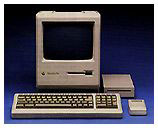 Notice how much memory you have installed. If you
have a Mac Plus, SE, or Classic, which all feature 8 MHz 68000
processors, the maximum RAM is 4 MB. If you don't have 4 MB of
memory, that is the first thing you should get. (It's cheap, don't
worry.) If you have 4 MB, you are perfectly capable of running
System 7, which you can get for free from Apple's website (links here). If you have a Plus, SE, or Classic,
do not use 7.0.1. Make sure you download version 7.0. If you are
using a Plus or SE, make sure it is the 800K disk version. (These
models can run System 7.1 or 7.5-7.5.5, although they tend to take
up a bit more memory than 7.0. dk)
Notice how much memory you have installed. If you
have a Mac Plus, SE, or Classic, which all feature 8 MHz 68000
processors, the maximum RAM is 4 MB. If you don't have 4 MB of
memory, that is the first thing you should get. (It's cheap, don't
worry.) If you have 4 MB, you are perfectly capable of running
System 7, which you can get for free from Apple's website (links here). If you have a Plus, SE, or Classic,
do not use 7.0.1. Make sure you download version 7.0. If you are
using a Plus or SE, make sure it is the 800K disk version. (These
models can run System 7.1 or 7.5-7.5.5, although they tend to take
up a bit more memory than 7.0. dk)
If you have a Macintosh SE/30,
which has a 16 MHz 68030 processor and a 68882 FPU, you can have up
to 128 MB of memory! The SE/30 can run up to System 7.5.5, and if
you have at least 8 MB of RAM and an 80 MB hard disk, I would
install 7.5.3, which as well can be obtained for free from Apple's
website. However, you will notice that the startup screen on
systems above 7.5 do not look very nice in black and white. This is
why I try not to install anything above 7.5 on a compact Mac.
If you have a Classic II,
which features a 16 MHz 68030 processor (and room for an optional
68882 FPU), the maximum amount of memory is 10 MB. It can run up to
Mac OS 7.6.1, but I don't recommend it. If you do not have at least
4 MB of memory, make sure you buy the extra RAM. The Classic II
shipped with system 7.0.1. Chances are good that you still have
that installed, which is fine for most uses. If you have 10 MB of
memory and at least an 80 MB hard disk, upgrade to System
7.5.3.
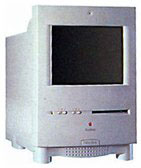 If you have a Colour Classic, which, like the Classic
II, features a 16 MHz 68030 (with room for an optional 68882 FPU),
you know that they are a bit bigger, more modern looking, and have
a 10" colour screen. The Colour Classic also shares a lot with the
Macintosh LC II, including the LC PDS
slot, which enables you to install accelerators or ethernet cards
(or both, with the Sonnet Presto
Plus). On the Colour Classic, the maximum memory is 10 MB. The
Colour Classic shipped with System 7.1 and enabler 401. If you have
4 to 8 MB of memory, stick with system 7.1. If you have 10 MB and
at least an 80 MB hard disk, go with 7.5.3. Even though it can run
up to 7.6.1, like the Classic II, I don't recommend it.
If you have a Colour Classic, which, like the Classic
II, features a 16 MHz 68030 (with room for an optional 68882 FPU),
you know that they are a bit bigger, more modern looking, and have
a 10" colour screen. The Colour Classic also shares a lot with the
Macintosh LC II, including the LC PDS
slot, which enables you to install accelerators or ethernet cards
(or both, with the Sonnet Presto
Plus). On the Colour Classic, the maximum memory is 10 MB. The
Colour Classic shipped with System 7.1 and enabler 401. If you have
4 to 8 MB of memory, stick with system 7.1. If you have 10 MB and
at least an 80 MB hard disk, go with 7.5.3. Even though it can run
up to 7.6.1, like the Classic II, I don't recommend it.
Now that your compact Mac is up and running, you probably want
to know what programs are useful. I like Microsoft Word 5.1a for
word processing. It is stable, fairly quick, and only requires 1 MB
of memory. It is also readily available at many used software
places, and it can often be found at flea markets for several
dollars. You can also use Microsoft Excel 4.0 and PowerPoint 3.0
without a problem.
For those of you who don't like Microsoft products, AppleWorks 5
works very nicely on an SE/30, Classic II, or Colour Classic. It
does require a 68020 processor and System 7, so it will not work on
a Mac Plus, SE, or Classic, although ClarisWorks 3 will.
Plug in a modem, install MacTCP, and you can have a nice little
computer to check your email or the local weather. Eudora 1.5.4
works fine on an SE/30, Classic II, or Colour Classic. Internet
Explorer 2.1 or Netscape 1.1.2 work great on those computers as
well.
If you have a Plus, SE, or Classic, you can probably still use
Eudora 1.5.4, but Internet Explorer or Netscape will not work.
Check on the internet for a copy of NCSA Mosaic.
In terms of games, utilities, and other things, there are some
great classic game sites out there. You can start with the Low End Mac links page. MacAddict has some downloads of
utilities, games, and some other programs. If you subscribed to
MacAddict for a long time, a lot of older versions of "The Disc"
have a lot of great stuff for compact Macs. C|net's download.com has a ton of software,
but they don't give very clear system requirements, and it is easy
to download something that requires a 68030 processor by mistake,
hoping to use it on your Mac Plus.
If you really demand speed, don't throw that compact Mac away!
Give it to a child. It's amazing what they can do with KidPix and a
Mac SE! If you don't have a child, try to donate it to a local
school - they may need computers.
If no one you know of will take it, see if anyone wants it on an
email list. You can start with Low End
Mac's extensive collection, which even includes a list just for compact Macs. There is
always someone out there who can use a compact Mac.
Low End Mac is an independent publication and has not been authorized,
sponsored, or otherwise approved by Apple Inc. Opinions expressed are
those of their authors and may not reflect the opinion of Cobweb
Publishing. Advice is presented in good faith, but what works for one
may not work for all.
unless otherwise noted. All
rights reserved. Low End Mac, LowEndMac, and lowendmac.com are
trademarks of Cobweb Publishing Inc. Apple, the Apple logo, Macintosh,
iPad, iPhone, iMac, iPod, MacBook, Mac Pro, and AirPort are
Additional company and product names may be trademarks or
registered trademarks and are hereby acknowledged.
: We allow and encourage links to
any public page as long as the linked page does not appear within a
frame that prevents bookmarking it.
Email may be published at our discretion unless marked "not for
publication"; email addresses will not be published without permission,
and we will encrypt them in hopes of avoiding spammers. Letters may be
edited for length, context, and to match house style.
: We don't collect personal
information unless you explicitly provide it, and we don't share the
information we have with others. For more details, see our



