Over the summer, I managed to get an iPod nano at the same time as
my MacBook Pro. I
appreciated the nano for it's small size, excellent portability, and
general robustness.
Well, I did, until the screen started having problems.
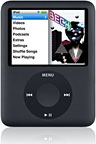 It started
out with me trying to change songs. The screen flashed between it's
regular appearance and a strange inverted one several times. Figuring
it was a software bug, I reset it by holding down the menu and center
buttons. When the Apple logo appeared, there were lines through it, and
the text on the screen was barely legible.
It started
out with me trying to change songs. The screen flashed between it's
regular appearance and a strange inverted one several times. Figuring
it was a software bug, I reset it by holding down the menu and center
buttons. When the Apple logo appeared, there were lines through it, and
the text on the screen was barely legible.
The music still played, and I used it this way for some time. The
next time I looked at the screen, it was completely black. Resetting it
again did nothing, and it was apparent that it was a hardware
issue.
Frustrated, I put it away and went online to file a repair request
order. Since it's only about four months old, it's covered under
warranty and can be replaced by a refurbished unit of the same
type.
The next day I went to check it, and it worked perfectly normally
with no sign that it had ever experienced any problems! Of course, now
I'm in the situation of having a repair request filed and having an
iPod that works intermittently, which I'm afraid to send in only to be
told, "well it works fine right now!"
It's been over a week since that happened, and my nano is still
working fine.
Are modern electronics designed to frustrate? They're littered with
bugs and weird quirks of all types, and it's almost expected that a
$200 device will break within a year. Even my MacBook Pro has several
bugs (for instance, once in a while it will wake from sleep while
closed), and it's only four months old. That should be unacceptable for
a nearly $2,000 notebook.
My Acer, which was under $1,000, has been mostly trouble free, with
the exception of some software incompatibilities (mainly having to do
with buggy drivers). Updating the video card driver and the trackpad
driver seemed to eliminate most of the problems.
The real issue is what people expect from the technology they buy.
The $800 LCD TV you buy today will probably be worth $50 in ten years,
and thus not worth repairing when it stops working. Electronics have
slowly gone from user-serviceable to non-serviceable, and that's
unfortunate.
In our living area at home, we have a 1941 Farnsworth floor model
radio. While not every single part in that radio is user-replaceable,
many of them are. The chassis is tilted outward so that tubes are
easily accessible. Like any old electronic item, however, it is not
bug-free. The pushbutton that allows you to listen to "standard
broadcast" (the AM band) doesn't like to stay in, and a piece of
cardboard is currently employed to hold it in. Sure, it could be
repaired, but this would involve sourcing a highly specific part for an
uncommon radio made by a company most have never even heard of. In the
meantime, the local NPR station comes in just fine.
Fast forward roughly 30 years and take a look at my 1976 Pioneer SX-1050
FM/AM stereo receiver, the second-from-the-top of the line for that
year. It features 120 watts per channel and a built-in (non-graphic)
equalizer, which was something rather unusual at the time. This
receiver is a perfect example of a hybrid between a metal chassis and
printed circuit boards. The power supply is built mostly on the metal
chassis, with one circuit board that can be replaced if necessary.
Given that it is completely solid state and no longer user-serviceable,
it could still easily be serviced by a repair shop. On top of that,
since a good example is still worth $300 or more, paying for a repair
on an old unit is cost-effective.
Granted, computers are a bit different than stereo equipment.
Computers for the past 30 years have been built upon integrated
circuits, and user-servicing has been more difficult - and today's
notebook computers make it nearly impossible.
About five years ago, the screen cable went out on my refurbished
400 MHz Titanium PowerBook G4. It was a
wonderful computer with an amazing screen and convenient form-factor,
but it would have cost nearly $800 for parts and labor to repair it -
and it was only two years old! Why? Simply taking apart the screen and
reassembling it was a multi-hour job, and the best advice the repair
center could give me was "buy a new computer." Sadly, that's what I did
- that time non-refurbished.
Unfortunately, modern audio devices are no different than my
TiBook.
As I sit here listening to Tori Amos' 1991 album Little
Earthquakes on my 2-year-old iPod video with a failing battery, I
can't help but think about how many personal audio devices this album
will outlast. I guess I have the comfort of knowing that I can play it
through the amplifier of my 1976 Pioneer, or, if that should fail, the
1941 Farnsworth - with the built-in auxiliary input that the
forward-thinking designers thought to include.



