
Pismo users with more than 512 MB RAM are having problems installing OS X 10.2, Lapvantage laptop stand inspired by iMac G4, 750 MB Iomega Zip drive, and more.
Except as noted, prices are in US dollars.
- Pismo RAM Bug with Jaguar
- Mac OS X: No Modem Sound on PowerBook G3 Series
- Lapvantage Dome Laptop Stand Inspired by Flat Panel iMac
- EZQuest Ships Boa 48x12x48x USB 2.0 CD-RW Drive
- Iomega Releases Zip 750 MB USB 2.0 External Drive
- PowerBook Zone Offers Special Deal on 40 GB FireWire Drives
- Cooling Fan for PowerBook and iBook Users
- Formac Releases DVI to ADC Conversion Box
- Bargain ‘Books
Pismo RAM Bug with Jaguar
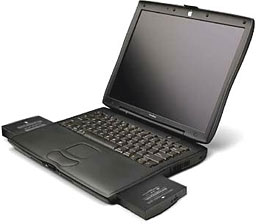 Some Pismo PowerBook owners are reporting difficulty installing OS X 10.2 Jaguar on machines that have been upgraded to more than 512 MB total RAM. While you can install two 512 MB DIMMs in a Pismo for a total of 1 GB of RAM, Apple only officially supports up to 512 MB in two 256 MB DIMMs.
The workaround is to remove any DIMMs of higher capacity than 256 MB during the system installation and then reinstall them once Jaguar is loaded.
I hope this works on my Pismo with 640 MB of RAM.
Mac OS X: No Modem Sound on PowerBook G3 Series
Problem: You cannot hear modem dialing sounds through speakers or headphones on PowerBook G3 Series computers when using Mac OS X. I have personally experienced this on my Pismo.
Products affected: PowerBook G3 Series computers running Mac OS X 10.0 or later.
Apple is investigating the issue, and Knowledge Base Document 106992 will be updated as more information becomes available.
Lapvantage Dome Laptop Stand Inspired by Flat Panel iMac
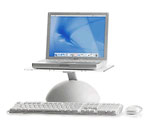
The Plasticsmith, Inc. has announced the release of the Lapvantage Dome, a laptop stand designed to improve computing ergonomics. Inspired by the look of the new iMac, the Dome givesPowerBook and iBook owners the ergonomics and style of a desktop. The Deluxe model is a full-featured desktop enhancement unit that adjusts to your desired height, swivels 360º and sports a polished acrylic platform.
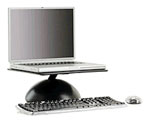
More and more people are replacing their desktop computers with laptops. But the inherent design of laptops violates the most basic ergonomic guidelines. Now laptop users no longer need to compromise on comfort. The Dome lets you show off your laptop while at the same time providing you the ergonomic benefits of optimal viewing height, improved posture andenhanced functionality. Its small footprint saves valuable desk space and allows you to tuck an external keyboard under the platform. This keeps you close enough to your laptop’s screen for comfortable viewing while preventing neck, shoulder, and back strain.
The Dome allows you to tuck an external keyboard up to 3.5″ under the platform. This keeps you close enough to your laptop’s screen for comfortable viewing while preventing back and neck strain.
The faster laptop computers become, the more likely they are to overheat. The Dome comes with gumdrop feet that users attach to the top of the platform. This keeps cool air circulating underneath the laptop.
Using an external keyboard and mouse can help extend the life of your laptop. The Dome keeps your laptop protected from accidental spills and reduces wear and tear on your laptop’s built-in keyboard.
Features:
- Raises laptop to eye level for optimal vantage point
- Designed for an external keyboard and mouse for ergonomic computing
- Includes 3M rubber feet to help keep your laptop running cool
- Deluxe model swivels 360º, vertically adjusts for optimal viewing, and sports a clear, polished acrylic platform
- Support arm made from anodized aluminum
- Manufactured from high quality, durable recycled ABS plastic
The U.S. Center for Disease Control recommends against using laptops as primary computers unless they are used in a way consistent with neutral posture: “The monitor should be placed so the top of the screen is at or just below eye level when seated in an upright position . . . Maintaining neutral postures will reduce stress and strain to the musculoskeletal system.”
Lapvantage can help make your laptop compliant with CDC’s ergonomics guidelines at a fraction of the cost of expensive docking stations and external monitors.
What’s more, you can swivel the Deluxe Dome to your heart’s content, making it easier to plug in peripherals and allowing you to more smoothly turn your laptop screen for presentations or simply showing your work to a colleague. Both models of the Dome come with 3M rubber feet that attach to the top of the platform, keeping your laptop running cooler.
The Dome, even at its maximum height position, supporting a heavy laptop, has been engineered to be exceptionally stable, weight-tested to support 75 lbs.
The Deluxe model comes in black or white, made of super durable recycled ABS plastic with a polished acrylic platform and height adjustment and rotating features, selling for $69.95.
The standard model comes in solid black or white with a stationary base and platform, both also made of recycled ABS plastic, which sells for $49.95. All four are sold exclusively at the Plasticsmith’s online store.
EZQuest Ships Boa 48x12x48x USB 2.0 CD-RW Drive
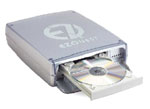
EZQuest is shipping its new Boa 48x12x48x USB 2.0 CD-RW drive. Last month, EZQuest began shipping its FireWireversion of this drive. The drives are priced at $189 for the USB drive and $199 for FireWire. Together, EZQuest claims that these new drives are the fastest, highest-performance drives in the industry. Both drives can burn a 74-minute CD in 1.52 minutes (about 20% faster than 40x drives) and rewrite a 74-minute CD in 6.1 minutes. Other features include 48x read speed (the fastest available on a CD recorder), 2 MB buffer size, and buffer under-run technology (which eliminates under-run errors in fast-write modes). These high-speed drives are ideal for data archiving and desktop publishing, as well as for MIDI and recording studio applications.
“With this USB addition, we now have a full complement of CD-RW drives,” said Ebrahim Zmehrir, EZQuest president. “The Boa 48x USB is packaged in our popular enclosure, which is the highest-quality, strongest, and most functional in the industry.”
Boa CD-RW drive features:
- 48x, 40x, 32x, 24x 8x write speed
- Universal Power Supply.
- 2 standard 6-pin FireWire ports
- 2 MB buffer
- Pro-Mar Case
The Boa CD-RW drives can be used with your home PC or Macintosh computers with FireWire capabilities. Boa CD-RW drives allow you to:
- Backup large amounts of data (up to 800 MB).
- Burn audio CDs using iTunes
- Transfer data from one computer to another.
- Read CDs at 48x.
- Make audio CDs.
- Copy CDs
- Rewrite CDs (using CD-RW media)
- Transfer data from PCs to Macintosh computers
The Boa 48x is housed in a light gray, streamlined case that is fully shielded with 0.6 metal. It comes ready to use and includes a built-in universal 50-watt auto-switching power supply, a cable, and software (CharisMac Discribe for Macs). The Boa 48x is compatible with Win 98SE and later versions, including XP. It is also compatible with Mac USB 1.1, but at a lower speed of 4x4x8x. The Boa 48x has a one-year warranty.
Iomega Releases Zip 750 MB USB 2.0 External Drive
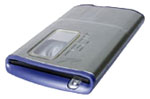
With more speed and more capacity, the new Iomega Zip 750 MB drive and disk provides a fast and durableportable storage solution to back up your important data. Iomega Automatic Backup software makes backup a snap, and Iomega Sync software helps transfer files between computers. Zip 750 MB drives and disks are the smart data storage choice.
Zip 750 MB USB 2.0 External Drive Macintosh System requirements:
- 233 MHz or higher Apple Macintosh computer with certified USB controller. Certified USB 2.0 Hi-Speed add-in PCI controller required for optimum performance.
- Mac OS 8.6 – 9.x (USB 1.x) / Mac OS 10.1 and greater (USB 1.x and USB 2.0 High-Speed)
- Must meet minimum RAM required for your specific operating system
- 16 MB hard drive space recommended, software suite applications will require additional hard drive space
- 4X CD-ROM drive for software installation
The Iomega Zip 750 MB USB 2 version is shipping and sells for $179.95.
A Mac OS X (and OS 9) compatible FireWire version will cost $199.95 and is not shipping yet. The drive will also support Mac OS X compatible Automatic Backup (formerly QuickSync).
750 MB Zip disks will cost $12.49 per disk Iomega.
PowerBook Zone Offers Special Deal on 40 GB FireWire Drives
The PowerBook Zone is trying something new with their stock of FireWire enclosures. Until now, they have offered bare enclosures without a hard drive. Customers mainly used the enclosure to place their PowerBook’s original drive when they replaced it with a larger one.
However, they are now offering a complete package: an external FireWire enclosure with a 40 GB IBM Travelstar 40GN 2.5″ hard drive included.
The package comes with all of the features of the regular enclosures: power supply, padded carrying case, high-quality FireWire cable, and user’s guide, plus a one year warranty on the hardware and a service satisfaction guarantee. If anything’s not to your liking, PowerBook Zone will fix it, guaranteed.
The initial price for this batch of drives is $230, and they will be shipping on August 25th.
Cooling Fan for PowerBook 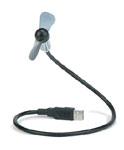 and iBook Users
Kensington’s FlyFan USB Fan is intended to keep your cool, wherever you are using your ‘Book – stuffy meetings, crowded airplanes, and even taxis in Texas won’t wilt you anymore. The FlyFan plugs into a USB port to provide a steady stream of cool air – without draining your battery.
Price: $24.99
Formac Releases DVI to ADC Conversion Box
Formac Electronic Inc. has announced Formac ADConnect, a DVI to ADC conversion box that opens the world of high-quality ADC displays to Macintosh and PC users with DVI connectivity.
“The superior picture quality of ADC flat panel displays such as Apple’s line of LCDs and the Formac gallery displays, have thus far only been accessible through expensive converters”, said Oliver Bergmann, Ph.D., Chief Executive Officer and President of Formac Inc. “The new Formac ADConnect provides the same high-quality conversion at an affordable price.”
In developing the new conversion box, Formac has focused on a cost-efficient design. Unlike other DVI to ADC converters on the market, Formac ADConnect is only one small box (8″ x 3″ x 1.5″), incorporating all necessary connectors and the power supply. Formac’s conversion box combines DVI video, USB, and external power to drive ADC flat panel displays with perfect image quality, and supports the convenient USB ports on the back of ADC flat panel displays. The efficient design allows Formac ADConnect to be priced almost at half the price of competitive products. In addition it reduces cable clutter and makes setup much easier than with conventional converters.
Besides giving Mac and PC owners the option to use ADC displays with a standard DVI interface, Formac’s new ADConnect also allows multiple ADC displays to be connected to the same ADC G4. Formac’s ADConnect is compatible with all G4 Power Macintosh and G4 PowerBooks with built-in DVI interface, as well as with older Macintosh and PCs that have a compatible DVI video card installed.
Formac ADConnect is available in the US through Formac Certified Resellers and Shop Formac! with an estimated retail price of $79.
Bargain ‘Books
There are two different versions of WallStreet running at 233 MHz, the cacheless MainStreet version and the later Series II with a level 2 cache. It’s not always possible to determine from the vendor’s listing which is being offered, so we’ve included links within this paragraph to the two models. The same goes for the PowerBook G4/667 (Gigabit Ethernet/2001) and G4/667 (DVI).
Wegener Media
- iBook 500, 128/10/Combo, refurbished, guaranteed for 60 days, $1,070
- iBook 500, 10/128/Combo, AirPort, $1,125
- iBook 600, 128/20/Combo, refurbished, guaranteed for 60 days, $1,275
- iBook 600, 128/DVD/Combo, AirPort, $1,325
Baucom Computers
- PowerBook 3400/180, 32/1.3 GB/CD/floppy/33.6/12.1″, $289
- PowerBook 5300ce/117, /32/1 GB/floppy/10.4″, $145
Small Dog Electronics
- iBook 600 14″ 256/20/Combo, new $1,499
PowerBook Guy
- PowerBook 3400c/200, 16/2 GB/CD/Floppy/33.6, $499.95
- PowerBook Pismo G3/400, 128/6 GB/DVD/FireWire/14.1″, $1,129.95
- PowerBook Pismo G3/500, 128/10 GB/DVD/FireWire/14.1″, $1,379.95
Power Max
- PowerBook Lombard G3/400, 256/6 GB/DVD, used, $1,239
- PowerBook G4/550, 256/20 GB/DVD, factory refurbished, $1,888
searchword: bookrev20020823
