10 Things New Classic Mac Owners Should Know
Low End Mac Reader Specials
Download Typestyler, still the Ultimate Styling Tool for Internet, Print and Video Graphics. Works great in Classic with a Native OS X Version on the way. Free Tryout: www.typestyler.com
LA Computer Company: LA Computer Company: Specials on AppleCare, Apple Displays, MacBooks, iMac's, MacBook Pros, Laptop and iPod accessories and more. Apple A/C Adapters for laptops starting at $25.00 Call 1-800-941-7654 or Click Here.
OWC: Juice up your iPod w/NewerTech High Capacity Battery from $19.99 Free Installation Videos for most models. Pro Installation Service w/FedEx Shipping From $57.95 (Battery Included). - www.MacSales.com
Mac users can finally play Party Poker for Mac. Not only that, they can also learn how to play PokerStars for Mac.
Laptop Hardware Provided by TechRestore - Overnight Mac & iPod Repairs.
Compare products like desktop computers, laptops, and LCD TVs side by side! All the information and reviews to make the best purchasing decision for a new cell phone GPS products or MP3 players. The Ciao network makes searching products easy for you.
MacPro Memory 667Mhz With Apple Spec Heat Sink 2GB $90 / 4GB $134 / 8GB $264. Click to Maximize your Macs...
- 2005.12.06
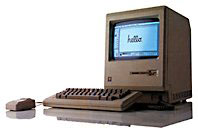
With a nod to 10 Things Every New Mac Owner Should Know over at 123macmini.com, here's a Low End Mac version of what Classic Mac owners should know.
1. 256 Won't Cut It
256 KB of memory may seem a lot to Mac 128k users, but if you're planning on getting some serious work done you'll need at least half a meg.
2. No Need to Defrag
When a Windows PC starts running slowly, the
first thing you'll hear is, "Have you defragmented the hard drive?"
Problems like this are rare if you don't have a hard drive.
3. Closing Unresponsive Applications
One switch solves all problems. It's called the reset button, and it makes you appreciate the "save often" mantra which you may have heard colleagues chanting. That said, you're less likely yo have unresponsive applications - there's only so much that could go wrong on System 6 with Word Perfect 3.
4. Where Did That Window Go?
It's right there. Just keep clicking on the floating menu bar, and it will reappear, courtesy of Windowshade. Either that or you closed it by accident, in which case you really should go and clean your mouse's ball.
5. Updates
Updating your operating system is very simple on Classic Macs. You choose the one you want and install it. Nor surprise updates. It's been years since Apple released any security fixes for any version of the Mac OS other than OS X.
And they say OS X is the future....
6. System Profiler
Want to know more about your Mac? Click on the Apple in the top left of the screen and click on the first link.
Want to know more? You can find a Torx T-15 screwdriver at your hardware store.
7. Exposé
Once you've got that Torx driver, you can make your Mac very "Exposé-d" indeed.
8. Login Items
Just add any programs you want to the Launcher, and they'll be easily accessible at start up. System extensions can easily be installed by dragging them to the Extensions folder - just don't get too carried away or there'll be trouble in store.
9. Eject Optical Media
If you've got a true classic Mac, what you may find problematic is getting optical media in there in the first place. CDs don't tend to fold up neatly to fit in that floppy disk slot - write to the CD manufacturer to complain.
10 Keyboard Shortcuts
Somewhat amazingly, they're just about the same as with any
modern Mac. And if you've come over to the Classic Mac from the
Windows world, just replace "Control" in a shortcut with the
command (Apple) key. Simple.
Recent 'Book Beat articles
- Who cares about Apple's market share?, 08.24. Market share and installed base are not only nebulous, but ultimately unimportant as long as Apple continues to turn a profit.
- Moving files from your new Mac to your vintage Mac, 06.13. Old Macs use floppies; new ones don't. Old Macs use AppleTalk; Tiger doesn't support it. New Macs can burn CDs, but old CD drives can't always read CD-R. So how do you move the files?
- Hands-on with an iBook leads to on-the-spot conversion, 04.26. After years with Windows, the Mac OS provided a mixture of awe at the graphics, surprise that Office runs, amazement that it works so easily with digicams and third-party monitors, and disbeli
- More in the 'Book Beat index.
Recent Content on Low End Mac
- Mac Pro overclocking, Windependence with Darwine, Blu-ray for Macs, and more, Mac News Review, 07.04. Also more on running Leopard on non-Apple hardware, Ubuntu on a Mac mini, the first autofocus webcam with Zeiss optics for Macs, and more.
- Wouldn't life be great with an iSlate?, John Hatchett, Recycled Computing, 07.04. PDAs and smartphones are too small for some tasks, full-fledged Tablet PCs are overkill, and ebook readers are too limited. Apple has the tech to own this niche.
- Mac of the Day: Blue & White Power Mac G3, Jan. 1999 - The most colorful Power Mac introduced an innovative 'drawbridge' enclosure.
- List of the Day: SuperMacs is for those using Umax SuperMac clones.
- July 6 in LEM history: 00: 3 user accelerators - 01: SCSI and FireWire Disk Mode - Stick with the Mac - Computers for college - 05: Optimizing OS X performance - Return of the bumper snicker - 06: Can consumer MacBook replace 2 PowerBooks and a ThinkPad? - Vintage Macs with System 6 run circles around 3 GHz Windows PC - Run Windows apps without Windows
- The Macintosh Portable started a notebook revolution, Carl Nygren, Classic Macs in the Intel Age, 07.03. Before Apple introduced the Mac Portable, notebook computers were text-based and ran MS-DOS. Ever since, graphical interfaces have been the norm for laptops.
- More links in our archive.
About LEM | Support | Usage | Privacy | Contacts





