
Introduced as the first sub-$1,000 Macintosh in October 1990, the basic Classic came with 1 MB of RAM, a SuperDrive, and space to mount an internal SCSI hard drive. The hard drive version came with 2 MB of memory and a 40 MB hard drive. RAM expansion was via a 1 MB daughter card with two open slots, which could accept a pair of 256 KB or 1 MB SIMMs. This made memory upgrades far easier than on the Plus or SE, since the motherboard didn’t have to be removed. At the same time, it means you should avoid any used Classic without 2 MB or more memory unless you have a source for the memory card.
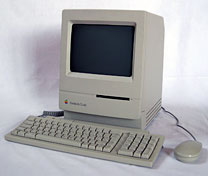
What Apple was thinking releasing an 8 MHz computer so late in the game is beyond me. By 1990, 8 MHz was just too slow for practical use, although that didn’t keep Apple from selling it or people from buying it. At this point, a 16 MHz Classic would have been sweet (see our review of the 16 MHz Brainstorm upgrade in a Mac Plus for details on that).
One new feature on the Classic was elimination of the brightness knob. Instead brightness was controlled with the Brightness control panel.
A feature unique to the Classic is the ability to boot from ROM by holding down command-option-x-o at startup. The ROM Disk is called “Boot Disk” and is 357 KB in size. The ROM Disk uses Finder 6.1.x and System 6.0.3 – this combination is specifically designed for the Classic. The only control panels are General, Brightness, and Startup Disk. MacsBug and AppleShare Prep are also part of the System, which loads into 294 KB of the Classic’s RAM. Because this is in ROM, there is no way to add anything to the ROM Disk.
- Got a compact Mac? Join LEM’s Vintage Macs Group or Vintage Macs Forum.
- LEM’s System 6 Group and System 6 Forum are for anyone using Mac System 6.
The Classic was the last Mac to use the 8 MHz 68000 CPU. Looking at all the compromises involved in its design, we label the Classic a Limited Mac.
Color display? Aura Systems made ScuzzyGraph II, a SCSI peripheral that provided 8-color video for people who didn’t want to buy (or couldn’t afford) a Mac II. 1989 cost was $995 to $2,495, depending on resolution.
You can convert a non-working compact Mac into a Macquarium. (Please, don’t even think of converting a working one – you can always find someone interested on the Classic Macs or Vintage Macs lists.)
Details
- introduced 1990.10.15 at $999 floppy only, $1,499 with 40 MB hard disk, 2 MB RAM; discontinued 1992.09.14
- code names: XO, Civic
- Gestalt ID: 17
- Order no.: M0420
- upgrade path: Classic II
Mac OS
- requires System 6.0.7 to 7.5.5
- addressing: 24-bit only
Core System
- CPU: 8 MHz 68000
- ROM: 512 KB
- RAM: 1 MB, expandable to 2 MB with RAM card, to 2.5 MB or 4 MB using 150ns 30-pin SIMMs (cannot use two-chip 1 MB SIMMs)
Performance
- 1.0, relative to SE
- 0.7 MIPS
- 0.37, MacBench 2.0 CPU
- 0.06, Speedometer 4
- see Benchmarks: Mac Classic for more detailed tests
Graphics
- 9″ b&w screen, 512 x 342 pixels
Drives
- floppy drive: 1.4 MB double-sided
- floppy connector on back of computer
- Hard drive: none or 40 MB
Expansion
- ADB ports: 2
- serial ports: 2 DIN-8 RS-422 ports on back of computer
- SCSI ports: DB-25 connector on back of computer
- expansion slots: memory only, requires special card
Physical
- size (HxWxD): 13.2″ x 9.7″ x 11.2″
- Weight: 16 lb.
- PRAM battery: 3.6V half-AA
- power supply: 76W
Accelerators
- MicroMac Multispeed (16, 25, or 32 MHz 68030), optional 32 MHz 68882 FPU
- MicroMac Performer (16 MHz 68030), optional 25 MHz 68882 FPU
- MicroMac Performer Pro (32 MHz 68030), 64 KB cache, optional 32 MHz 68882 FPU
Discontinued accelerators (68030 unless otherwise noted) include the Applied Engineering TransWarp (16, 40 MHz), Dove Marathon Racer (16 MHz), Mobius (25 MHz), and Total Systems Gemini Ultra (33, 50 MHz).
Tips
- Don’t buy a used Classic without the memory expansion board unless you have one available elsewhere.
- If you have less than 4 MB installed, upgrade to 4 MB. You can often find pulled 1 MB SIMMs (removed from other Macs during upgrade) inexpensively.
- Memory permitting, set the disk cache to 128k.
Cautions
- Apple discontinued support and parts orders for this model on 2001.01.01. You may be able to find dealers with parts inventory either locally or on our parts and service list.
- Never connect an Apple II 5.25″ floppy drive to the Mac’s floppy port. Doing so can ruin the floppy controller, meaning you can’t even use the internal drive any longer.
- Macs with black-and-white only displays (1-bit, no grays) may find Netscape Navigator 3 makes it impossible to view some pages and sites. The workaround is to use Navigator 2.
- Reliably supports serial speeds to 19.2 kbps, although default is 9600 bps. May have better throughput at 28.8 kbps despite some dropped and retransmitted packets. Throughput with a 56k modem may be limited. See 56k modem page. For more information on Mac serial ports, read Macintosh Serial Throughput.
Keywords: #macclassic #macintoshclassic
Short link: http://goo.gl/jp3jKE
searchwords: macclassic, macintoshclassic
Online Resources




