For those who remember the Clamshell that I wasusing as a sign-incomputer at school - here's an update!
The Clamshell had three areas that needed to be upgraded before Iwould want to take it on the road.
- More RAM is like Geritol to old computers, and I could go out andbuy a 512 MB chip to speed up things a bit. (About $30.)
- Old laptops have old batteries, and the Clamshell needs to get abrandy new battery. The current (old) battery can start the laptop, butwithin 10 to 20 minutes it dies tragically. ($80 to $120)
- Lastly, it only had a 10 GB hard drive, and that just will not do.($60 and up.)
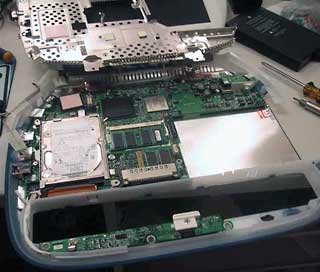
Inside a Clamshell iBook.
Free Things First
I operate on the notion of doing free things first, and I justhappened to have a 30 GB hard drive lying around.
I wanted to install MacOS X 10.4 "Tiger", which comes on DVD, but the Clamshell has aCD-ROM drive. So I removed my Pismo's hard drive andinstalled the 30 GB drive in it, because, the Pismo has a DVD drive andcan run the Tiger installer.
With the 30 GB drive firmly in place in the Pismo, I wiped the driveand partitioned it three ways. I installed a minimal version of Tigeron the first partition, put OS X 10.3 "Panther" on thesecond, and OS 9 on the third.
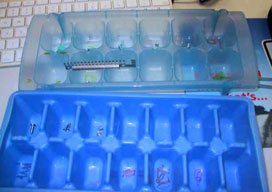 Now came the hard part: I had to put thedrive into the Clamshell.
First, I gathered up my ice cube trays as a home for many, many tinyscrews and, on another computer, launched a browser and went toiFixit.com. This was not the firsttime I had a Clamshell apart, and in the interval, I decided that theG4 iBook is just a little bit more treacherous to take apart than theClamshell. It is still a daunting process. The Clamshell had to betaken apart, the optical drive removed, the screen disconnected,shielding removed, and the computer ended up in pieces (photoabove).
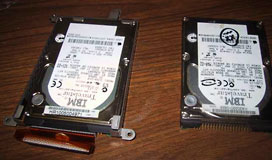 Once you have the old drive out, you can swap in the new oneand button the whole thing back together. Surprise, surprise! AClamshell will boot up "Tiger" and run it.
It is not a speed demon, but if you have modest demands for thisone-of-a-kind laptop, "Tiger" will work fine. I have a "Panther"partition just in case "Tiger" crashes and burns. And an OS 9partition is nice to have, since I am known as "Mr. Legacy" around hereand am called upon to bring old data to the new age from time totime.
As a tease for my next column, I have thought of a new product tomake tons of money for somebody else - and leave me penniless anddestitute. 



