A big part of the "change" in climate change seems to be more
frequent severe weather, including lightning storms here on the Eastern
Shore of Nova Scotia where I live (see map).
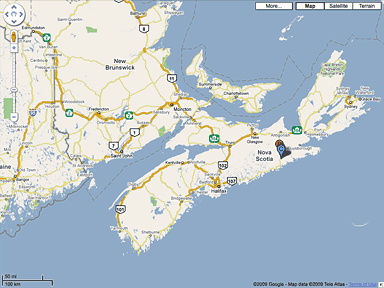
Charles Moore lives in rural Nova Scotia.
Power blackouts are not uncommon here, but were historically most
often fall or winter events caused by windstorms dropping trees and
branches on power lines, heavy wet snow, and ice storms. We're getting
more of that than ever, but spring and summer blackouts, once a rarity,
are becoming so common that it's really a year-round problem.
The last two power outages we've had here have been caused not by
wind but by lightning strikes, electrical storms seemingly both more
frequent and more violent than I recall from years ago. The latest one
this week was a spectacular and noisy bit of weather that parked over
us for several hours.
Power Blackouts More Frequent
 Neither
lightning storms nor power blackouts are unique to this part of the
world - US Department of Energy data indicates that outage frequency
increased throughout the past decade, and a
study conducted by Lawrence Berkeley National Laboratory (Berkeley
Lab) researchers in 2005 for the US Department of Energy's Office of
Electric Transmission and Distribution estimated that power outages and
blackouts cost the US about $80 billion annually.
Neither
lightning storms nor power blackouts are unique to this part of the
world - US Department of Energy data indicates that outage frequency
increased throughout the past decade, and a
study conducted by Lawrence Berkeley National Laboratory (Berkeley
Lab) researchers in 2005 for the US Department of Energy's Office of
Electric Transmission and Distribution estimated that power outages and
blackouts cost the US about $80 billion annually.
The Laptop Advantage
Power outages are one of the reasons why I'm a laptop fan. One is
much better equipped to weather a longish stretch without wall current
with a battery-powered computer than using a conventional desktop
model. (See Notebooks
and Blackouts.)
When the power cuts out, portables instantly shift to battery power,
preserving any unsaved work and allowing you to finish whatever you
were doing gracefully. The same kind of security and ability to carry
on computing with a desktop machine would require a really big (and
expensive) uninterruptible power supply (UPS), which also would add
another layer of complication and clutter - and perhaps cancel out the
price advantage of using a desktop machine.
However, internal battery charges are limited to 6 to 8 hours even
if one is fortunate enough to own one of the latest MacBooks or MacBook
Pros with their built-in, extended life batteries. I can get about five
hours from an extended-life battery in my old Pismo PowerBook, and with three
batteries that will get me through a couple of days with a bit of
conservation prudence exercised, but eventually the batteries are
drained, and if the power isn't back on yet, you need backup.
There are several possible modes.
Blackout Workaround Devices
You can keep a laptop computer going with a cheap power inverter and
a car battery, and you should be able to ride out even a lengthy power
interruptions if you have a means of periodically recharging the
battery.
400 watt UPS
I have a
700 amp rechargeable power pack, which has an automobile
cigarette-lighter type socket into which one can plug 12 volt items,
such as my Kensington 70 watt Auto Air power adapter (unfortunately now
discontinued). I also have a little 300 amp power inverter that
converts 12 volts DC (i.e.: a car battery) into 120 volts AC, but I
prefer to use the Kensington device because the inverter itself draws a
fair bit of charge. Running a laptop computer with this setup involves
stepping 12 volts DC up to 110 volts AC, and then back down to 24 volts
DC with the laptop's AC adapter - a power-wasting process.
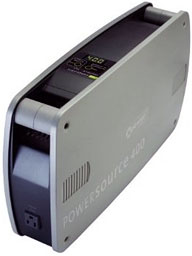 A more
elegant solution is Xantrex Technologies 852-0400 XPower PowerSource
400-watt Back-up Power Solution, which is available from Amazon.com
for $139.99 with free ground shipping (continental US). I don't have
one of these yet, but I'd like to.
A more
elegant solution is Xantrex Technologies 852-0400 XPower PowerSource
400-watt Back-up Power Solution, which is available from Amazon.com
for $139.99 with free ground shipping (continental US). I don't have
one of these yet, but I'd like to.
The PowerSource 400 is claimed to be able to supply up to eight
hours of uninterrupted backup power to devices such as a small TV, a
radio, a laptop computer, or even a desktop computer and LCD monitor,
an inkjet printer, a copier/printer/fax/scanner, an Internet modem, a
VoIP phone, a cell phone, or a cordless phone, allowing you to keep
working and stay productive through power blackouts, avoiding missed
deadlines and so forth.
The PowerSource 400 switches to backup power automatically and
seamlessly when a power outage occurs, so connected devices won't sense
the power outage at all. When grid power returns, it switches them back
to utility power, recharges its internal battery, and lapses into
standby mode until the next outage occurs. The unit incorporates five
AC outlets with surge protection, measures 19" x 4" x 11", weighs 38
pounds, and its styling harmonizes nicely with Apple hardware.
12V DC Power
For even longer outages. the $299 Freeplay Weza Portable
Energy Source is a versatile gadget that can keep you going more or
less indefinitely, so long as you have the stamina to keep stomping on
its actuator treadle to generate electricity. Freeplay says the Weza
can generate enough juice via a cigarette lighter adapter to jump-start
a boat or automobile battery - or to power a wide array of instruments
and accessories, from 25 to 40 watts, depending upon the amount of
effort applied.
The Weza has an internal rechargeable non-spill 12V, 7 Ah lead-acid
gel battery, which can be less laboriously charged from AC (with its AC
adapter) or DC power in about 8 hours. It can be charged from any DC
source that provides 13V to 21V, such as wind turbines or solar panels
for really green, off-the-grid computing.



