Nearly two months now on with wireless broadband, after 13 years of
really slow dialup, the speed is still a novelty. The service has been
faultlessly dependable so far, with no outages or other problems with
the network. We'll see how things go in a Nova Scotia winter's snows
and ice storms.
Pismo WiFi Problems
The only problematical aspect has been not with the network or the
Belkin wireless router, but rather with increasingly erratic and ragged
performance when connected with my old Pismo PowerBook via a Buffalo
WiFi CardBus adapter and AirPort running under Mac OS X 10.4.11. For the first
couple of weeks back in September, this setup worked well, but
currently it's gotten so bad as to be unusable. The connection just
drops out for no apparent reason, sometimes spontaneously restoring
itself - but usually not.
Dialup (I've maintained a minimal dialup service) still works as
well as it ever has, but the wireless LAN, which works superbly with my
Unibody MacBook and
17" PowerBook G4, is
a washout with the Pismo so far.
I've tried the usual easy stuff like running system maintenance
routines with OnyX, and even
applied the OS X 10.4.11 Combo installer again, but no joy. I
suppose a clean system reinstall would be worth a shot, and I may try
that next experimentally on an external FireWire drive, but I've been
ultra busy lately and haven't been able to fit it in.
17" PowerBook
I prefer using the Pismo for drafting and editing away from my
office workstation, but the wireless connectivity problem has me
stymied, so the alternative for now is to use the big 17-incher. That
has other advantages, such as support for OS X 10.5 "Leopard", but as I've
related here previously, I absolutely detest the AlBook's trackpad -
and it doesn't seem to like me much either. It's too bad, because
otherwise the 1.33 GHz G4 unit is a pleasure to use (albeit a bit
heavy).
One workaround I tried was a Logitech Cordless TrackMan Wheel
thumb-actuated trackball, the rationale being that a trackball made
sense for this sort of service, in conjunction with a Laptop LaidBack stand on beds and couches,
because it could remain stationary and didn't require a mousing
surface. It did work pretty well, but I never really acclimatized to
the thumb trackball to the point where it became intuitive.
A Great Mouse
However, this past week I've been using an
Razer
Orochi mobile gaming mouse, which I'm testing for a review, and
finding it to be a much more satisfactory solution than the trackball,
notwithstanding the need for a mousing surface. I dug out an old rigid mousepad platform by Contour
Design that I'd never used much, but it's turned out to be very
useful in this context.
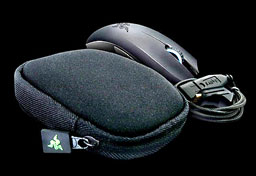 The Orochi is a very satisfying rodent to use. It's also
spectacular-looking, in a Darth Vader-ish way.
The Orochi is a very satisfying rodent to use. It's also
spectacular-looking, in a Darth Vader-ish way.
The Orochi, which is designed specifically for use with laptops and
comes with a protective carry-case, although it would make a fine
desktop mouse as well, is an ambidextrous unit that supports both
Bluetooth wireless or hard-wired USB connectivity - the latter via the
best-looking and most elegant USB cable I've ever seen: lightweight,
extremely flexible, and covered with a black braided fabric-like
texture. It plugs into a port at the mouse end hidden below the scroll
wheel - gold-plated no less - and is a generous three feet in
length.
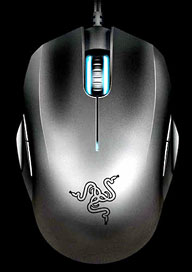 This multimode flexibility is a great idea. For use in desktop
mode, I would generally lean toward wired mode, but for portable use,
wireless is very convenient, and happily the Razer Orochi mouse has
manifested none of the latency lag that afflicts some Bluetooth mice.
Indeed, it is extremely responsive, thanks presumably to its
high-resolution 4000 dpi 3G laser sensor (five times greater than of
standard 800 dpi optical sensors) that offers speedy tracking up to 100
inches per second. That drops to 2000 dpi sensitivity when used with a
Bluetooth connection, and Razer says in order for the mouse to deliver
gaming grade precision, control, and accuracy, you want to go with a
hard-wired connection, although it's the most precise-feeling Bluetooth
mouse I've ever used.
This multimode flexibility is a great idea. For use in desktop
mode, I would generally lean toward wired mode, but for portable use,
wireless is very convenient, and happily the Razer Orochi mouse has
manifested none of the latency lag that afflicts some Bluetooth mice.
Indeed, it is extremely responsive, thanks presumably to its
high-resolution 4000 dpi 3G laser sensor (five times greater than of
standard 800 dpi optical sensors) that offers speedy tracking up to 100
inches per second. That drops to 2000 dpi sensitivity when used with a
Bluetooth connection, and Razer says in order for the mouse to deliver
gaming grade precision, control, and accuracy, you want to go with a
hard-wired connection, although it's the most precise-feeling Bluetooth
mouse I've ever used.
It also still takes several seconds to reconnect after the PowerBook
has been wakened from sleep mode, which I find tedious, as Razer
recommends switching the mouse off when not in use to extend battery
life, which requires a short wait for reconnection, but otherwise it
works extremely well.
Being designed for gaming, the Orochi has four oversized and
very low drag zero-acoustic ultraslick Teflon™ glide pads, which
provide slick and effortless tracking. In fact, it's so low-friction
that if the Contour mousepad isn't level, the mouse easily slides off
due to gravity.
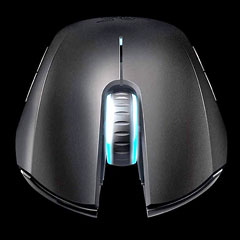 It's not a super-light mouse, being as it carries two AA cells
when used in Bluetooth mode, but it's definitely not heavy, weighing in
at 21 grams less on my postage scale than my slightly physically
smaller
Logitech V550 wireless laptop mouse, which also carries two AA
batteries. Few, if any, mice I've ever used track more effortlessly
than the Orochi, and it's It's a nice size (smaller than some of
Razer's other gaming mice, but not a mini-mouse by any means), has a
comfortable feel and good positive yet light button action. My only
real criticism is that the detents on the scroll wheel are too
pronounced and there's no freewheel option for the wheel.
It's not a super-light mouse, being as it carries two AA cells
when used in Bluetooth mode, but it's definitely not heavy, weighing in
at 21 grams less on my postage scale than my slightly physically
smaller
Logitech V550 wireless laptop mouse, which also carries two AA
batteries. Few, if any, mice I've ever used track more effortlessly
than the Orochi, and it's It's a nice size (smaller than some of
Razer's other gaming mice, but not a mini-mouse by any means), has a
comfortable feel and good positive yet light button action. My only
real criticism is that the detents on the scroll wheel are too
pronounced and there's no freewheel option for the wheel.
That latter issue had me pondering giving the Orochi Mouse a 3.75
out of 4 rating, but I'm so pleased with how this mouse has addressed
my pointing input problem with the 17" PowerBook that I'm going to give
it a full 4 out of 4. It's really a pleasure to use.
The Razer Orochi mouse requires Mac OS X 10.4 and later or Windows
XP and later. It retails for $79.99, which is at the high end for
computer mice these days, but this is a very high-quality, advanced
engineering mouse. In general, even though I'm not a gamer myself, I
often find gaming gear the cream of the crop for general use as well.
Purchase Link




