How to Upgrade Your eMac without Cracking the Case
- 2008.07.14 - Tip Jar
Popularity: ![]()
![]()
![]()
Low End Mac Reader Specials
Memory To Go Special: New 2008 iMac 2GB $42 / iMac Intel Core2 DUO & MacBook Pro 2GB $36 - 1GB $20. MacPro 8 Core Memory 4GB kit $154 / 2GB kit $94 -- Free shipping available.
Download Typestyler, still the Ultimate Styling Tool for Internet, Print and Video Graphics. Works great in Classic with a Native OS X Version on the way. Free Tryout: www.typestyler.com
LA Computer Company: Specials on AppleCare, iMac's, Apple Batteries and Apple A/C Adapters. Also Great prices on Used Apple Computers. Call 1-800-941-7654 Click Here.
OWC: Juice up your iPod w/NewerTech High Capacity Battery from $19.99 Free Installation Videos for most models. Pro Installation Service w/FedEx Shipping From $57.95 (Battery Included). - www.MacSales.com
Mac users can finally play Party Poker for Mac. Not only that, they can also learn how to play PokerStars for Mac.
Laptop Hardware Provided by TechRestore - Overnight Mac & iPod Repairs.
Compare products like desktop computers, laptops, and LCD TVs side by side! All the information and reviews to make the best purchasing decision for a new cell phone GPS products or MP3 players. The Ciao network makes searching products easy for you.
New iMac 800Mhz Memory 4GB $90, 2GB $45 - Click to Maximize your Macs...
In a recent article, Carl Nygren talked about upgrading his eMac for better performance, including gaming and watching HD (high-definition) movies.
First, let me say I agree with his assessment of the eMac as an excellent and still-viable platform for, well, almost everything a person would want to use a computer for - word processing, web surfing, email, instant messaging, listening to music and watching movies, and running the iLife suite of applications. Given that the later models can run Leopard - and very well - says a lot about their staying power - and their viability even in the office. I say this as a man who once used an eMac much like Carl's as his only Mac, even going so far as to put Garage Band and iMovie through their paces.
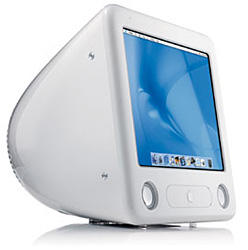
However, there's something that Carl doesn't talk about in his article that I think needs some consideration - one should not open an eMac lightly. This isn't some generic, built-to-be-opened beige box PC we're talking about, but a finely tuned and tightly engineered all-in-one system, and there are some rules that must be followed. It's not the walk in the park that Carl makes it sound like when he refers to replacing the hard drive or installing that SuperDrive that he scored in his Dumpster Dell. He denigrates his own abilities as a technician when he glosses over the steps he took to ensure a successful upgrade.
That being as it may, there's no reason to run in terror from an eMac, even one as in need of an upgrade as the one that Carl started with.
The memory is the easiest upgrade. A single Phillips head screw is all that separates you from the memory compartment on the underside of the eMac. It's about as easy an upgrade as you get on an all-in-one computer system, and I highly advise it. Earlier eMacs used PC100 and PC133 RAM, which you can get for a song nowadays, and even these higher end units are thrilled with fairly common and similarly cheap PC2700 DIMMs. An upgrade from 256 MB of RAM to 1024 MB or more is cheap, easy, and will make you think you somehow managed to upgrade the processor along with the memory, because your system will react so quickly.
Where we go our separate ways is in upgrading the hard drive and optical drive. Again, when I began to use my eMac, it was my only Mac, and as such, I was loath to take the shroud off and tinker, lest I break something irrevocably.
But you have to consider: the eMac is nothing more than an iMac G4 made cheaper for the education market by the use of a CRT instead of an LCD. Like every iMac ever made, it is designed to be upgraded from the outside by judicious use of FireWire and USB.
My eMac has a 40 GB internal drive, just like Carl's. It's not fast (5400 rpm, if I recall correctly) and tends to fill up quickly if you start adding digital media. Because of that, I pulled a 300 GB drive from an old PC server I was no longer using, stuffed it into a powered USB hard drive case, and plugged it in. With a little Disk Utility tinkering, I had increased my storage space by 750% and never once had to crack the case.
On a similar bent, when I decided that I needed the ability to do more than just read DVDs with the built-in Combo drive, I hooked up a Sony FireWire DVD±RW drive. Again, the system recognized it immediately, and I had the ability to burn DVDs at need. The nicest part about this arrangement is that I can unplug and put the drive away when it isn't needed, which is, honestly, most of the time.
Hmm - I think I begin to understand the allure of the MacBook Air and it's external optical drive now.
We have similarly upgraded systems, Carl and I - his with a bit more memory, mine with a bit more hard drive space. Our eMacs are running the same OS and enjoying the same performance increases and increased lifespan because of it. And while replacing the internal components does leave additional ports available for future growth, and a faster internal drive does allow for better response from the operating system, adding capacity with external devices gives me similar results without the technical headaches.
And they say that Apples are hard to upgrade. Here are two different
ways, both of which worked fantastically and made a five-year-old
computer run a nine-month-old operating system and still support
software that was released yesterday.
Editor's note: I have the same eMac as Carl and Jason. After replacing the internal hard drive once, I swore it off. My preference is for an external 7200 rpm FireWire drive, which isn't only fast, but also easy to move from one Mac to another. Also note that only the last two generations of eMacs support USB 2.0, making FireWire a far better choice on the first and second generation models. dk

Recent Macs in the Enterprise Columns
- Debunking Mac Myths Is Not the Way to Get Apple in the Enterprise, 08.06. There are other factors at work that keep those with vested interests on the Windows platform. Mythbusting won't change their minds.
- Turn your old Mac into a web server with Linux, Apache, MySQL, and PHP, 07.09. Step-by-step instructions for installing and configuring Linux, Apache, MySQL, and PHP on an older Mac.
- Turn your old Mac into a website server with free open source software, 07.02. By installing Linux without a GUI, your old Mac can dedicate all of its resources to running Apache, MySQL, and PHP.
- What Snow Leopard means for Macs in the enterprise, 06.25. With Exchange and Active Directory support coming in Mac OS X 10.6, two of the big obstacles to Macs in the workplace will be swept away.
- More in the Macs in the Enterprise index.
Links for the Day
- Mac of the Day: Centris 650, Feb. 1993 - The replacement for the Quadra 700 has room for an internal CD-ROM.
- List of the Day: Old Mac MP covers 604-based multiprocessor Macs and clones.
- September 7 in LEM history: 98: Banner exchanges - 00: Tips from the Mac manager - Getting a Mac job - 01: Apple and the gray market - Repositioning the 'Books - 04: Tray loading iMac a good choice for OS X? - Pismo CPU upgrades - 06: Mac mini value equation - Setting up a Mac Classic II - Putting the Intel transition in perspective - 07: Region free DVD viewing, - My Newton - Solving Mac disk and hardware problems - 2 apps every MacBook should have
Recent Content on Low End Mac
- Anticipation: New iPods Now, New Macs Later, Kev Kitchens, Kitchens Sync, 09.05. The season of new iPods is at hand, but new Macs may wait until 2009.
- Buy a MacBook Now or Wait?, MacBook touch Patents, Samsung X360 Takes on MBA, and More, The 'Book Review, 09.05. Also 20 years of portable Macs, data backup and preservation, universal U-Charge battery charger for Mac 'Books, bargain 'Books from $150 to $2,699, and more.
- Listen to Just the Music with the V-Moda Vibe Earbuds, Tommy Thomas, Welcome to Macintosh, 09.05. Well built, the noise canceling earbuds will let you hear all the nuances of your music without letting through background noise.
- Source of iPhone 3G Problems, Army Uses iPods as Field Translators, Gains with Business, and More, iNews Review, 09.05. Also UK bans iPhone ad as 'misleading', iPhone password easy to bypass, GM to offer radios with USB in 2009 models, weather tracking software, and more.
- Macs Gain Ground in August, Consumers Most Likely to Buy Macs, LaCie USB Speakers, and More, Mac News Review, 09.05. Also migrating Time Machine to a new drive and two new keyboards from Logitech.
- Best iPod touch Deals, Low End Mac Deals, 09.05. Refurb 8 GB, $199; new, $284; refurb 16 GB, $299; new, $370; refurb 32 GB, $399; new, $453.
- Best 15" MacBook Pro Deals, Low End Mac Deals, 09.05. Used 1.83 GHz Core Duo, $999; 2.16, $1,125; new, 2.2, $1,450 after rebate; refurb 2.4, $1,699; 2.5, $1,999; 2.6 Santa Rosa, $1,849; rebates on new.
- Best iMac G4 Deals, Low End Mac Deals, 09.05. Used 15" 700 MHz CD-RW, $279; 800 Combo, $300; 1 GHz $390; 17" 800 MHz SD, $439; 1.25 GHz, $449; 20", $569.
- Overclocking a Mac mini Got Me Hooked on Souping Up Macs, Adam Geller, My First Mac, 09.04. Stories of hot rodding iBooks, G3 iMacs, and PCI Power Macs on the cheap.
- Apple Will Not Abandon Optical Drives, the Mac Drought, Purposeful Mac Acquisition, and More, Dan Knight, Low End Mac Mailbag, 09.04. Also Mac OS X 10.5 on a G4-upgraded Blue & White G3 and problems using a flat panel display with a Quadra 700.
- Only Leopard Runs Routine Maintenance Tasks after Startup or Waking from Sleep, Charles W. Moore, Miscellaneous Ramblings, 09.04. Mac OS X 10.5 runs routine system maintenance scripts as soon as possible after starting up or waking up your Mac. Earlier versions of OS X do not do this.
- Tomorrow's Solid State Drives and Notebooks, Dan Knight, Mac Musings, 09.04. Flash drives are great but have some shortcomings. Some thoughts on building better SSDs and notebooks to use them.
- Best Mac mini Deals, Low End Mac Deals, 09.04. Used 1.25 GHz G4 SD, $549; 1.42 Combo, $409; new 1.83 Core2 Combo, $569 after rebate; 2.0 SD, $769 after rebate.
- Best 12" PowerBook G4 Deals, Low End Mac Deals, 09.04. Used 867 MHz Combo, no APX, $490; 1 GHz, $550; SuperDrive, $625; 1.5 GHz w/o APX, $660; w/APX, $675.
- Best 17" PowerBook G4 Deals, Low End Mac Deals, 09.04. Used 1 GHz, $779; 1.33 GHz, $799; 1.5 GHz, $859; 1.67 GHz, $910.
- 11 Mac Browsers Compared, Simon Royal, Mac Spectrum, 09.03. The latest versions of Internet Explorer, Opera, Safari, Shiira, iCab, Radon, Firefox, Netscape Navigator, SeaMonkey, Flock, and Camino tested in Leopard.
- Save Internet Radio, USB and Hard Drives, Hardware Manufacturers vs. Linux, and More, Dan Knight, Low End Mac Mailbag, 09.03. Also Mac won't book after cleaning, newer versions of OS X improve wake from sleep, downgrading to OS 8.6, unreadable pages on Low End Mac, and more.
- Another Free POP3 Provider, Recharging a Dead PRAM Battery, Current Kanga Value, and More, Charles W. Moore, Miscellaneous Ramblings, 09.03. GMX email now available in US, Panasonic UJ-841S drive won't burn discs, restoring a dead PRAM battery in a Pismo, and thoughts on Kanga value today.
- Best eMac Deals, Low End Mac Deals, 09.03. Used 700 MHz Combo, $120; 1.25 GHz SuperDrive, $150; 1.42 GHz, $349.
- Best Mac OS X 10.5 'Leopard' Deals, Low End Mac Deals, 09.03. Mac OS X 10.5, single user, $99; 5 users, $140; 10.5 Server, 10 users, $395; unlimited, $850.
- Best MacBook Air Deals, Low End Mac Deals, 09.03. Refurb 1.6 HD, $1,499; new, $1,690 after rebate; refurb 1.8, $1,699; new, $1,919 a/r; refurb 1.6 SSD, $2,099; new, $2,294 a/r; refurb 1.8, $2,299; new, $2,400 a/r.
- Psystar Strikes Back, Countersues Apple, Frank Fox, Stop the Noiz, 09.03. Psystar is trying to paint Apple as a monopoly and force it to license the Mac OS.
- More links in our archive.
About LEM | Support | Usage | Privacy | Contacts


