
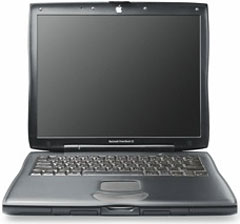
In 2005, I decided I needed a laptop computer. After using a Mac for a number of years, my first choice would have been an Apple laptop, but funds were tight, so I opted for a Windows machine. However, using Windows on a daily basis got the better of me, and I decided I had to have a Mac.
After searching eBay, I settled on a Lombard PowerBook G3.
The Lombard is often forgotten, sandwiched between the WallStreet and the Pismo, both seemingly getting more attention.
Changes
Introduced in May 1999 and discontinued in February 2000, Lombard was a major update to it’s WallStreet/PDQ predecessor. It was the first New World PowerBook, the first PowerBook with USB, and it was 20% lighter with longer battery life. Ethernet was also sped up from 10Base-T to 10/100Base-T. It did, however, have only one PC Card slot, as did all PowerBook G3 and G4s after it (except the 12″ PowerBook G4, which had none) as opposed to previous PowerBooks having two.
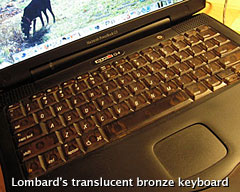 The Lombard was a huge step up from the WallStreet. The WallStreet was always a large beast with a keyboard that looked like it should be on a desktop. The Lombard was the first PowerBook to feature the slim, flat keyboard keys.
The graphics memory, which was always a hindrance on a WallStreet at 2 MB or 4 MB, went to a massive 8 MB on the Lombard, which was fantastic, considering it was powering the same size screen with same 1024 x 768 resolution. It made the whole Mac OS X experience so much better.
Lomdard was available in 333 MHz and 400 MHz models. I had a 333 MHz originally, and the difference between the two is negligible. The 400 MHz has an MPEG-2 decoder built into the hardware for playing DVDs in pre-OS X versions of the Mac OS, while the 333 MHz doesn’t. However, the 333 MHz can play DVDs in OS X because of the software decoder built into the operating system.
Good for OS X
The Lombard handled Mac OS X so much better than it’s predecessors. While it was only officially supported through Mac OS X 10.3.9 Panther, I successfully installed 10.4 Tiger on both of my Lombards.
While relatively low spec’d compared to the iBook G3 models, Lombards performed very well, outpowering the bottom-end 500 MHz iBooks. However, when its successor, the Pismo PowerBook, came out, the Lombard lost its glory.
Pismo features a massive change. It was the first PowerBook to have an AirPort slot for internal WiFi. It had a built-in FireWire port and officially supports Mac OS X 10.4 Tiger. It came with a DVD-ROM drive as standard, had a 100 MHz system bus, and maxed at a whopping 1 GB RAM vs. the Lombard’s 66 MHz system bus and 512 MB RAM ceiling.
But that is enough putting down of the Lombard.
I have had a WallStreet, two Lombards, and a Pismo, in that order, and while a maxed out Pismo with a superfast hard drive squashes a Lombard easily, I still regard my Lombards with some fondness and miss them.
After my Pismo, I moved to a 400 MHz Titanium PowerBook G4 and now have an 867 MHz Titanium PowerBook G4. While I love them and they obviously have a lot more power, I still miss the form factor, build quality, and general feeling of ruggedness you got from the G3 PowerBooks.
Getting the Most from Lombard
A lot of my articles were written on getting the best out of a Lombard.
I did a lot of upgrading to my Lombard, including fitting a slot-loading SuperDrive.
The Lombard doesn’t have an AirPort slot, but it does have a PC Card slot, which you can pop a WiFi card into. Some cards even use the same chipset as Apple’s AirPort Card, so OS X sees no difference. You can even make it AirPort Extreme compatible, giving you faster speeds and better security. Check out which cards will work in a PowerBook G3 or G4 PCMCIA slot.
For a guidance on what to do to your Lombard – and other G3s – check out my article, Getting the Most from Your G3 Mac.
If you are looking for a neat and robust portable Mac laptop for simple surfing, emailing, and office work, the Lombard is just the ticket. The Pismo is great, but it carries a higher price tag vs. the moderately priced Lombard.
A 400 MHz Pismo with 512 MB of RAM will perform only slightly better than a 400 MHz Lombard with 512 MB of RAM.
I loved my Lombards, but they always seem to be forgotten. Grab one and enjoy the experience.
Follow Simon Royal on Twitter or send him an Email.
Like what you have read? Send Simon a donation via Tip Jar.
keywords: #lombard #powerbook #powerbookg3 #techspectrum #simonroyal
short link: http://goo.gl/aEjzSW
searchword: lombard
