As you may have read in my
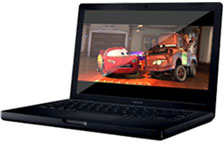
previous column, I have acquired a black 2.2 GHz MacBook. I am
going to review it here for all you Low End Mac readers!
To start with, the recent release of the MacBook Air has stolen some of the
MacBook's thunder. The truth remains, however, that the plain old
MacBook is the Apple notebook of choice for many students.
Under the Hood
The black MacBook that I am reviewing is the top-of the-line model,
selling for $1,499. I got it used; it's about two months old. As I
write this, new
models with the Penryn processors are replacing the 2.0 GHz and 2.2
GHz models with 2.1 GHz and 2.4 GHz ones.
My MacBook has a 2.2 GHz Intel Core 2 Duo processor with 4 MB of
L2 cache and an 800 MHz frontside bus. It has 1 GB of 667 MHz DDR2
SDRAM and a 160 GB 5400RPM Serial ATA hard drive. The display is a
13.3" 1280 x 800 (WXGA) unit with a glossy finish. A 1.3 megapixel
iSight webcam resides in the top center of the lid.
It has a full-size "Chicklet" keyboard, which is sealed. The
individual keys protrude from the top case. It has media and
application buttons, such as fast-forward, rewind, pause/play, and a
set of three volume adjustment keys (up, down, and mute). There are
also keys to adjust brightness and keys for Exposé and
Dashboard.
It has a slot-loading dual-layer SuperDrive on the right side of its
inch-thick case. On the other side, it has its MagSafe power connector,
a Mini-DVI port, a FireWire 400 port, two USB ports, a TV/media jack,
and a headphone port.
Design
The MacBook is crammed into an inch-thick matte black case. There
are no design frills to speak of, a refreshing change from Dell's and
all of the other PC vendors' designs with pinstripes and protrusions
and . . . well, you get my point.
On the top resides a glossy white Apple logo, which glows with light
from the display's backlight. Apple notebooks have been doing this in
some form since the original WallStreet PowerBook G3 in
1998. When you open the lid, two prominent features appear: A roomy,
but not exactly expansive, keyboard, and an enormous trackpad with a
single button.
Unfortunately, the beautiful black casing attracts fingerprints like
the plague. It's a good idea to wipe off your MacBook with a slightly
damp cloth each day. (Note to people considering a white MacBook: These
things don't apply to you. Your MacBook will just resemble a squashed
iBook G4.) While we're on the subject of color, it seems that the white
MacBooks are seen less in the study hall and at Starbucks. This could
be due to the fact that there are simply less of them produced, or the
fact that most black MacBook owners don't frequent such establishments
(i.e., they are "professional" users).
On that topic, the white MacBook certainly does look more juvenile
than the black one. In fact, I think that Apple may want to use the
black finish on their MacBook Pro; it's about time for a case redesign
on those.
Ergonomics/Usage
The keyboard on the MacBook takes some getting used to. I migrated
to this machine from an IBM ThinkPad, which has a keyboard with
out-of-this-world tactile feedback. I type at about fifty words per
minute on the MacBook, using my tried and true touch method. I am
trying to convert myself to not looking at the keyboard when I type, so
if there is a laughably juvenile mistake in this column, please forgive
me. Tactile feedback on the MacBook keyboard is decent. It is not as
progressive in travel as some are, however. The keyboard makes a wimpy
"click" sound when typing.
The palmrests I find to be just long enough for comfortable use.
There is a slight disparity in the edges of the casing, so the angles
chafe my wrists somewhat. Nothing major, but a slight annoyance.
The screen is comfortable to look at, but it's insanely bright on
the top setting, I suggest that you change it to a few notches short of
maximum.
The trackpad has a slightly smoother-than-normal texture to it, but
it is not at all uncomfortable. The expansive trackpad button is very
firm to the press, which is why I have set up tap-to-click in System
Preferences.
Performance
The MacBook is speedy, to say the least. It is the fastest computer
I have ever owned, my previous fastest being a 2 GHz Intel Core Duo.
Speaking of which, according to Geekbench the MacBook gets a score of
2907 (that's when plugged in and set to "Normal Performance"). I would
assume that it would score around a 3000 when set to Maximum
Performance, and I would, too, if it weren't for the fact that I am
currently on Interstate 40, running on battery, with the nearest
unencrypted router probably 10 miles away.
It runs Apple's latest-operating system, Leopard, with ease. With
1 GB RAM, running Garageband, Word, a Web browser, and iTunes at
the same time is about as far as I dared venture into the world of
multitasking. I hope to buy 4 GB soon.
Applications launch within a few bounces of the icon in the Dock,
and overall performance in them is great. I have only used it with a
copy of Photoshop CS and iLife '08. This review is being written in
Office 2004.
And speaking of performance, battery life is rated at six hours. I
can get around six hours at half brightness while typing continuously
with both AirPort and Bluetooth on. Currently, with four hours
remaining on the battery, I am at 75% charge. Brightness is three
notches from the top and both AirPort and Bluetooth are on.
Unfortunately, it does get very hot after intensive use. I will keep
it on a laptop stand for times when I am editing sound and images.
Pros
- Great display
- Terrific battery life
- Wonderful glossy screen
- Good color reproduction, as far as I know, but I'm not really a
designer
- Nice keyboard
- Decent amount of ports
- Looks incredibly beautiful
- iSight camera
- Light and thin
- Attracts admiring stares....
Cons
- Runs hot
- Sharp edges
- Attracts fingerprints like exit strategies attract criticism
- Attracts admiring stares....
I would recommend this notebook to anyone wanting to switch to Mac
or simply drag themselves out of the PowerPC era. There is not really
much more to say on the subject. There are a couple of ergonomic flaws,
but the benefits outweigh the flaws by a factor of ten to one.
Overall rating: 3-1/2 out of 4 LEMs.

Benjamin Zalutsky is a recent Mac convert.




