If you've read Getting Things Done:
9 Online Task Management Solutions, you know that I'm on the hunt
for a new way to manage my digital "Getting Things Done" task and
project planning. I was using Kinkless GTD, but a bug in that system
caused me to lose trust in it as a "trusted system". Because I want to
be "mind like water", I need to find another option soon.
In part one, I outlined my preferred criteria and looked at the
Web-based and browser-based systems. This time I'll look at
applications that install locally on my Mac.
Ultra-thin Local Applications
ZooDo (free) is a
basic task-creator for iCal. It's a stand-alone application, but it
serves as a "collection bucket" of sorts. Certainly helpful in the
gather/collect stage of planning, ZooDo is particularly friendly to
those who prefer keyboard interaction to a mouse/keyboard combo. Some
folks have brainstormed about how this makes GTD easier, particularly
with regard to further integration with Backpack (see Chris Messina's
Zoodo
for GTD).
High Priority
(single user, $6; family license, $12; business, $60) is a system
preference pane that creates a menu item in the menu bar. With High
Priority, you can see and update your iCal tasks, but not add to them.
I've mentioned High Priority before - see Managing Tasks with iCal's To-Do
Feature.
Another utility similar to High Priority is iClock, which
also brings a host of new services and functions with it. iClock
doesn't have iCal interaction, but it does offer a menu bar-based
method of managing task lists.
To-Do X ($15) is
another basic task manager. To-Do X is another stand-alone application,
and while it will import tasks from iCal, it has no further interaction
with it. To-Do X offers a number of good features for a task manager,
including categories (which could double as "contexts"), priorities,
and attached notes.
Stapler (€7.50
shareware) is a combination of a basic notepad and a to-do list
manager. It's very simple in orientation: creation date, notes, and a
checkbox for completed items. Tasks can be color-coded based on a
low-level preference setup. Stapler is not really designed for GTD, but
it could work for the right user.
If I were looking for a straightforward "To-Do" manager, one of
these might be sufficient, and all of them are affordably priced. It's
certainly conceivable to combine several of these - maybe in
conjunction with one of the online or browser-based systems - to have a
complete GTD system.
What I want, though, is an all-in-one application to manage my tasks
that will also interact with iCal bidirectionally - I want to pull
tasks from iCal and also update iCal's task list within the
application. And I want to be able to organize by context, priority,
and project, accordingly to the GTD system.
For what I'm looking for, none of these "thin" applications suit my
needs and preferences.
Robust GTD-oriented Task Management Applications
Midnight Inbox
Midnight Beep has been working hard to get Inbox out the door; it's still in
beta, but the release version is on the way with a promised price at
$35 (you can register now, and the beta won't expire). Inbox is
specifically designed to be a GTD application, and thus a top-to-bottom
implementation of the GTD system. What is more, Inbox is a
well-designed application with a beautiful Mac-like interface, and I've
been assured that iCal integration is on the way.
Inbox is sort of a "meta-application": It gathers events and tasks
from iCal, messages from Mail, and other documents, bookmarks, notes,
and other files and allows you to process them using the GTD model:
collect, process, review-plan-do. It gathers them on its own, by the
way, which is both blessing and bane; to build a project from scratch
requires going through iCal, Mail, etc. You can monitor your progress,
archive projects that are completed, and organize your work
patterns.
In a way, Inbox represents your personal David Allen coaching you
through your projects. One thing Inbox gets right that the others sort
of miss: GTD is more than mere task management, and Inbox's "meta"
quality addresses this more thoroughly than any other application for
the Mac. But this is also where Inbox goes awry. I already have systems
in place for much of what Inbox sets out to do; specifically, aggregate
my documents and files according to task. I doubt that Inbox will
surpass DEVONthink
for archiving, reference, and search ability of past and current files,
and it feels like early onset feature bloat because of that.
Inbox was supposed to be at release by now, and the beta still feels
very beta - it has a slightly unfinished quality to it. I think Inbox
looks like it has a lot of potential, and there are lots of great
functions planned for future versions, but it isn't yet to the point
where I'm willing to commit to it. I'll keep my eye on Inbox in the
coming weeks.
Thinking Rock
Thinking Rock is
another stand-alone application - and free at that. Like Inbox, it
follows the GTD model closely, with steps for each of the three main
steps (collect, process, review-plan-do). Thinking Rock has a more
interactive collection process, allowing you to enter all of the items
manually instead of finding them for you (which is also blessing and
bane - after all, manual entry of all of your projects is a lot of work
and sometimes redundant).
One big thing I like about Thinking Rock is that it's easy to enter
lots of new tasks at once: The collection stage as simple as typing a
brief description, then tabbing or hitting return a couple of times to
a new line.
It also has the nuance of being a Java application, making it very
portable: You can install Thinking Rock onto a flash drive and use it
on any computer, any platform. Because it's Java, it doesn't feel
exactly like a Mac app - but neither does it have the clunkiness or
sluggish operation that many Java applications have.
At version 1.2.1, Thinking Rock is established and bug-tested -
something that Inbox has working against it. Still, Thinking Rock felt
a bit buggy to me, and while I like some of its features and setup, I
can't commit to it for my system.
Park
If GTDTiddlyWiki
is getting close to what you're looking for in a GTD solution, Park might be the
final answer. It takes the TiddlyWiki idea and localizes it, plus it
adds on a few more features.
Park is as much a note-taker as it is a task-planner - which, in GTD
parlance, makes sense to a degree. But Park's emphasis on notes doesn't
feel like a task manager to me, and it reminds me of Midnight Inbox's
tendency to reach too far into other parts of my existing workflow,
often making it redundant.
The latest version of Park includes Spotlight support, which could
be huge. Park is free, and it's well-done in its version 1.0 status. It
might be right for you; it's not right for me.
Actiontastic
Another project in beta, Actiontastic,
barely made the "GTD-oriented" list; it's basically a simple task
manager - and an ultra-thin one at that. But it has markers for
categorizing by project or context, which qualifies it as GTD-friendly;
further, the developer openly says that he created it for a GTD
purpose, so I had to include it here in good conscience.
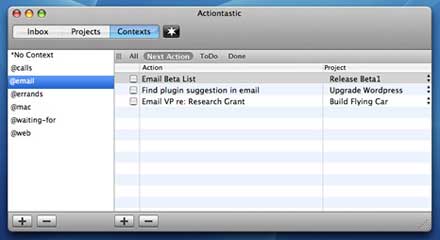
Actiontastic is, like many betas, a fairly bare-bones app that the
developer wants to make something more of. As it is, three tabs offer
you views of the inbox, projects, or contexts. Creating a new item in
the inbox allows you to enter a line of text, then select whether it is
an action or a project. That's all there is to it for now.
Clearly, this won't cut muster for managing due dates, iCal
integration, etc. But it will be worth watching if the developer makes
any advances on its progress. As it is, the beta version is free with a
stated expiration date.
Action Tracker
I'm cheating a bit including this one here, because all of the rest
of these are stand-alone applications. Action Tracker isn't;
instead, it's a FileMaker
Pro document. But it's a
well-designed GTD environment, and since I happen to have a FileMaker
Pro license, it qualifies for consideration.
document. But it's a
well-designed GTD environment, and since I happen to have a FileMaker
Pro license, it qualifies for consideration.
Like Inbox, Action Tracker is more than simply a task manager;
instead, it serves as an interface for your project management. In
addition to a very complete task and project management element, it
also organizes notes, contacts, and other files related to the project,
and it can create iCal events as well.
Jumping between entry mode and list-view mode is easy, and an added
bonus is that it has a 3x5 card printout function - any item or list
can be dumped onto an index card. This should make HipsterPDA
fans happy.
Action Tracker is free, but you must have a FileMaker
Pro license,
version 7 or later.
Frictionless
If the name sounds like a play on the Kinkless GTD name, you're
spot-on. Frictionless
was developed as a stand-alone rendition of Kinkless, with a goal to
create the same basic toolset of an outliner/task-planner. As such, the
developer included a major boon for Kinkless users like myself - the
ability to import projects and tasks from Kinkless GTD.
Frictionless is possibly the most thoroughly GTD of all GTD
applications. It's fairly easy to collect and gather, and new tasks go
immediately into a flat file of actions. These can be organized into
subsets of each other, creating a hierarchy of projects and
sub-projects. A lot of this can be done via keyboard or mouse, so
proficiency with the system could mean very fast organization of new
projects.
A Next Actions window is ready to give context-specific counsel
about tasks, and the This Week window allows for very easy weekly
reviews. David Allen would be proud.
Frictionless also has QuickSilver integration, which
instantly moves it up a notch or two for many hard-core Mac users (and,
frankly, for a lot of GTD Mac folk already adapted to Kinkless). And it
has an AppleScript that allows an action to be created directly from
Mail.
Frictionless lacks the ability to sync with iCal, but this may be
covered by the QuickSilver and Mail actions.
When you open Frictionless, a lot of windows show up at once - no
less than four windows have a regular function in the application. It's
easy enough to command-tilde through them, and each of them has a
command-# hotkey assigned. Still, it seems like a lot of windows to me,
even though each has a specific and important function in the GTD
system. While the application generally feels very Apple-icious, the
large number of important windows makes Frictionless feel a little
cluttered.
EasyTask Manager
OrionBelt's EasyTask Manager
rounds out the list of GTD applications available for the Mac. EasyTask
Manager is another stand-alone app that has some maturity, with version
1.6.6 available for $19.99.
EasyTask Manager is well-named: It manages only tasks, and it does
so easily. It has a lot of heavy GTD influence, though (unlike Inbox
and Frictionless) you could certainly use it if you weren't familiar
with the GTD system.
Tasks can be sorted by project or category, and they can be assigned
due dates, priorities, and notes. It will sync with iCal, either by
only importing tasks from iCal or by a bi-directional sync. A calendar
function makes it easy to perform regular daily and weekly reviews, and
heavy drag-and-drop ability makes for easy sorting and categorization
in process stage.
I like EasyTask Manager for what it isn't as much as for what it is.
It's a simple, straightforward application with a pleasant, but not
showy, interface. It has nearly all of the functions I want - and not
much that I don't want.
EasyTask Manager has little difficulty rising to the top of the list
in this comparison.
OmniFocus
OmniGroup has announced a forthcoming project they are calling
OmniFocus.
Omni, whose applications are regularly lauded as the most Mac-like
options around, built the wonderful OmniOutliner, the pro version of
which is the basis for the Kinkless GTD system.
Omni wisely brought in Ethan Schoonover, the developer behind
Kinkless, and Merlin Mann, the master of GTD fu, as consultants for the
development of OmniFocus. Because it is coming from Omni, and because
they have enlisted the help of these two capable partners, I have every
hope and confidence that whatever Omni eventually develops will be an
excellent option for a GTD-specific application.
Making the Decision
Clearly, it is the best of times and the worst of times for seekers
of GTD software. There are lots of great products out there that are in
development, meaning that the landscape for doing GTD on the Mac is
always changing.
Finding a working, usable system right now is a more difficult
exercise. My guess is that most users will find themselves right where
I am: Ready to commit to a good system - even ready to buy - but unsure
whether to shell out for what's available now or wait until something
closer to perfect comes along.
There will always be something better in the
future, but waiting for it won't meet your needs now.
My decision is to be consistent with one of my rules for technology:
If you need it today, buy the best that's available today. Don't wait
until tomorrow, hoping for something better. There will always be
something better in the future, but waiting for it won't meet your
needs now.
By the time you read this, I will own a license for EasyTask
Manager. It covers nearly all of my wish list, and it doesn't cost very
much.
While Frictionless was a very close second for me, and I think
OmniFocus will eventually woo me once it's available, EasyTask Manager
is more mature and compatible with my needs in a GTD app.
EasyTask Manager is the best buy for me today.




