Low End Mac Reader Specials
TypeStyler For Mac OS X is Now Shipping! Download The Free Fully Functional 60 Day Tryout at www.typestyler.com
OWC: Plug & Play Hardware RAID up to 8.0TB. High Performance, Data Redundant Solutions. FireWire 800, FireWire 400, USB2, or eSATA. Hot Swappable Bays, Data Rates over 200MB/s. Click here
Don't install Parallels to play poker online! Poker Mac will show you how
to download and install a native Mac poker application such as Full
Tilt Poker Mac.
Laptop Hardware Provided by TechRestore - Overnight Mac & iPod Repairs.
Compare products like desktop computers, apple laptops, apple macs, and LCD Monitors side by side! All the information and reviews to make the best purchasing decision for new mobile phones, sat nav systems, or MP3 players. The Ciao online shopping community makes searching products easy for you.
Mac Happens
How and Why I Use an eMac, iBook, and Power Mac G3
Evan Kleiman - 2004.12.01
I'm a big fan of "what I use" articles on the Net. It's nice to hear people talk about computers and what not, but I often wonder what computers they use. If you're anything like me, you wonder this, too.
Today I'll tell you a bit about my computer set up.
Since I'm a college student who goes home many weekends, my computer set up must work with this schedule. My main computer is an eMac 1.25. For the money, it's the best Mac anyone can get right now.
I have a 250 GB hard drive hooked up in a USB 2.0 enclosure that is made out of the same plastic as the eMac. Continuing with this color scheme, I have the white JBL Creature Iis. These are both the coolest looking and best sounding speakers I've ever experienced. For their size, the sound quality is awesome - much better than the stock speakers in the eMac.
The extra 250 GB is a perfect compliment to the 40 GB inside. It would be much less cost-effective to open the computer and install it, so I decided to go external. This way I can keep all of my media and system applications separate. (On another note, all I need to do is flip the power switch to conceal all of my MP3s. This can be very useful.) Right now I only have the stock 256 MB of RAM, but I plan to increase this soon.
Had I not broken it upon install, I would also have an AirPort Extreme card in the eMac. This would let me work around the school network's shortcomings and share my wired connection wirelessly with my other computer, an iBook G3. I bought the iBook at the same time as I bought the eMac, knowing I would want a lower end low-end Mac to bring to class and use around campus, and this is exactly what I got.
I didn't think I'd be able to use a laptop full time, so I made the decision to get two computers. The iBook is clearly not much of a powerhouse with an 800 MHz G3 and 128 MB of RAM, especially compared to the eMac. But for my purposes and use, it is the perfect companion computer.
My computers at home are a little
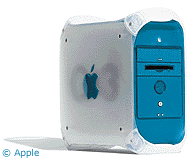
different. On my desk at home I have a B&W G3/400 that has served me
faithfully for several years now without much of a problem. I've
upped the RAM to 392 MB and added a Zip drive, as well as
overclocking it from 350 MHz. The overclocking didn't have much of
an effect but was more of a project for an article. However, it is
pretty easy.
My sister uses a lime iMac 266 that I upgraded to after using an SE/30 (back when I first started writing for LEM almost five years ago). Yes, the SE/30 is still kicking.
We also have two PCs built from scrap parts floating around on the network, connected wirelessly.
As far as software goes, I run OS X 10.3.6 on all my machines. I normally use the Microsoft Office suite of applications as opposed to the bundled AppleWorks. I mainly do this to keep up with the rest of the school, which is very Microsoft-oriented.
My browser of choice is FireFox. While I find the current release much less stable than the previous ones, I still prefer it to other browsers. My game du jour is StepMania. If you are a DDR freak like me, I suggest you check it out.
For file sharing, I like to keep it simple and stick with LimeWire and the default BitTorrent client.
At home I used Apple Remote Desktop to control the network I've set up and remotely install software. This really is a great little piece of software for managing a network, but it would me much more useful if I could use it to administer my computers at school from home and vice-versa. (VNC fails to work here, another pitfall of the crippled network at Temple in effort to increase security.)
Temple requires any user on its network to install Symantec Anti-Virus, whether Mac or PC. This "wonderful" program has blocked any possible viruses on the eMac and iBook. Of course, in five years using my iMac and G3, I never had an antivirus installed on them and never had a virus. Looks like Temple should have taken some of Jeff Adkins' advice instead of buying such a large piece of software for the entire student body.
My desktop snapshots have been featured at ResExcellence.
Toy-wise, I only have a few. I recently bought an open-box blue iPod mini on a Best Buy Black Friday deal for US$150. I bought the dock and armband with it and must say it is the greatest single investment I've ever made.
For digital photos, I have a white Canon PowerShot SD10. While it's by no means a professional camera, its small size and sleek style make it perfect for everyday picture taking. I read its 256 MB SD card with a PNY USB 2.0 reader.
Lastly, I have a 512 SanDisk Cruzer-mini that I got on sale on Black Friday for US$50 with a US$20 rebate.
This is my current set up. While I've owned closed to nine Macs,
I could never pick my favorite and am sure I'll be adding to the
collection as the years go on.
Recent Mac Happens articles
- The iPod shuffle is overpriced and underfeatured, 02.18. Small, stylish, and popular, the iPod shuffle isn't worth the price of admission.
- Four kinds of iPods, six storage capacities: Which is best for you?, 02.11. Choosing between the iPod, iPod mini, iPod photo, and iPod shuffle made easier.
- How to add memory, replace the hard drive, and use a second display with your eMac, 02.01. Three low-cost ways to upgrade your eMac for better performance and greater flexibility.
- Internet sharing and printer sharing for your Macs, 12.08. Sharing your Internet connection and USB printer is easy, with wires or without.
- More in the Mac Happens index.
Links for the Day
- Mac of the Day: Power Mac G5 Quad, Oct. 2005 - With two 2.5 GHz dual-core G5 CPUs, the G5 Quad was the most powerful PowerPC Mac ever and introduced PCI Express.
- Group of the Day: Mac Network deals with all aspects of Mac networking.
- November 21 in LEM history: 00: OS upgrades, downgrades - AltiVec vs. Pentium III - 01: Saved by the clones - Computer of the future - 02: Apple Education: Let's get to it - 03: Panther lets Macs and PCs work together, - Lombard SCSI bug - 05: 3 survivors from the 1970s - Real world battery life inadequate - Windows to Mac file transfer with Zip disks - $99 alternative to Microsoft Office - 06: Parallels 1.0 far more polished than beta
- Support Low End Mac
Recent Content on Low End Mac
- Apple's Tablet an End Run Beyond Netbooks, Frank Fox, Stop the Noiz, 11.20. Whatever Apple has planned will leverage existing technologies while going beyond what its competitors can offer.
- NASA Chemical Sensor for iPhone, Smartphone Death Match, iPhone Earrings, and More, Ian R Campbell, 11.20. Also mobile phone dangers, new apps, GPS solution for iPod touch, new iPod and iPhone cases, and more.
- Apple #4 in Reliability, Apple Tablet a Gadget for All?, HP's i7 Notebook Outdoes Mac Rivals, and More, The 'Book Review, 11.20. Also Flash 10.1 improves video on Hackintosh netbooks, thin-and-light notebooks impress, Windows XP finally on the way out, and more.
- i5 iMac Benchmarked, Mac mini 'Shouldn't Be Overlooked', Twitter Client for Classic Mac OS, and More, Mac News Review, 11.20. Also why Apple leaves the low end to others, 10.6.2 fixes video playback problem in 27" iMac, 3D Leopard and Snow Leopard performance, and more.
- Replacing the Hard Drive in a Clamshell iBook, John Hatchett, Recycled Computing, 11.19. Yes, it is one of the most difficult Apple notebooks to disassemble and reassemble, but a 10 GB hard drive just will not do.
- IBM Model F: A Great Old Keyboard with an Outdated Layout, Tommy Thomas, Welcome to Macintosh, 11.19. Although it used a different technology than the revered IBM Model M keyboard, the Model F was a great keyboard in its own right.
- Soft Touch Keyboards, Wireless Mouse Options, Loving SeaMonkey 2, and More, Charles W. Moore, Miscellaneous Ramblings, 11.18. Also the future of browsing with PowerPC Macs and the multiple mouse input bug introduced with OS X 10.5.8.
- More links in our archive.
Recent Deals
- Best eMac Deals, 11.18. Used 1 GHz Combo, $100; SuperDrive, $269; 1.25 GHz Combo, $119; SD, $319; 1.42 GHz Combo, $289; SD, $498.
- Best Mac OS X 10.6 and Mac Box Set Deals, 11.18. "Snow Leopard", single user, $25; 5 users, $45; Mac Box Set, single user, $139; 5 users, $180; Server, $414. Shipping included.
- Best Xserve Deals, 11.18. Used 1 GHz dual G4, $649; 2.3 dual G5, $795; 3.0 4-core Xeon, $1,899; refurb 2.26 4-core, $2,499; new, $2,888; refurb 8-core, $2,999; new, $3,449; more.
- Best 15" MacBook Pro Deals, 11.17. Used 1.83 GHz, $750; 2.16, $800; 2.33, $900; refurb 2.4, $1,299; 2.53, $1,449; 2.66, $1,699; 2.8, $1,899; new 2.53, $1,579; 2.66, $1,799; more.
- Best Power Mac G4 and AGP Video Card Deals, 11.17. Used 400 MHz, $50; 933 MHz, $80; 500 dual, $60; 867 dual, $90; 1 GHz dual, $150; 1.25 GHz dual, $225; 1.42 GHz, $499.
- Best Mac OS X 10.5 Deals, 11.17. "Leopard" upgrade, $80; single user license, $135; 5 users, $173; Mac Box Set, 5 users, $230; Server, 10 users, $340; unlimited, $850. Shipping included.
- Best Mac mini Deals, 11.16. Used 1.42 GHz G4 mini, $379; 1.66 GHz Core Solo, $419; 2.0 Core 2, $450; new 2.26 GHz nVidia, $580; 2.53 GHz, $769; Server, $990.
- Best iBook G4 Deals, 11.16. Used 12" 1.07 GHz Combo, $210; 1.33 GHz, $298; 14" 1.33 GHz, $398; 1.42 GHz, $479; SuperDrive, $498.
- Best iPod shuffle Deals, 11.16. Used 1 GB, $35; 4 GB, $65; refurb 1 GB, $39; 2 GB, $59; new 2 GB, $55, 4 GB, $75. New and refurb prices include shipping.
- More deals in our archive.
About LEM | Support | Usage | Privacy | Contacts
Navigation
Used Mac Dealers
Apple History
Video Cards
Email Lists
Favorite Sites
MacSurfer
MacMinute
MacInTouch
MyAppleMenu
InfoMac
Macs Only!
The Mac Observer
Accelerate Your Mac
RetroMacCast
PB Central
MacWindows
The Vintage Mac
Museum
DealMac
DealsOnTheWeb
Mac2Sell
ramseeker
Mac Driver Museum
JAG's House
System
6 Heaven
System 7 Today
the pickle's Low-End
Mac FAQ
Abandonware
Petition
Mac vs. PC Info
Affiliates
The Apple
Store
Mac
Connection
B&H
MacMall
TechRestore
ExperCom
Crucial
Memory
batteries.com
Advertise
MacMinute
MacInTouch
MyAppleMenu
InfoMac
Macs Only!
The Mac Observer
Accelerate Your Mac
RetroMacCast
PB Central
MacWindows
The Vintage Mac
Museum
DealMac
DealsOnTheWeb
Mac2Sell
ramseeker
Mac Driver Museum
JAG's House
System 6 Heaven
System 7 Today
the pickle's Low-End
Mac FAQ
Abandonware
Petition
Mac vs. PC Info
Mac Connection
B&H
MacMall
TechRestore
ExperCom
Crucial Memory
batteries.com