Apple
Mail is a nice email application for basic needs, but it has
limitations and imperfections. You may think that its limits are
too tight or its interface awkward. Either way, you may be
interested in a replacement.
If you can find a free solution that handles the job well,
you'll definitely appreciate it.
Ever since Microsoft turned Outlook Express into a professional
product (Entourage) and Qualcomm killed Eudora Light, the selection
of free email applications has been thinner. There is almost no
money to make from heavy development of free software, and
economics speak volumes, but there still are options.
I could have listed and tested all the available free software,
including variations of the same programs, but I chose to keep only
the software that is likely to remain under sustained development
for a long time on the short list. Therefore, my only two free
recommendations are Mozilla Thunderbird and Eudora (in advertising
mode).
I excluded Netscape, because Thunderbird now is the main focus
of the Mozilla Foundation.
This week we'll look at Thunderbird. Come back next week for a
look at Eudora.
Thunderbird
For regular iBasics readers, it shouldn't be a surprise that my
top recommendation is Mozilla Thunderbird. I believe in open source
projects - especially when they come from the Mozilla Foundation.
Not only is the cause good, but the software easily meets my
standards in terms of quality. Mozilla software is not about bells
and whistles, but rather about doing things right and giving you
sufficient control over your own fate.
That's in addition for not requiring expensive upgrades for new
versions (yeah, that was a shot at Apple).
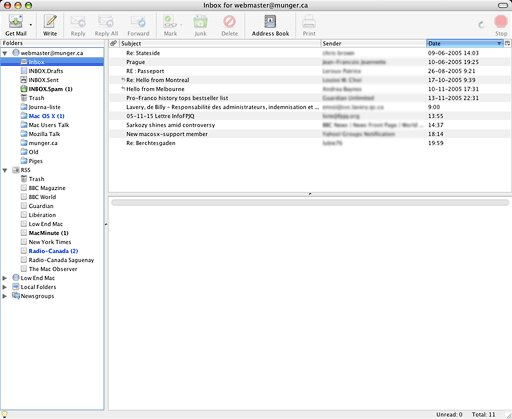
The first thing that makes Thunderbird shine is its simple,
elegant, and intuitive interface. It looks more Mac-like than the
version of Mail that ships with Tiger! Apple Mail now ignores most
of the button design and window element standards established with
Mac OS X. In comparison, Thunderbird is a first-class Aqua
citizen.
Not only does it embrace Apple's interface standards, but it's
also much more customizable. For example, Mail offers a great
selection of toolbar buttons, but it regroups some of them without
asking if you want them together. Thunderbird does better.
It would be a mistake to think that Thunderbird is all about
looks. This free email client offers an exhaustive feature set that
you would only expect from commercial or advertising-driven
software.
Thunderbird supports both IMAP and POP3 email. It also offers a
thorough handling of newsgroups and RSS feeds.
Should you rely on Thunderbird if your email needs are
demanding? As far as I know - and my email software has to receive
and filter a few hundred items per day - the answer is yes.
When I used it with the POP3 protocol, which meant a mail
database stored on my hard drive, I found Thunderbird very
responsive when working with a large mail database. I found it
reliable as far as database integrity is concerned.
On the IMAP side, Thunderbird's options allow users to
synchronize their mail and folder subscriptions as well as
Microsoft Entourage does, and that's expensive commercial
software!
Junk Mail
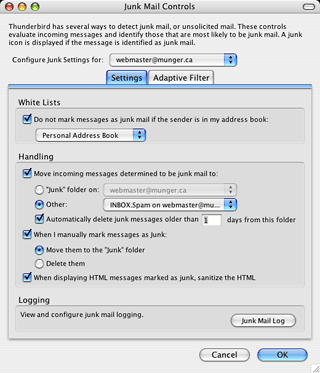 A
genuine concern for demanding users should be the junk mail filter.
When its criteria are too tight, it throws legitimate email away.
When it is too loose, it lets spam into your Inbox.
A
genuine concern for demanding users should be the junk mail filter.
When its criteria are too tight, it throws legitimate email away.
When it is too loose, it lets spam into your Inbox.
Thunderbird does a nice job at separating the good from the bad
and the ugly. It isn't 100% perfect, but it seems as effective as
most commercial spam filters. It often does a better job right off
the bat than many of them.
Thunderbird supports HTML, but it is mainly designed to do plain
text, which is the basic choice for Internet email.
Once such basic needs are covered, Thunderbird's main features
are about doing things the right way. The application itself is
intuitive, with well-grouped menus, pertinent contextual menus, and
nice options in general. It's always nice to control-click (or
right-click) and get the right menu items instead of too many
(Entourage) or not enough of them (Apple Mail).
One weakness of Thunderbird is importing data from other
applications - it only imports from Netscape Communicator 4 and
Eudora. However, this kind of weakness seems to be an industry
standard. Just as with other products, you often need to search on
Version Tracker to find third-party converters.
Power users can rest assured: You can create and tweak some
files to modify all kinds of things, such attribution lines, and
download (or create your own!) extensions that add functionality to
Thunderbird.
Some features sound stupid (and they may be), such as loading a
page from the Web in Thunderbird instead of in your browser, but
that can be useful. I suggest using that feature, as I do, to view
your city's weather forecast for the day while checking your email
in the morning. It saves you a trip to your browser just to see
what kind of weather to expect.
With all of these features, Thunderbird seems to be as solid as
a rock. It is a gem for free software, and it is under constant
development. Version 1.5 is coming out soon, with plenty of new
features such as spell checking while typing, better address
autocompletion, a phishing detector, and better overall
security.
I don't recommend Thunderbird just because I like it. I
recommend it because it is a great alternative to Apple Mail and
because it has a tremendous future. Without paying a penny for it,
you benefit from a decent number of features within an application
that keeps improving.
Given the development roadmap outlined by the Mozilla
Foundation, users who adopt Thunderbird should find it useful for
years to come. With a bit of time, it may add features like an
integrated calendar, making it a rival to Microsoft Entourage.

Link: Mozilla
Thunderbird
Michel Munger is a journalist who lives in Montréal. He discovered the Mac in 1994, and his work on a PC reminds him every day why he embraced Apple's platform. Munger has also authored some MacDaniel columns.