
The iMac Channel
The Business iMac?
15 April 1999 - Dan Knight
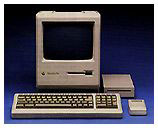
Once upon a time there was a compact computer called the Macintosh. It used small disks, a small keyboard, and a small screen.
 Then a company called Radius invented a
revolutionary device: a full page display for the Macintosh. Unlike
conventional displays, this was a portrait monitor - taller than it
was wide.
Then a company called Radius invented a
revolutionary device: a full page display for the Macintosh. Unlike
conventional displays, this was a portrait monitor - taller than it
was wide.
There were even rumors that Apple might build a compact Mac with an internal portrait display, although that never quite happened.
However, Apple did sell a Portrait Display, a 15" monitor 640 pixels wide and 870 pixels high. It could comfortably display an entire sheet of paper at actual size, making it quite popular in offices.
For those seeking the rough equivalent of a compact Mac with a full page display, it could be used on the LC or LC II (with a third-party video card), LC III, or IIsi. This made for a very nice page-oriented computer.
The iMac
The iMac, in any speed, is a lot of computer. Fast G3 processor, good sized hard drive, good graphics, decent sound, and a very nice price point for a Macintosh. And it has already found a place in the business world.
But unless you're willing to use the somewhat fuzzy 1024 x 768 setting, it doesn't come anywhere close to displaying a full vertical page. For that you want either a vertical monitor (an idea which has never really caught on with the public) or one displaying at least 1152 x 870.
To do that, you either want a sharp b&w screen (again, something none to popular with the buying public) or a larger color screen. Based on considerable experience with color monitors ranging from 13" to 21", it's pretty safe to say that you need a very sharp 17" screen to handle 1152 x 870. Better yet, an 18" or 19" screen.
The Business iMac
No, I'm not really proposing that Apple build an iMac with a 17-19" screen. After all, if it's not compact, it really isn't an iMac.
Instead, Apple should market it with a different name: a G3-based Mac visually related to the iMac, Power Mac G3, and new blue-n-white monitors, but also distinct.
The Business Mac should contain a multiscan screen capable of displaying crisp text at up to 1152 x 870, allowing display of two full pages side-by-side. Better yet if it could do 1280 x 960 or 1280 x 1024, but that shouldn't be essential.
Apple could market this to several markets as a plug-and-play alternative to traditional computers with separate monitors and CPUs. It would be as easy to set up as the iMac, albeit somewhat larger and more expensive.
Looking at the iMac 333 selling for $1,199 and the Power Mac G3/300 selling for $1,599 plus about $500 for a monitor, a target price of $1,600 sounds reasonable. Except for the power supply and screen, the insides could be identical to those in the iMac - the onboard video already supports resolutions well beyond 1152 x 870, although the iMac's small screen can't display them.
Using iMac insides, a larger screen, and shipping with 64 MB of memory could make this the ideal business Mac, a popular home computer, and a good choice for educators.
And at a projected price of $1,600, it would make an excellent alternative to the Power Mac G3 for those who don't need expansion slots.
About LEM Support Usage Privacy Contact
Follow Low End Mac on Twitter
Join Low End Mac on Facebook
Favorite Sites
MacSurfer
Cult of Mac
Shrine of Apple
MacInTouch
MyAppleMenu
InfoMac
The Mac Observer
Accelerate Your Mac
RetroMacCast
The Vintage Mac Museum
Deal Brothers
DealMac
Mac2Sell
Mac Driver Museum
JAG's House
System 6 Heaven
System 7 Today
the pickle's Low-End Mac FAQ
Affiliates
Amazon.com
The iTunes Store
PC Connection Express
Macgo Blu-ray Player
Parallels Desktop for Mac
eBay

