Compiled by Charles Moore
and edited by Dan Knight
- 2005.09.29
This Week's iPod News
The top story this week is scratched and cracked iPod nano screens. To
avoid scratches, look into one of the many protective covers or
screen skins available. For a cracked screen, contact Apple or your
Apple dealer - it may be covered under warranty.
PowerBook, iBook, iPod, and other portable computing is covered
in The 'Book Review. General
Apple and Mac desktop news is covered in The Mac News Review. News about Apple's
transition to Intel CPUs and other Intel developments is covered in
The Macintel Report.
All prices are in US dollars unless otherwise noted.
iPod nano Screen Problems
News and Comment
Tips
Products and Services
Software
iPod nano Screen Problems
iPod nano Screen Woes Deepen
The Register's Charles Arthur reports:
"OK, let's see if we can find some good news about the iPod
Nano. Hey, here's some: Jim Allchin, head of Microsoft's Windows
division, bought one the day it came out. Talk about sleeping with
the enemy!
"Umm...oh. He says it stopped working after a day. 'They have
moisture issues,' he said. (You're really not supposed to take it
into the shower, Mr Allchin.)
"OK, er... the high street chain Dixons says it was selling an
average of five per minute over the weekend. That's more like it!
Except... the story that first appeared here last week, about how
amazingly easily the screen scratches, has spread far and wide, and
so far down the food chain that even local and national newspapers
have written about it. Oh dear.
"More importantly, the post on Apple's discussion boards
discussing the issue has grown from 188 posts to 583 (at last
count), and now includes people who have cancelled their orders.
Ooooh dear."
Pocket-size Player Poses Big-Time Problem
stanford.edu/daily's Mia Lee reports:
"When was the last time you were excited to hear something
described as 'impossibly small'?
"Apple, Inc. hopes it was Sept. 7, when the Cupertino-based
company announced the release of its wafer-thin iPod nano, the
latest and greatest addition to an omnipresent MP3-player
lineup.
"The sleek device, which comes in white or black, weighs just
1.5 ounces and is a mere 0.27 inches thick. Touted as being thinner
than a standard No. 2 pencil, the nano squeezes past comparable
players that are more than twice its size.
"At the San Francisco press conference, Apple Chief Executive
Officer Steve Jobs promised that good things, indeed, come in small
packages....
"But before you give Steve Jobs your undying praise and your
local retailer $249 plus tax, consider the tragic testimony of
Matthew Peterson.
"Peterson, 26, and creator of the Web site,
http://flawedmusicplayer.com, was dismayed to find his nano's
liquid crystal display (LCD) screen cracked after just four days of
use.
"Peterson laments that the durability of regular iPod screens
does not appear to carry over to the nano line."
iPod nano Turns into Pocket-sized Problem
mobilemag.com's Ritwik Sinha reports:
"Apple's iPod nano may have endeared itself instantly to the
music lovers all across the globe, but now many users are openly
venting their grudge against the company's assurance that it could
be safely placed in your pocket.
"iPod nano owners are claiming that the color screen of the
device has been damaged after they carried it in their pockets. The
number of upset customers is growing, one user has even gone to the
extent of setting up a website flawedmusicplayer.com to register
grievances. And cribbing opinions are flowing in to the website in
quite a sizable number."
iPod nano Owners in Screen Scratch Trauma
The Register's Charles Arthur reports:
"People slavering to get Apple's 'impossibly small' iPod nano
into their sticky hands may want to pause a moment: those ahead of
them in the queue have discovered that it's also unbelievably easy
to scratch the screen, nixing its photo-displaying abilities.
"Apple's discussion forums are already host to a 188-post thread
on the topic, where people have spotted that the plastic used for
the screen and front of the product is as sensitive as a Kate Moss
sponsor.
"Trouble is that a few scratches will quickly make the colour
screen all but useless for viewing album art and photos stored on
the machine....
"When the point was put to the head of Apple's iPod division,
Jon Rubenstein - who in the past oversaw the development of the
Titanium PowerBook - the one that killed off WiFi reception,
because metal cages do that - he replied: 'Nah, you don't really
think that? It's made of the hardest polycarbonate... You keep it
in a pocket with your keys?'
"Actually, not so for owners we've heard from."
Is the nano Screen Issue Really Two Separate
Problems?
MacDevCenter's Todd Ogasawara says:
"I noticed what seemed like a minor screen marking the day after
I bought my iPod nano. But, now I wonder if it is a screen issue or
something else entirely (at least for my particular unit). You can
see the bottom right corner of my screen and part of the shell in
the photo attached here....
"So, I took a long and hard look at my nano and noted that the
scratches have not affected the LCD display itself. Then, I noticed
that the surface blemishes actually extend to a good portion of the
nano shell. For my specific nano, I think the problem is not so
much the screen but whatever coating covers the screen and shell. I
saw similar problems with a clear protective cover that HP used on
its Jornada 420 several years ago."
News and Comment
All Aussie iPod Users Breaking the Law
 The Herald Sun's Liam Houlihan
reports:
The Herald Sun's Liam Houlihan
reports:
"Australia's million iPod users are all breaking the law.
"A Herald Sun investigation has found - despite the popularity
of the pastime - no legal method exists for Australian iPod owners
to fill their player with music.
"And they could face court with anti-piracy groups refusing to
rule out suing users of the popular player.
"None of the tunes available from legal download Internet sites
are compatible with the Apple iPod music players. The common method
of "ripping" tunes on to an iPod from the user's own CD collection
is illegal - as a breach of copyright laws.
"And unlike Britain and the US, Australia does not yet have an
Apple iTunes store for iPod-compatible legal downloads. An
estimated million people nationwide have already bought and put
music on their iPods - the most popular model of MP3 player."
Apple Canada Announces Claims Process for
Refund of iPod Levy
 Canadian Press reports:
"Apple Canada has announced a claims process for customers who
bought iPods from Dec. 13, 2003 to Dec. 21, 2004 and were charged a
levy that has since been struck down by the courts.
"'As we announced last month, Apple is refunding money collected
through Canada's blank media levy,' the company said in a
statement. 'Customers wishing to claim a refund can get more
information at apple.com/ca.'
"In July, the Supreme Court of Canada backed a Federal Court of
Canada decision quashing the levy on iPods and other digital music
players.
"The nonprofit Canadian Private Copying Collective (CPCC) had
collected the tax built into the price of the devices since
December 2003. The agency collects such tariffs on behalf of
musicians and record companies."
Macworld UK's Jonny Evans reports:
"Apple Canada has announced the details of its 'iPod Levy Refund
Program'.
"The company is refunding money it collected on behalf of
Canada's royalty collection body, the Canadian Private Copying
Collective (CPCC), which had been collecting a tax on behalf of
musicians.
"This tax was declared unlawful by the Supreme Court of Canada,
which rejected the levy on iPods and other digital music devices.
The tax was designed to compensate artists for illegal file
sharing."
BBC TV Watchdog Reveals iPod's Achilles'
Heel
 Macworld UK's Jonny Evans reports:
"Apple's decision to announce the UK price of its iPod Battery
Replacement scheme following two months of obfustication became
clear last night when battery problems in its iPod music players
became the focus of a BBC TV investigation.
"UK consumer advocate show, 'Watchdog', took Apple to task over
battery life."
iPod Maps Draw Legal Threats
 Wired's Matt Reed reports:
"Transit officials in New York and San Francisco have launched a
copyright crackdown on a website offering free downloadable subway
maps designed to be viewed on the iPod.
"iPodSubwayMaps.com is the home of iPod-sized maps of nearly two
dozen different transit systems around the world, from the Paris
Metro to the London Underground."
Apple's iPod nano Could Be 'Key Product' into
2006
Forbes' Maya Roney reports:
"UBS Investment Research raised its price target on Apple
Computer to $64 from $59 and maintained a 'buy' rating on the stock
based on its analysis of the 4-gigabyte iPod nano.
"UBS said the 4G nano could be Apple's 'key product' into 2006,
with many stores struggling to keep the devices in stock."
Apple's Cost to Build the nano
Businessweek's Arik Hesseldahl reports:
"Researcher iSuppli took a look inside the latest iPod to find
out how much Apple is making off it and who supplies its parts
"Rumors swirled for weeks that Apple Computer CEO Steve Jobs had
a product up his sleeve that would upstage the long-awaited ROKR
music-playing phone. The speculation was confirmed on Sept. 7, when
Apple unveiled with fanfare the iPod nano. The ultra-thin digital
music player has been met with mostly rave reviews, and it stole
the limelight from the ROKR, developed with Motorola.
"Now that the Nano is on the market, attention has turned to
more practical questions. Among them: How fat are Apple's margins
on it?
"Market research firm iSuppli set out to satisfy the curiosity
by buying the $199 2-gigabyte version of the Nano and tearing it
apart. The verdict? It costs Apple $90.18 in materials to build the
unit and $8 to assemble it, leaving a profit margin before
marketing and distribution costs of about 50%. That's consistent
with the margins on earlier iPod versions and serves as a reminder
of what a profit machine the iPod family of products has become for
Apple since it was introduced in 2001."
iSuppli Surprised by nano Component
Choices
EE Times reports:
"Apple Computer Inc. has made some surprising semiconductor
choices according to iSuppli Corp., who recently conducted a
'teardown' analysis of Apple's new iPod nano music player.
"Apple's choices include the use of PortalPlayer Inc.'s 5021C
system-on-chip (SoC) for audio processing and Cypress Semiconductor
Corp.'s CY8C21434 for the circuitry behind the iPod nano's
trademark Click Wheel interface, according to iSuppli (El Segundo,
Calif.). These and other ICs account for 77 percent of the $90.18
total bill-of-materials (BOM) cost for the 2-gigabyte version of
the iPod nano, the firm said."
iPod Updater 2005-09-23
iPod Updater 2005-09-23 includes new iPod Software 1.1.2 for
iPod shuffle. iPod Updater 2005-09-23 contains the same software
versions as iPod Updater 2005-09-06 for all other iPod models.
iPod Updater 2005-09-23 delivers the following software:
Features of iPod Software 1.1.2 for iPod shuffle:
- Bug fixes for iPod shuffle
Link: iPod
Updater 2005-09-23
Apple Offers Custom Engraving of iPod
shuffle
ilounge.com's Larry Angell reports:
"The online Apple Store has begun offering free personalized
engraving on the iPod shuffle. Unlike the full-size iPod and iPod
nano, the laser-engraved text is printed on the side of the shuffle
and has a one line, 40 character limit."
The iPod mini from 1954
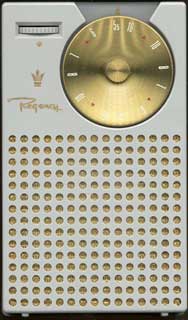 arstechnica.com's Ken "Caesar" Fisher says:
"An astute observation by John Ousby has left plenty of people
scratching their heads. Ousby has spotted the uncanny resemblance
between the now defunct iPod mini, and a transistor radio that made
its debut over 50 years ago. The Regency TR-1 transistor radio hit
the market in 1954, and was the first commercially sold transistor
product aimed at the consumer market, according to Steve Reyer. Not
only was it small and convenient, but it was also stylish,
featuring colorful case options, and a bold circular dial. It came
in blue, green, lavender, black, white, and a light red. Regency
marketed it with the slogan, 'See it! Hear it! Get it!'"
Nokia's iPod-Killer Phone Slips to
2006
The Register's Andrew Orlowski reports:
"Nokia only began to partner with Microsoft earlier this year -
but already it's showing signs of catching Longhorn Syndrome.
"The Finnish phone giant has confirmed that its would-be iPod
killer, the N91 music phone, will miss the Christmas shopping
season, and won't now ship until Q1 2006."
Motorola Leader Zander in 'Screw nano'
Furor
Macworld's Tom Krazit reports:
"Some analysts and Apple fans believe that CEO Steve Jobs will
eventually develop an Apple-designed smart phone, based on Apple's
traditional insistence on keeping tight control over the hardware
that runs its software products. Zander declined to comment
specifically on the idea of an Apple smart phone, but said 'all
computer companies are thinking about voice.'
"He did have some harsh words for Apple's new iPod nano, which
many analysts believe stole the spotlight from Motorola's ROKR
phone during a recent launch event.
"'Screw the nano. What the hell does the nano do? Who listens to
1,000 songs?' Zander said."
Apple, Motorola: A Love-Hate
Relationship
beta.news.com says:
"The latest chapter of the apparent love-hate relationship
between Apple and Motorola is unfolding in the blogosphere after
some choice comments by the latter company's chief executive. Trade
publication InfoWorld reported that Motorola's Ed Zander dissed the
iPod nano at a Silicon Valley gathering Friday, saying: "Screw the
Nano. What the hell does the Nano do? Who listens to 1,000
songs?"
"Zander seemed to be joking when he made his remarks, but it
wouldn't be surprising if they reflected some underlying tension
between the companies. Conflicts between the two partners go back
as far as 1999 (when Zander was still at Sun Microsystems), with
Apple blaming some of its financial problems on Motorola's
inability to manufacture its PowerPC chips fast enough to keep up
with Macintosh production."
iTunes, iPod Among Design Award
Winners
PR: Friday night, His Royal Highness the Crown Prince
presented the INDEX: awards of a total of £500,000 to the
winners of the large design event. The international INDEX: jury
selected the five designs that they view to have improved life
within the last five years in the following five categories: body,
home, work, play, and community. The winners also received prizes
from Royal Copenhagen and Georg Jensen.
The winners include Apple iTunes, iPod (Play) - design by Apple
Design Team, USA
iPod together with Apple's iTunes software is truly changing the
way people experience their music. iPod allows a music fan to have
their entire music collection with them anytime, anywhere. The
iTunes software provides unparalleled ease of use for organization
and sharing of music as well as recorded literature and images.
Playlists can be shared with other computers across a network via
Apple's Bonjour technology. iTunes secures that music users pay for
their music.
Tips
iPod nano: Why Isn't the Charging Icon
Always Flashing?
A new Apple Knowledge Base Article says:
"When you plug your iPod nano into a power source, the charging
icon appears - it's a lightning bolt over a battery. Depending on
the state of the battery, it may or may not animate (flash between
gray and green). In either case, the icon indicates the battery is
charging successfully. When the battery is fully depleted, the iPod
nano may not appear in iTunes until it has been charged for about
10 minutes.
"The non-animated version of the icon.... appears when your
battery has been fully or nearly depleted of charge. This appears
for up to 10 minutes. Note: If your iPod nano is connected to the
computer, the computer won't see it until after that 10 minutes has
elapsed. After that, you'll see the 'Do not disconnect'
screen."
Charging Your iPod Battery
An updated Apple Knowledge Base article says:
"All iPod models have an internal, nonremovable, lithium-based
rechargeable battery. A fully charged battery can provide anywhere
from up to 8 hours to up to 15 hours of battery life, depending on
the iPod model and its use. After about 14 to 28 days of non-use,
you will need to charge the battery.
"Your iPod displays a battery icon in the upper-right corner of
the screen to show approximately how much charge is left.
"Rechargeable batteries have a limited number of charge cycles
and may eventually need to be replaced. Battery life and number of
charge cycles vary by use and settings."
iTunes and iPod: Photo Sync FAQ
An updated Apple Knowledge Base article says:
"iTunes 4.7 and later has the ability to sync photos from your
computer to any iPod with a color display (including iPod nano and
iPod photo). Find out the answers to common questions about photo
syncing."
Products and Services
InvisibleShield Protects iPod nano
Against Scratched Screen
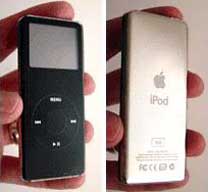 PR: For the purists among us who think the iPod nano
looks best just like it is, we bring you the InvisibleShield - an
invisible, full-body wrap for the hot, new iPod nano.
PR: For the purists among us who think the iPod nano
looks best just like it is, we bring you the InvisibleShield - an
invisible, full-body wrap for the hot, new iPod nano.
Beware! The black nano gets scratched much worse than any
previous iPod. You will not regret getting InvisibleShield
protection. ]
Free shipping for a limited time. And don't forget the Lifetime
Warranty! When you own an InvisibleShield, your nano is protected
for life!
iPod nano - Full Body Protector - $19.95
Plexus Plastic Cleaner, Protectant, and
Polish
PR: Plexus was developed for use in the aviation industry
- specifically, for cleaning and protecting aircraft windshields
and painted surfaces. As Plexus became more and more popular,
people quickly discovered it could be used on a limitless variety
of plastic surfaces. Since then, Plexus has continued to grow in
popularity, and today it is recognized as the most effective
plastic cleaner, protectant and polisher on the market.
Until now, plastic-cleaning products have proven less than
satisfactory. Existing cleaners are often messy to use (especially
creams and pastes) and require several steps to apply. They have to
be rubbed on and buffed. They often leave a sticky, tacky or oily
residue. And, in many cases, they're abrasive, leaving small lines
in the plastic.
Dissatisfied with these cleaners, many people resort to products
that are alcohol, ammonia, or petroleum-based. Unfortunately, these
products can dry out plastic, leading to cracking and discoloration
over time.
The bottom line: over the years, people have had no truly
reliable, effective products to turn to for cleaning and protecting
plastic.
Fortunately, now there's a solution: Plexus. The most effective
product available for cleaning, protecting, and polishing all kinds
of plastic.
To use Plexus, simply spray and wipe - no buffing, no mess, and
no waste.
Plexus protects plastic more effectively than ordinary cleaners.
Because Plexus seals the pores in plastic surfaces with a
micro-thin layer of shiny, protective wax, plastic becomes
resistant to debris, oil, scratches, and eventual yellowing. And
its antistatic properties repel dust and lint.
Since new plastic is most vulnerable to contaminants and damage,
using Plexus early on can help in the long-term protection and
maintenance of plastic. Plexus gives you a cleaner, more lustrous
finish than ordinary cleaners. Plexus leaves no smears and no
smudges. Instead, the finish it leaves is shiny, brilliant, and
clear like no other. Plexus makes colored plastics vibrant, makes
clear plastic virtually transparent, and leaves plastic paints
gleaming like new.
Use Plexus on your computer screen to keep it clean and
fingerprint-free. Or use it on your eyeglasses to keep them
clean.
Plexus comes in a variety of sizes for a number of uses. So when
you're looking for the most effective cleaner, protectant, and
polish for any kind of plastic. The 13 oz. aerosol can typically
sells for $9.95.
HomeDock: A Home for Your iPod at
Home
PR: Introducing the incredible HomeDock for iPod. Easily
connect and enjoy your iPod's music through your Home Stereo &
TV .
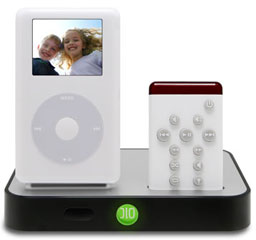 You have a case and
headphones for taking your iPod on the go, your car is outfitted
with the latest TransPod to enjoy your tunes in the car, but what
do you do with your iPod at home? The DLO HomeDock is where your
iPod lives &endash; at home. Walk in the door, dock your iPod
onto the HomeDock, and enjoy your iPod's music throughout the
house.
You have a case and
headphones for taking your iPod on the go, your car is outfitted
with the latest TransPod to enjoy your tunes in the car, but what
do you do with your iPod at home? The DLO HomeDock is where your
iPod lives &endash; at home. Walk in the door, dock your iPod
onto the HomeDock, and enjoy your iPod's music throughout the
house.
The DLO HomeDock includes everything necessary to attach your
iPod to your Home Stereo and TV to enjoy its music and pictures at
home. It includes a 14-function remote control to play your tunes
from across the room. It also includes a standard AC plug to power
and charge your iPod while docked. It even allows you to connect
your iPod without removing it from your favorite iPod case. The DLO
HomeDock is truly a home entertainment center for your iPod.
Do You Know How Good Your iPod Really Sounds?
The iPod sounds great through its included earbud headphones. It
even sounds great through a set of travel speakers or the iBoom.
But when you hook up and play your iPod through your professional,
high-fidelity home stereo sound system, we bet you'll be blown away
by just how good your iPod really sounds.
The DLO HomeDock connects your iPod to your Home Stereo via the
included standard RCA type plugs and cables. No complicated
Y-cables or headphone plugs are necessary. Simply dock your iPod
onto your HomeDock and your iPod's music is sent to your Amplifier
through the superior audio line-out from the bottom of the iPod. No
adapters, no loose cables, just great sounding iPod music coming
through your 'real' stereo at home.
Just When You Thought Tacky Home Slideshows Were Over.
The DLO HomeDock also connects to your TV via Composite or
S-video so you can easily show all those pictures trapped inside
your photo capable iPod. Just dock your iPod, select a photo
slideshow and begin reliving the memories all over again. Any size
TV screen will show off your beautiful photos better than the tiny
iPod screen. Connect the HomeDock to one of the new digital flat
screen TVs via S-video and the fun is even bigger. Control the show
from the comfort of the couch with the included remote control. Of
course your chosen musical soundtrack still plays through your Home
Stereo speakers for the proper accompaniment to the big picture
show.
It Does Windows &endash; And Macs
After you get used to the convenience and performance of the
HomeDock next to your home stereo and TV, you'll wish you had its
handy connections and remote control right next to your PC or Mac.
Well you can. The HomeDock also includes standard USB that connects
to your computer and lets your sync and charge your iPod right from
the HomeDock. USB powers your HomeDock so you don't even need to
plug it in when attached to your computer. Play your iPods music
through a pair of powered speakers or passed back through the input
of your PC. What you have now is a convenient, great sounding iPod
office stereo system &endash; with a remote control of
course.
Quick Facts
- Shipping in October
- Play your iPod, iPod mini or iPod nano's music through your
home stereo
- Watch slideshows with music on your big screen TV
- Remote Control of over 14 separate iPod functions including
photo slideshows
- Charge, sync and dock your iPod with your Mac or PC via
USB
- Dock your iPod without removing most iPod cases
- Add a pair of powered speakers for a complete compact sound
system
HomeDock: $99.99
iFM Radio, Remote, and Recorder for
iPod
PR: iFM integrates FM radio tuning, recording and remote
control functionality to the iPod, all in a tiny aluminum
enclosure. With the flip of a switch users can now switch
seamlessly between controlling their music library and listening to
their favorite FM radio programming. Use the iFM as an inline
remote to control the iPod's transport controls, great for
workouts, biking or hiking. iFM is also a recording device, with a
built in microphone to record voice, or change modes to capture
live FM radio directly to the iPod!
 The integrated white backlit LCD shows
the operating mode of the iFM at a glance.
The integrated white backlit LCD shows
the operating mode of the iFM at a glance.
Features:
Radio*
- Digital auto station scan with wraparound
- Band-Switch function to switch between US, European and
Japanese FM bands
- 6 station presets per band
Remote*
- Controls play, pause, fast forward, rewind, next song, previous
song, volume
Recorder**
- Records FM radio
- High quality omnidirectional built in microphone for recording
voice memos
- Automatically saves to the iPod
- One-touch start and stop recording***
- Recording time only limited by amount of available space on the
iPod
* 3G/4G/Photo/mini models
** 3G/4G/Photo models
*** 4G/Photo models
Many Existing Belkin Accessories
Compatible with iPod nano
PR: Belkin's existing line of iPod accessories include
devices that are both compatible with the iPod nano and are
available in both black and white colors, such as the TuneCast(TM)
II (F8V3080 and F8V3080-APL) and Auto Kit for iPod(R) (F8V7058-APL
and F8V7058-APL-BLK). These products are widely available in North
America. Other new and to-be-announced accessories for nano will be
available starting October 2005.
The TuneCast II, an FM transmitter that plays music from your
MP3 player through FM radio waves, plugs into the nano's headphone
jack. It keeps the dock connector, which is situated next to the
headphone jack on the nano, accessible. The TuneCast II is
available in both black and white colors, as is the Auto Kit, which
charges the nano in your car.
"The iPod nano typifies Apple's unique ability to push the
limits of innovation," said Mark Reynoso, Sr. VP of Sales and
Marketing. "Building in a color screen and photo capabilities is
ingenious, and moving to a flash-based architecture not only
increases the product's durability but also extends the battery
life."
"Many of our existing products are already a good fit for the
nano, and we will soon be adding several new nano-specific
accessories as well as ensuring overlapping compatibility, as
necessary, with future iPod accessories," continued Mr.
Reynoso.
Belkin accessories for nano:
Power and listen to your nano in your car
- Auto Kit for iPod w/Dock Connector, White (F8V7058-APL) and
Black (F8V7058-APL-BLK) - $39.99
- TuneCast II Mobile FM Transmitter, Gray/Black (includes a
Belkin Auto Power Cord that connects to your car's cigarette
lighter) (F8V3080) - $39.99
- TuneCast II Mobile FM Transmitter, White (F8V3080-APL) -
$39.99
- Cassette Adapter, Gray (F8V366) and White (F8V366-APL) -
$19.99
- TuneCast Mobile FM Transmitter, Gray (F8V367) and White
(F8V367-APL) - $29.99
- Auto Power Cord for iPod w/Dock Connector (F8V7067-APL) -
$19.99
Listen to your nano through your home stereo
- Mini-Stereo Audio Cable - 3.5MM to 3.5MM M/M - 6ft
(F8V203-06-APL) - $3.99
- Mini-Stereo Audio Cable - 3.5MM to 3.5MM M/M - 6ft
(F8V203-06GLD-AP) - $19.99
- Mini-Stereo Extension Cable - 3.5MM to 3.5MM M/F - 6ft
(F8V204-06GLD-AP) - $19.99
- Y Audio Cable, 6 ft. (F8V235-06-APL) - $5.99
- Stereo Link Cable, 7 ft. (F8V235-07GLD-AP) - $19.99
Share the music from your nano over two sets of headphones
- Headphone Splitter (F8V234-WHT-APL) - $4.99
- Speaker and Headphone Splitter (F8V234-GLD-APL) - $9.99
Link: Belkin
Belkin's Complete Lineup of Leather
Cases for iPod nano
PR: Belkin announces a variety of new cases for the iPod
nano. Addressing the various needs of the iPod user, three
formfitting, leather-case designs are available. Designed to
reinforce the nano's minimalist industrial design approach,
Belkin's cases fully manage various aspects of user functionality
while still maintaining a sleek-yet-simple aesthetic design. These
cases will be available in North America in October.
Carabineer Case for iPod nano (F8Z057) - $24.99
The Caribineer Case's formfitting design and fine-grain leather
construction keeps your nano form slim while still giving you
complete and easy accessibility to all ports. Featuring a
carabineer clip for convenient positioning and hands-free carrying,
this Case also offers a locking clip to easily secure your
iPod.
Flip Case for iPod nano (F8Z059) - $24.99
The Flip Case offers quick, easy, and convenient storage with
its built-in cable-management mechanism. Designed with a
multi-mount clip and hook for a variety of ways to secure your iPod
nano, this Case also provides easy accessibility to all ports. The
Flip Case features a formfitting design, packaged within a
fine-grain leather construction.
Folio Case for iPod nano (F8Z058) - $24.99
The Folio Case secures comfortably around your wrist with
convenient lanyard strap. Designed for easy accessibility to all
ports, the Folio Case comes packaged within a fine-grain leather
construction and features a formfitting design.
"We're very excited about the new iPod nano and its exceptional
engineering," comments Ernesto Quinteros, Belkin Director of
Industrial Design. "Given the new form factor, it was our goal to
create designs that would reflect this minimalist intent. We
believe that our new slim leather cases will add smart protection
to this high-touch experience."
Link: Belkin
Software
PodTunesColor iTunes Controller Looks
Like a Color iPod
PR: PodTunesColor has been given a major overhaul and now
features a color screen that displays the album art of the
currently playing song - just like a real iPod. As before it also
displays the name and artist of the current song but now also shows
the track number and shows if the song is playing or paused.
You can also now switch shuffle on or off using the middle
(select) button and the current shuffle status is displayed in the
top left of the iPod's screen.
A Complete list of new features
- A color screen with album art,
- Switch Shuffle on and off directly from PodTunesColor
- Shuffle icon indicates if shuffle is on or off
- Icon in the top left of screen now indicates whether iTunes is
playing or paused
- Track numbers (e.g. 7 of 645) in upper left of screen
- Switch the backlight on and off (Menu button)
- Tooltips
- More readable font
- Improved graphics
System requirements: Mac OS X 10.3 or higher
PodTunesColor is free.
iPod It Transfers PIM Data to Your
iPod
PR: Who needs a PDA when you have an iPod?
Transfer your PIM data to your iPod so it's available whenever
you need it; iPod It supports transferring information from
Entourage, Stickies, Mail, Address Book and iCal. You can even
download RSS feeds, weather forecasts and news headlines directly
to your iPod.
Features
- Transfer all or a subset of your Entourage events, contacts,
messages, notes and tasks to your iPod.
- Select Entourage information by category (or folder for
messages).
- Transfer all or a subset of your Stickies, Mail messages,
Address Book contacts, and iCal calendars.
- Includes all of your Calendar and Contact information. Fields
not supported by the iPod (e.g. meeting locations and IM addresses)
are included within the event/contact notes.
- Advanced filtering to control the information that gets
transferred. Examples include date ranges for events, flagged
contacts, unread (and/or flagged) messages and tasks based on
whether or not they have been completed.
- Download RSS feeds. iPod It ensures that only unread articles
are transferred to your iPod.
- Download weather forecasts and news.
- Subscribe to Internet published iCals for direct download and
transfer to your iPod.
Supports all versions of iPod and iPod mini software:
- For version 2.0 iPods messages, notes/stickies, tasks, news and
weather forecasts can be transferred into your iPod's Notes. The
information is organized by type and category to allow for easy
navigation to all of your information. Notes longer than 4 KB
are split into multiple notes. Notes are organized and linked to
allow for easy navigation while reading.
- Events, tasks, weather forecasts and iCals can be transferred
into your iPod's Calendar. Your calendar information will be
organized into separate calendars based on category. Tasks can also
be transferred to the To Do list found on 2.0 iPods.
- For version 1.x iPods, iCal To Do items can be transferred as
entries in a "To Do" calendar.
- For version 1.x iPods, Contacts, messages, notes, tasks, news
and weather forecasts appear as Contact entries. Long entries are
logically split into multiple contacts.
Sync all (or a subset) of your information to your iPod with a
single click. Uses your filter settings to determine what
information gets synced.
Automate the syncing of your information by selecting automatic
syncing on launch and automatic exit following a sync. Use iPod
Launcher and connecting your iPod is all you'll ever have to
do!
Provides for manual transferring of information if you need more
control over what gets transferred to your iPod.
Locates your iPod and transfers information to the correct
location within your iPod without asking you where it should
go.
Clean your iPod of all information within given iPod It
categories.
New in this version:
- Fixed Event support with Entourage X and attendee handling with
Entourage 2004 SP2.
- Fixed iCal support to ensure that event notes are always
include on your iPod.
- Removing iCal calendars from your iPod no longer removes
Entourage calendars.
System requirements:
- Requires Mac OS X 10.3 or greater (Tiger compatible)
- iPod Software 1.1 or higher
- Microsoft Entourage X for Entourage transfer
iPod It is $14.95 shareware.
iPod.iTunes iPod Track & Playlist
Sync/Transfer
PR: Unlike other iPod software to copy songs off the
iPod, iPod.iTunes checks which tracks and playlists on the iPod are
not in the iTunes music library and only adds those seamlessly to
the iTunes library, avoiding duplicates, saving your time. Beside
playlists, iPod.iTunes can also transfer song dependent data like
"My Rating", "Last Played", "Play Count", album artwork, etc...
- Simple one click synchronization or...
- Option to choose tracks manually if you don't want to
synchronize them all. You can listen to tracks before you choose to
transfer them.
- Tracks and playlist entries can be synchronized together or
separately. If the tracks on the iPod are already in the iTunes
library and you only want the iPod playlists, you can use the
playlist synchronization alone.
- With every track synchronization iPod.iTunes creates a
date&time stamped playlist in iTunes containing the tracks
which were transferred. This gives the option to easily add those
tracks to existing playlists or to create new playlists from the
transferred tracks.
- Support for the iPod's "On The Go" playlist.
- Copies by default seamlessly to the iTunes music folder and
creates a folder structure based on artist/album, as in iTunes
(with options).
- File naming based on track number and track name, as in
iTunes.
- File formats: MP3, AAC/MP4, Protected AAC (iTunes Music Store),
Audible audio books, Podcasts, Apple Lossless.
- Support for Windows-formatted iPods.
- iPod.iTunes can run directly from the iPod, so it's always
there when you need it.
- Registration is independent of the computer. You can just
connect your iPod to any Mac without registering every
machine.
iPod.iTunes can be used to
- Keep music and playlists on different Macs up to date
- Do a full restore of tracks and playlists - i.e. after a hard
disk failure or if you buy a new Mac
- Revert accident deletion of tracks and/or playlists in iTunes,
if these are still on your iPod
- Clone an iPod
- Transfer an entire music library from one Mac to another via
the iPod
New in this version:
- Compatibility for changes in iTunes 5.0.1.
- Compatibility for iPod nano firmware 5.0
System requirements:
- Mac OS 10.2 up to 10.4.2
- iTunes 3.0.1 up to 5.0.1
- Mac/PC-formatted iPod with firmware 1.0 up to 5.0. Does
currently not work with the iPod shuffle.
iPod.iTunes sells for $49.
iPod Deals
For current iPod prices from a variety of sources, see our
Best iPod Deals.



