- 2002.09.26
Those of us who have been around for a while, we remember.
We remember when the only computer worth having in the classroom was
an Apple II. We remember when
Windows 1.0 came out with its laughable interface. We remember bringing
our own computers from home out of sheer frustration with the lack of
resources provided by our districts.
Before there were IT committees, tech councils, or "standards," we
were there.
And now we're being assailed from all sides. Young teachers arrive
having never used a Mac. Consultants gently guide purchases toward the
Wintel hegemony. This week, one lab converts from Mac to PC. 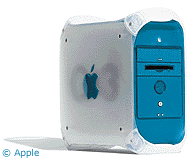 Next week, the library ditches a bunch of G3 Blue and Whites in favor of
Dells - when the Blue and Whites were often the only machines
working.
Next week, the library ditches a bunch of G3 Blue and Whites in favor of
Dells - when the Blue and Whites were often the only machines
working.
Marginalized
If you look at the decision making process at a typical two-platform
school, you find that the Macs are increasingly relegated to enclaves
where teachers, like myself, make a concerted effort to concentrate
them in one place. The PCs are installed where younger teachers or
teachers connected to business want to stay with what they find
comfortable.
In our school, the Byzantine hardware purchasing process and
committee-based decision making has resulted in some bizarre
decisions.
- The newspaper ditched its collection of aging 5200s in exchange for some PCs, despite
the fact that everyone acknowledges that the Mac is the computer of
choice in publishing circles.
- The most common use for our 500 MHz CD-RW iMacs is as
a teacher workhorse machine - including accessing a critical attendance
program through an NT server that makes the iMac feel slow as
molasses.
- Classes in creative settings, such as Web design and art, have
abandoned the platform entirely in favor of low-priced Wintel
machines.
- The science teachers who use computers use Macs - because they are
inheriting the displaced machines. Several have voiced a preference for
a PC-based lab, but since what I do I do for fun, not for pay, they can
do that themselves if they want.
- Our award-winning video production class is practically all Wintel
due to the high cost of Final Cut Pro and lack of options in
iMovie.
The only really outstanding example of Mac use left is one teacher
who teaches a slew of courses including Web design, plus our small
fleet of iBook laptop carts - which I have to prepare and maintain,
because if I didn't do it, they'd suffer from an incomplete and
inconsistent configuration. There are a couple of science labs using
Macs, but right now they could kind of go either way, depending on what
kind of machines become available.
Decision Making
Sometimes I feel like I stepped through a wormhole and live in an
anti-universe, with everything the same, but backwards. Like the
budget, for example.
Now that California's budget has tanked and the Digital High School
grant has evaporated, we have exactly one-fifth of an FTE dedicated to
computer issues, plus some tech time on a weekly basis from the
district. That brings questions to mind.
Will the Dells (running Windows 2000) last indefinitely, or will
they disintegrate faster than the iMacs, due to their
easy-open-stolen-from-AppleDesign? Will students open up the computers
and pop out the easy-bake RAM chips? Will they be able to successfully
circumvent the PC security logins more effectively than they can hack a
Mac? Will they steal the mice because they work at home? Will there be
some rampant virus that slips by the district's proxy server, infecting
the network? Will the Macs be rejected by people who prefer to use
floppy drives?
No one knows the answers. One thing I do know: School districts do
not like to be early adopters. We are firmly seated in OS 9 for
the time being, so any possible benefits of Jaguar are not ours to
partake.
This is not helped by the fact that education users do not get much
of a break on Apple hardware or software. Fifty bucks off a $1,000
computer is pretty much a joke when the competition discounts by half
or more.
Apple's education market share is slipping primarily because the
teaching workforce is aging and the younger teachers have no compelling
reason or brand loyalty to fall back on. Districts are building real IT
support structures - some more successfully than others - which prefer
to have a single platform to support because it is simpler for them to
comprehend.
Unlike the past, in many cases you're not even allowed to diagnose
and repair machines yourself. Dynamic and motivated teachers are not
able to control how the technology money that everyone is being forced
to use is spent. When you were the only teacher using computers, you
got a grant and bought what you wanted. When early technology budgets
were established, they asked you because you were the only one with
significant experience.
Now everyone must have computers - whether they want them or not -
and the kind of decision making that goes into that sort of a purchase
is entirely different than one centered on creating the best solution
for a specific problem at hand.
The most compelling reasons for using a Mac used to be ease of
networking with AppleTalk, compatibility and upgradeability of systems
from many different years of development, and iDisk. None of these
reasons are positive contributions any longer; even the iDisk that we
promised would negate the lack of a hard drive has been taken away (not
that it ever worked through our proxy servers anyway).
Our head IT guy says, "Apple has nothing to offer me," and the
considerations of my little classroom are not strong enough to override
that in today's budget climate. All I can do is look out for myself;
convincing others has become difficult, contentious, and moved beyond
the scope of what is appropriate for colleagues to do for each
other.
Creeping Conversion
Our district suffers from a creeping conversion, not the centralized
proclamation of fealty to the Wintel hegemony that you sometimes read
about. Officially, we are a cross-platform district and will be for the
indefinite future. Wintels can be chosen (and are), but when decisions
are made in situations about which no one cares, Wintels move in by
fiat, and no one can challenge the fait accompli when you walk
in and see a sea of black Dellmentias filling a room.
Inch by inch, step by step, things are creeping toward the Dark
Side.
Advocacy
Now that I've painted a gloomy picture for you, let me try to add a
glimmer of light to the landscape.
If you are a Mac advocate, like myself, then you are probably using
computers in the classroom for more than just "Internet research." Your
students are probably creating things, making more than just a study of
the vendor's operating system or a favorite application suite. If
that's the case, showcase the work. Don't hide it.
- Let people see what's possible using your Mac.
- If you are offered a seat on a technology committee, take it. If
you aren't offered, ask.
- Help others with their computers.
I will supply any science teacher who asks with functional Macs to
build the beginnings of a computer lab. I have more machines than I can
use right now, and there are teachers who could use more machines in
our school. They're beginning to get fired up about it, but just
beginning.
Just in case you're thinking it, I have to tell you our district
will not transfer even unused machines outside of a school, let alone
the district. Long story.
And if you get a grant that covers hardware, buy a Mac.
It wouldn't hurt if you read Low End Mac
and sent links to our articles to all your friends.
is a longtime Mac user. He was using digital sensors on Apple II computers in the 1980's and has networked computers in his classroom since before the internet existed. In 2006 he was selected at the California Computer Using Educator's teacher of the year. His students have used NASA space probes and regularly participate in piloting new materials for NASA. He is the author of two books and numerous articles and scientific papers. He currently teaches astronomy and physics in California, where he lives with his twin sons, Jony and Ben.< And there's still a Mac G3 in his classroom which finds occasional use.



