There comes a day when a Mac's built-in networking just isn't
enough. On a standard Mac, file sharing can be enabled for a maximum of
10 users sharing a maximum of 10 folders. Up to 100 users can be
registered to log in, but only 10 can be logged in at any given
time.
Even though I managed to latch on to a copy of AppleShare IP, it was
only enabled for 10 simultaneous users. The server functions were
better than a regular Mac, but I couldn't solve the essential problem
of having everyone automatically log in (using FoolProof) and
mount their own group folder at the same time.
Over the course of two years, this has left me with a hodgepodge lab
with some machines running FoolProof, others using Multiple Users, and
no two configurations exactly alike. Time to rebuild my classroom
network from scratch.
To solve these problems, several readers suggested I use a
Linux-based server to work around the 10-user limit, and that project
is still on my to-do list.

The reason it's a to-do is because I got my Xserve today. A grant from the Dean and Margaret
Lesher Foundation, a local education foundation in Contra Costa County,
California, funded the purchase of an Xserve server to allow students
in different class periods to work on a collaborative project involving
constructing a website about building a classroom planetarium out of
cardboard. It'll also work as a server for just about anything else I
plan to do, so that's okay, too.
Our new server arrived today - delivered in person by our district
Mac tech after having been tagged for the hardware inventory. You know
something's up when they deliver it and want to see you install it as
soon as the box is opened. Unfortunately I had some pressing
commitments, so it was with the greatest effort that I resisted the
temptation to set the thing up completely and switch the server
functions to it.
I settled for just unpacking it and plugging it in.
The server comes in a surprisingly large and heavy box. From the
photographs you see on Apple's web site, I had the impression that the
thing was fairly small - sort of like a thin version of a G3 beige box. If you look at
the specs, however, you'll see the thing is, according to Apple's spec
sheet:
- Height: 1.73 inches (4.4 cm)
- Width: 17.6 inches (44.7 cm) for mounting in standard 19-inch
rack
- Depth: 28 inches (71.1 cm)
- Weight: 26 pounds (11.8 kg); 31 pounds (14.1 kg) with four Apple
Drive Modules
That's huge! It takes two people to mount it in a rack. However, I
don't have a rack, so I set it on a desktop to try it out.
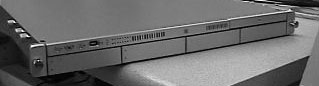
The front of the Xserve has 4 removable drive bays (bottom row) and
a top row chock full of indicator lights, a power switch, a FireWire
port, and a CD-ROM (on the far right side).
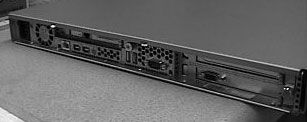
The rear of the server is also filled with ports such as a gigabit
ethernet port, two FireWire ports, two USB ports, a VGA monitor port,
and a serial data terminal port for folks who live and die by the
command line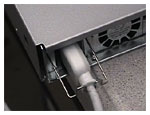 .
.
Even the power port is designed especially for server use. The
special power cord has a bump in the cord designed to be held by a wire
retainer to keep the server from being accidentally unplugged.
Although the OS X Server software comes preinstalled on the Xserve,
you also get a number of useful CD-ROMs including the OS X 10.2
Server software itself. 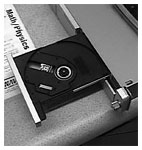 There
must be a CD-ROM drive, then. To my surprise (having not slavishly
memorized the specs), it was a pop-open drive similar to the ones used
in an iBook.
There
must be a CD-ROM drive, then. To my surprise (having not slavishly
memorized the specs), it was a pop-open drive similar to the ones used
in an iBook.
Who could resist?
I plugged it in and turned it on. That was a real surprise - if
you're purchasing one of these for a classroom, they aren't quiet at
all. A roaring wind like a blow dryer on high power started up as the
powerful cooling fan started blowing. I can't imagine what a rack full
of these things sounds like.
If you're buying one for small business or school use, believe the
literature when it says it is not meant for desktop use. That roar
would drive me crazy. Fortunately, I have a storage cabinet where the
server can not only be stored, but it can actually be plugged in and
connected to the network as well. Behind cabinet doors it's no louder
than a typical noisy PC.
As tempting as all that desktop real estate is, you aren't supposed
to pile things on top of the Xserve - not even a monitor. So I strung
cables to a nearby VGA monitor, snagged a spare G3 Blue and White
keyboard and mouse, and proceeded to answer the registration
questions.
There are considerably more questions to answer than for a consumer
Mac, but the setup environment was so similar that I found it easy to
follow without referring to the manual. Just keep a notebook nearby to
keep track of all the new passwords and user names (such as
"Administrator") you'll need to create. Especially the "Admin"
password, which grants you access to all other aspects of the
machine.
The server self-configured off the DHCP network, and I selected both
IP and AppleTalk based file sharing servers. It was smart enough to ask
if the IP was fixed or variable. There were the usual questions about
naming the computer, naming the server, setting the time zone, and so
on.
Next you have to decide what services to enable. I left the mail,
web, ftp, and QuickTime streaming servers off for now - I'm mainly
looking for a file server for the time being. Even if you don't
activate it, you will need to register a user name and password with
the QuickTime streaming server.
All in all, the setup experience was very pleasant and
understandable, and easier than installing my old copy of ASIP. After
finishing these tasks, the computer cycled through some software
updates, rebooted, and was ready to use. The entire setup process took
perhaps twenty minutes - and would have been faster if you'd done it
before.
Other benefits the new server will provide include the ability to
NetBoot machines over the network using standard configurations, having
students be able to access files from anywhere on campus, and - I hope
- eventually being able to import a user list from my class gradebook
and create individualized accounts for all my Space Academy students
next year.
The configuration I ordered has a pair of 1 GHz processors, nearly a
quarter terabyte of hard drive space, and a gigabyte of RAM. Functions
such as the magnification of dock items (I know, I know, eye candy
reduces server efficiency, but I'm not hosting some Fortune 500 company
here, for cryin' out loud) were absolutely stunning.
A fast G4 smokes all my other machines - the fastest of which is a
500 MHz G3. You can see smoother animation, snappier windows, faster
boots - my server boots faster than most of my OS 9 machines - it
really shows the difference between a powerful machine and a machine
that is merely adequate. My current server is a 300 MHz Blue and White G3
running ASIP 5, and there just isn't any comparison between the two as
far as responsiveness.
That's as far as I got in the hour I allowed myself. As I go farther
along, I'll tell you more about the various server management
applications included in OS X 10.2 Server. I have high hopes for
this machine - it should reduce my workload considerably as I convert
machines to the new setup.
A couple of other points: First, make sure you use a monitor capable
of going all the way up to 1024x780 resolution, which is required of
some applications. Second, don't forget that this is a Mac that doesn't
ship with a keyboard or a mouse.
There's a lot to learn about this piece of equipment, even for power
users, so take your time and write down everything that you'll need to
remember.
is a longtime Mac user. He was using digital sensors on Apple II computers in the 1980's and has networked computers in his classroom since before the internet existed. In 2006 he was selected at the California Computer Using Educator's teacher of the year. His students have used NASA space probes and regularly participate in piloting new materials for NASA. He is the author of two books and numerous articles and scientific papers. He currently teaches astronomy and physics in California, where he lives with his twin sons, Jony and Ben.< And there's still a Mac G3 in his classroom which finds occasional use.



