- 2004.11.08
Every now and then you see a product that you can imagine someone
needing - but not yourself. That's what I thought at first when
Marathon Computer offered to send me a Re-Porter
for review.
The Re-Porter (emphasis on the port) is a device with a 1.5
meter (5') cable that essentially moves the ports from the back of your
computer to the front. The computer end of the cable is a bundle of
plugs that plug into your USB (old and new), FireWire (both kinds), and
audio I/O ports and gives you access to these ports from the front of
your machine. Re-Porter also provides an extra USB port as a sort of
bonus.
The user end is a softball-sized sphere with empty ports on a flat
face. This US$59 device is made by the same folks who make a variety of
mounting hardware for Mac Xserves, G4 towers, and other devices.
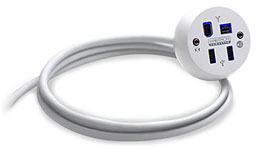 Re-Porter doesn't require any drivers, so I plugged it
into a laptop just to see how it works. The ball's ports light up when
it's plugged in and your computer is powered up, glowing a friendly
blue internally.
Re-Porter doesn't require any drivers, so I plugged it
into a laptop just to see how it works. The ball's ports light up when
it's plugged in and your computer is powered up, glowing a friendly
blue internally.
The device does exactly what it claims - the cluster of cables from
the computer is condensed to a single flexible cable that ends in the
ball.
Not everyone needs to spend $59 to extend ports, but when you think
about it, there should be a market for this. After all, the G5 tower is
designed to sit on the floor, and only a few of its ports are on the
front (one USB, one FireWire, and one headphone jack). Even at that,
most people keep their towers on the floor, so even the front ports are
kind of a grunt and a stretch to get to.
If you are connecting and disconnecting digital cameras and iPods
frequently, this might fit the ticket.
In my situation, I thought of another use. We're using a Power Mac
G5 as the heart of our new planetarium, and we have to fit the control
console in a tight spot. Plugging and unplugging peripherals will be
more convenient with this port extender, especially as we won't want to
be scooting the G5 around much once everything is in place and
working.
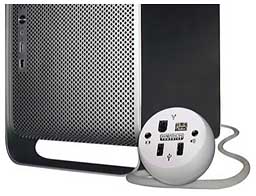 On the other hand, there are a couple of problems
with the Re-Porter. One is the form factor, which the manufacturer says
is designed more for your hand than it is for your desk. That sounds
good, but the device is probably going to spend a lot more time on your
desk than in your hand. The spherical "bottom" doesn't have so much as
a dent to keep it from tipping over. This means that every time you
plug and unplug something, you'll have to fiddle with all the other
cables attached to make it look level.
On the other hand, there are a couple of problems
with the Re-Porter. One is the form factor, which the manufacturer says
is designed more for your hand than it is for your desk. That sounds
good, but the device is probably going to spend a lot more time on your
desk than in your hand. The spherical "bottom" doesn't have so much as
a dent to keep it from tipping over. This means that every time you
plug and unplug something, you'll have to fiddle with all the other
cables attached to make it look level.
It also means there is a minimal surface to provide friction to hold
it in place when some heavy device starts dragging it across the table.
I could see myself yanking it and various peripherals off a desk if I
forget to unplug something (as I've been known to do, much to my sorrow
when the victim was a PowerBook). If it had a little more tug to it
with a rubber base or something, I'd feel the resistance more.
It's also too large to recommend for use with a laptop. It's best
suited for desktop use, but even if my desk were better organized, I'm
not sure where I'd put the thing.
Re-Porter is too expensive for a casual gift or stocking
stuffer.
I think it could potentially have a greater customer base if it
served as a hub for not only USB but FireWire as well. You can gum up
anything if you make it all things to all people, but for $59 I could
get a nice hub that also puts the ports I use where I need them and
stays where I put it on the desk.
You are paying a bit for style. That may not be in the cards for
your typical low-end user, but people who hate grunting and squeezing
under the desk to plug in that extra peripheral may like it.
Summary: Re-Porter looks nice, does what it says, is a little
pricey, and should meet your needs if you need repeated access ports on
the back of a computer that are normally inaccessible.
is a longtime Mac user. He was using digital sensors on Apple II computers in the 1980's and has networked computers in his classroom since before the internet existed. In 2006 he was selected at the California Computer Using Educator's teacher of the year. His students have used NASA space probes and regularly participate in piloting new materials for NASA. He is the author of two books and numerous articles and scientific papers. He currently teaches astronomy and physics in California, where he lives with his twin sons, Jony and Ben.< And there's still a Mac G3 in his classroom which finds occasional use.



