Mac OS X and the Blue and White G3 Firmware Update Problem
Low End Mac Reader Specials
Memory To Go Special: MacPro 8 Core Memory 4GB kit $192 / 2GB kit $109. MacBook Pro / MacMini / iMac Intel Core2 DUO 2GB $44 1GB $23--Free shipping available.
Download Typestyler, still the Ultimate Styling Tool for Internet, Print and Video
Graphics. Works great in Classic with a Native OS X Version on the way. Free
Tryout: www.typestyler.com
LA Computer Company: LA Computer Company: Specials on AppleCare, Apple Displays, MacBooks, iMac's, MacBook Pros, Laptop and iPod accessories and more. Apple A/C Adapters for laptops starting at $25.00 Call 1-800-941-7654 or Click Here.
Other World Computing: OWC Mercury On-The-Go FW400/800/USB2/eSATA Solutions: High Performance A/V Rated, **Bus Powered** Hard Disk Storage - **Now 40GB and up to ***250GB*** in the palm of your hand. Macworld Magazine Editor's Choice - from $87.99!
Mac users can finally play Party Poker for Mac. Not only that, they can also learn how to play PokerStars for Mac.
Laptop Hardware Provided by TechRestore - Overnight Mac & iPod Repairs.
Compare products like desktop computers, laptops, and LCD TVs side by side! All the information and reviews to make the best purchasing decision for a new cell phone GPS products or MP3 players. The Ciao network makes searching products easy for you.
Memory For New Intel Core2 DUO MacBooks, MacBook Pro, MacMini & iMacs" 4GB Kit $80, 3GB Kit $60, 2GB Kit $40, 1GB $20. Click to Maximize your Macs...
- 2005.03.01
I've
gone around on this problem once or twice, so I thought I ought to
memorialize it with notes - and share them with you, while I'm at
it.
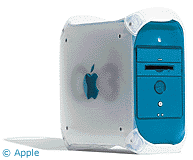
Here's the problem: I have several Blue and White Power Mac G3 towers, the
kind that have ADB ports in the back and can run OS X
(barely).* I like these computers, but I have a couple that are
kind of quirky.
I decided to upgrade one of them to OS X as an experiment.
It was originally running OS 8.5, which is an okay operating
system, but some of the software I use in my class requires OS 9.x
and some of it requires OS X, so I dove in.
In an attempt to maximize the hard drive space, I first erased
the hard drive using the OS X installer utility - this turned
out to be a mistake. I then installed OS X, which went
smoothly, if slowly.
After installing OS X, I tried out a number of functions,
including connecting to a server, starting various programs,
printing, and so on.
The first time I tried to use a Classic application, the OS told
me it couldn't find a Classic System Folder. Of course not - I had
deleted it in the hard drive wipe. Out comes the OS 9 CD.
OS 9 checked the drive and then aborted the install, telling me
I needed to do a firmware update from the extras folder on the CD
first.
Okay, so I found the "G3 Firmware Update" and ran right into a
Catch-22. The firmware update requires that you be running the
Classic Mac OS, and the Classic OS won't run until the firmware
update is installed.
You Can't Get There From Here
You can't install the Firmware
Update 1.1 by booting off the OS 9 CD; the firmware
update writes a file to the active OS 9 System Folder, and CDs
are read-only.
If you do what I did and
don't have the original system CDs for the B&W G3, you're sunk.
Luckily I had an original OS 8.5 CD that shipped with my aging
G3 Beige machine, so I booted the
B&W G3 with that CD, installed OS 8.5 as a clean install, and
rebooted.
Now I could run the Firmware Update - run, shut down, hold the
programmer's button on front panel, restart until you hear a tone,
and then release the button.
Now I could finally install OS 9 and run Classic via OS X
when necessary. But for now the machine is set to boot into
OS 9 because running OS X and Classic at the same time
takes so much of the 6 GB hard drive that there's no room left
for Microsoft Office and certain other applications I need to use
in the classroom.
To have the machine useful in its present state, I need to keep
using OS 9. (My students are disappointed . . . they
like getting to play with OS X.)
An OS X compatible firmware update utility would be nice, but
it's unlikely Apple will expend any effort to retrofit these older
machines that barely run OS X, as this is a relatively
isolated problem.
If you're stuck, though, having a portfolio of older OS
installation CDs is always handy.
* UPDATE: I'm using OEM equipment, which has 128 MB RAM and a
300 MHz processor, and a 6 GB (not 4 like the article
originally said) hard drive. I have to install Classic, Office, a
suite of science programs, and leave some room for student work on
the drive. On the machine I was using, the last thing I was
installing was Office, and it didn't fit. Hence "barely." Also,
OS X on the G3 runs acceptably well, but because of the RAM
limitations switching programs starts being noticeably slow when I
open two or more apps. I've used worse computer/OS combinations (OS
8.6 on a 5200, for example, is
much worse) but it could be better as well. Perhaps "barely" was
too strong a word.
Everyone pointed out that if you upgrade RAM and hard drive,
OS X runs just fine. That's true, I'm sure. However, the
upgrade budget in my district is something like a few pennies per
machine (I am not making this up), so you can do the math and see
that the priority isn't going to be OS X upgrades in a
district where new Mac purchases are verboten. Nevertheless, when
it comes time to make the switch to OS X, I will see what can
be done. I've pulled bigger rabbits out of smaller hats than a
moderate upgrade to a computer....
Low End Mac Reader Specials
Memory To Go Special: MacPro 8 Core Memory 4GB kit $192 / 2GB kit $109. MacBook Pro / MacMini / iMac Intel Core2 DUO 2GB $44 1GB $23--Free shipping available.
Download Typestyler, still the Ultimate Styling Tool for Internet, Print and Video Graphics. Works great in Classic with a Native OS X Version on the way. Free Tryout: www.typestyler.com
LA Computer Company: LA Computer Company: Specials on AppleCare, Apple Displays, MacBooks, iMac's, MacBook Pros, Laptop and iPod accessories and more. Apple A/C Adapters for laptops starting at $25.00 Call 1-800-941-7654 or Click Here.
Other World Computing: OWC Mercury On-The-Go FW400/800/USB2/eSATA Solutions: High Performance A/V Rated, **Bus Powered** Hard Disk Storage - **Now 40GB and up to ***250GB*** in the palm of your hand. Macworld Magazine Editor's Choice - from $87.99!
Mac users can finally play Party Poker for Mac. Not only that, they can also learn how to play PokerStars for Mac.
Laptop Hardware Provided by TechRestore - Overnight Mac & iPod Repairs.
Compare products like desktop computers, laptops, and LCD TVs side by side! All the information and reviews to make the best purchasing decision for a new cell phone GPS products or MP3 players. The Ciao network makes searching products easy for you.
Memory For New Intel Core2 DUO MacBooks, MacBook Pro, MacMini & iMacs" 4GB Kit $80, 3GB Kit $60, 2GB Kit $40, 1GB $20. Click to Maximize your Macs...
- 2005.03.01
I've gone around on this problem once or twice, so I thought I ought to memorialize it with notes - and share them with you, while I'm at it.
Here's the problem: I have several Blue and White Power Mac G3 towers, the kind that have ADB ports in the back and can run OS X (barely).* I like these computers, but I have a couple that are kind of quirky.
I decided to upgrade one of them to OS X as an experiment. It was originally running OS 8.5, which is an okay operating system, but some of the software I use in my class requires OS 9.x and some of it requires OS X, so I dove in.
In an attempt to maximize the hard drive space, I first erased the hard drive using the OS X installer utility - this turned out to be a mistake. I then installed OS X, which went smoothly, if slowly.
After installing OS X, I tried out a number of functions, including connecting to a server, starting various programs, printing, and so on.
The first time I tried to use a Classic application, the OS told me it couldn't find a Classic System Folder. Of course not - I had deleted it in the hard drive wipe. Out comes the OS 9 CD.
OS 9 checked the drive and then aborted the install, telling me I needed to do a firmware update from the extras folder on the CD first.
Okay, so I found the "G3 Firmware Update" and ran right into a Catch-22. The firmware update requires that you be running the Classic Mac OS, and the Classic OS won't run until the firmware update is installed.
You Can't Get There From Here
You can't install the Firmware Update 1.1 by booting off the OS 9 CD; the firmware update writes a file to the active OS 9 System Folder, and CDs are read-only.
If you do what I did and
don't have the original system CDs for the B&W G3, you're sunk.
Luckily I had an original OS 8.5 CD that shipped with my aging
G3 Beige machine, so I booted the
B&W G3 with that CD, installed OS 8.5 as a clean install, and
rebooted.
Now I could run the Firmware Update - run, shut down, hold the programmer's button on front panel, restart until you hear a tone, and then release the button.
Now I could finally install OS 9 and run Classic via OS X when necessary. But for now the machine is set to boot into OS 9 because running OS X and Classic at the same time takes so much of the 6 GB hard drive that there's no room left for Microsoft Office and certain other applications I need to use in the classroom.
To have the machine useful in its present state, I need to keep using OS 9. (My students are disappointed . . . they like getting to play with OS X.)
An OS X compatible firmware update utility would be nice, but it's unlikely Apple will expend any effort to retrofit these older machines that barely run OS X, as this is a relatively isolated problem.
If you're stuck, though, having a portfolio of older OS
installation CDs is always handy.
* UPDATE: I'm using OEM equipment, which has 128 MB RAM and a 300 MHz processor, and a 6 GB (not 4 like the article originally said) hard drive. I have to install Classic, Office, a suite of science programs, and leave some room for student work on the drive. On the machine I was using, the last thing I was installing was Office, and it didn't fit. Hence "barely." Also, OS X on the G3 runs acceptably well, but because of the RAM limitations switching programs starts being noticeably slow when I open two or more apps. I've used worse computer/OS combinations (OS 8.6 on a 5200, for example, is much worse) but it could be better as well. Perhaps "barely" was too strong a word.
Everyone pointed out that if you upgrade RAM and hard drive, OS X runs just fine. That's true, I'm sure. However, the upgrade budget in my district is something like a few pennies per machine (I am not making this up), so you can do the math and see that the priority isn't going to be OS X upgrades in a district where new Mac purchases are verboten. Nevertheless, when it comes time to make the switch to OS X, I will see what can be done. I've pulled bigger rabbits out of smaller hats than a moderate upgrade to a computer....
Jeff Adkins is a science teacher who isn't afraid to state his preferences in computing platforms. In his classroom he has everything from a beige All-in-One to a a G4 XServe, and they all work together nicely. He calls himself the "poster child for technology integration" in the classroom. He was the 2006 Outstanding Educator of the Year for the California Computer Using Educators (CUE) organization. He also maintains a site for astronomy teachers at www.AstronomyTeacher.com.
Recent Mac Lab Reports
- Microsoft Word 2004 vs. iWork Pages 1.0 for writing a book, 01.10. Microsoft Word is great for technical writing, powerful yet slow, while Pages lets you concentrate on just writing, making it great for novels.
- iWeb a great tool for quickly creating an attractive website, 09.11. Apple's iWeb software isn't just easy to use, it also integrates nicely with .mac and other programs in the iLife bundle.
- Use your Bluetooth phone to control your Mac? Maybe, 02.27. Salling Clicker software turns many Bluetooth phones into remote controls for Bluetooth-equipped Macs.
- More in the Mac Lab Report index.
Recent Content on Low End Mac
- Apple's eMate still a great tool in the classroom, Tommy Thomas, Welcome to Macintosh, 05.09. How one teacher equipped his classroom with eMates with his own money - and plans to keep using them as long as possible.
- $199 iPhone coming?, iPod not a Walkman, crosswalk danger, iPods taking over cars, and more, iNews Review, 05.09. Also the iPhone is a second-rate phone, iPhone 2.0 may introduce handwriting recognition, Kensington battery pack and chargers, new iPhone apps, and more.
- Best Power Mac G4 deals, Low End Mac Deals, 05.09. Used Cube, $479; 400 MHz PCI, $70; 450 AGP, $105; 733 DA, $150; 867 QS, $200; 1 GHz, $250; 450 dual, $295; 1 GHz dual, $400; 1.42, $600; more.
- Best 15" MacBook Pro deals, Low End Mac Deals, 05.09. Used 1.83 GHz Core Duo, $1,100; 2.16, $1,295; refurb, 2.2 Core2, $1,449; 2.4 Penryn, $1,699; 2.5, $2,149; new 2.2, $1,525 after rebate; 2.4, $1,685 a/r; more.
- MacBook sales explode, MacBook Air reviews, several new hard drives, and more, The 'Book Review, 05.09. Also silver-zinc batteries may outlast lithium-ion, Bell Aliant bundling MacBook with Internet access, notebook drives benchmarked, bargain 'Books from $150 to $2,699, and more.
- Best iPod touch deals, Low End Mac Deals, 05.09. Refurb 8 GB '08, $249; 16 GB '07, $329; '08, $349; new 8 GB '07. $269; '08, $280; 16 GB '07, $330; '08, $369; 32 GB, $475.
- Apple tops in tech support, Penryn iMacs and Psystar Open Computer reviewed, and more, Mac News Review, 05.09. Also the iMac philosophy, OpenOffice 3.0 going Mac, MozyHome backup comes to Macs, weather in the Dock, and more.
- More G4 upgrade advice, secure disk wipes, 500 MHz iMacs with Tiger in action, and more, Dan Knight, Low End Mac Mailbag, 05.09. The importance of securely clearing your hard drive before you pass on your Mac, Pismo and closed lid mode, G3 iMacs in the classroom, and more thoughts on upgrading G4 Power Macs.
- 140 million copies of Vista sold (yawn), Frank Fox, Stop the Noiz, 05.09. It sounds like a lot, but over 85% of Windows users are staying away from Vista. 20% of Mac users have embraced Leopard in one-third the time.
- Mac of the Day: Macintosh LC, Oct. 1990 - only 3" tall, the LC was the least expensive color Mac in 1990.
- List of the Day: Jaguar List is for anyone using Mac OS X 10.2.x.
- May 12 in LEM history: 99: Is Apple missing the boat? - 00: PowerBook history - Frankenstein Power Mac - 03: Beige Power Mac G3 - Is a 5400 worth buying? - Upgrades for the tray-loading iMac - Quiet computing - 04: Windows stability: Nothing changes - Broadband Internet access: Picking the right speed - 06: The future of PowerPC Macs in the Intel era - Setting up a 68040-based Mac media center - Mac mini Core Duo upgrades
- Why one Mac user chose BlackBerry over iPhone, Andrew J Fishkin, Best Tools for the Job, 05.08. The advantages of OS X, Safari, Mail, and iSync don't outweigh the familiarity of BlackBerry, its excellent software, easily replaceable batteries, and a camera-free option.
- 500 MHz iMac with Panther great for Internet, watching video, and more, Carl Nygren, My Turn, 05.08. At $65 with upgraded RAM and a bigger hard drive, it was too good to pass up, and it works very nicely with Mac OS X 10.3.
- Boomerang: The Blue and White Power Mac G3 that kept coming back, Charles Webb, The Webb Chronicles, 05.08. Over its nine-year lifespan, this Power Mac had at least five owners before it finally gave up the ghost.
- Best Intel iMac deals, Low End Mac Deals, 05.08. Used 17" 1.83 GHz, $699; 20" 2.16 Core2, $885; refurb 20" 2.16, $949; 2.4, $1,099; 24" 2.16, $1,199; 2.4, $1,399; 2.8, $1,599; Penryn from $1,049 after rebate.
- Best 17" PowerBook G4 deals, Low End Mac Deals, 05.08. Used 17" 1 GHz, $790; 1.33 GHz, $850; 1.5 GHz, $859; 1.67 GHz, $889.
- Best Mac OS X 10.5 'Leopard' deals, Low End Mac Deals, 05.08. Mac OS X 10.5.1 single user, $99; 5 users, $139; 10.5 Server, 10 users, $450; unlimited, $899.
- More links in our archive.
About LEM | Support | Usage | Privacy | Contacts





