- 2006.03.28
Thanks to Linda W. Uhrenholt, an Education Advocate for
AT&T, I've learned about a potentially troublesome "feature" of
Blogger, the free blogging tool now owned by Google. Linda wrote to
ask:
 "Today I noticed that in the upper right hand corner
[of my blog there] is a button/arrow called 'Next Blog.' I clicked
on it and with horror realized it went to someone else's blog - and
it sure wouldn't be appropriate to show this particular blog. I
went to your blog to see if it was the same deal. Sure enough on
your http://espaceacademy.blogspot.com/
in the right corner was that link and it went to 'body pump' and
one time it went to 'meat treats' from your site. I emailed the
Blogger Support to see how to disable that function but wanted to
know if you had ever asked them how to disable it?"
"Today I noticed that in the upper right hand corner
[of my blog there] is a button/arrow called 'Next Blog.' I clicked
on it and with horror realized it went to someone else's blog - and
it sure wouldn't be appropriate to show this particular blog. I
went to your blog to see if it was the same deal. Sure enough on
your http://espaceacademy.blogspot.com/
in the right corner was that link and it went to 'body pump' and
one time it went to 'meat treats' from your site. I emailed the
Blogger Support to see how to disable that function but wanted to
know if you had ever asked them how to disable it?"
I noted that she is correct. While on campus, the district
filtering software will do a pretty good job of preventing that
link from going anywhere objectionable. But at home it's another
story altogether.

I took a look at the template supplied by Blogger to see if
there were any simple way of removing some lines of code to make
the button - or at least the navbar - disappear. Alas, if there is,
it's beyond my quite meager HTML skills.
So I did what any red-blooded power user would do: I searched in
Google to find a way to suppress Google's navbar. Sure enough, I
discovered
Instructions to Remove Blogger navbar.
I found the following instructions. Take the CSS code below,
copy and paste it into your Blogger template, and voilà, the
navbar is gone.
<style type="text/css">

#b-navbar {

height:0px;

visibility:hidden;

display:none

}

</style>
These kinds of things sound so simple on tech help sites, but to
novice users there are still barriers to prevent them from figuring
out what to do. For example, maybe you've never tried to see the
source code for your template. So here's a more detailed
step-by-step procedure:
- Log into your blog account at www.blogger.com.
- Click the Template tab.
- "Edit Current", the sub-tab, should be automatically selected.
If not, click it.
- Scroll down through the code until you see the end of the
heading section: </head> Your template may not look exactly
like mine does, but search for the </head> tag somewhere near
the top. Perhaps you can copy the template to an external word
processor as a backup just in case, especially if you've customized
your template in any way.
- Copy the code from the article above, then paste the code
between the end of the heading </head> and the beginning of
the <body> section. Check for extraneous carriage returns or
beginning or ending letters being missed during the copy and
paste.
- Click "Save template changes." then "Republish your entire
blog."
There may be a delay of several minutes, as the site warns, if
you have many posts.
This will remove the navbar and place a strip of blank space at
the top of your blog. See the cited website above to investigate
options for removing the blank space.
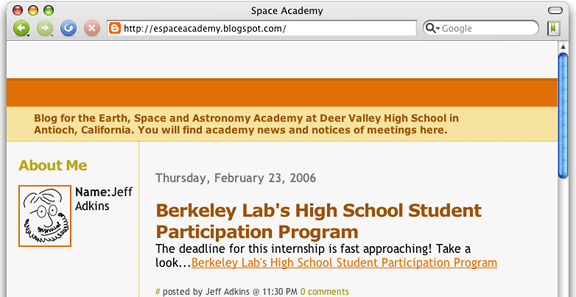
Unfortunately, the search box is deleted, and one of the links
back to Blogger disappears; but as long as there's a "Powered by
Blogger" button at the bottom of your blog, I think I agree with
the original source: You aren't violating the terms of service.
If Blogger provided an option to disable "Next Blog" (even if it
isn't the default choice), it would go a long way towards easing
the minds of educators using Blogger for whatever purpose.
Linda and I traded a few comments on this problem, in which she
indicated that the folks at Blogger essentially pointed her at the
help forums and left it at that.
In many ways, Google and Apple have a lot in common. Google is
noted for its simple interfaces and clean (some would say sparse)
page layouts. Like the Macintosh, using Google services such as
Google Maps or Google Chat makes doing specific tasks either easy
or impossible with little middle ground.
This points to the great strength of the PC - while much of it
is either mildly more difficult than the Mac or insanely difficult,
there is middle ground, and someone, somewhere has figured out how
to do the thing you need to do.
Their minimalist approach makes getting Google's attention
difficult, because (like Apple) they resist feature bloat. Apple
likes to add new features, but not every new feature that
can be imagined, because they look at the Windows paradigm and see
how this actually inhibits the user in many cases.
Nevertheless, uncontrolled links to inappropriate sites is a
fairly big issue for the adoption of blogs in the education space,
and if anyone at Google reads this, they should know this is a
Pretty Big Deal - even bigger than the text editing tools not
working in Safari.
For many education users, this will be a deal breaker.
Many thanks to Linda Uhrenholt for pointing it out to me.
is a longtime Mac user. He was using digital sensors on Apple II computers in the 1980's and has networked computers in his classroom since before the internet existed. In 2006 he was selected at the California Computer Using Educator's teacher of the year. His students have used NASA space probes and regularly participate in piloting new materials for NASA. He is the author of two books and numerous articles and scientific papers. He currently teaches astronomy and physics in California, where he lives with his twin sons, Jony and Ben.< And there's still a Mac G3 in his classroom which finds occasional use.



