Emulation, using software to make one kind of computer act is if
it was a completely different piece of hardware, is older than
personal computing itself.
For instance, when Bill Gates and Paul Allen first read of the
pioneering MITS Altair personal computer in the January 1975 issue
of Popular Electronics, they set out to write a BASIC
language compiler for it. The problem was that they didn't have an
Altair - but they did have access to a Harvard computer lab and
information about the Altair's Intel 8080 processor.
So they wrote an 8080 emulator, and used it to write the code
for their BASIC. By March, Paul Allen was offered the title of
director of software for MITS, and Gates and Allen's partnership,
then known as Micro-Soft had its first sale.
More recently, emulation software such as Connectix's Virtual
PC has allowed Mac users to boot a PC on their Apple hardware,
running any of a wide range of PC operating systems and application
software.
But what about the opposite, emulating a Mac on PC hardware? It
turns out to be a much more difficult task. The problem? At the
heart of every computer is a relatively small amount of code which
runs in between the operating system and the processor's
hardware.
On PCs, this is relatively simple and simple-minded. By the
early 1980s, companies like Compaq and Phoenix had successfully
reverse-engineered the BIOS used in IBM's original PC, making
possible the wide range of PC-clones that dominate that market
today. When Virtual PC boots up, it runs a licensed PC ROM BIOS as
one step in creating a genuine fantasy PC.
Macs have much more complex ROMs, containing (among other
things), the Mac Toolbox and QuickDraw, sets of software routines
that define basic ways the computer is going to work. Apple owns
that code and doesn't allow it to be shared. As a result, it's not
as easy to make PC think it's a Mac.
Basilisk II is one of several programs that try to emulate
a Mac on PC hardware. All are 680x0 emulators; no one has released
emulation software for a PowerPC CPU. Like the commercial SoftMac, Basilisk II
requires Mac ROMs to work, either installed on a US$200 card sold
by the SoftMac people or (more commonly) with ROM image files
captured with SoftMac's CopyROM utility (and transferred from a
Mac-floppy to a PC hard drive using SoftMac's free GemXplor file
transfer utility).
Where SoftMac is marketed commercially, Basilisk II is an open
source project, originally written by Christian Bauer, and
distributed under the GNU General Public License. In other words,
it's freely available and not crippled.
Like many open source projects, versions have been developed for
a variety of operating systems. In this case, Basilisk II is
available for BeOS R4 (both PowerPC and x86), x86 Unix (tested with
Linux, Solaris 2.5, FreeBSD 3.x, and IRIX 6.5), AmigaOS 3.x, and
Windows NT/2000/XP/9x. Source code is available for
downloading.
The
Windows versions are maintained by Lauri Pesonen. While
you're on her site, be sure to scroll down the page to the link for
Marc Hoffman's unofficial manual.
Unlike commercial products for the Mac like Virtual PC, getting
Basilisk II up and running is a bit of a project. Hoffman's manual
is a big help here,
The first step is getting access to a genuine Mac ROMs - either
on a permanent basis, installed into SoftMac's hardware card, or
long enough to capture to a disk image file. (Legally, you should
own the Mac you're using in this way). You'll be limited by the
version of the Mac ROMs you're using; don't expect colour support
if you've started off with the ROMs from a black and white-only
Mac Plus, for example.
Once you've installed Basilisk II and copied the ROM image file
over, you're ready to create a hard drive image, configure Basilisk
II, and install the Mac OS from a bootable CD or set of floppies.
(Don't expect to be able to download a Mac OS on your PC and
install it from there. Trust me, it won't work).
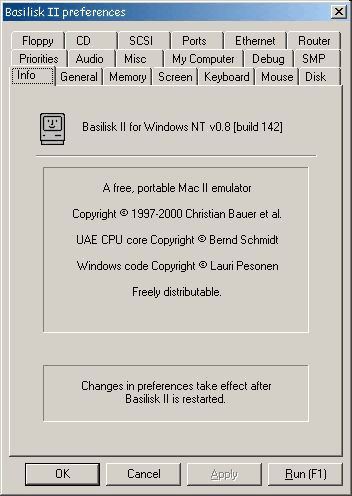
Basilisk II has a reasonably friendly graphical configuration
utility. It can be used to set the display options, to choose what
specific 680x0 processor to emulate, and to dedicate a portion of
your PC's RAM for the Mac's use. Your fantasy Mac can be told that
your PC's CD drive, floppy drive, keyboard, and mouse are
Mac-equivalents, and that the hard drive and ROM image files are
the real things.
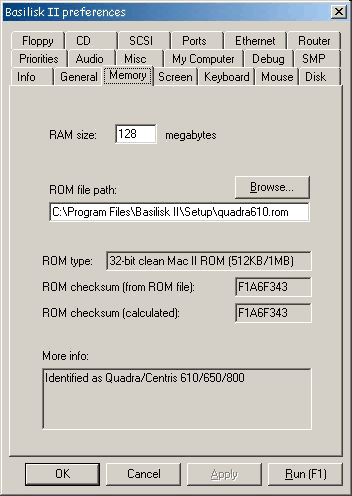
CD and ethernet setup varies between Win9x and NT/2000/XP
systems. Again, Hoffman's manual is invaluable at walking users
through the necessary steps.
An especially nice option is the ability to make the PC's "My
Computer" show up on the Mac desktop, making it possible to copy
files back and forth between the virtual Mac and the main PC
drives. Also nicely implemented is the ability to share the PC's
Internet connection.
How well does it work? I currently have Basilisk II installed on
a 750 MHz Compaq notebook running Windows 2000. Using ROM images
from an old Mac Quadra 610, I
have it set to emulate a 68040 CPU and have given it 128 MB to play
with. I'm running it in an 800 x 600 pixels window with 16-bit
colour. I've given it a 500 MB virtual hard drive.
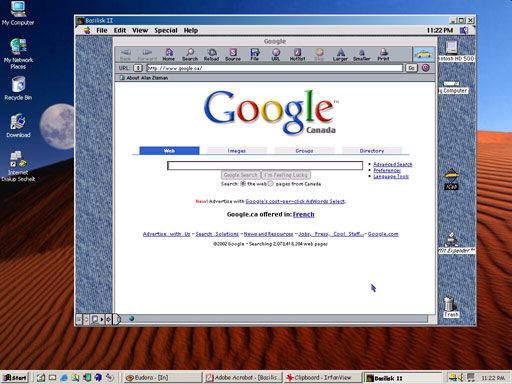
At various times I've installed Mac OS 7.5.3, 7.6.1, and 8.0,
and I'm currently using 8.1, which was the last version to run on
680x0 hardware. You can't use Mac-emulation to learn about
OS X on your PC. Still, OS 8.1 is reasonably modern and has
good Internet support.
It boots in under 20 seconds, even when loading a reasonable set
of control panels and extensions. I've got Netscape 4.05 and iCab
browsers running happily along with older versions of Microsoft
Word and Excel, ClarisWorks 5.0, and even an old Photoshop (ver
2.5). I can connect to my iBook via AppleTalk.
(If I ever install an 802.11b wireless PC Card in this PC
notebook, I'll see if I can share it for wireless Internet and
networking access with this virtual Mac).
Subjectively, performance feels pretty good. Crude benchmark
testing measuring CPU
whetstones (using the 68k DWhet utility scored 17647
- slower than 60 MHz PowerPC 601-powered Macs (scoring about 22000)
and quite a bit faster than 33-MHz 68040 Macs (scoring about 5500).
Of course, even with its score close to that of low-end original
PowerPCs, this 680x0 emulator can't run PowerPC-native Mac
operating system or application software. However, those results
jive with my subjective sense that my emulated 68040 is faster than
any real 68040 Apple ever sold.
It works, but is it good for anything? Maybe yes, maybe no.
Isn't it enough that you can have that authentic Mac look and
feel on your PC desktop? I suppose Web designers forced to work
with a PC could use it to test whether their pages will work with
Mac browsers - at least with the older versions that will run in
emulation.
And if you have a vital (or favourite) piece of older Mac
software, this may be a way to continue to use it when dragged,
kicking and screaming, over to a Windows system.
Or take it all the way - set your Windows system to autoload
Basilisk II at startup so your PC can boot right to a Mac OS.
Convert your PC into a superfast virtual 68040 Mac and never have
to fuss with Windows again. 



