Low End Mac Reader Specials
TypeStyler For Mac OS X is Now Shipping! Download The Free Fully Functional 60 Day Tryout at www.typestyler.com
Don't install Parallels to play poker online! Poker Mac will show you how
to download and install a native Mac poker application such as Full
Tilt Poker Mac.
Compare products like desktop computers, apple laptops, apple macs, and LCD Monitors side by side! All the information and reviews to make the best purchasing decision for new mobile phones, sat nav systems, or MP3 players. The Ciao online shopping community makes searching products easy for you.
Mac2Windows
'Just Say No to Microsoft' Fails to Convince
- 2006.01.17 - Tip Jar
As Mac users, we've already made a choice to say "no" to the majority computing platform, so many of us may be interested in Tony Bove's Just Say No to Microsoft (No Starch Press, US$24.95) with its subtitle, "How to ditch Microsoft and why it's not as hard as you think".
Bove focuses on how to replace Microsoft Windows with Macs and Linux operating systems - and how users who remain Windows-users can make their systems as Microsoft-free as possible with alternatives to Internet Explorer, Microsoft Office, Windows Media Player, and more.
He offers a history of Microsoft as it rose to dominate the field of personal computer operating systems and productivity software, chapters on Mac and Linux, and looks at alternatives to the various Microsoft Office programs and Windows Media Player. That's followed by network and Internet alternatives and a 12-step program for kicking the Microsoft addiction.
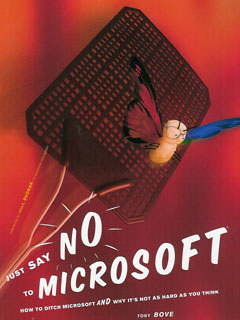
The book is an often-sprightly read with a
combination of humour, anger, and practical tips.
It Doesn't Quite Work
But for me, it doesn't quite work. Bove seems trapped by his anti-Microsoft frame. As a result, complicated procedures in Windows or Microsoft software are always pointed out negatively, while often-complicated procedures in Microsoft alternatives are simply ignored.
This starts on the first page of the introduction, where Bove notes his elation at running OpenOffice.org's office software on his PowerBook. "Not a piece of Microsoft code in sight." True, but also no mention of the effort it takes to get the non-OS X-native OpenOffice.org software up and running on his PowerBook - if this had been a piece of Microsoft software, you can bet he would have complained loudly.
"To get high-quality sound from an iMac, PowerBook, other Macs, or iPods, you can connect them to your home stereo equipment." Guess what? You can do this with a Windows PC as well, and in exactly the same way Bove describes - running a cable from the sound output jack to your home stereo.
Bove makes light of Linux limitations as well; he suggests that computers with 64 to 128 MB of RAM "can run Linux with all its bells and whistles". Don't bet on it; up-to-date Linux distributions can be very nice and very usable, but they're also pretty much as RAM-hungry as up-to-date Mac OS X or Windows installations, at least if you want "all the bells and whistles".
He highlights a report of a college technologist turning 133 Mhz Pentium systems into "serviceable Internet kiosks for the college's students"; just add Linux, CD-ROM drives, and more RAM. Sorry, but more RAM, CD-ROM drives, and Windows would probably make slow but usable Internet kiosks as well.
Just Plain Wrong
We get errors of fact. Linux-father Linus Torvalds is described as "a student programmer in Norway" (he's Finnish), while Bove claims, "Word documents are now the most common carrier for viruses", which was once the case but certainly hasn't accounted for any of the most common infections of the past few years.
Bove has a thing against PowerPoint as well, which he describes as "a dinosaur stalking the new world of interactive media that simply won't give up". By confining a presenter to "a single pre-set path, limiting the creator's options, discouraging spontaneity, and diminishing flexibility" he gets to blame the software (and Microsoft) for business and government stupidity. He then goes on to promote PowerPoint alternatives including OpenOffice.org's Impress presentation module and Apple's Keynote, but fails to realize that these alternatives equally tie presenters to a linear set of onscreen slides.
Blaming NASA's Columbia space shuttle disaster or the war in Iraq on PowerPoint presentations may make for good clean fun, but it's not clear to me that history would have been any different if the presenters had been using non-Microsoft software.
And that's ultimately the problem with this book: It's great to provide users with alternatives to the Microsoft mega-standards, and this book does a pretty good job of pointing out a range of alternatives. But accuracy is also important, and it's important to compare alternatives by the same standards as Microsoft's products.
Microsoft may have a lot to account for; unfortunately, with its
factual errors and in-your-face biases, "Just Say No..." isn't the
book to convince many users to "ditch Microsoft".
Alan Zisman is Mac-using teacher and technology writer based in Vancouver, BC, Canada. Many of his articles are available on his website, www.zisman.ca. If you find Alan's articles helpful, please consider making a donation to his tip jar.
Recent Columns by Alan Zisman
- G4 'Book vs. Hackintosh Netbook: Which Makes More Sense?, 03.08. Comparing a used 12" G4 iBook or PowerBook with a netbook running Snow Leopard, which is the more practical choice?
- OS X on My Dell Mini 9: Success at Last!, 03.02. Although last year's attempts to install OS X failed, new utilities made it easy to turn this Dell netbook into a Hackintosh.
- iPad Promises to Free Users from Files and Folders and Drives, 02.23. For a lot of computer users, finding files they've saved can be a confusing and frustrating process, one that the iPad eliminates.
- 2 Freebies for Switchers, 01.07. Windows users are used to a maximize button and a Start menu. Two free apps to bring these features to OS X.
- More in the Mac 2 Windows index.
Links for the Day
- Mac of the Day: iMac Core Duo, Jan. 2006 - The first Intel-based iMacs ran at 1.83-2.0 GHz, came with 17" and 20" displays.
- Group of the Day: Vintage Macs is for all 680x0-based Macs, from the 128K through Quadras.
- March 16 in LEM history: 00: Cascading Style Sheets - 01: Passing of a free OS - Buying a used Mac - 06: Capture stills from DVDs - Intel unleashes OS X - Rivals can't match iPod system - 07: Pismo Spotlight woes solved - Flash-based MacBook mini speculation - Mac Pro could go 8-core
- Support Low End Mac
Recent Content on Low End Mac
- Why I Plan to Stop Using Google Docs, Jason Walsh, Mac Life, 03.16. Jason Walsh continues his search for the perfect word processor and explains why he uses Google Docs - and why he will stop using it.
- Why Run Leopard on Slow G4 Macs?, Simon Royal, Mac Spectrum, 03.15. Tiger has lower demands and runs more smoothly on low-end Macs, but Leopard gives you access to more up-to-date software.
- The Apple Patient, John Hatchett, Recycled Computing, 03.15. The used 12" PowerBook has a dead screen, missing key, damaged case, and minimal memory, but it does work.
- Consumer Reports Rates Apple Tops, Macs Cost Less to Manage than PCs, 6 Core Mac Pro Soon?, and More, Mac News Review, 03.12. Also dreaming of a Mac mini on steroids, focus on word processiong, Ubuntu ditches brown for more Mac-like appearance, and more.
- iPad Ships April 3, iPhone Stand Made from Cutlery, Apple's Draconian Developer Agreement, and More, iNews Review, 03.12. Also an open letter to Steve Jobs, Apple bans cell phone radiation app, wireless iPhone charging with Case-mate Hug, new apps, and more.
- Apple Tops in Laptop Support, Rise of Netbooks Charted, 1 TB Bus Powered Hard Drive, and More, The 'Book Review, 03.12. Also Apple files for patent on notebook cooling technology, the Mac user and his i7 laptop, HP's latest Vivienne Tan netbook, and more.
- More links in our archive.
Recent Deals
- Best iPad Deals, 03.16. 16 GB iPad, $499; 32 GB, $599; 64 GB, $699; 16 GB with 3G, $629; 32 GB 3G, $729; 64 GB 3G, $829. Free ground shipping.
- Best iPod classic Deals, 03.12. Used 20 GB, $119; 40 GB, $139; 60 GB, $159; 30 GB video, $129; 60 GB, $159; 80 GB, $169; refurb 120 GB, $189; new, $214; 160 GB, $228 shipped.
- Best G3 iBook and AirPort Card Deals, 03.12. 366 MHz 12" clamshell, $89; 466, $125; 500 white CD, $100; 600, $199; 800 Combo, $239; 14" 900, $225.
- Best Xserve Deals, 03.12. Used 1 GHz dual G4, $499; 2.0 dual G5, $599; 2.3, $749; refurb 2.26 4-core Nehalem, $2,499; new, $2,699; 8-core, $3,449; refurb 2.66, $4,299; new, $4,799; more.
- Best iPod touch Deals, 03.11. Refurb 8 GB, $149; 16 GB, $199; 32 GB, $249; 64 GB, $339; new 3G/8 GB, $184; close-out 2G/16 GB, $229; 3G/32, $270; 64, $355. Shipping included.
- Best Mac OS X 10.5 Deals, 03.11. "Leopard" one user, $180; upgrade from 10.4, $150; 5 users, $400; Server, 10 users, $493; unlimited users, $600.
- Best 17" MacBook Pro Deals, 03.11. Used 2.33 GHz, $1,099; 2.5, $1,349; refurb 2.66, $1,949; 2.93, $2,199; new 2.8, $2,249 after rebate; 3.06, $2,749.
- More deals in our archive.
About LEM | Support | Usage | Privacy | Contacts
Navigation
Used Mac Dealers
Apple History
Video Cards
Email Lists
Favorite Sites
MacSurfer
MacMinute
MacInTouch
MyAppleMenu
InfoMac
Macs Only!
The Mac Observer
Accelerate Your Mac
RetroMacCast
PB Central
MacWindows
The Vintage Mac
Museum
DealMac
DealsOnTheWeb
Mac2Sell
ramseeker
Mac Driver Museum
JAG's House
System
6 Heaven
System 7 Today
the pickle's Low-End
Mac FAQ
Abandonware
Petition
Mac vs. PC Info
Affiliates
The Apple
Store
Mac
Connection
B&H
MacMall
TechRestore
ExperCom
Crucial
Memory
batteries.com
MacMinute
MacInTouch
MyAppleMenu
InfoMac
Macs Only!
The Mac Observer
Accelerate Your Mac
RetroMacCast
PB Central
MacWindows
The Vintage Mac
Museum
DealMac
DealsOnTheWeb
Mac2Sell
ramseeker
Mac Driver Museum
JAG's House
System 6 Heaven
System 7 Today
the pickle's Low-End
Mac FAQ
Abandonware
Petition
Mac vs. PC Info
Mac Connection
B&H
MacMall
TechRestore
ExperCom
Crucial Memory
batteries.com



