Like many elementary schools, Vancouver (BC, Canada) Chief Maquinna Elementary
School holds a winter concert where the children perform
seasonal songs for family and friends. It's a nice event, kept to about
an hour in length so it doesn't tax anyone's patience.
For several years I've been recording the concert. The first year we
produced an audio CD as a school fundraiser, but sales were barely at
the break-even point. Since then we've been ripping the recordings as
MP3s and placing them on the school website. Even though our school
population is by no means wealthy (a large majority of the families are
recent immigrants to Canada), nearly all have computers and Internet
access.
We don't stream the audio files; instead, they are simply linked on
a web page. That means home users may have to wait a while while the
files, typically 1-2 MB in size, download. But it works very smoothly
within the school, where about 50 computers are directly linked by
ethernet to the school's web server; inside the school the tunes can be
listened to almost as if they were on the local hard drives. It's nice
to see students with headphones on listening and humming along with
their performances from earlier years.
This year's recording and production was totally done on a G4 iBook (the 12" 800 MHz
model). Of course, "totally done" still requires some old-style
non-computer hardware, just as in the days of recording to reel-to-reel
tape, you need microphones, a mixer, etc.
Years of playing in rock bands has left me with a cache of sound
hardware.
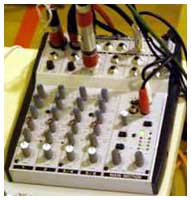 I recorded the kids using three rock 'n' roll standard
Shure SM58 microphones. They're not the best for the job, since they're
really designed for close miking soloists, not miking a bunch of kids
from about 15' away, but they're what I have on hand. I connected them
to a little Behringer six-channel mixer, about the size of a hardcover
novel and costing about US$75 - an inexpensive and basic piece of
gear.
I recorded the kids using three rock 'n' roll standard
Shure SM58 microphones. They're not the best for the job, since they're
really designed for close miking soloists, not miking a bunch of kids
from about 15' away, but they're what I have on hand. I connected them
to a little Behringer six-channel mixer, about the size of a hardcover
novel and costing about US$75 - an inexpensive and basic piece of
gear.
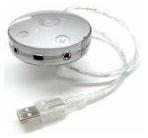 Since the iBook lacks an audio-in port, I connected the mixer
to a Griffin
Technology iMic , a simple little US$40 audio input and output
device that plugs into a USB port. The next problem was choosing
OS X recording software. There are lots of options, ranging from
expensive pro-level programs like the US$499 Peak - they also make a US$99
Peak-LE that probably would have worked fine.
Since the iBook lacks an audio-in port, I connected the mixer
to a Griffin
Technology iMic , a simple little US$40 audio input and output
device that plugs into a USB port. The next problem was choosing
OS X recording software. There are lots of options, ranging from
expensive pro-level programs like the US$499 Peak - they also make a US$99
Peak-LE that probably would have worked fine.
And there are free options, such as the SimpleSound-like Audio Recorder or
Audacity. I
really want to like Audacity. It's an open source project with some
nice features, but it lacks one feature that I consider essential
whether recording live or just digitizing old LPs or tapes: I need
meters to show the intensity of the sound being recorded.
You might think you can make your recordings louder or software
after the fact - and to a degree this is true. But if your original
recordings are too faint, when you increase the volume you also make
the inevitable background noise more noticeable. Boost too quiet an
original recording and it can sound like the music is being played in a
shower with the water running.
If you record at too high a level, the loudest parts of the sound
will be clipped and distorted. Even if you reduce the volume, you'll
just end up with quieter distortion. Digital recording is less
forgiving than old-style analogue recordings. (Clipping for a fraction
of a second may be acceptable, but you definitely don't want clipping
for extended periods of time.)
I've made both sorts of mistakes and have Winter Concerts from years
past as documentary evidence.
Meters (often called VU Meters in the old days of tape recordings)
give you a visual way to see your recording levels. Your goal is too
get your levels as loud as possible while avoiding clipping the loud
parts. The OS X Sound preference panel has a meter, but it mixes
together left and right sound channels, isn't very responsive, and
doesn't show when you're clipping clearly enough to make it very
usable.
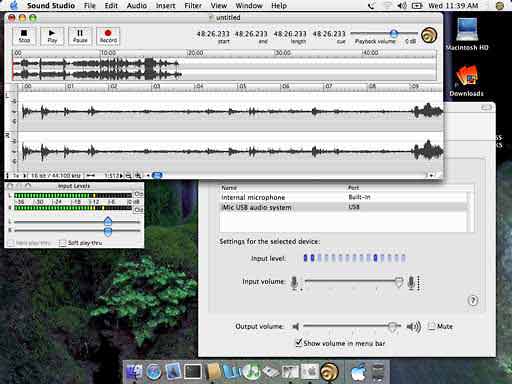
Sound Studio Screen Shot
After testing several shareware recording applications, I settled on
Sound Studio. It's US$50,
with reduced prices for students and teachers. It includes a nice set
of features with an easy-to-learn interface. While lacking pro-level
features (which are beyond what I need or want), it also lacks a
pro-level price. It does include a good pair of meters. It saves sound
files in several uncompressed formats, including AIFF and Windows-style
WAV.
With my mikes and mixer, iMic and Sound Studio, I was ready to
record. I set up the gear and computer and sat in on several classes'
rehearsal sessions to get a rough sense of levels. After that, I could
set levels, click "record," and sit back and watch the dress rehearsal
(attended by 200 students from our school's nearby annex) - and later
the actual performance.
That gave me a pair of hour-long audio files, each about 500 MB or
so. The next step was to split them into individual songs, I used Sound
Studio, locating each song amid the noise of moving classes on and off
stage, the MC's remarks, and more. Copy a song, paste it into a new
file, clean up the beginning, fade out the applause at the end, save.
Repeat ten times, and the end result was a folder filled with just the
songs, about 250 MB worth of content.
If I had wanted to, I could have burned them to a CD, but I wanted
to rip them to MP3 format.
iTunes does that
just fine, but it takes a few not-entirely intuitive steps. First, set
the MP3 conversion rate. The higher the bit-rate, the better the
quality, but the larger the files - though even at a fairly high
quality, the file sizes are much smaller than the uncompressed files as
originally recorded. 128 kbps files are near-CD quality and tend to be
about 1/10th the original file size; 64 kbps files are FM-radio quality
at about 1/20th the original file size. That was my choice; to select
it, I opened the iTunes preferences dialogue, clicked on Importing, set
it to import using the MP3 encoder, and opted for a Custom setting.
That let me pick a 64 kbps stereo bit rate, opting for smaller files at
the expense of sound quality.
Next you need to get the individual songs into iTunes (still in
uncompressed AIFF format). The File menu's Add to Library item does
this, letting you select the sound files en masse. Finally, find them
in your iTunes library (in my case, they were at the bottom of the
list, with no Artist or Album listed). Select them all, click on the
Advanced menu's Convert to MP3, and pretty quickly you've got a second
copy of each tune added to the iTunes library.
The actual MP3 files can be found by looking in your Music folder. I
found them in the iTunes/iTunes Music/Unknown Artist/Unknown Album
folder. What was originally about 250 MB of music in AIFF format had
compressed down to about 12 MB.
Not finished yet, but close. Next, I moved them to another folder
and renamed them to simpler names with no spaces. (Make sure the file
names end in .mp3) Then I made a web page with links to each of the
songs. I used the free Mozilla
Composer web page creation program.
Finally, using Transmit
(US$25 shareware) FTP software, I uploaded the web page and graphics,
along with the ten MP3 files, onto the school's website. You can
check out the
results.
The next school day, students were pleased to be able to sit in the
computer lab and sing along with their performances from the day
before. 



