Dan Knight
- 2005.02.21, updated 2005.02.23
Mac
Duff writes: "I've been searching around for an answer, and it
struck me that you perhaps might have one - or an educated
guess.
"A friend of mine inherited an
original G3/233 iMac. I have the leftover 20 GB hard drive and
G4/450 CPU from my Sawtooth (it
now has dual 1.3 GHz G4s and a RAID array). I got to wondering if
my Sawtooth drive and CPU would work in this iMac. I'm sure the
hard drive would - but what about that processor?"
The iMac uses a standard IDE hard drive, so transplanting the 20
GB drive should be no trouble at all - just be sure that the first
partition is under 8 GB in size or the iMac won't be able to
boot OS X from it.
As for the CPU, you're out of luck. The CPU in the iMac is soldered
to the same card that holds system memory, so you can't remove it.
If you want more horsepower, the
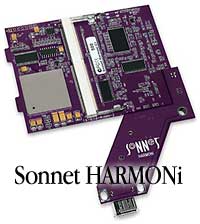
Sonnet
HARMONi (600 MHz G3, $300, also adds a FireWire port) and
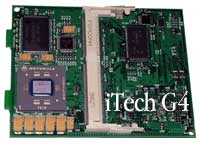
iTech
G4 from TechnoWarehouse (466 MHz G4, $249 less $25 rebate
when you ship them your old CPU) are the only CPU upgrades
currently made for the tray-loading iMacs.
UPDATE: FastMac
also makes a 466 MHz G4 upgrade for the tray-loading iMac. It
retails for US$160.
UPDATE: The Sonnet HARMONi card was incompatible with early
versions of Mac OS X 10.4. The FireWire port would tie up 100%
of CPU resources. This problem was fixed in version 10.4.7 (if
not earlier). If you have a HARMONi card that's had this issue,
be aware that updating to 10.4.7 or newer should fix it.
While you're inside the iMac, you might want to consider
upgrading the RAM. The original iMac came with just 32 MB, and
that's not enough to be very useful under Mac OS 8.1 or later.
I'm guessing RAM has already been upgraded somewhat, and if it
has 96 MB or more installed, it's going to be fine under any
version of OS 8 or 9. But if your friend wants to run
OS X, that's not nearly enough - 128 MB is a rock bottom
minimum, and that's inadequate for good performance.
Mac OS X is a thoroughly modern operating system, and if you
don't give it enough RAM, it will use the hard drive to simulate
more RAM than you have. This is called virtual memory, and it's
orders of magnitude slower than using physical RAM. The more RAM,
the better.
That said, not all tray-loading iMacs support 256 MB memory
modules, and since recent tests at
Macs Only! show that Macs don't get appreciably faster with
more than 256 MB, I'd suggest going with a pair of 128 MB modules,
which start at US$25-30 each (see ramseeker for current prices
from several vendors).
If you're looking at CPU upgrades, you may as well look at used
slot-loading iMacs, and you can buy a G3/400 iMac for $300
nowadays, add a 256 MB module for US$30-35, and have a computer
with a faster system bus - and no need to partition your old 20 GB
hard drive when you drop it into the iMac.
All that said, it your friend doesn't plan on going with
OS X, the current CPU and memory are probably adequate, and
there's no need to partition the hard drive, since Mac OS 8
and 9 boot just fine from an unpartitioned 20 GB hard drive.