Low End Mac Reader Specials
TypeStyler For Mac OS X is Now Shipping! Download The Free Fully Functional 60 Day Tryout at www.typestyler.com
Don't install Parallels to play poker online! Poker Mac will show you how
to download and install a native Mac poker application such as Full
Tilt Poker Mac.
Laptop Hardware Provided by TechRestore - Overnight Mac & iPod Repairs.
Compare products like desktop computers, apple laptops, apple macs, and LCD Monitors side by side! All the information and reviews to make the best purchasing decision for new mobile phones, sat nav systems, or MP3 players. The Ciao online shopping community makes searching products easy for you.
Mac Daniel's Advice
Getting iSync to Work with an Unsupported Cell Phone
Dan Knight - 2005.08.01
Popularity: ![]()
![]()
![]()
![]()
![]()
![]()
![]()
I added a bunch of new phone numbers to my Mac's Address Book over the weekend and ran into problems when I tried to upload them to my cell phone.
That had never happened before. iSync had worked with my old Motorola cell phone via USB, and also with the newer V262. Now iSync couldn't see the phone at all
What had changed?
Tiger. I'd upgraded to Mac OS X 10.4 shortly after it was released, and the new version of iSync couldn't see my phone at all.
Oddly enough, the computer
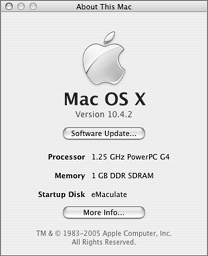
could. To determine that the USB cable hadn't gone bad, I went to
the Apple menu and selected About This Mac. Then I clicked on the
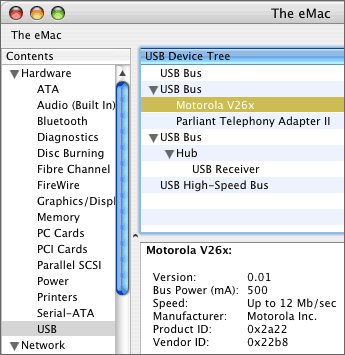
More Info... button, selected USB in the box on the left, and then
selected Motorola V26x - all the information about my cell phone
showed up.
I did some Googling and discovered that the Motorola V265 was supported. That's the same phone, but with a camera. I couldn't see any reason for iSync not to work with my V262.
More research brought me to the
data inside the iSync program itself. By left-clicking
(command-clicking for those who still use one-button Apple mice), I
was able to examine the contents of the iSync package. Going down
several levels, I found the file I needed.
Contents / PlugIns / ApplePhoneConduit.syncdevice / Contents / PlugIns / PhoneModelsSync.phoneplugin / Contents / Resources / MetaClasses.plist
I opened the MetaClasses.plist file in TextWrangler, found the section with data about the Motorola V265, and saw that the vendor ID and product ID were identical for the V265 and V262. Then copied the data, pasted in a second copy, and replaced the three instances of V265 with V262 in the first listing so it looked like this:
<key>com.motorola.V262</key>
<dict>
<key>Identification</key>
<dict>
<key>com.apple.gmi+gmm</key>
<string>Motorola CE, Copyright 2000+Motorola V262 Phone</string>
</dict>
<key>InheritsFrom</key>
<array>
<string>com.motorola.usb.0x22B8/0x2A22</string>
</array>
<key>Services</key>
<array>
<dict>
<key>ServiceName</key>
<string>com.apple.model</string>
<key>ServiceProperties</key>
<dict>
<key>ModelName</key>
<string>V262</string>
<key>PhoneIcon</key>
<string>MOTV710.tiff</string>
</dict>
</dict>
</array>
</dict>
And then I could finally synchronize the phone numbers I'd added to Address Book with the ones stored in my cell phone.
If you have a cell phone that isn't officially supported by iSync (and you're far from alone if that's the case), you may be able to make it work. First, determine the vendor ID and product ID of your phone, and then do some research. Maybe there's already another phone in MetaClasses.plist with the same identifiers. If so, you can do what I did.
If not, you'll need to do some more research and identify cell phones that are nearly identical to yours. If it works, cool. If not, you're no further behind than when you started.
Happy hacking!
Not sure if you should upgrade your old Mac or replace it? Check the Mac Daniel index to see if we've already addressed your problem.
Recent Mac Daniel columns
- WiFi Hardware Compatible with Desktop Macs Running OS X, MetaPhyzx, 03.11. USB, ethernet, PCI, and other wireless hardware compatible with Mac OS X.
- WiFi CardBus Adapters Compatible with PowerBooks, MetaPhyzx, 03.11. CardBus hardware and drivers compatible with PowerBooks running Mac OS X.
- WiFi PC Cards Compatible with PowerBooks Running OS X, MetaPhyzx, 03.11. PCMCIA/PC Card hardware and drivers compatible with PowerBooks running Mac OS X.
- WiFi PC Cards for PowerBooks Running Mac OS 9, MetaPhyzx, 03.10. PCMCIA cards and drivers reported to be compatible with PowerBook running the Classic Mac OS.
- More in the Mac Daniel index.
Links for the Day
- Mac of the Day: Mac mini Core Solo, Feb. 2006 - The only Mac to use a Core Solo CPU, this model ran at 1.5 GHz, has integrated graphics, and includes a Combo drive
- Group of the Day: SuperMacs is for those using Umax SuperMac clones.
- November 24 in LEM history: 98: Microsoft's heavy hand - 00: Looking at the iMac - 04: The best Mac for the holidays - Picking the right replacement for a dead mouse - Better battery for 15" AlBook
- Support Low End Mac
Recent Content on Low End Mac
- Pismo WiFi Networking Issue Finally Solved?, Charles W. Moore, Miscellaneous Ramblings, 11.24. It turns out the problems wasn't the Pismo, the Buffalo WiFi card, or Mac OS X 10.4. It was the Wireless G router - Linksys to the rescue!
- Mini VGA to S-video Adapter a No Go for eMacs, Dan Bashur, Apple, Tech, and Gaming, 11.24. You might think that Apple's Mini VGA S-video adapter is a cheap way to connect your eMac or G4 iMac to your TV. You would be wrong.
- Google Calendar with iPhone or iTouch Is Great for Scheduling, John Hatchett, Recycled Computing, 11.24. Web-based Google Calendar allows access and updates from any computing platform, including Mac, Windows, Linux, and iPhone OS.
- Why Spaces is My Favorite Leopard (and Snow Leopard) Feature, Charles W. Moore, Miscellaneous Ramblings, 11.23. Spaces, a feature introduced with OS X 10.5, is like having several monitors on your Mac without the cost and space of using multiple displays.
- i5 iMac Benchmarked, Mac mini 'Shouldn't Be Overlooked', Twitter Client for Classic Mac OS, and More, Mac News Review, 11.20. Also why Apple leaves the low end to others, 10.6.2 fixes video playback problem in 27" iMac, 3D Leopard and Snow Leopard performance, and more.
- Apple's Tablet an End Run Beyond Netbooks, Frank Fox, Stop the Noiz, 11.20. Whatever Apple has planned will leverage existing technologies while going beyond what its competitors can offer.
- Apple #4 in Reliability, Apple Tablet a Gadget for All?, HP's i7 Notebook Outdoes Mac Rivals, and More, The 'Book Review, 11.20. Also Flash 10.1 improves video on Hackintosh netbooks, thin-and-light notebooks impress, Windows XP finally on the way out, and more.
- NASA Chemical Sensor for iPhone, Smartphone Death Match, iPhone Earrings, and More, Ian R Campbell, 11.20. Also mobile phone dangers, new apps, GPS solution for iPod touch, new iPod and iPhone cases, and more.
- More links in our archive.
Recent Deals
- Best G4 iMac Deals, 11.24. Used 15" 700 MHz CD-RW, $150; 800 MHz Combo, $229; 1 GHz, $289; 17" 1.25 GHz, $200; 20" 1.25 GHz, $509.
- Best MacBook Air Deals, 11.24. Used from $899; refurb from $1,099; new 1.6 GHz/120 HD, $1,150 after rebate; 1.8/64 SSD, $1,150 a/r; 1.86/128 SSD, $1,350 a/r; 2.13/128 SSD, $1,694 a/r.
- Best PowerBook G3 Deals, 11.24. Used 233 MHz WallStreet, $75; 266 MHz, $160; 400 MHz Lombard, $199; 400 MHz Pismo, $289; 500 MHz, $350.
- Best 12" PowerBook G4 Deals, 11.23. Used 867 MHz SuperDrive, $348; 1 GHz Combo, $379; SD, $519; 1.33 GHz, $529; 1.5 GHz Combo, $549; SuperDrive, $609.
- Best Mac Pro Deals, 11.23. Used 2.66 GHz 4-core, $1,300; 3.0 4-core. $1,919; refurb 2.66 4-core Nehalem, $2,149; 2.93, $2,549; 2.93 8-core, $4,999; new 2.26 8-core, $2,290.
- Best Time Capsule and AirPort Deals, 11.23. Used 802.11g AirPort Extreme, $49; 500 GB Time Capsule, $150; new, $190; 1 TB dual-band, $280; 2 TB, $469; 802.11n AirPort Extreme, $170.
- Best eMac Deals, 11.18. Used 1 GHz Combo, $100; SuperDrive, $269; 1.25 GHz Combo, $119; SD, $319; 1.42 GHz Combo, $289; SD, $498.
- Best Mac OS X 10.6 and Mac Box Set Deals, 11.18. "Snow Leopard", single user, $25; 5 users, $45; Mac Box Set, single user, $139; 5 users, $180; Server, $414. Shipping included.
- Best Xserve Deals, 11.18. Used 1 GHz dual G4, $649; 2.3 dual G5, $795; 3.0 4-core Xeon, $1,899; refurb 2.26 4-core, $2,499; new, $2,888; refurb 8-core, $2,999; new, $3,449; more.
- More deals in our archive.
About LEM | Support | Usage | Privacy | Contacts
Navigation
Used Mac Dealers
Apple History
Video Cards
Email Lists
Favorite Sites
MacSurfer
MacMinute
MacInTouch
MyAppleMenu
InfoMac
Macs Only!
The Mac Observer
Accelerate Your Mac
RetroMacCast
PB Central
MacWindows
The Vintage Mac
Museum
DealMac
DealsOnTheWeb
Mac2Sell
ramseeker
Mac Driver Museum
JAG's House
System
6 Heaven
System 7 Today
the pickle's Low-End
Mac FAQ
Abandonware
Petition
Mac vs. PC Info
Affiliates
The Apple
Store
Mac
Connection
B&H
MacMall
TechRestore
ExperCom
Crucial
Memory
batteries.com
Advertise
MacMinute
MacInTouch
MyAppleMenu
InfoMac
Macs Only!
The Mac Observer
Accelerate Your Mac
RetroMacCast
PB Central
MacWindows
The Vintage Mac
Museum
DealMac
DealsOnTheWeb
Mac2Sell
ramseeker
Mac Driver Museum
JAG's House
System 6 Heaven
System 7 Today
the pickle's Low-End
Mac FAQ
Abandonware
Petition
Mac vs. PC Info
Mac Connection
B&H
MacMall
TechRestore
ExperCom
Crucial Memory
batteries.com



