I received a phone call last night 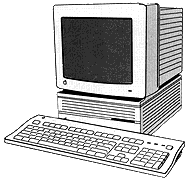 from an excited
first-time owner of a Mac. The young lady is an experienced Mac user,
having held several graphics arts jobs, but has never had a home
computer. A friend had given her a Mac IIci. It had a 250 MB hard drive and
20 MB of RAM. It also came with Adobe Illustrator 5.5.
from an excited
first-time owner of a Mac. The young lady is an experienced Mac user,
having held several graphics arts jobs, but has never had a home
computer. A friend had given her a Mac IIci. It had a 250 MB hard drive and
20 MB of RAM. It also came with Adobe Illustrator 5.5.
She'd already given the IIci a pretty good shakedown and determined
that for the "price," she could live with a 25 MHz computer. Her
question was pretty straightforward: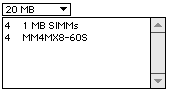 "Can I upgrade the RAM on this machine, and if so, how far?" She was
using most of her RAM to run the system and Illustrator and often
couldn't open anything else.
"Can I upgrade the RAM on this machine, and if so, how far?" She was
using most of her RAM to run the system and Illustrator and often
couldn't open anything else.
A quick check in Newer
Technology's GURU (428K)
revealed she had a bank of four 1 MB SIMMs and another of 4 MB SIMMs
(30-pin). 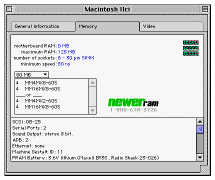 While she could
theoretically go as high as 128 MB of RAM with eight 16 MB SIMMs, I
suggested she go to ramseeker to look for the
best price for just four 16 MB SIMMs to replace the ones. This would
give her a total of 80 MB, retaining the use and value of the 4 MB
chips. When I did a followup check of ramseeker, I found that even
going this route made the upgrade come in at around $100, a
considerable sum for an aging machine.
While she could
theoretically go as high as 128 MB of RAM with eight 16 MB SIMMs, I
suggested she go to ramseeker to look for the
best price for just four 16 MB SIMMs to replace the ones. This would
give her a total of 80 MB, retaining the use and value of the 4 MB
chips. When I did a followup check of ramseeker, I found that even
going this route made the upgrade come in at around $100, a
considerable sum for an aging machine.
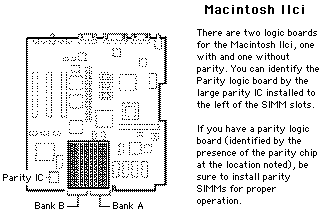
I forgot to check the current
Apple Memory Guide (1673K PDF document) and got to make a return
call to tell her to check for the parity chip as noted in the guide.
The same info is also included in GURU, but I didn't scroll down and
read very carefully.
 I was a
bit surprised that she didn't already know where to look for answers to
her questions. It reminded me of the whole topic of how computers
should work. You should be able to turn them on, do your stuff, and be
on your way.
I was a
bit surprised that she didn't already know where to look for answers to
her questions. It reminded me of the whole topic of how computers
should work. You should be able to turn them on, do your stuff, and be
on your way.
In this user's case, the places where she'd worked with Macs
insulated their users from anything but the most rudimentary
troubleshooting with skilled Systems Administrators and PC (Mac)
troubleshooters. I'd even lightened the wallet of one of her employers
on one occasion to clean up some system problems on a Performa 6500/300 she was using
(grin). It's a fairly typical scenario. That's good in one way, as they
are paid to put out graphics products, not tinker with their machines.
In a time when computers are a mature technology, that should be the
case every time. As ably noted by Charles
Moore in a column for MacSimple, we're just not there yet:
Computers, despite their technological sophistication,
are not a mature technology. A good analogy is the automobile early in
this century. Computers, even Macs - which are the best of the lot, are
still at about the stage of sophistication as cars were when you had to
manually crank the engine to start them, fiddle with manual spark
advance and carburetor mixture controls to keep them running, use a
clutch to get underway, and wrestle with a non-synchromesh manual
gearbox that required double-clutching for downshifting. Computers will
get easier to use, but meanwhile, like people who wanted to drive in
the age of the Model T Ford, you have to work around the machine's
shortcomings.
I had an ugly reminder of this fact while putting together this
column. I was searching for a shareware item on a CD and somehow
managed to trash my system. While I could do an "extensions off"
restart, a full restart produced a type 10 bus error. Norton Utilities
5 couldn't discover the problem, but TechTool Pro 2.5.3, which ran
great off the hard drive even though I'd started from the OS 9 CD,
detected unrepairable problems with the system file.
While the Mac was doing a System 9 clean install and a Conflict
Catcher system merge, I got to work on this column on our aging Acer
Aspire. While I like the Acer about as well as any PC on which I have
to work, I'll take my Mac any day over it. It did help that I have
Claris Home Page on both my Mac and Acer. I just copied the column
folder onto a zip (the zip drive works even with a startup from the OS
9 CD) and worked with it on the Acer. I do, however, have the soon to
be released MacDrive 2000 (oops,
did I break my NDA?) installed on the Acer to read my Mac formatted
floppies and zips.
Whether the young lady decides to shell out the bucks for a major
RAM upgrade or not, I found all of this an interesting example of older
Macs still in use. What was one person's castoff has become an exciting
"new" Macintosh for another!
Last week I wrote about a Mac SE/30 that
was returned to regular use in a classroom. I always love to do columns
like that, as I get some of the most interesting, and in the first case
below, moving, emails from readers.
Hello Steve,
Your article on the Mac SE adoption caught my eye. You
see, I have (er, had) an old SE/30 which as time went on and computers
progressed, my cool older kids refused to use for anything, due to the
small B&W screen and its perceived slowness. I also have 2 little
boys adopted recently from Romania. How do these 2 facts fit
together?
Because of our new connection to Romania, I was put in
contact with a woman who helps run an orphanage for rescued street kids
in Bucharest, Romania . . . they currently have a dozen or so boys aged
8 to 18. As you might expect many of these kids have little formal
schooling and their prospects for productive life work can be dismal.
This little orphanage has a PC (older, but color and since it's a PC,
prone to crashes) which they use for fundraising and newsletters but
really can't let the kids near. So . . . Mac SE to the rescue! I boxed
up my old SE, complete with software and ImageWriter printer (all of
which was "worth" nothing here in the U.S.) and sent it with a friend
to Romania who delivered it to this little orphanage. They love it!
(and acted like they just got a new G3 with a 20" monitor) . . . the
kids can use it, maybe learning some keyboarding and other skills that
may allow them an "in" to a job eventually, and even more importantly
have a "cool, American computer" that is their own!
I love knowing that my first Mac is doing good
somewhere in the world! I adopt their kids, they "adopt" my baby-Mac .
. . what a concept!
Thanks again for your story.
Edward Kolb
Omaha, NE
In a world that has so many problems, it's uplifting that there are
people like Edward doing the things they do.
This email also caught my attention:
Hi there. My name is Al Miner. I am the computer
teacher, excuse me, the Technology Coordinator :-), for a medium sized
Catholic elementary/junior high school in Omaha NE.
When I got this job 4 years ago we only had a few LC
family Macs in the computer lab, and every classroom (25 of them) had a
hard-drive-less MS-DOS i286 in it talking Novell on an ethernet
network
We also had a science teacher who was participating in
a grant from the University of Nebraska which gave her classroom a
computer, and our school a frame relay connection and router.
Not being an expert in Ethernets or Novell, I asked
the techs from the local university to come over and connect the router
to our Novell network. After three tries, they assured me it was still
definitely something Novell could do, but they couldn't seem to make
THIS Novell network link up to the router. I really ought to upgrade to
the next version. The price for the upgrade at the time for as many
machines as I would be running was something like 3 times my yearly
budget.
So about three years ago I was sitting there with a
decent connection to the Internet, a decent physical network wiring
setup, and a school full of PCs that were not up to any of the tasks
the teachers were asking for.
Send in the Macs.
At about the same time I began dropping memory and
network cards into my LC computers in my classroom, and with very
little fuss and bother I suddenly had 6 Internet stations in my
computer lab. "This is so easy," thought I. "I could do this for all
the classrooms if I could get my hands on enough cheap Macs."
So I started hitting the newsgroups (this was the
pre-eBay days mind you), and I found a fellow in Texas who would sell
us SE 4/40s with a network card installed for $75 and an SE/30 16/200
for $150. Seemed fair to me, so our school invested $450 in four SEs
and a SE/30, and my teachers began their near psychotic love affair
with in-school e-mail.
I set up the SE/30 with a freeware web server (Quid
Pro Quo) and a freeware e-mail server (Apple Internet Mail Server, now
Eudora I.M.S.), made us a modest web page, contacted our provider about
a DNS name for the machine and
gave all my teachers an Internet e-mail account.
I then set up the four SEs in convenient teacher
places around the building, and showed everyone how to use the very
simple kiosk style e-mail checker (POPmail/Lab, the perfect solution to
having more than one e-mail address per computer).
The response was immediate and favorable. Very little
of educational value probably took place at first, but the teachers
soon realized it was easier to e-mail a memo as it was to pass a memo
and a checklist ("read this and check your name off the list"). Our
principal has even given up his old weekly handwritten blue dittoed
weekly newsletter for an e-mailed version.
Since then we've had some fund raisers and replaced
the "Mushroom Macs" with a member of the Mac II family or a rare Quadra
in every classroom. We still use POPmail/Lab on all of them and
Netscape version 2. The children have all signed an Internet agreement, and
use them for research or rewards.
We haven't abandoned the SEs. They are sharing a
LaserWriter IInt, word processing for the junior high kids. They play
an occasional game of Choplifter or Hangman as well.
Still talking on the network, and still useful. How
many other 12 year old computers can you say that about. (Don't get me
started on our Apple IIgs/e collection.
POPmail/Labis getting a little long in the tooth, but it really is
a useful, hard drive saving app.
Keep up the good work with the MacInSchool site. It's
one of my frequent bookmarks!
Al Miner
Al Miner
Computer Guy
St. Thomas More School
Omaha, Nebraska
mineral@stm.creighton.edu
 Now that we've
rounded the Y2K corner, I suspect that more than a few older labs of
PC's have had their dates permanently rolled back, but there are lots
of folks out there with similar vintage or older Macs still in
productive use (with the correct 2000 date!). It probably is not the
only option, but when I get questions from readers about what they
might do with say, an old 286 machine, the word "doorstop" immediately
comes to mind!
Now that we've
rounded the Y2K corner, I suspect that more than a few older labs of
PC's have had their dates permanently rolled back, but there are lots
of folks out there with similar vintage or older Macs still in
productive use (with the correct 2000 date!). It probably is not the
only option, but when I get questions from readers about what they
might do with say, an old 286 machine, the word "doorstop" immediately
comes to mind!
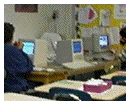
While rambling a bit, I'll answer a question before it's even asked.
The image at right has been altered considerably to hide the identity
of the two former students shown. I have tons of great classroom photos
that I enjoy going back to again and again. Showing recognizable images
of students, especially elementary students, is first probably not
legal without a signed release form. With the dangers inherent in our
society and on the world wide web for children, I simply choose not to
use photos that include recognizable images of students.
Low End Mac is an independent publication and has not been authorized,
sponsored, or otherwise approved by Apple Inc. Opinions expressed are
those of their authors and may not reflect the opinion of Cobweb
Publishing. Advice is presented in good faith, but what works for one
may not work for all.
unless otherwise noted. All
rights reserved. Low End Mac, LowEndMac, and lowendmac.com are
trademarks of Cobweb Publishing Inc. Apple, the Apple logo, Macintosh,
iPad, iPhone, iMac, iPod, MacBook, Mac Pro, and AirPort are
Additional company and product names may be trademarks or
registered trademarks and are hereby acknowledged.
: We allow and encourage links to
any public page as long as the linked page does not appear within a
frame that prevents bookmarking it.
Email may be published at our discretion unless marked "not for
publication"; email addresses will not be published without permission,
and we will encrypt them in hopes of avoiding spammers. Letters may be
edited for length, context, and to match house style.
: We don't collect personal
information unless you explicitly provide it, and we don't share the
information we have with others. For more details, see our



