I found a loaded Mac IIfx a
couple of years ago on an
eBay auction that I just couldn't resist. The IIfx is the
granddaddy of the venerable Mac II series. Marketed from March, 1990,
to April, 1992, for a cool $10,000, it blew the socks off of anything
around.
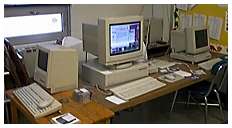
The Mac IIfx was the dream
machine of early 1990's graphic artists. It blazed at 40 MHz, had six
NuBus slots, eight RAM slots, and room for one 5.25" hard drive and two
floppy drives. It used several advanced features, including a faster
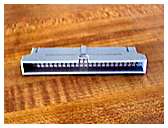
data transfer system that required some special
termination of the SCSI chain, both inside and out.
 The one I
purchased set me back a bit, as it came loaded with 68 MB of RAM. The
Mac IIfx is the only computer I know that uses 64-pin SIMMs. (It was
the only Macintosh to use them. The LaserWriter IIntx also used the
same 64-pin SIMM.) These 64-pin SIMMs are hard to find, and the
cost of 64 MB of new RAM, if you can find it, is far more than I
paid for my entire IIfx!
Upgradestuff and
Mushkin Memory still list Newer RAM 16 MB modules in sets of four,
but get ready to gasp when you see the price! MemoryX also lists 1 MB and 4
MB 64-pin SIMMs for the IIfx. There is, however, currently an eBay
auction with a smashing deal on a set of four 16
MB 64-pin SIMMs.
The one I
purchased set me back a bit, as it came loaded with 68 MB of RAM. The
Mac IIfx is the only computer I know that uses 64-pin SIMMs. (It was
the only Macintosh to use them. The LaserWriter IIntx also used the
same 64-pin SIMM.) These 64-pin SIMMs are hard to find, and the
cost of 64 MB of new RAM, if you can find it, is far more than I
paid for my entire IIfx!
Upgradestuff and
Mushkin Memory still list Newer RAM 16 MB modules in sets of four,
but get ready to gasp when you see the price! MemoryX also lists 1 MB and 4
MB 64-pin SIMMs for the IIfx. There is, however, currently an eBay
auction with a smashing deal on a set of four 16
MB 64-pin SIMMs.
At any given time, there seems to be a wealth of
IIfx parts and computers available on the eBay auction site. While
it's sorta sad to see the old machines going so cheap, I opted not to
do this column on my IIfx, which is recovering from unnecessary major
surgery! While some functions are still quite fast, it is still a 68030
chip computer.
My IIfx has been anything but untroubled. While an outstanding
performer when it works, it was subject to random hardware crashes at
least once a day. I'd pretty well ruled out software problems after
disabling most of the likely culprits and having run TechTool Pro,
Norton Utilities (3.5), and Conflict Catcher a bunch of times. At other
times, it just refused to start until bopped or torn down and
reassembled. The addition of the proper external SCSI terminator solved
some of the problems, but the day finally came when it refused to start
despite my best efforts. A final complete tear down by some of my sixth
graders, including removal of the motherboard and re-seating of all of
the RAM and ROM chips, bought it two final, untroubled weeks of use.
Then it went down again and stayed down.
Rather than continue to fight the critter, I took the IIfx home and
replaced it with the Mac IIsi we
use in my classroom as a spare. The IIsi has been a consistent, stable
performer in its role as a backup machine. While slow, it has ethernet
and even runs CDs from our ancient JVC CD burner.
I just let the IIfx sit a few weeks while I found a replacement
motherboard on eBay. It came in a box over twice the size of the
motherboard with enough bubble wrap to keep my daughters merrily
popping for a week! When installed, the IIfx fired up and ran like a
champion - for about 15 minutes. The machine would start and run a bit
and then stop. On restarts, it often would display a gray screen and
halt, or not engage the monitor at all. I swapped video cards. I
swapped video cards again with no improvement.
Pulling the motherboard on a IIfx isn't really a difficult chore.
First, when the unit is off but still plugged in, tap the power supply
to discharge any static electricity. One spark onto almost anything
could ruin your (and the IIfx's) whole day.
Unplug the unit. If you're going to pull the power supply, there's
just one retaining screw. Remove it, unplug the supply from the
motherboard (There's no catch or lock on it.), and pull the unit
towards the front of the machine and then up and out.
Four screws hold the "drive balcony" in place. Unhook the cables
attached to the drives and then remove the four screws. I remove the
screw closest to the floppy drive last, and remove it with the
balcony. Otherwise, it usually falls on or under the motherboard.
The motherboard is held in place with two screws and (let me count)
nine nasty but effective plastic catches. Remove the screws and start
loosening the catches from the front to the rear of the motherboard.
Then work the motherboard out. You'll need to go back and keep
re-releasing the nasty, but effective plastic catches.
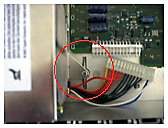
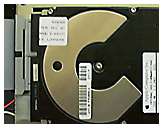
I finally consulted the Apple service manual and found that the
internal SCSI filter should be mounted on the hard drive, rather than
on the motherboard SCSI block, as the machine had come to me. This
little gem may help in the future, but it didn't prevent the IIfx from
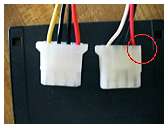
sounding the "chimes of death" repeatedly. I also switched power cords
as suggested in the service manual. The manual also had a note about an
auto shutdown feature to prevent overheating, but that really didn't
seem to be the case, unless there was a bad thermostat involved and
duplicated on two sets of parts.
I would have switched batteries, but I'd put in new ones with the
motherboard swap (not an absolute guarantee, but close). Unnerved, but
undaunted, I rearranged and reseated the SIMMs. Then I switched power
supplies - twice. At that point, I had done everything but swap the
RAM, which I'd tested with TechTool Pro. Had I been a little sharper at
the time, I'd have run the old utility, Snooper, but I never thought of
it.
After several hours of futile attempts at repair, I finally took a
break and watched All
the President's Men. This has nothing to do with Mac computing,
other than it probably saved a IIfx from a quick decent out a second
story window.
When I resumed my troubleshooting efforts, I also decided to try to
set up OT/PPP and a modem during the machine's brief periods of
activity. As I started to type in the name of my Internet service
provider, I noticed the "G" key was dead. For some folks, this would
have told them the answer, but I'm still using a keyboard at school for
the Mac server (Power Mac
8550) with a dead "x." I eventually grabbed another keyboard and
for good measure used a brand new cable that I'd found in a box of junk
at school.
While generally fooling around waiting for the proverbial cartoon
light bulb to appear above my head, I saw all three keyboard indicator
lights (num lock, caps lock, and scroll lock) flicker on and off. I
jiggled the mouse connection and the lights flickered again - and then
the mouse went dead. The keyboard, it turned out, was deader than a
doornail as well. Fortunately, I had one more keyboard to try before I
had to start pulling them off working Macs in the household.
With the "new" keyboard, the IIfx refused to lock up, even
when I flirted with disaster by using an external ZipPlus drive without
the special external terminator (which I'd left at school). I'm still
not sure whether there was something else wrong with it that got
knocked back in whack with all of the in and out of parts. I can't
imagine having gone through three back keyboards (counting the one at
school which is working fine with the Mac IIsi). But apparently, the
IIfx was locking up at startup when it did its startup hardware check.
When it found a bad keyboard, it gave the chimes of
death.
At any rate, now I'm "stuck" with an extra IIfx motherboard (grin,
grin) that I guess I'll just have to drop into a Mac II case and use at
home!
Some places and things that may or may not have anything to do
with the Mac IIfx:
 Odd Thoughts While Shaving Between Paragraphs:
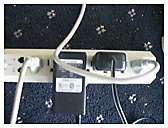
Does anyone else but me get frustrated with peripheral power supply
units that take up so much space that you can't use the plugs beside
them on a power strip?
While just generally mucking about on the online auction circuit, I
have been continually amazed at the quantity and variety of
Mac IIs available. One of the really neat things about Mac IIs is
the interchangeability of NuBus cards. A reader recently wrote that he
was hunting for ethernet cards for his twin IIfxs and his 6 year old
twin daughter's! I suggested that if he couldn't find the ethernet
cards individually, he might consider buying a whole computer on an
auction that includes an ethernet card. I picked one up that way a
couple of weeks ago when I bought another Mac IIcx. The cost of the
entire transaction was about one-third of what an ethernet card goes
for new. But just think of it - twins on twin Mac IIfxs. Sounds like a
Low End Mac photo opportunity!
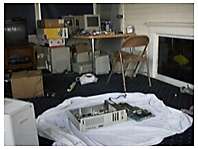 When I
started to put this column together, I found a photographer's horror.
I'd done all the photo work without wearing my glasses! For those of
you with good eyesight, that means I let the viewfinder act as glasses
while focusing the shots, but also making the images blurry. So the
IIfx had to come apart again. As soon as I get done editing and sending
this column to Dan (Knight), I'll get to put it together yet again.
Annie hasn't noticed the mess I've created in the sun room as yet.
When I
started to put this column together, I found a photographer's horror.
I'd done all the photo work without wearing my glasses! For those of
you with good eyesight, that means I let the viewfinder act as glasses
while focusing the shots, but also making the images blurry. So the
IIfx had to come apart again. As soon as I get done editing and sending
this column to Dan (Knight), I'll get to put it together yet again.
Annie hasn't noticed the mess I've created in the sun room as yet.
I'd hoped to include a link for the Mac IIfx service manual, but
Apple has closed or moved the directory! Once again Apple has "helped"
Mac users by making it more difficult and more expensive to maintain
their older Macs. I'm sure it must be to "improve the user
experience."
Finally, if you were wondering about what happened on the Going
Wintel for a Month series, Windows 95 and the IEP program worked well
all week. Whew! I still have one more week of solid Windows computing
at school, but I just couldn't stand to write a column this week
dealing mostly with Windows issues.
Low End Mac is an independent publication and has not been authorized,
sponsored, or otherwise approved by Apple Inc. Opinions expressed are
those of their authors and may not reflect the opinion of Cobweb
Publishing. Advice is presented in good faith, but what works for one
may not work for all.
unless otherwise noted. All
rights reserved. Low End Mac, LowEndMac, and lowendmac.com are
trademarks of Cobweb Publishing Inc. Apple, the Apple logo, Macintosh,
iPad, iPhone, iMac, iPod, MacBook, Mac Pro, and AirPort are
Additional company and product names may be trademarks or
registered trademarks and are hereby acknowledged.
: We allow and encourage links to
any public page as long as the linked page does not appear within a
frame that prevents bookmarking it.
Email may be published at our discretion unless marked "not for
publication"; email addresses will not be published without permission,
and we will encrypt them in hopes of avoiding spammers. Letters may be
edited for length, context, and to match house style.
: We don't collect personal
information unless you explicitly provide it, and we don't share the
information we have with others. For more details, see our